
Setting up a blog on WordPress can feel like a thrilling adventure. You’re about to share your voice, ideas, and passions with the world.
But where do you start? The process might seem overwhelming, but don’t worry—you’re not alone. With the right guidance, you can transform your ideas into a thriving blog. Imagine the satisfaction of seeing your first post live, the excitement of engaging with your readers, and the joy of watching your blog grow.
This guide will walk you through every crucial step, ensuring you create a professional and compelling blog. Ready to dive in? Let’s make your blogging dream a reality!
Choosing The Right Domain Name
Picking a domain name is like choosing a name for your baby. It should be simple and easy to spell. Always try to keep it short. Short names are easy to remember. Avoid numbers and hyphens. They can confuse people. Make sure your domain name is unique. It should stand out. Check if it’s available. Use online tools to help you. Consider using keywords related to your blog. This helps people find you. A good name will help your blog grow.
Selecting A Reliable Hosting Provider
Choosing the right hosting provider is key for a blog. A good host keeps your blog online. It also makes it fast. Reliable hosting stops your site from going down. Look for hosts with 24/7 support. This helps if you face issues. Check for good reviews. They show if the host is trustworthy. Some hosts offer easy installation for WordPress. This is helpful. Compare prices and features. Some hosts are cheaper but may lack features. Your blog needs speed and uptime. Security is also important. It keeps your data safe. Choose wisely. Your blog’s success depends on it.
Installing WordPress
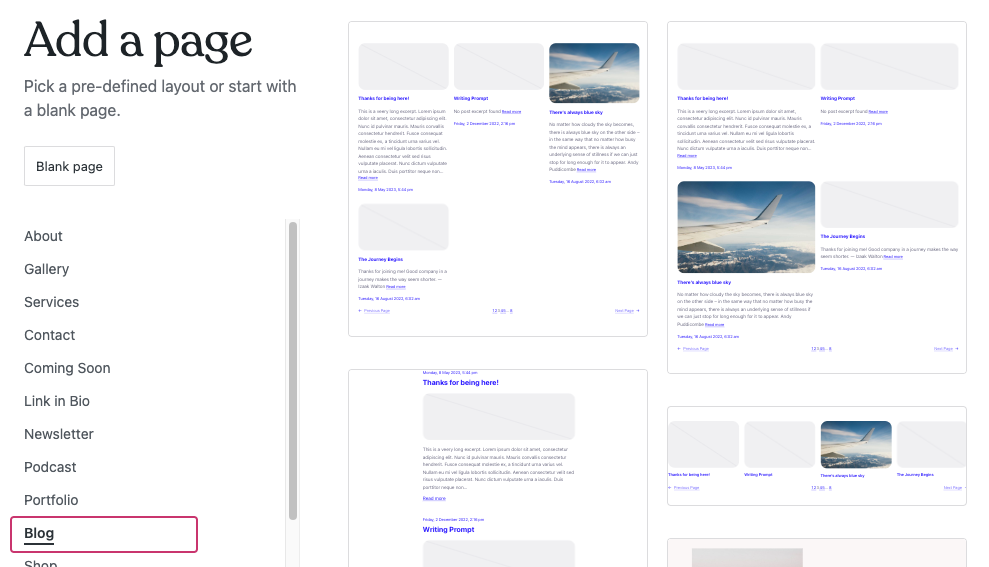
First, download WordPress from the official website. Save it to your computer. Next, find a good web host. Choose one that supports WordPress. Most hosts do. Create a new database for your blog. This step is important. Now, upload the WordPress files to your server. Use an FTP client for this. FileZilla is a good option. Then, open your web browser. Go to your website address. The WordPress setup page will appear. Follow the steps. Enter your database details. Choose a username and password. Make sure they are strong. This keeps your blog safe. Now, press the install button. Your WordPress blog is ready!
Credit: wordpress.com
Picking A Theme
Choosing a theme is fun. Free themes are cost-effective. They offer basic features. Great for beginners. But, premium themes have more features. They offer better support. You can find unique designs. Premium themes often have regular updates. They provide more security too. Decide based on your needs. Think about your budget. Try free themes first. Upgrade later if needed.
Customization is important. Themes should be easy to customize. Check for color options. Look for font choices. See if you can add your logo. Some themes have drag-and-drop builders. They make changes simple. Widgets can add features. Check if the theme supports them. Make sure it works on mobile devices. Look at customer reviews. They can help you decide.
Essential Plugins
SEO plugins help your blog get more visitors. They make sure your content is easy to find. One popular plugin is Yoast SEO. It helps with keywords and readability. Another choice is All in One SEO Pack. This plugin offers many tools for beginners.
Keeping your blog safe is very important. Plugins like Wordfence protect your site from hackers. Sucuri Security offers a firewall and malware scanner. These tools keep your blog safe day and night.
A fast blog keeps readers happy. W3 Total Cache speeds up your site by storing files. This reduces load time. WP Super Cache also helps by creating static files. Faster blogs rank better in search engines.
Credit: www.isitwp.com
Creating Quality Content
Knowing your audience is very important. It helps in creating content that people love. Think about their age, hobbies, and problems. Imagine what they might like to read. Ask questions to understand their needs. This way, your blog becomes more interesting.
Plan your content ahead of time. It keeps your blog organized. Choose topics for the next few weeks. Write them down in a calendar. This helps you stay on track. Schedule posts so readers know when to check back. Consistency is key.
Optimizing For Search Engines
Find the right keywords for your blog. Think about what people type. Use tools like Google Keyword Planner. It helps you find words people search for. Focus on words with low competition. This means fewer people use these words.
Pick words that match your blog’s topic. These words help search engines find you. Don’t use too many keywords. Use them naturally in your text. This way, your blog reads well.
Use titles that include your main keyword. Keep titles short. Make them easy to read. Use headings to break up text. This makes reading easy.
Include images. Add alt text to each image. This helps search engines understand the image. Link to other pages. Use internal links to connect your posts. This keeps readers on your site longer.
Promoting Your Blog
Social media can help attract readers. Share your blog posts on popular platforms. Facebook, Twitter, and Instagram are great options. Use pictures to grab attention. Short, catchy captions work best. Ask questions to engage your audience. Respond to comments and messages quickly. This builds a friendly community. Join groups related to your blog topic. Share your expertise there. But, don’t spam. Share valuable content instead.
Email is a powerful tool for bloggers. Create a simple newsletter. Send it regularly to your subscribers. Share your latest blog posts in it. Offer exclusive content to keep them interested. Use short and clear subject lines. This helps emails get opened. Personalize your emails with the subscriber’s name. It makes them feel special. Always give an option to unsubscribe. Respect their choice.
Analyzing And Improving Performance
Analytics tools help you understand your blog’s performance. They show how many people visit your site. You can see which posts are most popular. This helps you know what your readers like. Google Analytics is a good tool for this. It is free and easy to use. Look at the numbers often. This will help you improve your blog. Make changes based on what you learn. This keeps your blog interesting and fun.
A/B testing helps find what works best. You try two versions of something. See which one people like more. You can test titles, images, and layouts. This helps your blog get better. Make small changes and watch the results. Keep what works well. Change what does not work. Always aim to make your blog better. This keeps readers coming back. It’s simple and effective.
Credit: themeisle.com
Frequently Asked Questions
How Do I Choose A Blog Theme?
Selecting a theme is crucial for your blog’s visual appeal. Pick one that aligns with your content and audience. Ensure it’s mobile-friendly, fast-loading, and SEO-optimized. Explore WordPress’s theme library for various options. Customize it to reflect your brand and engage readers effectively.
What Plugins Are Essential For WordPress Blogs?
Essential plugins enhance functionality and user experience. Install SEO plugins like Yoast for optimization, and Jetpack for security and stats. Use Akismet to combat spam comments. Consider contact form plugins like WPForms. Evaluate each plugin’s features and reviews to ensure compatibility and efficiency.
How Can I Improve My Blog’s Seo?
Improving SEO involves optimizing content and structure. Use keywords naturally in titles, headers, and meta descriptions. Ensure images are compressed and labeled with alt tags. Build internal links and seek backlinks from reputable sites. Regularly update content for freshness and relevance.
Why Is Mobile Optimization Important?
Mobile optimization ensures your blog is accessible to smartphone users. A responsive design adapts to different screen sizes, improving user experience. Google prioritizes mobile-friendly sites in search rankings. Optimize images and site speed for quick loading. This helps retain visitors and boosts SEO performance.
Conclusion
Starting a WordPress blog can feel overwhelming. But with these steps, it’s manageable. Choose a simple theme that suits your style. Customize it to make it yours. Remember to install essential plugins for security and performance. Write content that engages your audience.
Quality matters more than quantity. Focus on topics your readers love. Regular updates keep your blog fresh. Be patient with growth. Blogging success takes time. Stay consistent and keep learning. Enjoy the journey of sharing your ideas. Your blog is a reflection of you.
Make it meaningful and authentic. Keep blogging!


