
Are you setting up a WordPress website and feeling a bit overwhelmed by the technical requirements? You’re not alone.
One of the most important aspects of getting your WordPress site up and running smoothly is ensuring that the right PHP modules are installed. These modules are like the hidden engines powering your website, and having the right ones can make all the difference between a site that runs like a dream and one that struggles with performance issues.
But which PHP modules do you really need for WordPress? Making the wrong choices can lead to frustrating errors or security vulnerabilities. That’s why it’s crucial to get this right from the start. We’ll break down the essential PHP modules required for WordPress, explaining why each is important in a straightforward way. By the end, you’ll not only know exactly what you need, but you’ll also have the confidence to optimize your site for better performance and security. Ready to dive in and unlock the full potential of your WordPress site? Let’s get started!
Credit: zeropointdevelopment.com
Core Php Modules
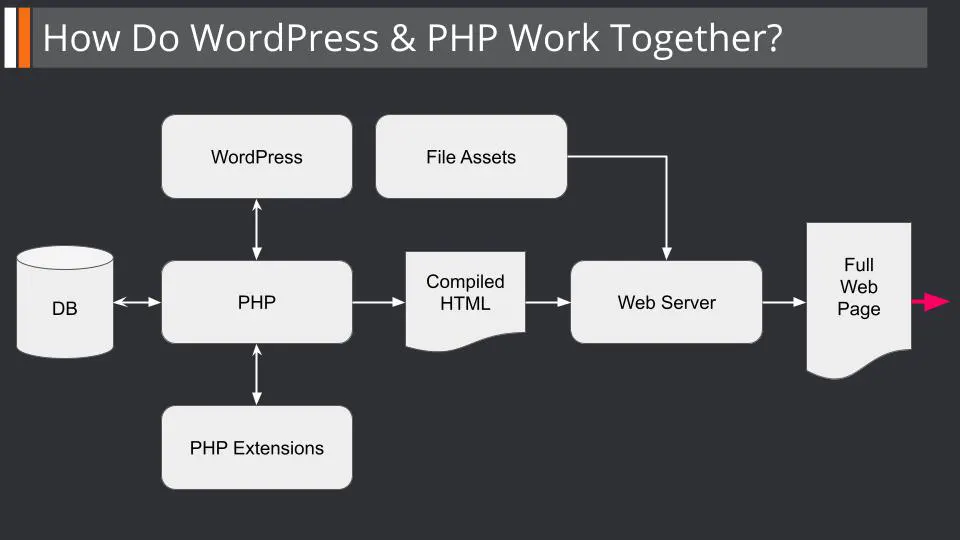
WordPress needs some PHP modules to work well. These modules help with tasks like handling images, managing databases, and keeping data secure. They make sure WordPress can display images correctly, store user information safely, and run smoothly. Without them, WordPress might not work as expected.
PHP GD is crucial for image processing. It helps WordPress resize images. PHP MySQL or MySQLi connects WordPress to its database. It lets WordPress save and retrieve data efficiently. PHP cURL enables WordPress to communicate with other websites. This is necessary for sharing data between websites. PHP mbstring handles text with special characters. It ensures all text displays correctly on WordPress. PHP XML deals with XML files and helps WordPress manage data in this format.
Database Interaction Modules
MySQLi and PDO help WordPress talk to databases. These modules let WordPress store and fetch data. MySQLi is easy to use. It works well with MySQL databases. PDO is flexible. It can work with different databases. Both make WordPress fast and smooth.
WordPress needs MySQLi or PDO to manage data. Without them, WordPress won’t work right. These modules are vital for keeping your website data safe. They ensure your site runs well. Using them makes your WordPress site reliable.
Image Processing Modules
GD Library helps in editing images. It can resize, crop, and rotate pictures. It supports many image formats. This library is essential for basic image tasks. It is widely used in WordPress for handling media.
ImageMagick offers advanced image features. It converts and edits images in various formats. Many developers prefer it for complex image tasks. This module supports text on images and animations.
Proper image modules make media management easy. They improve image quality and loading speed. Better images attract more visitors. Efficient modules help websites run smoothly. They are key for a good user experience.
Credit: wpassist.me
Xml And Json Modules
WordPress needs some special tools to work well. XML and SimpleXML help WordPress read special files. These files store important data. XML stands for Extensible Markup Language. It helps to organize data. SimpleXML is a simpler way to use XML. It makes handling data easier.
JSON is another tool. It stands for JavaScript Object Notation. It helps WordPress talk to other sites. JSON makes data easy to read. It’s like a friendly language for computers.
In data handling, these tools are key. They help WordPress understand and share data. Without them, WordPress would struggle. They keep everything running smoothly.
Session And Cookie Management
The session module helps store user data. It keeps track of user activities. This is important for user experience. The module saves data like login info. Session data is temporary. It goes away when the user closes the browser. Sessions are vital for user interactions on WordPress sites. They keep users logged in and manage their data. Using the session module ensures smoother site performance.
Cookies are small files. They store user info on the browser. These files remember user preferences and settings. Cookies help in tracking user behavior. This helps in providing a personalized experience. Cookies are also used for authentication. They ensure user security and improve site functionality.
WordPress heavily relies on sessions and cookies. They manage user interactions efficiently. Without these, user experience can suffer. WordPress plugins often use these modules. They enhance site features and security. Proper management of sessions and cookies is crucial. It ensures a seamless experience for WordPress users.
Url And Http Handling Modules
cURL helps WordPress talk to other websites. It sends requests and gets responses. This module is very important. Without cURL, WordPress cannot fetch data from other sites. Downloading files and accessing APIs also need cURL.
file_get_contents reads the content of a file. It can read files from the web. This function is useful for fetching simple data from URLs. Easy for kids to understand. It works well with smaller files.
Both cURL and file_get_contents are used for external requests. They help WordPress connect with the outside world. They are like messengers. They bring information from other sites to WordPress. Without them, WordPress might feel lonely.
Security Modules
OpenSSL keeps data safe. It encrypts information. Data sent on the internet stays protected. Secure websites use OpenSSL. It helps stop hackers from stealing info. OpenSSL is a key part of keeping sites safe.
Hash ensures data stays unchanged. It creates a unique code for each piece of data. This code helps confirm the data is the same. Passwords use hash for security. Hash makes sure data is not tampered with. It is vital for WordPress security.
Security modules are important for WordPress. They keep sites safe from threats. OpenSSL and Hash are essential. These modules protect data and stop unauthorized access. Using them helps keep WordPress sites secure and trustworthy.
Cache And Performance Modules
OPcache makes PHP code run faster. It stores precompiled code in memory. This speeds up page loading. Websites become quicker. Users get pages fast. It helps reduce server load. More users can visit at once.
APCu keeps data ready to use. It caches data objects. Speeds up repeated tasks. Less waiting for users. It reduces database queries. Websites run smoothly. Improves user experience.
Both OPcache and APCu boost speed. They make WordPress efficient. Faster sites attract more visitors. Users stay longer on fast sites. Performance matters for success. Quick sites rank better on search engines.
Debugging And Error Handling
Xdebug is a tool for developers. It helps find errors in code. This module shows exactly where the problem is. Use it to make the code better. It makes debugging easier and faster. Developers can see what’s happening inside the code. This makes fixing errors quicker. Xdebug is very helpful for WordPress sites. It helps keep them running smoothly. Every developer should learn to use it.
Good error handling is important. It prevents the site from breaking. Always check for errors in the code. Use tools to catch them early. Make sure error messages are clear. They should explain what went wrong. This helps in fixing the issue quickly. Regular checks make the site reliable. Users get a better experience. Keep learning new ways to handle errors. It improves the site quality.
Credit: www.hostinger.com
Additional Optional Modules
Mbstring helps WordPress handle different languages. It makes sure characters show right. Without it, some languages might break or look odd. This module is key for sites with many languages.
Intl makes WordPress understand different cultures. It helps with dates, numbers, and more. With Intl, users see things in familiar ways. It makes your site friendly and easy to understand.
These modules offer enhanced flexibility to WordPress. They make your site better for everyone. Adding them can improve user experience. It’s a smart choice for global reach and user satisfaction.
Frequently Asked Questions
What Php Modules Are Essential For WordPress?
WordPress requires several PHP modules to function properly. Essential modules include cURL, mbstring, and GD for image processing. OpenSSL is needed for security, and XML is used for parsing XML data. These modules ensure smooth performance and compatibility with various plugins.
Why Does WordPress Need Php Modules?
PHP modules enhance WordPress functionality by enabling specific features. They support operations like image processing, secure data transmission, and XML parsing. Modules ensure that plugins work efficiently and the website performs optimally. Without them, some WordPress features may not function as expected.
How To Check Installed Php Modules For WordPress?
To check installed PHP modules, create a phpinfo. php file. Place it in your WordPress directory and access it through your browser. This file displays all installed PHP modules and their versions. It’s a quick way to verify if essential modules are active on your server.
Can Missing Php Modules Affect WordPress?
Yes, missing PHP modules can affect WordPress performance. Essential features and plugins may not work correctly without required modules. This can lead to functionality issues and slow website performance. Ensuring all necessary PHP modules are installed helps maintain a fully functional WordPress site.
Conclusion
Choosing the right PHP modules boosts your WordPress performance. Modules like cURL, GD, and mbstring enhance functionality. They ensure smoother operations and better compatibility. Don’t forget the importance of XML and JSON support. These help in data handling and API integration.
Ensure your server setup meets WordPress requirements. Regular updates keep your site secure and efficient. Optimize your site by checking module availability. Better performance means happier visitors. Happy visitors mean more engagement. Keep exploring and improving your WordPress setup. Your site’s success relies on these small yet vital adjustments.
Stay informed and proactive for optimal results.


