
Imagine trying to build a house without a solid foundation. It wouldn’t stand for long, would it?
Similarly, when you’re creating a website on WordPress, the core files are your foundation. They are crucial to the health and functionality of your site. But what exactly are these WordPress core files, and why should you care about them?
You’ve probably heard about WordPress’s flexibility and ease of use. Yet, beneath its user-friendly surface lies a complex system that makes everything possible. Understanding WordPress core files is like peeking under the hood of a powerful engine. It empowers you to make better decisions about your website’s maintenance and security. By the end of this article, you’ll have a clearer picture of what these files do and why they’re essential to your online presence. You’ll be equipped with knowledge that sets the stage for a smoother, more effective WordPress experience. So, let’s dive in and uncover the secrets behind the core files that keep your website running like a well-oiled machine.
WordPress Core Files
WordPress core files are the main files that make WordPress run. They include important scripts and functions. These files help create websites and manage content. Every WordPress site needs these files to work properly.
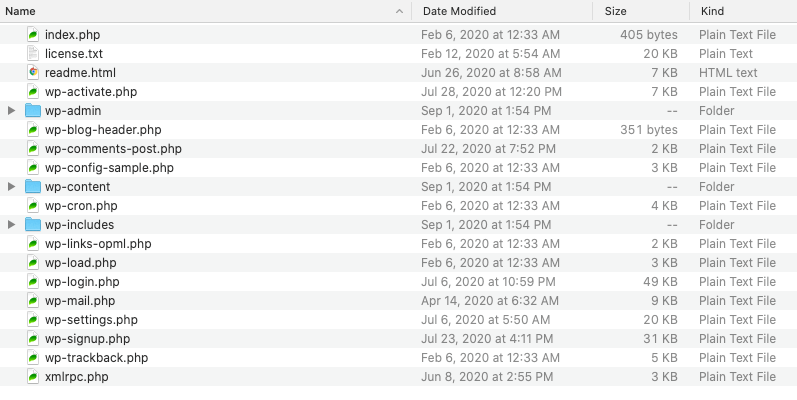
Some important core files are wp-config.php, wp-load.php, and wp-settings.php. They set up the database and load settings. Themes and plugins work with these files to add features. Without them, WordPress cannot function.
Keeping these files updated is crucial. Updates fix bugs and improve security. Always back up your site before updating. This ensures that your website stays safe and runs smoothly.

Credit: themeisle.com
Importance Of Core Files
WordPress core files are essential. They keep your website running. Core files include PHP and CSS. They help display content. Without them, websites break. Security is a big part. Core files protect from hackers. Updates to these files are crucial. Updates fix bugs. They improve security. Always update them. Never ignore this task.
Core files are like the brain of your site. They control functions. They manage plugins and themes. Without core files, plugins fail. Themes will not work. Core files help in loading pages. They keep everything smooth. They ensure your website is fast. Fast websites are good for visitors. They make browsing fun.
Main Components
The wp-config.php file holds important settings. It connects the website to the database. This file contains security keys. These keys protect your site from attacks. Changing these keys can make your site safer.
The wp-settings.php file sets up the environment. It loads settings and functions. This file is crucial for initializing WordPress. It helps your site run smoothly. Many site features depend on it.
The wp-load.php file is the entry point. It loads WordPress files and sets paths. Without this file, WordPress can’t start. It ensures all required files are available. Essential for site functionality.
The wp-admin directory is the control center. It manages site content and settings. This directory has files for the admin dashboard. It allows users to change site settings. Important for site management.
The wp-includes directory has core functions. It contains PHP files essential for WordPress. These files are responsible for site features. They manage things like posts and user interactions. Critical for site operations.
Credit: solidwp.com
Functions And Features
WordPress core files are the heart of the platform. They include essential files that make WordPress work. These files help in creating and managing websites. Core files have tools like themes and plugins. They also offer a dashboard to control settings. Users can add posts and pages with ease.
Core files update automatically for security. They keep your site safe from threats. The files include PHP, CSS, and HTML. Each file has a specific role. Together, they create a smooth user experience. WordPress core files are vital for a website’s success.
Updating Core Files
WordPress core files are very important. They help run your website. Updating them keeps your site safe. Always backup your site before any updates. Backups save your site in case of problems. Automatic updates can be set up. This makes life easy. Manual updates need more work. They need more time too. Always check for new updates. New updates fix bugs. They help improve site security. Outdated files can cause issues. These issues can be big. Some updates add new features. New features make your site better. Updating regularly helps your site stay fast. It keeps your site running well.

Credit: melapress.com
Security Considerations
WordPress core files are the heart of your site. They contain essential data. Keeping them safe is very important. Hackers often target these files. They look for weaknesses. Regular updates help protect them. Outdated files are risky. They can let bad people in.
Backups are a smart choice. They save your site’s data. Secure passwords help keep files safe. Strong passwords are hard to guess. Limiting access is wise. Only trusted people should see these files. Plugins can also help with security. Choose trusted plugins for extra safety.
Firewall protection adds another layer. It blocks harmful traffic. Monitoring tools watch for strange activity. They alert you if something seems wrong. Staying informed helps you react quickly. Learn about new threats. Security practices keep your site safe.
Common Issues And Troubleshooting
WordPress core files are very important. They help your website run. Sometimes, these files can cause problems. A common issue is the “White Screen of Death”. This happens when a plugin or theme doesn’t work. Another issue is broken links. This can make pages not open. Also, slow website speed can be a problem. Too many plugins can slow down a site. Keeping plugins updated helps. Sometimes, you can’t log in to the admin area. This can be because of a wrong password. Or maybe a plugin is causing trouble.
It’s helpful to know some troubleshooting steps. First, clear your browser cache. This might fix some display issues. Next, try deactivating all plugins. Then, activate them one by one. This finds the troublesome plugin. If you can’t log in, try resetting your password. Use the “Lost your password?” link. Always back up your site before making changes. This keeps your data safe.
Best Practices
Keep your WordPress core files up-to-date for security. This helps protect your site. Use a trusted source for all updates. Avoid downloading updates from unknown sites. They may contain harmful code. Regularly backup your files. This ensures you can restore your site if needed. Store backups in a safe place.
Set proper permissions for your files. This limits access and keeps them safe. Only give permissions to people you trust. Use strong passwords for your WordPress accounts. Change them often to stay secure. Enable a firewall for extra protection. It acts as a barrier against threats. A firewall keeps unwanted visitors out.
Always monitor your website for changes. Check for unusual activity. This can help you spot issues early. Use plugins wisely. Only install necessary plugins. Too many plugins can slow down your site.
Frequently Asked Questions
What Are WordPress Core Files?
WordPress core files are the essential files that make up the WordPress platform. They include PHP scripts, libraries, and assets that enable WordPress to function properly. These files are maintained by the WordPress developers and should not be modified. Regular updates ensure security and compatibility with plugins and themes.
Why Are WordPress Core Files Important?
WordPress core files are crucial because they provide the backbone for your website’s functionality. They ensure your site runs smoothly and securely. Regular updates to these files help maintain compatibility with themes and plugins. Altering core files can lead to security vulnerabilities and functionality issues, so it’s best to avoid modifications.
Can I Modify WordPress Core Files?
It’s strongly discouraged to modify WordPress core files. Altering them can introduce security risks and cause functionality issues. Updates to core files will overwrite any changes made. Instead, use child themes or custom plugins to implement customizations. This approach keeps your site secure and maintains compatibility during updates.
How To Update WordPress Core Files?
Updating WordPress core files is simple and essential for security. Navigate to your WordPress dashboard, click on “Updates,” and then “Update Now. ” Regular updates ensure your site remains secure and compatible with themes and plugins. Always back up your site before performing updates to prevent data loss.
Conclusion
WordPress core files are vital for your website’s operation. They form the backbone, ensuring everything runs smoothly. Understanding these files helps you manage your site better. You can troubleshoot issues more effectively. Regular updates are crucial for security and performance.
Always back up your site before making changes. This ensures you can restore it if needed. A basic knowledge of core files empowers you. It helps in customizing and enhancing your WordPress site. Keep learning and exploring. Your website will thank you for it.


