Are you scratching your head trying to figure out the difference between AWS and WordPress? You’re not alone.
Many people find themselves in this exact position, wondering how these two powerful tools fit into the digital landscape. If you’re looking to enhance your online presence or build a robust digital solution, understanding the distinct roles of AWS and WordPress is crucial.
Imagine being able to choose the right platform with confidence, knowing exactly how it will meet your needs. You’ll be empowered to make informed decisions that could transform your digital projects. This article will unravel the mystery, helping you grasp the key differences in simple terms. By the end, you’ll know which platform is the right fit for you, whether you’re aiming to host websites, manage content, or scale your business. Dive in and discover how AWS and WordPress can serve your unique goals!
Aws Overview
Amazon Web Services, or AWS, is a cloud platform. It offers many services for businesses. Companies use AWS for computing power and storage. AWS helps in hosting websites and applications. Many big companies use AWS daily. It’s popular for its reliability and scale. AWS services are flexible and secure. Users only pay for what they use.
AWS has many data centers worldwide. This ensures fast service for everyone. It supports many programming languages. AWS also has tools for analytics. This helps businesses grow smarter.
Developers love AWS for its ease of use. Setting up servers is simple on AWS. It reduces the need for physical hardware. Many startups choose AWS for its affordability.
WordPress Overview
WordPress is a popular tool for creating websites. It’s easy for beginners. People use it to make blogs, shops, and more. WordPress is free and open-source. This means anyone can use and change it. Lots of people help make it better.
WordPress has many themes and plugins. Themes change how your website looks. Plugins add extra features. Want a contact form? There’s a plugin for that. Need a gallery? There’s a plugin too.
WordPress is user-friendly. You don’t need coding skills. Just click and type. Many people choose WordPress for their websites.
Core Functions
AWS offers cloud services. It provides storage, computing, and databases. Businesses use AWS for scaling. AWS helps with hosting websites. It also supports data analytics. AWS can integrate with other tools. Security is a top priority. It has global reach. AWS is reliable and flexible.
WordPress is a platform for websites. It is user-friendly. People use it for blogs. You can create pages easily. WordPress supports plugins. These add features. Themes change the look. It is open-source. Many people contribute. WordPress is great for small sites. It is easy to manage.
Credit: docs.aws.amazon.com
Infrastructure
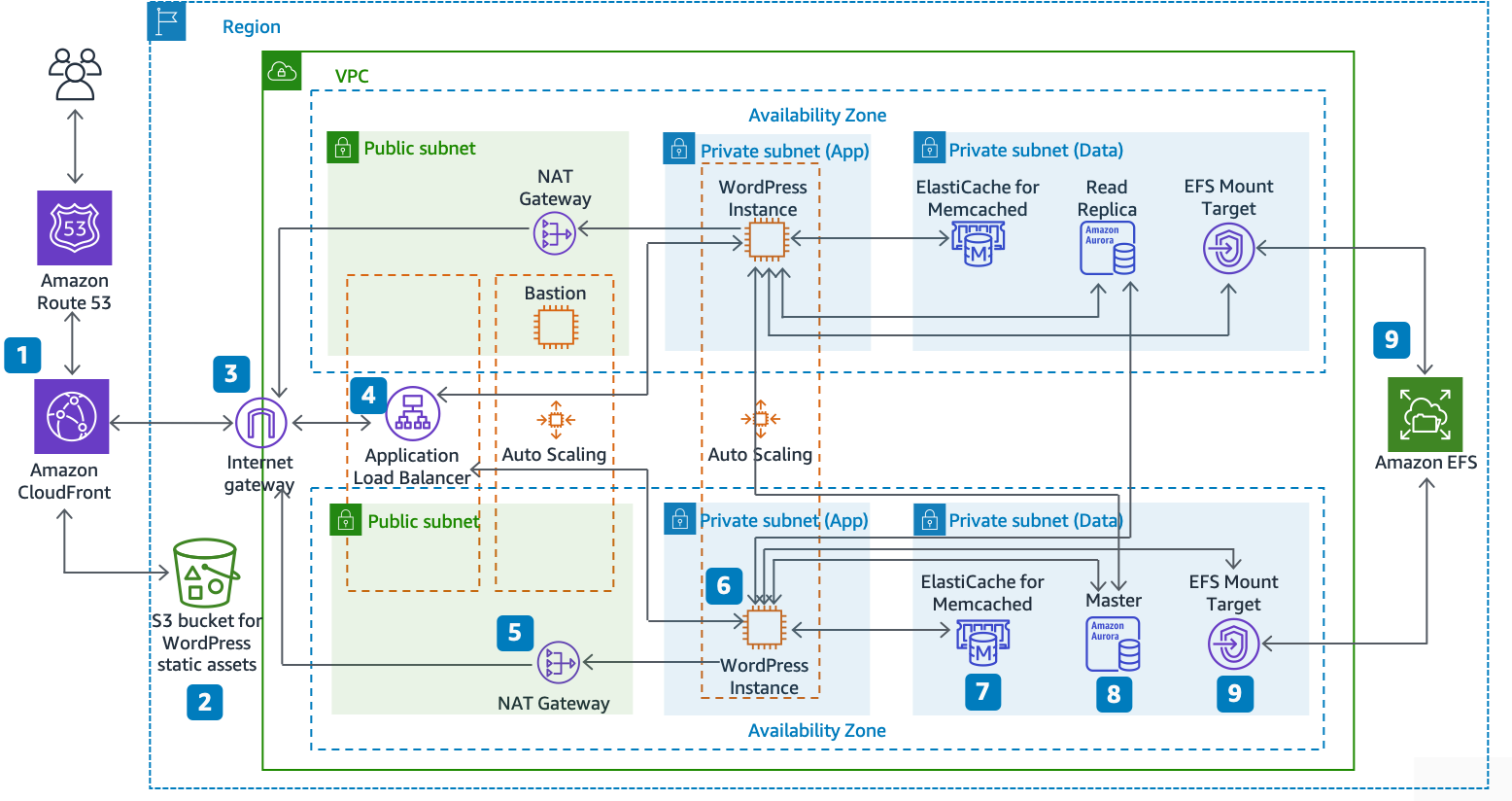
AWS is a huge cloud service. It offers many tools and services. Users can build, store, and manage their projects. Scalability is a big feature. Businesses can grow without limits. AWS supports many programming languages. It is flexible for developers. Security is strong with AWS. It protects data well. Many companies trust AWS for their needs.
WordPress is a popular website builder. It is easy to use for beginners. Hosting can be shared or managed. Shared hosting is cheaper. Managed hosting gives better speed. WordPress has many themes and plugins. Users can customize their sites. WordPress is great for blogs and small businesses. It is user-friendly and simple.
Use Cases
AWS helps businesses store data. It provides computing power. Many companies use it for big projects. AWS is good for developers. They can build apps. It’s flexible and scalable. Big firms like Netflix use AWS. They need lots of resources. AWS offers cloud services. It can handle many tasks. AWS is safe for data. It keeps it protected. Great for enterprise solutions.
WordPress is a popular tool. Many use it for websites. It helps bloggers share ideas. Small businesses use WordPress. It’s easy to set up. No need for coding skills. WordPress has many themes. Users can choose designs. Plugins make it versatile. WordPress is good for content management. People can publish posts fast. It’s ideal for personal projects. Many use it for online stores too.

Credit: feather.so
Scalability
AWS offers many tools for scaling. It can handle huge traffic. It uses services like Auto Scaling and Elastic Load Balancing. These tools help manage traffic easily. If traffic grows, AWS can add more servers. This means your website stays fast. AWS is great for big projects. It suits businesses that need to grow quickly.
WordPress can also scale. It works well with plugins. These plugins help manage more visitors. Using a content delivery network (CDN) can help. A CDN makes your site faster. WordPress needs a good server for big traffic. It’s best for small to medium sites. For very big sites, you might need extra help. But for many users, WordPress handles scaling well.
Customization
AWS offers cloud-based solutions for businesses, focusing on infrastructure and flexibility. WordPress, on the other hand, is a content management system, ideal for building and managing websites. Both serve different needs, with AWS providing robust hosting solutions and WordPress offering an easy way to create and customize websites.
Aws Customization Options
AWS offers a wide range of customization options. Users can change server settings. They can choose different operating systems. AWS allows scaling resources up and down. This helps manage costs. Developers have control over network settings. They can set up security measures as needed. AWS supports various programming languages. This makes it flexible for different projects. Users can configure data storage options. They can select databases that fit their needs.
WordPress Themes And Plugins
WordPress is known for its themes and plugins. Themes change the site’s appearance. Plugins add new features. Users can install thousands of themes. Each theme has unique designs. Plugins help with SEO, social media, and more. They enhance site functionality. WordPress is easy to customize. Users do not need coding skills. Themes and plugins make WordPress versatile. They help users build websites quickly.
Cost Structure
AWS uses a pay-as-you-go model. You pay for what you use. There are no hidden fees. Prices can vary based on demand. Cloud services can scale up or down. This helps manage costs. AWS offers a free tier. This is good for beginners. But, costs can grow with usage.
WordPress itself is free to use. But, other costs exist. Hosting is a key cost. Themes and plugins may have fees. Some are one-time costs. Others are monthly. Custom designs can be expensive. Maintenance and updates add to costs. Overall, WordPress can be cost-effective. It depends on what you need.
Security
AWS uses strong security tools. It has a firewall to block bad access. Encryption keeps data safe. AWS checks user identity with multi-factor authentication. It keeps servers in secure places. Regular security updates fix any problems. AWS has a team to watch for threats. It also offers DDoS protection to stop attacks. Security is always a top focus.
WordPress offers many plugins for security. They help stop malware. It uses password protection for accounts. Regular updates keep WordPress safe. Backup options save your data. WordPress has a community that finds security issues. Users can add SSL certificates for better protection. It’s important to choose secure themes and plugins. WordPress works to keep sites safe.
User Experience
The AWS interface is for tech experts. It has many tools and options. These can be hard to understand. Users can feel lost. There are many buttons and menus. It can be confusing. AWS requires training to use well. Beginners may find it tough.
WordPress is easy to use. The dashboard is simple and clear. Users can see where things are. Adding posts is quick. Editing is easy. WordPress is good for beginners. It helps users feel in control. The design is friendly. No special skills are needed. It is like a friendly guide for website building.
Community Support
AWS Support Resources are rich and diverse. Users can access official documentation, tutorials, and webinars. AWS offers premium support plans for technical help. Users can join AWS user groups for sharing ideas. These resources are helpful for solving issues.
WordPress Community and Forums are known for being active. Many users contribute to forums and online discussions. They share solutions and tips freely. Official WordPress resources include guides and tutorials. The community is friendly and welcoming. It’s easy to find answers to common problems.
Credit: wpvip.com
Frequently Asked Questions
What Is Aws Used For?
AWS, or Amazon Web Services, provides cloud computing services. It offers scalable storage, computing power, and database solutions. Businesses use AWS for hosting websites, data storage, and application development. It’s cost-effective and supports flexible scaling options.
Can WordPress Run On Aws?
Yes, WordPress can run on AWS. AWS provides the infrastructure to host WordPress sites. It offers flexibility and scalability to manage website traffic. With AWS, you can enhance WordPress performance using advanced tools.
Is Aws Suitable For Small Businesses?
AWS is suitable for small businesses. It offers affordable cloud solutions that fit various needs. Small businesses can benefit from scalable resources and pay-as-you-go pricing. AWS enables cost-effective growth and resource management.
How Does WordPress Differ From Aws?
WordPress is a content management system for building websites. AWS is a cloud service platform offering infrastructure and computing resources. WordPress focuses on website creation, while AWS provides the underlying infrastructure for hosting and more.
Conclusion
AWS and WordPress serve different needs. AWS provides cloud services for developers. WordPress offers a platform for building websites. Both have unique strengths. AWS excels in scalability and flexibility. WordPress shines in ease of use and content management. Choose based on your project needs.
AWS suits complex applications. WordPress fits simple websites and blogs. Understanding their differences helps you pick the right tool. Make informed decisions to achieve your goals. Consider your technical skills and project requirements. Adapt and grow with the right platform.
Success depends on matching tools to tasks.