
Have you ever wondered how to make your WordPress site more organized and user-friendly? If so, understanding tag descriptions might be the key.
When you explore the world of WordPress, you’ll find that tags are more than just a nifty way to categorize your content; they play a vital role in SEO and user experience. But what exactly is a tag description, and why should you care about it?
Imagine having the power to guide your readers and search engines directly to the content they crave. By mastering tag descriptions, you can enhance your website’s visibility and ensure your audience finds exactly what they’re looking for. Dive into this article to discover the secrets behind using tag descriptions effectively and how they can transform your WordPress site into a beacon of information and engagement.
Tag Description Basics
Tag descriptions help organize your content in WordPress. They provide extra details about a tag. This makes it easier for users to find related content. A good tag description improves your site’s SEO. It makes your content more visible in search results.
Adding a description is simple. Go to your WordPress dashboard. Find the Tags section under Posts. Select a tag and add your description. Be clear and precise. Use keywords that match your content. This will help search engines understand your site better.

Credit: gretathemes.com
Importance Of Tag Descriptions
Tag descriptions help in organizing your content. They make it easy for users to find related posts. Tags act like labels for your blog posts. Good tag descriptions improve your site’s SEO. Search engines use these tags to understand your content better. This leads to better visibility in search results. Tags can group similar topics together. They create a more structured website. Visitors stay longer because they find relevant information easily.
Clear descriptions attract more readers. People know what to expect when they see a tag. Tags guide users through your website. They help users discover more content. This increases engagement with your site. Using the right words in tag descriptions is crucial. It keeps your content organized and accessible.
Creating Effective Tag Descriptions
Find the right keywords for your tags. Use words that people search. Simple words are best. Try to use words that fit the topic. Tools can help find these words. Make a list of the best words. Use these words in your tag descriptions.
Keep descriptions short. Aim for about 150 characters. Short descriptions are easy to read. They fit well in search results. Make sure each word counts. Use words that give clear meaning. Avoid using too many words.
Write in a simple way. Make descriptions interesting. Use words that catch attention. Ask a question or give a fact. This makes people want to learn more. Use sentences that are easy to read. Keep your readers interested.
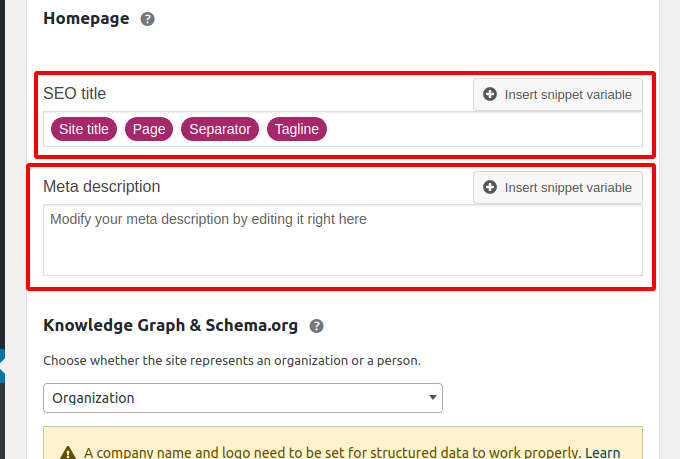
Credit: prathimahospitals.com
Tag Descriptions And Seo
Tag descriptions help with search engine visibility. They tell search engines what your page is about. This helps your page appear in the right search results. Use clear and simple words. Search engines like this. It helps them understand your content better.
Good tag descriptions can make user experience better. They help users find what they need fast. Users see these descriptions in search results. Clear descriptions guide them to your page. This makes browsing easier for everyone.
Tag descriptions can affect your click-through rate. A good description can make people click your link. It tells them what to expect on your page. This can bring more visitors to your site. More clicks mean more traffic.
Tag Description In WordPress
Editing tag descriptions can be simple. Start by visiting the WordPress dashboard. Click on Posts, then Tags. Find the tag you want to edit. Click on Edit next to the tag name. Type your description in the box. Press Update to save changes. Easy and straightforward!
Plugins can enhance tag descriptions. Install SEO plugins like Yoast or All in One SEO. These tools offer extra features. They help with keyword suggestions. Make descriptions more effective. Plugins guide you in making better tags. Boost your site’s visibility with optimized tags!
Handling many tags can be tricky. Create a system to manage them. Use spreadsheets or lists. Keep track of tag names and descriptions. Update them regularly. Make sure each tag is unique. Avoid duplicate descriptions. This keeps content organized. Good management helps users find information easily.
Common Mistakes To Avoid
Overstuffing keywords can confuse readers. It makes text hard to read. Use keywords wisely. A few are enough for good effect. Too many will not help. Search engines may not like it either.
Ignoring readability is a big mistake. Text should be easy to read. Short sentences work best. They keep readers interested. Long sentences can be boring. Clear text helps everyone understand.
Neglecting updates can harm your site. Update tags often. They should match your content. Old tags can mislead. Fresh tags can bring more visitors. Keep tags relevant and current.
Best Practices For Tag Descriptions
Tag descriptions should be clear and consistent. Use the same style for all tags. This helps users understand the content better. Tags should match the content they describe. Keep descriptions short and to the point. Avoid complex words. This makes it easier for everyone to understand.
Align tag descriptions with your content goals. This helps in reaching the right audience. Focus on keywords that matter most. This helps in search engine results. Keep an eye on what your audience likes. Use this to improve your tags.
Check how your tags perform often. This helps find what works best. Use tools to see which tags get the most clicks. Change tags that do not perform well. This can help improve your site’s visibility. Always aim for better user experience.

Credit: taxopress.com
Frequently Asked Questions
What Is A Tag Description In WordPress?
A tag description in WordPress is a brief summary of a tag’s purpose. It helps search engines understand the content associated with the tag. This description can improve SEO by providing context for both users and search engines. It enhances the overall organization and discoverability of your website’s content.
How To Add A Tag Description In WordPress?
To add a tag description, go to your WordPress dashboard. Navigate to “Posts” and then “Tags. ” Click on the tag you want to edit. Enter your description in the “Description” box. Save your changes. This process helps improve SEO and provides clarity on your website’s content.
Why Is Tag Description Important For Seo?
Tag descriptions are crucial for SEO as they provide context to search engines. They help search engines understand the relevance of your content. This can improve your website’s visibility in search results. By using relevant keywords in descriptions, you can boost your site’s SEO performance.
Can Tag Descriptions Improve User Experience?
Yes, tag descriptions enhance user experience by providing context to your content. They help users understand the relevance of the tag to their search. This clarity can lead to better engagement and retention. A well-written description can guide users to more relevant content on your site.
Conclusion
Understanding tag descriptions in WordPress boosts your site’s organization. They help search engines and users find relevant content. Easy to implement, these descriptions enhance your site’s visibility. Clear tags improve user experience by streamlining navigation. They also make content more accessible and engaging.
Remember to keep descriptions concise and relevant. This ensures they serve their purpose effectively. Regularly update your tags for optimal results. A well-tagged site attracts more visitors. Enjoy smoother content management and better SEO outcomes. Start leveraging tag descriptions today for a more organized website.


