
Struggling to remember your WordPress username on Bluehost? You’re not alone.
Many users find themselves in this predicament, especially when they’re eager to dive into their site management or make necessary updates. This small detail can feel like a significant roadblock, but don’t worry—solving it is easier than you might think.
By understanding why it happens and how to quickly retrieve or reset your username, you can eliminate the frustration and get back to focusing on what truly matters—your website. Stick with us as we guide you through the simple steps to find or reset your WordPress username on Bluehost. You’ll feel empowered and back in control in no time.
Understanding WordPress And Bluehost
WordPress is a simple way to make websites. It lets you build blogs, shops, and more. Many people use it because it is easy and flexible. You don’t need to be a tech expert. Just follow the steps, and you will have a site. WordPress is free. It has many themes and plugins. These help you add cool features. You can change how your site looks without knowing code. This is why WordPress is loved by many.
Bluehost helps keep your website online. It stores your site on its servers. Your site will run smoothly with Bluehost. Many people trust it for reliable hosting. It works well with WordPress. You can install WordPress in one click. Bluehost offers good support too. If you have problems, they help you. This makes it a popular choice. Many beginners use Bluehost for their first website.
Accessing Your WordPress Account
Your WordPress username is very important. It helps you login to your site. You can find it in the email from Bluehost. This email comes after you sign up. It tells you how to get started. Check your email inbox for this message. Look for the subject line about your new account.
The username is a key part of your login. You need it every time. Without it, you can’t access your site. It’s also a part of your site’s security. Choose a strong username. Avoid using common words. This keeps your account safe. Always remember your username. Write it down if needed.
Finding Your WordPress Username
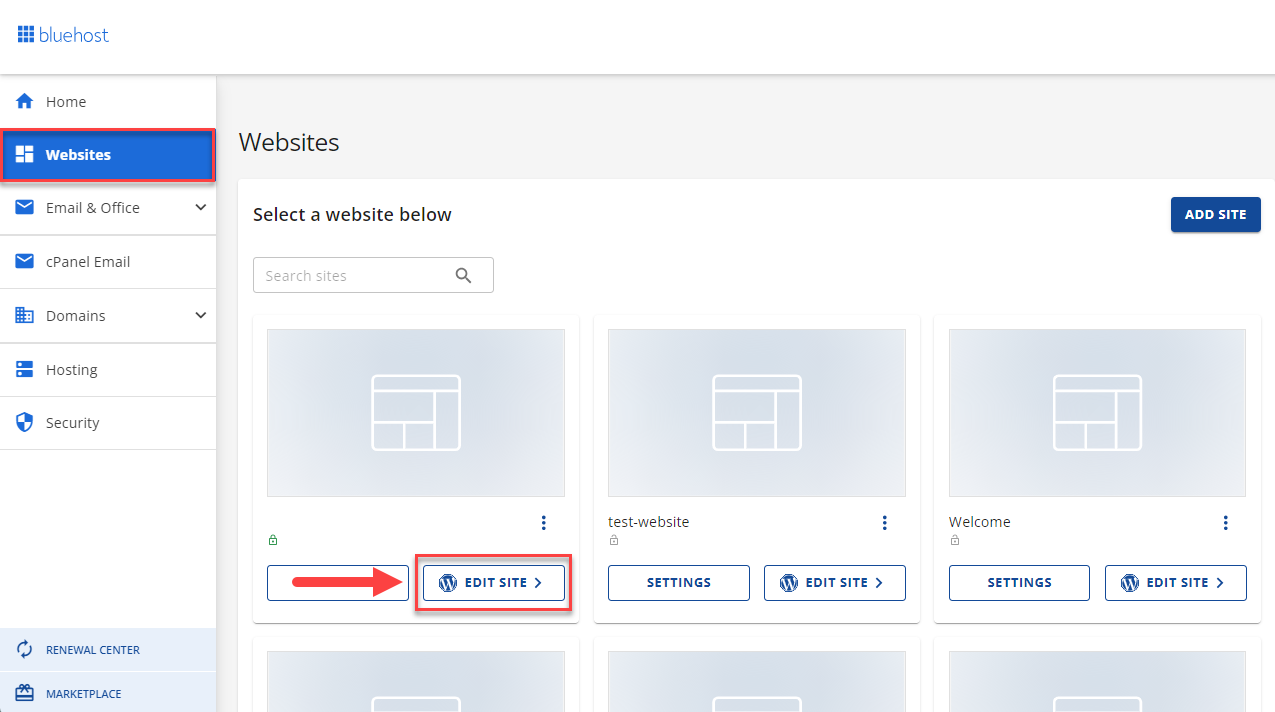
First, log into the Bluehost dashboard. Find the My Sites section. Click on it. Now, choose the site you want. Look for the Admin Login button. Click it. This takes you to the WordPress login page. You will see your username here.
Check your email inbox. Bluehost sends login details. Look for the email from Bluehost. Open it. Find the username in the email. If you can’t find it, check spam or junk folder. Email might be there.
Log into WordPress admin panel. Click on Users on the left side. Here you see all users. Find your name. Your username is next to your name. You can see other users too. Make sure to note it down.

Credit: www.bluehost.com
Resetting Your WordPress Username
Sometimes, we forget our WordPress username. This can be frustrating. A simple way to recover it is by resetting your password. Visit the WordPress login page. Click on the “Lost your password?” link. Enter your email address. You will get a password reset email. Follow the instructions to set a new password. Once done, you can log in and see your username.
If password reset doesn’t help, contact Bluehost support. They are friendly and ready to help. Visit the Bluehost website. Find the “Help” or “Support” section. You can use live chat or call them. Explain your issue. They will guide you to recover your username. Remember, always keep your login details safe.
Troubleshooting Common Login Issues
Forgetting your WordPress username or password happens often. It can be fixed. Check if the Caps Lock is on. Passwords are case-sensitive. Double-check the spelling of your username. Sometimes we miss a letter or two. Use the “Forgot Password” link if needed. It sends a reset email. Follow the instructions in the email. This helps you create a new password.
Too many wrong attempts can lock your account. Wait for a while and try again later. If you still can’t log in, contact Bluehost support. They can help unlock your account. Always keep your username and password safe. Write them down in a secure place. This prevents future issues. Staying organized helps you avoid login problems.
Credit: www.bluehost.com
Tips For Securing Your WordPress Login
Passwords should be hard to guess. Use a mix of letters, numbers, and symbols. Avoid using simple words like “password” or “123456”. Change passwords often. Never share your passwords. Write them down safely if needed. Short passwords are weak. Longer passwords are better.
Two-factor authentication adds more security. It uses your phone or email. After entering your password, you get a code. This code is special and changes every time. It makes it harder for others to get in. Set this up in your account settings. It’s easy and quick to do. Protect your WordPress site better.
Credit: www.bluehost.com
Frequently Asked Questions
How Do I Find My WordPress Username In Bluehost?
To find your WordPress username in Bluehost, log in to your Bluehost account. Navigate to the “My Sites” section. Click on “Manage Site” for your WordPress site. Under “Settings”, you will find your WordPress login credentials including your username.
Can I Change My WordPress Username On Bluehost?
No, you cannot change your WordPress username directly on Bluehost. To change your username, use a plugin like “Username Changer”. Alternatively, create a new user with the desired username, then assign administrative privileges and delete the old user.
What Should I Do If I Forget My WordPress Username?
If you forget your WordPress username, visit the WordPress login page. Click “Lost your password? ” And enter your email. Follow the instructions sent to your email to reset your login credentials, including recovering your username.
Is My Bluehost Username Different From WordPress?
Yes, your Bluehost username is typically different from your WordPress username. Bluehost provides you with hosting account credentials, while WordPress username is used for site administration. Keep them secure and separately recorded for easy access.
Conclusion
Understanding your WordPress username on Bluehost is crucial. It simplifies login and site management. Keep your username secure to protect your website. If you forget, use Bluehost’s support tools for recovery. Regularly update your credentials for enhanced security. Staying informed about account details ensures smooth blogging.
Knowing your username helps streamline your WordPress experience. Always prioritize security to prevent unauthorized access. This knowledge empowers you to manage your site efficiently. Remember, a secure username is the key to a safe WordPress journey. Enjoy a hassle-free blogging experience with this essential information.


