Have you ever felt overwhelmed trying to organize your WordPress pages? You’re not alone.
Navigating through the maze of page settings can be daunting, especially when it comes to understanding the “Order” feature in Page Attributes. This seemingly simple tool can significantly impact how your website is structured and perceived by visitors. Imagine having the power to control the sequence in which your pages appear, ensuring a seamless user experience.
Intrigued? Stick around, because we’ll unravel the mysteries of the “Order” function and show you how to master it for your website’s success. Whether you’re a seasoned WordPress user or just starting out, understanding this feature can give you an edge. Ready to dive in and take control of your site’s organization? Let’s get started!
Order In Page Attributes
The Order in Page Attributes helps arrange pages in WordPress. It sets the order of pages. Small numbers come first. Large numbers come later. This feature is handy for organizing. Pages will show in the order you want. The default value is zero. You can change it to any number. Each page can have a different number. This makes it easy to control the sequence. Use it to display pages logically. It helps users find information fast. Simple and effective.
Role Of Order Attribute
The order attribute in WordPress helps you organize pages. It lets you decide the sequence of pages. Think of it like arranging books on a shelf. A page with a lower order number will appear first. For example, a page with order “1” will come before a page with order “2”. This is useful for creating menus or lists. It makes browsing easy for users. Setting an order is simple. Just assign a number to each page. Remember, smaller numbers go first. This way, your site stays neat and tidy.
Setting Page Order
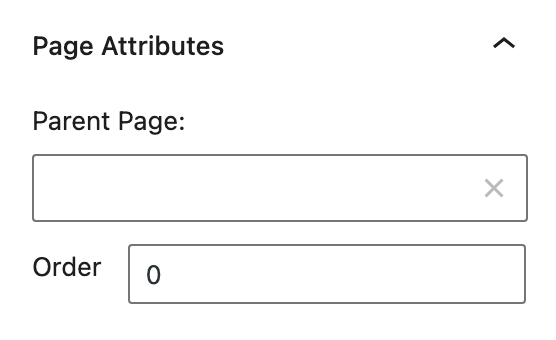
Page order helps arrange your pages in a specific sequence. This is useful for creating a logical flow on your site. Each page has an order number. Pages with lower numbers appear first. You can set these numbers in the page attributes section.
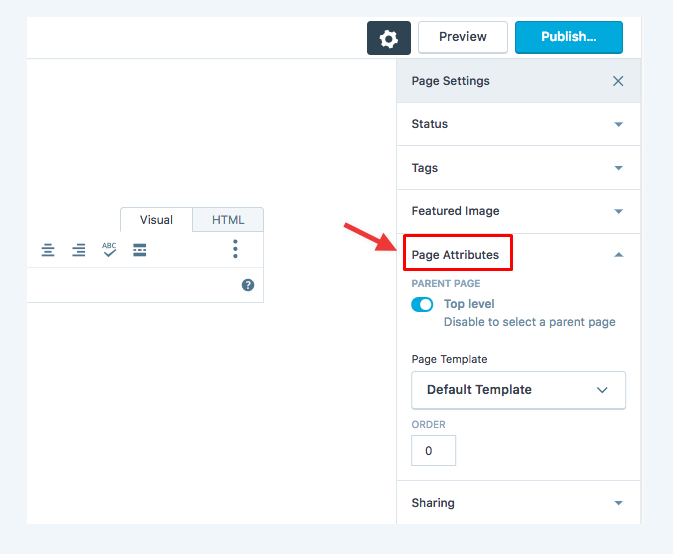
To change a page order, go to your WordPress dashboard. Find the page you want to reorder. Click on it to open the editor. Look for “Page Attributes” on the right side. Enter a number in the “Order” box. Remember, zero is the first number. Save your changes.
This feature is simple yet powerful. It helps in organizing content. It makes your website easier to use. Visitors can find information quickly. It improves the overall user experience.
Credit: avada.io
Impact On Page Hierarchy
The order in WordPress page attributes affects page placement. Pages with a lower number appear first. This helps in creating a clear structure for your website. It’s crucial for sites with many pages. Proper order makes navigation easy. Users find what they need quickly.
Content should be organized logically. For example, the main page might be 0. Subpages can be 1, 2, and so on. This setup is easy to understand. It helps in maintaining a clean hierarchy. Visitors appreciate sites with a logical flow.
Using Order For Navigation
Pages in WordPress can have an order number. This helps to arrange them. Lower numbers show first. Higher numbers come later. You can use this to plan your page layout. It helps visitors to find their way easily. The order is set in the Page Attributes section. This feature is very simple but very useful.
Each page can have a different number. Choose numbers wisely to make sense. For example, a homepage might have number 1. A contact page could have number 10. This way, pages appear in the order you want. It makes your site look neat and organized.
Order Vs Other Attributes
Order in WordPress controls the sequence of pages. It helps organize content. Attributes like parent and template serve different roles. The parent attribute sets a hierarchy. Templates decide a page’s layout. Order is about arrangement. The others focus on structure and design.
Using order is like numbering pages. It keeps them in the right sequence. Setting order is easy. Just type a number in the box. Lower numbers appear first. This attribute is simple but important. It makes navigation smooth for users.
Common Use Cases
Understanding order in page attributes is crucial for WordPress users. This feature lets you arrange pages in a custom sequence. It helps in maintaining a structured navigation. For example, a teacher can organize lessons in order. This ensures students follow the correct path. Businesses can display services in a logical sequence. This enhances user experience on their site.
Bloggers often use this to arrange posts by importance. It’s useful for storytelling or tutorials. Setting the order is simple. Just assign numbers to pages. Lower numbers appear first. This straightforward method keeps your site organized. It improves the flow of information. Having a neat arrangement makes it easier for visitors to find what they need.
Credit: www.maine.edu
Troubleshooting Order Issues
WordPress page order can be tricky. Pages might not display as expected. Check the page order number in attributes. A small number shows a higher priority. Ensure all pages have a number. Sometimes, pages miss this number.
Make sure plugins are not causing issues. Some plugins affect page order. Deactivate them one by one. Then check if the problem is solved.
Another method is changing the theme. Some themes have different settings. Try a new theme to see if it helps. If the order is still wrong, it may be a WordPress bug. Keep WordPress updated to avoid bugs. Bugs can cause unexpected issues.

Credit: www.elon.edu
Frequently Asked Questions
What Does Order In Page Attributes Mean?
In WordPress, the ‘Order’ attribute lets you arrange pages in custom sequences. It controls the display order, especially when pages are listed automatically. By assigning a numerical value, you can prioritize the appearance of specific pages, making navigation more intuitive for users.
How To Change Page Order In WordPress?
To change page order, go to the page editor in WordPress. Find the ‘Page Attributes’ section, then enter a number in the ‘Order’ field. Lower numbers appear first. Save your changes to update the page order on your site.
Is Page Order Important For Seo?
Page order can indirectly affect SEO by enhancing user experience. Properly ordered pages improve navigation, keeping visitors engaged longer. This can reduce bounce rates and potentially improve rankings, as search engines value user-friendly sites.
Can Order Affect WordPress Menus?
Order set in page attributes doesn’t directly affect WordPress menus. Menus are customized separately in the Appearance section. However, organizing pages logically can help when creating menus, ensuring a coherent structure for site visitors.
Conclusion
Order in Page Attributes in WordPress helps organize content. It guides the sequence of pages in your website’s navigation. Easy to use, it allows clear structure. Readers find information quickly, improving user experience. You can enhance site navigation without coding skills.
Just assign numbers to pages. Lower numbers appear first. Simple adjustments lead to better website flow. Streamlined navigation boosts engagement and retention. Your site’s layout becomes intuitive. Visitors appreciate smooth browsing. Remember, organized pages make your site inviting. Implementing order improves your WordPress website’s functionality effortlessly.