
Are you ready to take your web service to the next level? Hosting your web service in Azure can unlock a world of possibilities, offering scalability, reliability, and security.
But where do you start? You might be wondering how to navigate Azure’s vast ecosystem and make the most of its powerful features. In this guide, you’ll discover straightforward steps that will help you host your web service efficiently in Azure.
Imagine the peace of mind knowing your web service is running smoothly on a platform trusted by countless businesses worldwide. You’ll learn how to harness Azure’s capabilities with ease, even if you’re not a tech expert. Let’s dive in and transform your web service hosting experience into something truly remarkable!
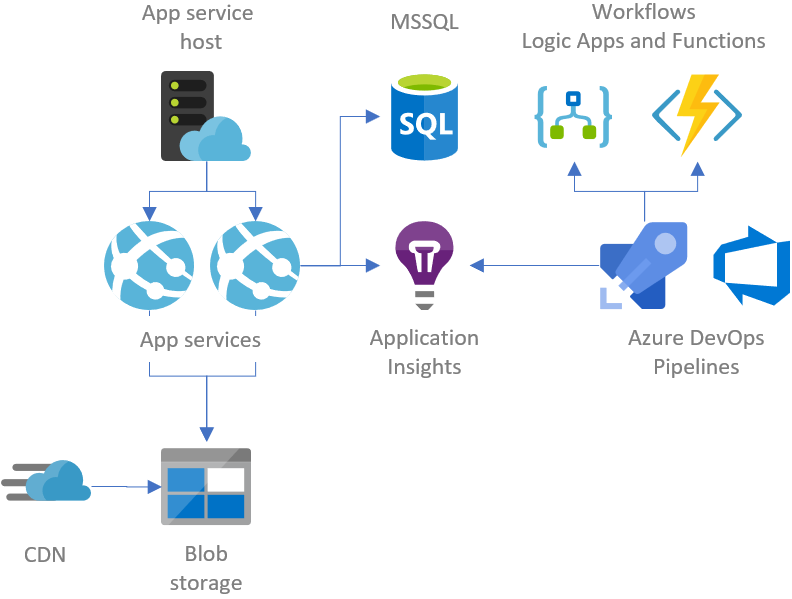
Credit: gunnarpeipman.com
Benefits Of Hosting On Azure
Azure provides a secure platform for your web service. It keeps data safe from threats. Azure offers scalability. Your service can grow when needed. It helps manage heavy traffic easily. Azure has reliable uptime. Your service stays online most of the time. It supports multiple languages. Easy for developers across the world. Azure gives automatic updates. Your service stays updated without effort.
Azure has cost-effective plans. You pay for what you use. It reduces extra costs. Azure provides 24/7 support. Help is available anytime. Azure integrates with popular tools. You can use tools you already know. It ensures fast performance. Your service runs quickly and smoothly.

Credit: azure.microsoft.com
Setting Up An Azure Account
Start by visiting the Azure website. Click on the “Start free” button. You will need an email address. Enter it carefully. Follow the steps to create your account. Provide your basic details. These include your name and address. You might need a credit card for verification. Don’t worry, you won’t be charged. Once done, you get free credits to explore Azure.
Check your email for a verification link. Click it to activate your account. Now you have your own Azure account. You can start using Azure services. Explore different options available. Take your time and learn.
Choosing The Right Azure Service
Azure App Service is great for hosting web apps. It is easy to use. You can quickly deploy your app here. It supports many languages like Java, Python, and .NET. Developers love its built-in security features. Automatic scaling is also available. This means your app can handle more users. App Service also integrates with other Azure services.
Azure Virtual Machines give you more control. You can run any software you need. It is like having your own computer in the cloud. This service is flexible. You can choose your operating system. Windows or Linux, it’s up to you. Virtual Machines are perfect for custom setups. But, they need more management. So, make sure you have time to manage them.
Azure Kubernetes Service helps with containerized applications. It is a good choice for microservices. It manages scaling and deployment automatically. Kubernetes is complex but powerful. Developers use it for advanced projects. It works well with Docker containers. You can deploy many apps with ease. Azure Kubernetes ensures apps run smoothly.
Configuring The Environment
Resource groups keep your Azure resources organized. They help in managing costs. Use the Azure portal to create them. Choose a name that describes its purpose. You can add resources later. Location matters. Pick the closest region. This ensures better performance. Save your choices and move to the next step.
Networking connects your web service to the internet. Set up virtual networks. They manage data flow. Firewalls protect your service from threats. Enable them in Azure. Security settings guard your data. Use strong passwords. Enable encryption for safety. Always check security options before you proceed.
Performance levels define how fast your service runs. Choose based on your needs. Basic levels are for small apps. Premium levels handle big tasks. Look at your budget. Consider user traffic. Adjust settings to balance performance and cost. Review your choice frequently. This keeps your service efficient.
Deploying The Web Service
Hosting a web service in Azure involves setting up a cloud environment for your application. Create an Azure account, deploy resources, and configure your service. Azure provides tools for monitoring and scaling to ensure smooth operation.
Uploading Code
Upload your web service code to Azure. Use the Azure portal for this. Click on the app service. Find the deployment center. Choose your source code location. It could be GitHub or Bitbucket. Connect your repository. Follow the steps to complete the upload.
Configuring Deployment Slots
Deployment slots help manage your updates. Create a staging slot. Deploy new versions to this slot first. Test the new version here. Swap slots for the final release. This keeps the main service running smoothly. You can create multiple slots. Use them for different environments.
Automating Deployment With Ci/cd
Set up continuous integration and continuous deployment. Use tools like Azure DevOps. These automate your deployment process. Code changes trigger automatic updates. This reduces manual work. Ensures faster, reliable releases. It also helps catch errors early. This keeps your web service robust.
Managing And Monitoring
Azure simplifies hosting web services with its robust tools. Users can manage resources efficiently, ensuring optimal performance. Monitoring features offer real-time insights, helping to maintain seamless operations.
Using Azure Monitor
Azure Monitor helps keep an eye on your services. It collects metrics and logs to understand performance. You can see if your service is working well. If something goes wrong, you will know quickly. Azure Monitor can show you alerts and even fix some issues.
Setting Up Alerts
Alerts tell you when something is wrong. You can set them to watch important parts of your service. You decide what problems to watch for. Alerts can send emails or messages. This helps you react fast and keep things running smoothly.
Scaling And Performance Tuning
Scaling means adding more power to your service. Sometimes, more users need more resources. Azure makes it simple to scale up or down. Performance tuning adjusts settings for better speed. This ensures users have a good experience.
Ensuring Security And Compliance
Protect your web service with strong security protocols. Use firewalls to block harmful traffic. Encrypt data using SSL certificates. This keeps data safe from hackers. Set up multi-factor authentication. It adds an extra layer of security. Regularly update your software to fix security holes.
Keep user data safe and private. Store data in secure databases. Limit who can see this data. Use encryption to protect sensitive information. Inform users about data handling policies. Get user permission before collecting personal data.
Follow laws and regulations for data protection. Check which certifications your service needs. Consider certifications like ISO 27001 or GDPR. These show that your service is safe. Regular audits help maintain compliance. Document all processes and updates.

Credit: build5nines.com
Cost Management
Azure has many pricing models. You can pay as you go. This means paying only for what you use. Or, choose a reserved plan. This helps save money. With reserved plans, you pay upfront for one or three years. Knowing these models helps manage your budget.
Setting a budget in Azure is easy. This helps control spending. You can set alerts to notify when spending is high. Alerts warn you when you reach a limit. This helps avoid extra costs. Use these tools to stay within your budget.
There are many ways to optimize costs. Turn off unused resources. Use the Azure Advisor tool. It gives tips to save money. Choose the right size for your needs. Smaller sizes cost less. Always check for better deals. Saving money is possible with the right choices.
Troubleshooting Common Issues
Azure hosting can encounter issues like service configuration errors or network connectivity problems. Solutions include checking configuration settings and reviewing network security groups. Understanding Azure’s diagnostic tools helps troubleshoot effectively.
Handling Deployment Errors
Deployment errors can be tricky. Always check your error logs first. They show what went wrong. Use the Azure portal for detailed error messages. Ensure your code and environment settings match. Sometimes, a simple typo can cause issues. Double-check all configurations before deploying. Restart the deployment if needed.
Resolving Connectivity Problems
Connectivity issues often occur due to network settings. Ensure your firewall allows necessary traffic. Check if the VPN is properly configured. The Azure portal has tools to test connections. Ensure your DNS settings are correct. A mismatch here can block access. Contact support if problems persist.
Addressing Performance Bottlenecks
Performance bottlenecks slow down your service. Use Azure’s monitoring tools to spot them. Check for high CPU and memory usage. Sometimes, scaling up resources helps. Optimize your database queries. This can improve speed. Consider using caching for repeated tasks. It reduces load and increases speed.
Best Practices
High availability is key for Azure web services. Use load balancing to spread traffic across servers. This helps avoid downtime. Auto-scaling adjusts resources based on demand. This keeps your service running smoothly.
Backups protect your data from loss. Regularly save copies of data. Use Azure Backup for this task. It offers secure storage and easy recovery. Practice disaster recovery to prepare for emergencies. Always have a plan ready.
Updates keep your system safe. Apply patches to fix bugs. Maintenance ensures everything runs well. Schedule checks to find problems early. This prevents bigger issues later. Keep your software up-to-date.
Frequently Asked Questions
Can A Website Be Hosted On Azure?
Yes, a website can be hosted on Azure. Azure provides scalable cloud services for hosting websites efficiently. It offers various plans to suit different requirements, including virtual machines, app services, and databases. Azure ensures high availability, security, and global reach for your website.
Does Azure Have Web Services?
Yes, Azure offers web services through Azure App Service. It supports various languages and frameworks for building scalable applications. Azure also provides features like automatic scaling, integrated DevOps, and enterprise-grade security. It enables seamless deployment and management of web apps in the cloud environment.
How To Deploy Waf In Azure?
Deploy WAF in Azure by navigating to the Azure portal. Create an Application Gateway with WAF enabled. Configure settings and rules tailored to your security needs. Review and apply the settings to secure your applications efficiently. Ensure continuous monitoring for optimal performance and protection.
How Do I Host An Html Website On Azure?
Host your HTML website on Azure by creating a Storage Account. Upload your files using Azure Storage Explorer. Enable static website hosting in the Azure portal. Set your index and error pages. Access your site via the provided endpoint URL.
Ensure proper configuration for seamless deployment.
Conclusion
Hosting a web service in Azure is straightforward. You can achieve it with simple steps. Azure offers flexibility and scalability. It’s suitable for various business needs. Start with setting up your account. Choose the right service plan. Then, deploy your web service.
Monitor performance regularly. Ensure security measures are in place. Azure provides tools for this. Keep your service updated. This maintains efficiency and reliability. Explore Azure’s features further. They enhance your web service experience. With Azure, you cater to diverse audiences.
It’s a reliable cloud solution. Perfect for your web service needs.


