
Are you looking to secure your website and enhance your visitors’ trust? Installing an SSL certificate is a crucial step, especially if you’re using GoDaddy’s Economy Linux Web Hosting.
SSL certificates encrypt data exchanged between your server and your users, ensuring their sensitive information remains private. But how do you go about installing one on your GoDaddy hosting plan? Don’t worry; you’re not alone in this. Many website owners find the process daunting at first.
But with the right guidance, you can successfully install an SSL certificate and boost your website’s credibility. This guide will walk you through the entire process, step-by-step, making it easy and straightforward for you to follow. By the end of this article, you’ll have the confidence and knowledge to secure your site like a pro. Let’s dive in and make your website safer and more trustworthy for your users.
Prerequisites For Ssl Installation
Ensuring you own the domain is crucial. Use the WHOIS tool to verify. Make sure the registered information is accurate. This step is vital for SSL validation.
Always make a backup of your website files. This ensures safety from data loss. Store backups in a secure location. Use strong passwords for all accounts. This protects against unauthorized access. Regularly update your system and software. Keep security features up-to-date. This helps prevent potential threats.
Generating Csr On Linux
A CSR stands for Certificate Signing Request. It is a block of code. This code is given to a Certificate Authority. The authority uses it to create an SSL certificate. The CSR has information about your website. It includes your domain name and public key. The CSR also shows who you are.
OpenSSL is a tool for creating CSRs. It is easy to use. First, open your terminal on Linux. Type the command:
openssl req -new -newkey rsa:2048 -nodes -keyout yourdomain.key -out yourdomain.csr
The command generates two files: yourdomain.key and yourdomain.csr. Keep the key file safe. You will need it later. The CSR file is sent to the certificate authority. Follow these steps and your CSR is ready.
Purchasing Ssl Certificate From Godaddy
Picking the right SSL plan is important. GoDaddy offers different SSL plans. Each has its own features. Some plans are for one website. Others cover multiple websites. Choose what fits your needs. Look at your website’s traffic. Also consider your budget. Don’t spend too much if you don’t need to. A simple website needs a basic plan. Big websites might need a more advanced plan. Compare the features of each plan. Make sure it covers all your needs.
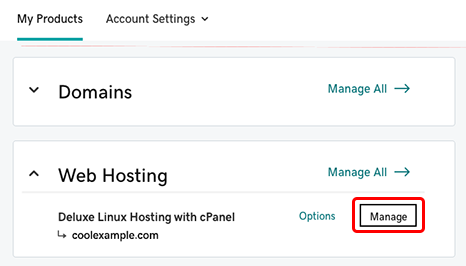
After picking your plan, start the purchase. Go to the GoDaddy website. Add the SSL plan to your cart. Proceed to checkout. Fill in your personal details. Include your email address. This is where you get updates. After filling details, make the payment. Use a credit card or another payment method. Once paid, you will get a confirmation email. The email has instructions. Follow them to complete the process. Keep a copy of the email for your records.
Credit: www.godaddy.com
Installing Ssl On Linux Hosting
First, connect to the server. Use SSH for this. Open a terminal. Type the command ssh username@your-server-ip. Replace username and your-server-ip with your details. Enter your password. You are now inside your server.
Find your SSL certificate files. They come from your provider. Upload them to the server. Use a tool like FileZilla. This helps move files. Put them in a safe folder. Remember the path. You need it later.
Edit the Apache config file. Use a text editor. Open the file named httpd.conf or apache2.conf. Add the SSL settings. Use these lines:
| Directive | Description |
|---|---|
SSLEngine on |
Turns on SSL |
SSLCertificateFile |
Path to certificate file |
SSLCertificateKeyFile |
Path to key file |
Restart Apache after changes. Use sudo service apache2 restart. Your site is now secure!
Testing Ssl Installation
Verifying Certificate with SSL Tools is important. SSL tools help check certificate status. They show if it is active or expired. Use online SSL checkers. Enter your website URL. These tools will show detailed results. Pay attention to errors or warnings. They indicate certificate issues. Always use trusted SSL tools. This ensures accurate results. Proper verification keeps your site secure.
Resolving Common Issues is crucial for smooth SSL function. Sometimes errors appear after installation. Common errors include mismatched domain names. Check if your domain matches the certificate. Another issue is expired certificates. Ensure your SSL certificate is current. If problems persist, contact your hosting provider. They offer support and solutions. Regular checks prevent future issues. Keep your SSL running smoothly.
Renewing Ssl Certificate
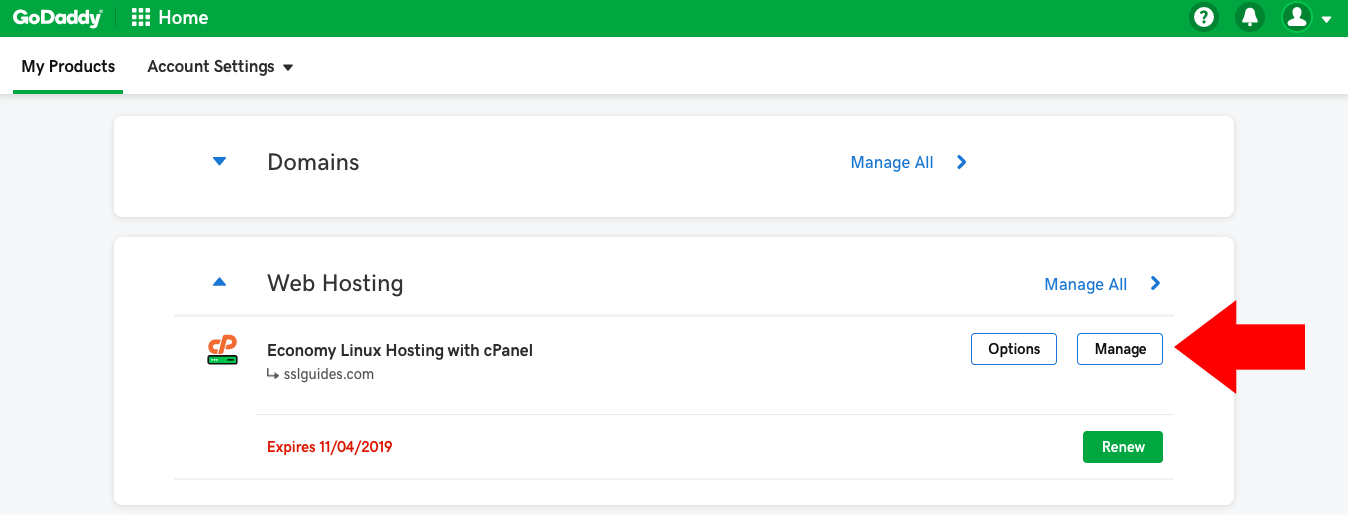
Installing an SSL certificate on GoDaddy’s Economy Linux hosting involves straightforward steps. Begin by accessing your account’s cPanel. Locate the SSL/TLS section and upload your certificate. Confirm installation by checking your website’s secure connection status.
Understanding Renewal Process
SSL certificates need renewal every year. It’s important for website security. Without renewal, websites show security warnings. These warnings scare visitors away. To renew, log in to your GoDaddy account. Find the SSL section. Click on your certificate. Follow the steps to renew. It’s simple and quick. Always check the expiration date. Stay ahead with renewals.
Automating Ssl Renewal
Automating saves time and effort. It ensures certificates never expire. Use tools like certbot for automation. Certbot is free and easy to use. It works with Let’s Encrypt certificates. Set up a cron job on your server. This job renews your SSL automatically. Double-check automation settings. Ensure it’s running smoothly.
Enhancing Website Security With Ssl
SSL makes websites safer. It encrypts information. This keeps data safe from hackers. Godaddy Linux Web Hosting supports SSL certificates. Start by logging into your account. Next, navigate to the SSL/TLS settings. Here, you can configure the SSL certificate. Choose the right SSL certificate for your website needs. Then, apply the settings. Make sure all steps are followed correctly. Errors can make the site insecure. After configuration, your site is more secure. Data shared on your site is now safer.
Redirecting from HTTP to HTTPS is important. It ensures all traffic is secure. First, access your site’s .htaccess file. This file controls redirects. Add the code for redirecting HTTP to HTTPS. Make sure the code is correct. Save the changes to the file. Now, your site will use HTTPS automatically. Visitors will see a secure lock icon. This builds trust with your users. More secure browsing for everyone on your site.
Credit: www.godaddy.com
Credit: www.ssltrust.com
Frequently Asked Questions
How To Install Ssl Certificate In Linux Web Server?
Install SSL by obtaining the certificate files from your provider. Copy them to your server. Update Apache or Nginx configuration files to include the certificate paths. Restart the server to apply changes. Verify installation using SSL tools. Ensure HTTPS is enabled in your website settings.
How Do I Add An Ssl Certificate To My Godaddy Domain?
Log into your GoDaddy account and navigate to “SSL Certificates. ” Purchase or use an existing SSL certificate. Select your domain and follow the installation steps provided by GoDaddy. Ensure the SSL is activated by checking your website’s URL for “https://” instead of “http://”.
How To Install Godaddy Ssl Certificate In Ubuntu Nginx?
First, download your SSL certificate files from GoDaddy. Upload them to your server. Update your nginx configuration file with paths to the certificate and key files. Test the configuration with `sudo nginx -t`. Finally, restart nginx using `sudo systemctl restart nginx`.
Your SSL certificate should now be installed.
How To Run Auto Ssl In Web Hosting Godaddy?
Activate Auto SSL in GoDaddy by navigating to your hosting account. Select “Security” and enable “SSL Certificate”. Ensure your domain is secured automatically. Check SSL status under “Manage Domains”. Regular renewals occur automatically, ensuring continuous protection. Contact support if issues persist for assistance.
Conclusion
Installing an SSL certificate on GoDaddy Linux hosting is straightforward. Follow the steps. Your website will be secure. No more worries about data breaches. Visitors will trust your site more. SSL boosts search engine rankings. Better visibility means more traffic.
Traffic leads to potential growth. It’s worth the effort to install SSL. You gain security and trust. Take action now. Secure your website today. Protect your users and enhance your site’s credibility. Your website deserves it. Embrace security. Stay ahead in the digital world.


