
Are you thinking about moving your web hosting to AWS but unsure where to start? You’re not alone.
As technology evolves, businesses and individuals are looking for reliable and scalable solutions, and Amazon Web Services (AWS) is at the forefront. With its robust features and flexibility, AWS can transform how you manage your website. But how can you make the move without losing your mind?
Imagine having the power to control your website with unparalleled ease, backed by AWS’s world-class infrastructure. It’s not just a dream; it’s a possibility waiting for you to grasp. This guide will walk you through the migration process step-by-step, ensuring you understand each stage clearly and confidently. Whether you’re a seasoned developer or a curious newbie, you’ll find the insights you need to make your transition smooth and successful. Ready to unlock the potential of AWS and take your web hosting to the next level? Let’s dive in and explore how you can make this transformation happen seamlessly.

Credit: itproconf.wisc.edu
Benefits Of Migrating To Aws
Migrating to AWS offers many advantages. AWS provides scalable resources for businesses. This means you can adjust your resources easily. You only pay for what you use. AWS is cost-effective.
Security is a major benefit. AWS has strong security measures. It protects your data. AWS uses encryption and access controls. These keep your data safe.
Reliability is another key feature. AWS servers have high uptime. Your website stays online. This ensures your users have a good experience.
AWS also offers global reach. Your site can be accessed from anywhere. This helps businesses expand. AWS is a good choice for growing companies.
Migration tools are available. These help move your data. AWS provides support for migration. This makes the process easier.
Pre-migration Checklist
Check the current server settings. Look at the software and hardware used. Write down the limitations of the existing host. Understand the traffic and user behavior.
Set clear objectives for migration. Decide what features are needed on AWS. Aim for better performance and scalability. Think about security and reliability.
Calculate the budget for the move. Check AWS pricing plans. List the tools and services required. Consider team availability and expertise. Prepare for unexpected expenses.
Aws Services For Web Hosting
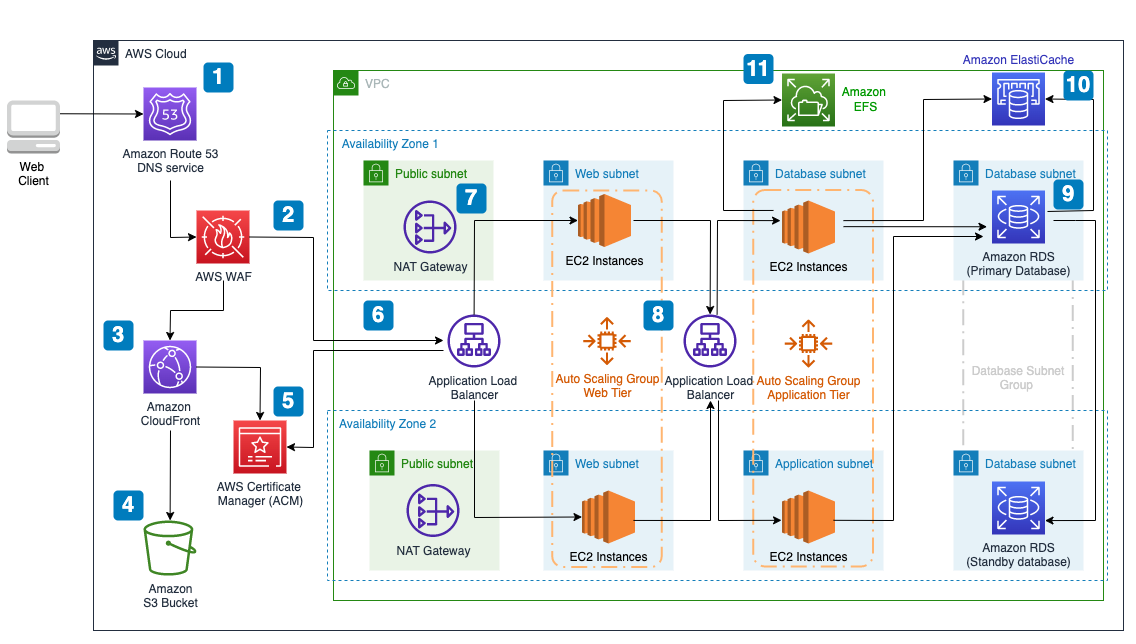
Amazon EC2 provides virtual servers. These servers are called instances. They run applications in the cloud. You can choose the size and type of instance. This helps match your needs. Pay only for the resources you use.
Amazon S3 is a storage service. It saves files in the cloud. Keep your data safe and secure. S3 is good for backups and archives. Access data from anywhere. Pay-as-you-go pricing keeps costs low.
Amazon RDS manages databases. It supports popular database engines. Examples are MySQL and PostgreSQL. RDS handles backups and updates. This saves time and effort. Enjoy a scalable and reliable database service.
AWS Elastic Beanstalk simplifies application deployment. Upload your code and Beanstalk handles the rest. It manages the infrastructure and resources. Scale your application easily. Beanstalk integrates with other AWS services.
Credit: medium.com
Preparing Aws Environment
Begin by visiting the AWS website. Click on “Create an Account.” Fill out the necessary details. Use a valid email address. Choose a strong password. Follow the on-screen instructions. Ensure all information is correct. Your account is now ready.
Go to the AWS Management Console. Navigate to “Security Groups.” Select “Create Security Group.” Give it a name. Add a short description. Define your inbound and outbound rules. Allow only necessary traffic. Save your configuration. Your security group is now set up.
Access the AWS IAM service. Click on “Roles.” Choose “Create Role.” Select a trusted entity. Define permissions for the role. Use predefined policies. Assign the role a name. Confirm your settings. Your IAM role is now established.
Data Migration Strategies
AWS offers the Database Migration Service to help move databases. This service is easy to use. It supports many database types. It also keeps your data safe during the move. The service helps reduce downtime. This means your website stays online.
Transferring files to AWS can be simple. Use AWS S3 for storing files. It’s like a big online folder. The AWS Snowball is another option. It’s great for moving large data sets. These tools make storage transfer quick. And easy.
Changing DNS settings is important. Use AWS Route 53 for this task. It helps direct traffic to your new site. Ensure the DNS settings update properly. This avoids downtime. Keep an eye on it. Check the DNS changes are correct.
Application Deployment
EC2 instances are the virtual servers in AWS. Create a new EC2 instance from the AWS console. Choose the right instance type for your needs. Configure the security group to allow traffic. Install necessary software on the instance. Connect to your instance using SSH. Check the instance’s performance regularly. Use monitoring tools for this.
Elastic Beanstalk simplifies application deployment. Upload your code to Elastic Beanstalk. The service handles deployment tasks automatically. It will set up the environment for you. Monitor your application through the Elastic Beanstalk dashboard. Adjust settings as needed. This ensures optimal performance.
Load balancing distributes traffic across multiple servers. Use AWS Elastic Load Balancer for this. This improves your application’s availability. Auto Scaling adjusts the number of instances based on demand. It adds more instances when traffic is high. Reduces instances when traffic is low. This helps maintain performance and save costs.
Testing And Validation
Migrating web hosting to AWS requires thorough testing and validation. Ensure all functionalities work smoothly post-migration. Check website performance, security, and data integrity to confirm successful transition.
Performance Testing
Performance testing checks if the website runs fast and smooth. It ensures that users can load pages quickly. AWS tools help monitor speed. A slow website makes users unhappy. Use tests to find slow parts. Fix these parts for better speed. This keeps users happy.
Security Audits
Security audits keep your website safe. They look for weak spots. Hackers might use these to attack. AWS offers security tools. Use them to protect data. Regular audits are important. They help find and fix issues. A safe website builds trust.
User Acceptance Testing
User acceptance testing checks if users like the website. Test if everything works as expected. Ask users to try tasks. Gather feedback on their experience. This helps improve the website. Make changes based on feedback. A good user experience is key.
Post-migration Optimization
CloudWatch helps check your website’s health. It tracks performance and alerts on issues. With it, you see CPU usage and memory stats. It shows network traffic too. Easy graphs make data clear. Get notifications for unusual activity. It’s like a watchful eye on your server.
AWS can be cost-efficient. Know your spending with AWS Cost Explorer. It helps understand where money goes. Check monthly bills and see trends. Use it to find extra expenses. Save money by adjusting resources. Cost Explorer is your budget friend.
Speed is key for websites. AWS offers tools for tuning performance. Optimize your server settings for best speed. Use AWS Elastic Load Balancing. This spreads traffic for faster loading. Monitor databases with RDS. Keep your site running smoothly always.
Troubleshooting Common Issues
Migrating web hosting to AWS involves addressing common issues like DNS configuration and data transfer errors. Ensure a smooth transition by checking server compatibility and updating your DNS settings. Regular backups safeguard your data during the process.
Network Connectivity Problems
Many face network connectivity problems during migration. Check your firewall settings. Ensure they allow traffic. AWS security groups might block access. Review them carefully. Verify your DNS settings. They should point correctly. Sometimes, IP changes cause issues. Update them immediately. This can restore connection. Always double-check your network cables. They should be secure and undamaged.
Resource Allocation Errors
Resources might not be allocated properly. AWS has limits on resources. Understand these limits well. Allocate resources wisely. Check your CPU and memory usage. Ensure they meet application needs. You might exceed AWS quotas. Monitor usage regularly. Adjust resources as necessary. Regular reviews help avoid errors.
Application Compatibility
Applications must be compatible with AWS. Some apps need updates. Check software versions. Ensure they work with AWS services. Compatibility issues can cause failures. Test applications in a sandbox. This prevents major disruptions. Documentation can provide guidance. Follow it for smooth operation. Always keep applications updated.

Credit: www.youtube.com
Future Scaling And Maintenance
Migrating web hosting to AWS ensures future scaling and maintenance benefits. AWS provides flexibility, reliability, and robust security features. This migration process includes assessing needs, planning resources, and executing data transfer effectively.
Planning For Growth
Websites grow with time. AWS helps you manage this growth. Start small and increase your resources later. It is smart to plan ahead. Predict future needs and prepare for them. Use AWS tools to monitor growth. Adjust plans based on the data. Proper planning avoids surprises. It saves time and money.
Regular Maintenance Practices
Maintenance is key for smooth running. Check your site often. Look for any issues or errors. Fix problems quickly. AWS has tools to help with this. Use them to keep things running well. Backup your data regularly. This protects against data loss. Keep software updated. It ensures security and efficiency.
Leveraging New Aws Features
AWS often introduces new features. These can improve your site. Stay updated on these changes. Use new tools to enhance performance. Try new services to cut costs. They can make tasks easier. New features can help scale your site. Implement them carefully. Ensure they fit your needs.
Frequently Asked Questions
How To Migrate A Web Application To Aws?
Begin by assessing your current application architecture. Set up AWS accounts and services. Migrate data using AWS Database Migration Service. Reconfigure application components for AWS. Test thoroughly to ensure functionality and performance.
Can You Use Aws For Web Hosting?
Yes, AWS is perfect for web hosting. It offers scalable, reliable, and cost-effective solutions for various hosting needs. AWS provides services like EC2, S3, and RDS to enhance website performance and security. Leverage AWS’s global infrastructure for high availability and seamless user experience.
How Do I Migrate My Hosting Server?
Backup your data first. Choose a new hosting provider. Transfer your files and databases. Update DNS settings. Test the new server thoroughly.
How To Migrate A Website From Godaddy To Aws?
Start by backing up your GoDaddy website files and database. Set up an AWS account and create an EC2 instance. Transfer files using SCP or FTP and restore the database on AWS. Update DNS settings to point to AWS. Test the website to ensure it’s functioning correctly.
Conclusion
Migrating your hosting to AWS can simplify your online presence. AWS offers reliability and scalability. Follow steps carefully to ensure a smooth transition. Double-check settings to avoid disruptions. This move can enhance website performance. Explore AWS tools for better management.
Understand your needs before choosing AWS services. Remember, preparation is key for success. Enjoy improved security and uptime with AWS. Your website deserves the best hosting solution. Take the plunge and experience AWS benefits. Happy migrating!


