Are you curious about how to make your WordPress site more user-friendly? Or perhaps you’ve stumbled upon the term “interface language” and wondered what it truly means for your website.
Understanding interface language in WordPress is key to creating an engaging and accessible site for your audience. It’s not just about translating words; it’s about transforming the entire experience for your visitors. Imagine the possibilities when your site speaks directly to your users in their preferred language.
This small yet powerful tweak can significantly boost user satisfaction and engagement. Stick around, and you’ll discover how mastering interface language can be your secret weapon in building a successful WordPress site.

Credit: wordpress.com
Defining Interface Language
Interface Language in WordPress is the language seen by users. It includes menus, buttons, and settings. Choosing a language makes WordPress easier to use. Many languages are available. English is a common choice. But WordPress supports many others. Spanish, French, and German are popular. Users can switch languages anytime. The process is simple. Go to settings and pick a language. This helps non-English speakers. They use WordPress more comfortably.
Developers should consider language options. It affects user experience. A good choice makes users happy. They find WordPress easy to navigate. Clear language avoids confusion. Site owners should keep language in mind. It’s important for their audience. Different countries need different languages. Choose wisely. It makes a big difference.

Credit: make.wordpress.org
Importance Of Interface Language
Interface language in WordPress is very important. It helps users understand the platform easily. Many people from different countries use WordPress. They need to read instructions in their own language. This makes tasks simple and quick. The interface language is like a guide. It shows users where to click and what to do. This saves time and avoids confusion. A clear interface boosts productivity. Users can focus on creating content. Changing the language is easy in WordPress settings. This feature is very helpful.
WordPress supports many languages. It offers translation options. Users feel comfortable with their native language. They can complete tasks with confidence. The right interface language enhances user experience. It attracts more people to use WordPress. Everyone can enjoy its tools and features.
Setting Interface Language In WordPress
WordPress lets you choose your site’s language. This is called the interface language. You can pick from many languages. This helps users from different places. They can read and use the site easily.
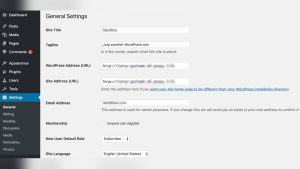
Changing the language is simple. Go to the settings menu. Look for the general settings. You will see a language option there. Choose your preferred language. Save your changes. The site will now display in that language.
Not all themes support every language. Check your theme’s compatibility. Some plugins may also need language settings. Adjust these to match your site’s language. This ensures a smooth experience for everyone.
Impact On User Experience
Interface language in WordPress changes how users see the site. It makes navigation easy for non-native speakers. Clear language helps users find what they need. Confusing language can frustrate them. They might leave the site. Simple words and phrases are best. They make users happy. They feel welcome. They stay longer. They explore more pages. This boosts site traffic. Better user experience improves site success.
Different languages help reach more people. Users from other countries feel included. They understand content better. Multilingual support is key. It shows respect for all cultures. It creates a friendly atmosphere. It attracts global visitors. This is good for business. Interface language is an important tool. It shapes how users feel about the site.
Interface Language Vs. Content Language
The interface language in WordPress changes the text users see on the dashboard. It includes menus, buttons, and settings. This makes it easier for users to navigate. Users can pick their preferred language. This helps non-English speakers use WordPress comfortably.
In contrast, the content language is the language of the posts and pages. This is what your audience reads. You can write blog posts in any language. Choose a language that your readers understand.
Using the right interface and content language is important. It improves user experience and reader engagement. Always ensure the language settings match your needs. This helps in creating a friendly environment for users and readers alike.

Credit: translate.wordpress.com
Challenges In Multilingual Sites
Running a site in many languages is tough. Different languages need different settings. Users might struggle with understanding text. Translation is not always perfect. Automatic translation tools can make errors. Words may lose meaning. Sometimes, images or graphics need adjustment too. They might have text that is not translated. Navigation becomes tricky. Menus should be clear in every language. This takes time and effort. Keep users happy in all languages. Technical issues can arise. Plugins may not support all languages. Updates can break translations. Stay alert to these problems. Consistency is key. Make sure every part of your site feels the same. No matter the language. This keeps users engaged.
Popular Plugins For Language Management
WordPress has many plugins for language management. These tools help with interface language. A popular choice is Polylang. It offers easy translation options. Users can switch languages easily. WPML is another strong option. It supports many languages. WPML is great for big websites. TranslatePress is user-friendly. It lets you translate directly from the front-end.
Loco Translate is helpful for theme and plugin translations. It supports both PO and MO files. It has an easy-to-use editor. Weglot is fast and automatic. It translates your site in minutes. Users find it very efficient.
Each plugin has unique features. Choose one that fits your needs. Always check for compatibility with your theme. Keep your WordPress updated for best results.
Tips For Choosing The Right Language
Picking the right language is vital. Understand your audience first. Know what language they speak. Check plugin compatibility. Some plugins may not support all languages. It’s important. Keep translations simple. Too many complex words confuse users. Ensure language support. Not all languages have full support. Test your site. Make sure everything looks good in the new language. Language affects SEO. Choose a language that helps your site’s visibility.
Consider cultural nuances. Some phrases may not translate well. Use reliable translation tools. They help maintain quality. Update regularly. Languages change over time. Keeping up is crucial. Consult experts if needed. They can offer valuable insights. User feedback is key. Listen to what users say. It helps improve your site.
Frequently Asked Questions
How To Change The Interface Language In WordPress?
Changing the interface language in WordPress is simple. Go to your dashboard, click on ‘Settings’, then ‘General’. Scroll to ‘Site Language’ and select your preferred language from the dropdown menu. Save changes to apply the new interface language instantly.
Why Is Interface Language Important In WordPress?
Interface language enhances user experience by providing content in a familiar language. It helps users navigate and understand WordPress functionalities better. Offering multiple language options can attract a wider audience, making your site more accessible and user-friendly.
Can I Use Multiple Languages In WordPress?
Yes, WordPress supports multiple languages. You can use plugins like WPML or Polylang to create a multilingual site. These plugins allow you to translate content, making it accessible to users in different languages. This feature is crucial for reaching a global audience.
Does Changing The Language Affect Seo?
Changing the language can affect SEO positively. It allows you to target keywords in different languages, expanding your reach. Properly configured multilingual sites improve user experience and can increase visibility in various search engines, boosting your site’s overall SEO performance.
Conclusion
Understanding interface language in WordPress is crucial. It enhances your user experience. Simplifies navigation for non-native speakers. Offers customization to fit your needs. Choosing the right language boosts your site’s accessibility. Makes it easier for diverse audiences to engage. This feature supports global reach.
Your content becomes more approachable. Explore the settings today. Adjust as necessary. Improve your website’s functionality with ease. The right language setting is key. It opens doors to a broader audience. Keep your WordPress site user-friendly. Adapt to changing language preferences.
Your website benefits greatly from this feature.