
Are you ready to take your Web API to the next level? Hosting it on AWS could be the game-changer you’ve been searching for.
AWS offers a robust, scalable, and secure environment that can handle whatever your API demands. Imagine having the power to cater to millions of users seamlessly, without worrying about downtime or performance issues. You might be wondering how to get started, or perhaps you’re concerned about the technical challenges.
Don’t worry, you’re not alone. Many developers have taken the plunge and are reaping the benefits. This guide will walk you through the process, step by step, so you can confidently host your Web API on AWS. Whether you’re a seasoned developer or a curious beginner, there’s something here for you. Keep reading, and unlock the potential of your API on AWS today!

Credit: docs.aws.amazon.com
Aws Account Setup
Start by visiting the AWS website. Click on the Sign Up button. Enter your email and create a strong password. Choose a unique account name. Provide your contact details. Make sure you enter your phone number correctly. You will need it later for verification. Select your payment method. AWS accepts credit cards. Follow the prompts and verify your account.
Log into your AWS account. Go to the Billing Dashboard. Click on the Billing Preferences link. Enable billing alerts. Enter your email address for notifications. Set a budget limit for alerts. You can choose monthly or weekly alerts. Alerts help you track spending. This prevents unexpected costs.
Credit: docs.aws.amazon.com
Choosing The Right Aws Service
AWS offers many services for hosting APIs. Two popular options are EC2 and Lambda. Understanding each helps in making the right choice.
AWS provides flexible hosting solutions. EC2 offers virtual servers for full control. Lambda allows running code without server management. Each service has its unique benefits.
EC2 is like a computer in the cloud. It handles all kinds of tasks. Lambda runs code only when needed. It is cost-effective and scales easily. EC2 suits apps needing constant uptime. Lambda works for bursty workloads.
Deciding between EC2 and Lambda depends on your needs. EC2 provides full control over the environment. Choose it for complex applications. Lambda is great for simple, event-driven tasks. Evaluate your API’s requirements carefully. This helps in selecting the best service.
Configuring Aws Ec2 Instance
First, log into your AWS account. Open the EC2 dashboard. Click on Launch Instance. Choose an Amazon Machine Image (AMI). Select the one that fits your needs. Choose an instance type. Make sure it matches your requirements. Click Review and Launch to start your instance. It’s a simple process.
Security groups control traffic to your instance. Open the Security Groups section. Click Create Security Group. Give it a name and description. Add rules to allow traffic. Use HTTP and HTTPS for web access. Don’t forget to add SSH for remote control. Save your settings.
Connect to your instance using SSH. Install necessary software packages. Use yum or apt-get commands. Make sure to install all dependencies. Update the system after installation. This ensures everything runs smoothly. Your EC2 instance is now ready.
Deploying Web Api On Ec2
First, prepare your API code. Compress it into a zip file. Then, log in to your AWS account. Open the EC2 console. Use the SSH client to connect to your instance. After that, use the scp command to upload your zip file. Ensure the file is in the correct directory. This step is important for the next phase.
Install necessary software packages on your EC2 instance. This might include web servers like Apache or Nginx. Set up your environment variables. Make sure they match your API’s requirements. Then, extract your zip file. Place the contents in the web server’s root directory. Ensure permissions are set correctly.
After configuration, test your API. Access it via the public IP address of your EC2 instance. Use tools like Postman to send requests. Check if the API responds correctly. Fix any issues you find. This ensures your API is ready for users. Testing is crucial for smooth operation.
Using Aws Lambda For Serverless Hosting
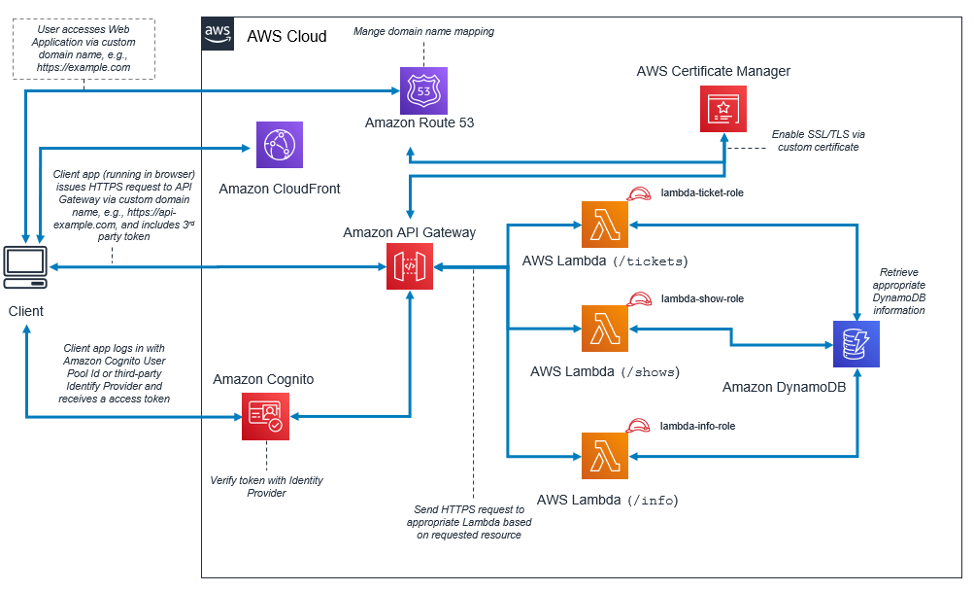
Create a Lambda function in the AWS console. Choose a runtime that suits your API. Set up the handler to manage requests. Add code directly or use a ZIP file. Ensure your function has necessary permissions.
Use API Gateway to connect with Lambda. Set up a new API. Choose REST or HTTP. Define endpoints to handle requests. Link these endpoints to your Lambda function. Use method request settings for security.
Deploy the API by creating a stage. Assign a name to the stage. Deploy the API to make it live. Use the stage URL to access your API. Monitor and update as needed. Ensure everything works smoothly.
Managing Api With Aws Services
Use CloudWatch to keep an eye on your API. It shows you important data. You can see how your API is working. This helps fix problems fast. Alerts can be set. You will know if something is wrong. Your API stays healthy.
Elastic Load Balancing helps your API handle more users. It divides traffic evenly. This keeps your API fast. No one likes slow websites. Your users stay happy. More users can visit without issues.
IAM Roles keep your API safe. Only the right people can use it. You can set permissions. Your data stays secure. No one can access it without permission. This keeps your API safe from harm.
Cost Optimization Strategies
AWS has many pricing plans. Each service has its own cost. Understand these costs to save money. Some services charge by usage. Others have fixed rates. Knowing these differences helps you plan.
Cost Explorer is a tool. It shows spending patterns. Use it to see where money goes. Find services that cost more. Reduce their usage. You can view graphs and trends. This helps in planning better.
Savings Plans offer discounts. Commit to a service for one year. Get lower rates. This can save a lot. Choose the right plan. Match it with your needs. Savings Plans are flexible. They adjust to usage changes.
Credit: www.rahulpnath.com
Troubleshooting Common Issues
Deployment can sometimes fail. Check your error logs carefully. Logs tell what went wrong. Make sure all files are in the right place. Also, check your network settings. Sometimes, the network blocks your deployment. Restarting the deployment can help too. Always have a backup plan ready.
Security groups keep your API safe. Sometimes they block too much. Check your rules. Make sure important ports are open. Port 80 and 443 are often needed. Update your rules if needed. Wrong settings can block your API. Always test after making changes. Testing ensures everything works fine.
Sometimes your API runs slow. This is a bottleneck. Check your server load. High load means your server is busy. You can add more resources to help. Also, check your database connections. Slow connections can cause delays. Use monitoring tools to find problems quickly. Fast APIs make users happy.
Frequently Asked Questions
How To Deploy Web Api In Aws?
Deploy a web API in AWS by creating an EC2 instance. Install your server software and upload API code. Configure security groups to allow necessary traffic. Use AWS Elastic Beanstalk or Lambda for serverless deployment if needed. Ensure proper IAM roles for secure access.
How Do I Host My Web Api?
Choose a reliable hosting provider, set up a server, and deploy your web API using Docker or Node. js. Configure security settings and monitor performance. Ensure backup and scalability options are available for future growth.
Can I Host A Web App On Aws?
Yes, you can host a web app on AWS. AWS offers scalable solutions like EC2, Elastic Beanstalk, and Lambda for efficient hosting. These services provide flexibility and performance optimization for your web application. AWS also ensures high availability and security for your hosted applications.
How To Host Fast Api In Aws?
Use AWS EC2 to host your FastAPI. Install FastAPI and Uvicorn on the server. Configure security groups for necessary ports. Deploy your app using Uvicorn. Optimize settings for performance. Use AWS RDS for databases if needed. Ensure regular backups and monitoring for reliability.
Conclusion
Hosting a Web API on AWS is straightforward. Begin with setting up an account. Then, choose the appropriate AWS service. You can opt for EC2 or Lambda. Next, configure your server settings carefully. Deploy your API with ease using AWS tools.
Monitor performance using AWS CloudWatch. Ensure security with IAM roles and policies. Following these steps ensures a smooth deployment process. AWS offers scalability and reliability for your API. You now have the knowledge to host confidently. Ready to enhance your web services with AWS?
Dive in and start today!


