
Are you looking to take your web app to the next level? Hosting it on Google Cloud Platform (GCP) could be your game-changer.
Imagine having the power, flexibility, and scalability at your fingertips, allowing your app to handle traffic spikes effortlessly. You’ll no longer be held back by server limitations, and your users will enjoy faster, smoother experiences. In this guide, we’ll walk you through the steps to host your web app on GCP, making it accessible to users around the globe.
Get ready to unlock the potential of your web app, ensuring it runs efficiently and securely with Google’s robust cloud infrastructure. Let’s dive in and transform your app’s performance and reach!
Setting Up Google Cloud Account
First, go to the Google Cloud Platform website. Click on the “Get started” button. You need to create a Google account. Follow the steps to sign up. Use your email address and password. You will receive a confirmation email. Click on the link in the email. Your account is now ready. Remember to keep your password safe.
Next, explore the dashboard. You will see options to manage your cloud services. Check the billing section to understand costs. Set up a payment method if needed. Google Cloud offers free trials. You can try services before buying. It’s good to read the terms of service. Now, you are ready to start using Google Cloud.
Choosing The Right Hosting Option
App Engine is easy. It handles many tasks for you. This makes it great for beginners. It scales apps automatically. You don’t worry about servers. Compute Engine gives more control. You manage the servers. It’s flexible. Good for complex apps. Choose based on your skills.
Cloud Run is simple. It runs containers easily. Kubernetes Engine is for big apps. It manages many containers. Cloud Run is fast. Kubernetes needs more setup. Think about your app size. Pick what fits best.
Configuring Your Environment
First, download the Google Cloud SDK from the official website. Follow the instructions to install it on your computer. Remember to choose the right version for your operating system.
After installation, open the command prompt or terminal. Type gcloud init and press enter. This command will start the setup process.
Ensure that the command line tools are set up. Type gcloud components install followed by the tool name. Install any tools you need for your project.
Use gcloud auth login to sign in. This connects your account to Google Cloud. Now, you can use Google Cloud services.
Preparing Your Web Application
Code must run efficiently on the cloud. Remove any unnecessary parts. This helps to save time and resources. Use tools to check your code. They find and fix errors. Always update your code. This makes it run better.
Use cloud services to make your app strong. Cloud services help with storage and databases. They manage your data well. Connect your app to these services. This makes your app faster and safer. Always choose the right service. This helps your app work best.
Deploying Your Application
First, you need to upload files to Cloud Storage. This is like putting your app in a safe place. Use the Google Cloud Console. Choose Storage and then Create Bucket. A bucket is where your files go. Name it something easy. Click Create to finish. Now, your files are in the cloud. Simple, right?
Next step is to launch on App Engine. App Engine is like a big computer. It runs your app for you. Start by choosing App Engine from the console. Click on Create Application. Pick a region close to you. This helps your app run fast. Then, choose your programming language. Follow the setup steps. Now, your app is live. People can use it online.

Credit: cloud.google.com
Managing Resources And Costs
Keep an eye on your app’s usage. Use Google Cloud tools to see how much you use. Check reports every week. This helps you find high usage times. Watch for unexpected spikes. These might cost more money. Set up alerts for big changes. Alerts will warn you quickly. This way, you can fix issues fast.
Use Google Cloud pricing tools. These help you save money. Choose the right plan for your needs. Don’t pay for more than you use. Shut down unused resources. This saves costs. Auto-scaling is helpful. It adjusts resources based on need. This avoids overpaying. Always check for discounts. Google offers discounts for certain usage levels. Take advantage of them.
Ensuring Security And Compliance
Strong security keeps data safe. Use firewalls to block threats. Encrypt data to protect privacy. Regularly update software for latest security patches. Monitor systems for suspicious activity. Conduct security audits frequently. Limit access to sensitive data. Use multi-factor authentication for login safety.
Follow rules to keep data secure. Ensure data practices meet industry standards. Document all processes clearly. Train staff on compliance rules. Regular checks help maintain standards. Update policies with new laws. Report compliance status regularly. Educate users on data safety rules.
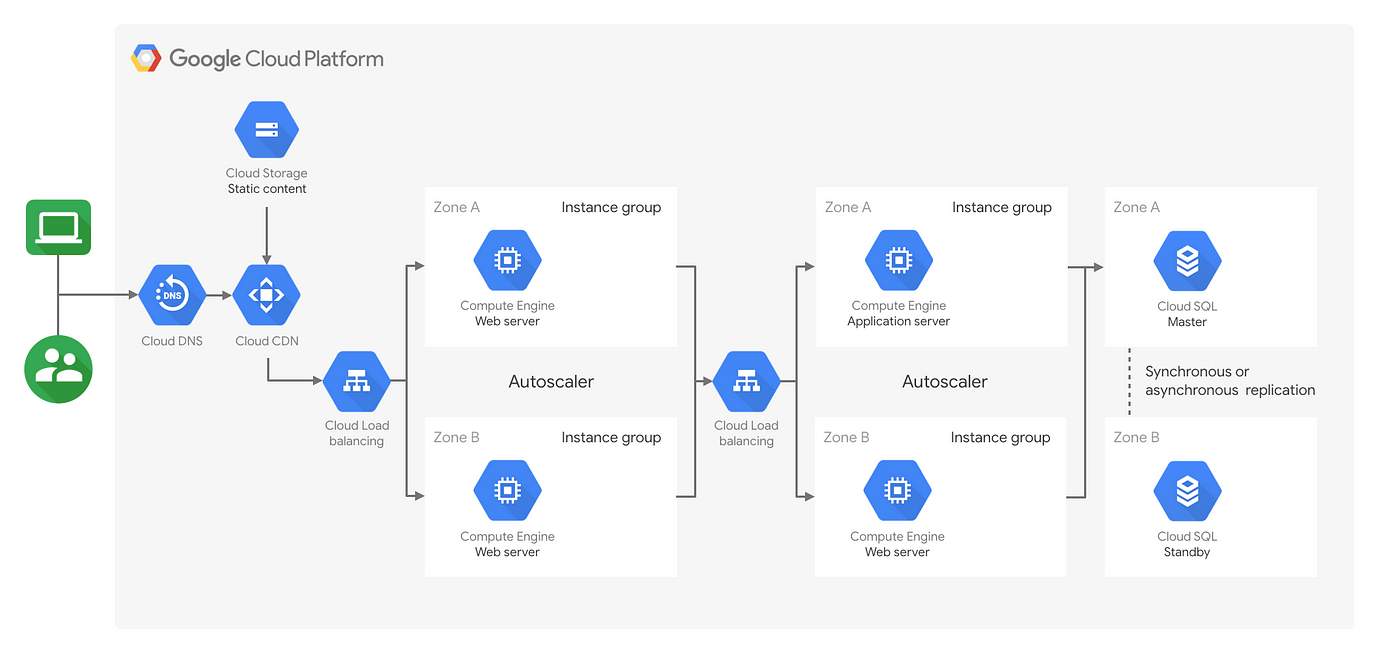
Credit: medium.com
Scaling Your Web App
Google Cloud Platform helps your app grow. It uses automatic scaling. This means your app can handle more users. No need to change settings. It adjusts by itself. This keeps your app fast and smooth.
Resources increase when users increase. Resources decrease when users drop. This saves money and energy. Your app stays efficient and cost-effective. This is great for busy times and quiet times.
Sometimes many users visit at once. This is a traffic spike. Google Cloud can manage these spikes. Your app stays online and fast. No delays for users. It gives extra resources when needed. This keeps users happy and engaged.
After the rush, resources go back to normal. Your app runs smoothly again. This helps in keeping costs low. Enjoy peace of mind with Google Cloud.
Troubleshooting Common Issues
Deploying a web app on Google Cloud Platform can face challenges. Common issues include configuration errors and firewall settings. Understanding these can simplify your hosting process.
Debugging Deployment Errors
Deployment errors can be tricky. Check error logs for clues. Logs can tell you what’s wrong. Missing files or wrong paths are common. Double-check your code. Ensure all dependencies are included. Check syntax errors in your files. Even small mistakes can cause big problems. Make sure your project settings match Google Cloud’s requirements. If something is missing, fix it.
Resolving Connectivity Problems
Connectivity issues can stop your app. Firewall settings might block access. Check and adjust them if needed. Network settings should be correct. Ensure your app can connect to the internet. Test connections regularly. Use tools to diagnose problems. Sometimes, server settings need changes. Make sure all IP addresses are correct. Check your domain settings too. Ensure everything is configured properly.
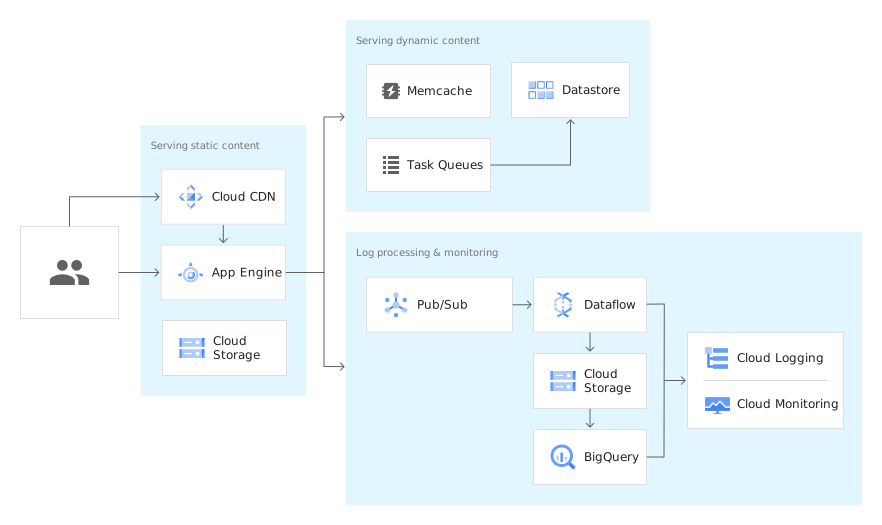
Credit: cloud.google.com
Leveraging Google Cloud Tools
Google Cloud Console helps manage cloud apps easily. You can see everything in one place. Create projects and deploy apps with a few clicks. The console shows all your resources. Monitor your app with real-time data. Set up alerts to catch problems early. Simple tools make it easy for beginners. Explore the console to find new things.
Firebase is a tool for web apps. It helps store data and sync it fast. Secure user data with authentication features. Connect Firebase to your app with simple steps. Use real-time database for live updates. Firebase supports many languages. Easy setup for hosting and cloud functions. Improve your app with Firebase features.
Frequently Asked Questions
Can I Host An App On Google Cloud?
Yes, you can host an app on Google Cloud. Use services like App Engine, Compute Engine, or Kubernetes. These platforms offer scalability and flexibility. Start by creating a Google Cloud account. Deploy and manage your app with powerful tools and resources.
Enjoy robust security features for your application.
Can I Host My Website On Google Cloud?
Yes, you can host your website on Google Cloud. It offers scalable solutions like Compute Engine and App Engine. Google Cloud provides reliable infrastructure and global network coverage, ideal for businesses seeking robust hosting options. Explore Google Cloud’s features for optimal website performance and security.
How Do I Host A Web Based App?
Choose a reliable hosting provider and register a domain name. Upload your web app files using FTP or a control panel. Configure server settings and databases. Ensure security measures are in place. Test your app to confirm functionality before going live.
Does Google Support Web Hosting?
Google does not offer traditional web hosting services. It provides cloud solutions like Google Cloud Platform for developers. These services enable businesses to host applications and websites. Google Cloud offers scalable resources and advanced infrastructure for hosting needs. For more information, visit Google Cloud’s official website.
Conclusion
Hosting a web app on Google Cloud Platform is simple and efficient. Start by setting up your Google Cloud account. Then, choose the right services for your app’s needs. Google Cloud offers flexibility and scalability. You can handle traffic spikes with ease.
Always monitor your app’s performance. Use Google Cloud’s tools for insights and improvements. Regular updates ensure security and efficiency. With these steps, your web app runs smoothly on Google Cloud. Enjoy the benefits of cloud hosting and keep your users happy.
Your app is now ready for the world.


