
Ready to elevate your website game? Boldgrid combined with Web Hosting Hub offers an exciting opportunity to create stunning websites with ease.
If you’re tired of struggling with complex website builders or feeling overwhelmed by technical jargon, you’re in the right place. Boldgrid is designed for you—whether you’re a beginner or someone with a bit more experience. It transforms the website building process into something intuitive and enjoyable.
Imagine having the power to design a website that truly represents your vision without the hassle. Boldgrid offers flexibility and creativity without sacrificing simplicity. You’ll be able to craft a professional-looking site in no time, all while enjoying the seamless integration with Web Hosting Hub. This means faster loading times, reliable performance, and plenty of support when you need it. You’ll discover step-by-step guidance on how to get started with Boldgrid and Web Hosting Hub. We’ll cover everything from installation to customization, ensuring you have all the tools you need to succeed. So, if you’re ready to turn your ideas into reality, keep reading—you won’t want to miss what’s next!
Credit: www.webhostinghub.com
Getting Started With Boldgrid
First, visit the Web Hosting Hub website. Find the signup page. Enter your personal details. Choose a plan that fits your needs. Complete the payment process to finish your registration. Check your email for a confirmation message. Follow the instructions provided. Your account is now ready.
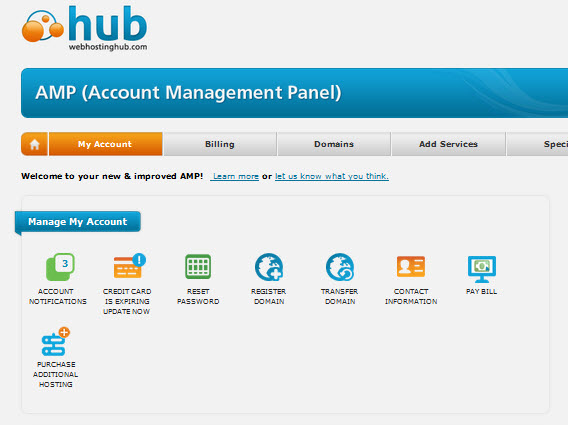
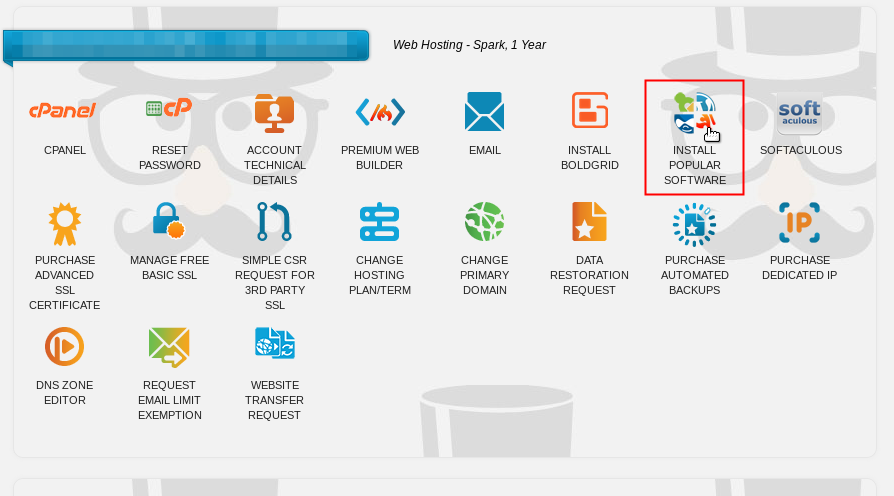
Log in to your account dashboard. Locate the Boldgrid option. Click to start the installation. Follow the on-screen prompts. Installation is quick and easy. Boldgrid will now be part of your dashboard. Explore its tools and features. Start designing your website today. Boldgrid makes it simple and fun.
Setting Up Boldgrid
Pick a name for your website. It should be easy to remember. Keep it short and simple. Make sure it’s related to your site. Check if it’s available. Use tools to find out if it is. Choose a name that is unique. This will help people find your site easily.
First, log into your WordPress dashboard. Then go to the “Plugins” section. Click on “Add New.” Search for Boldgrid in the search bar. Once found, click “Install Now.” Wait for the installation to finish. After that, click “Activate.” Boldgrid is now ready to use. Customize your website as you like.
Exploring Boldgrid Features
Boldgrid offers a variety of themes for your website. Each theme is designed to make your site look great. Choose a theme that suits your style. You can easily change it later. Themes help your site look professional. They also make it easier for visitors to find information.
Boldgrid allows you to customize page layouts with ease. Drag and drop elements to arrange them. Add text, images, and videos to your pages. You can also change colors and fonts. This makes your site unique. Your website can stand out from others.
Credit: www.webhostinghub.com
Designing Your Website
Start by adding text to your website. Use clear, short sentences. This makes it easy to read. Add images to make the page look nice. Pictures can make your site more interesting. Use video clips to show more information. Make sure videos are short and clear. They should help explain your content. Bold important words to make them stand out. This helps readers find key points fast. You can also use lists to organize information. Lists make content easy to follow. Always check that your content is correct. Mistakes can confuse readers.
People use phones to browse websites. Make sure your site looks good on small screens. Use a responsive design. This design changes to fit different devices. Make buttons big enough to tap easily. Small buttons can be hard to press. Text should be easy to read. Use a clear font and size. Test your website on different phones. Check if it loads quickly. Slow sites can make visitors leave. Keep your design simple. A clean layout is best for mobile viewing.
Enhancing Functionality
Explore the features of Boldgrid with Web Hosting Hub to enhance your website’s functionality effortlessly. Start by installing Boldgrid through your hosting account’s dashboard. Customize templates and add features with simple drag-and-drop tools.
Integrating Plugins And Tools
Plugins make websites better. They add features and tools. With Boldgrid, choose many plugins. Some plugins help make pages fast. Others protect sites from bad people. A plugin can add contact forms. Another plugin can help with social media. Plugins are easy to add and use. With just a few clicks, a plugin can be part of your site. Make sure you update plugins. This keeps your site safe and working well.
Setting Up Seo Features
SEO helps people find your site. With Boldgrid, setting up SEO is simple. It uses tools to make your site easy to find. Add keywords to your pages. This helps search engines like Google. Use good titles for your pages. Write clear descriptions. They help people know what your page is about. Boldgrid helps with these tasks. It makes sure your site is ready for search engines. This helps more people visit your site.
Credit: www.webhostinghub.com
Maintaining Your Site
Keeping your website safe is important. Regular backups protect your content. Back up your site at least once a week. Updates keep your site secure. Update plugins and themes often. This helps your site run smoothly.
Check how fast your site loads. A fast site keeps visitors happy. Use tools to monitor speed. Fix slow pages quickly. Look at your site’s traffic stats. See how many people visit. Find out what pages they like. This helps you improve your site.
Frequently Asked Questions
How Do I Get Started With Web Hosting?
Choose a reliable web hosting provider and select a suitable plan. Register a domain name. Set up your website using a CMS like WordPress. Configure your settings, and upload your website files. Secure your site with an SSL certificate. Contact support for any assistance needed.
How To Connect To A Domain With Hosting?
To connect a domain to hosting, update the domain’s DNS settings. Set the nameservers to those provided by your hosting provider. Access your domain registrar’s dashboard, locate DNS settings, and enter the nameserver details. Save changes, and wait for DNS propagation, which can take up to 48 hours.
What Are The Three Types Of Web Hosting?
The three types of web hosting are shared hosting, virtual private server (VPS) hosting, and dedicated server hosting. Shared hosting is cost-effective for beginners. VPS hosting offers more control and resources. Dedicated server hosting provides maximum control and performance, suitable for large websites.
Can You Do Web Hosting Yourself?
Yes, you can host your own website. You’ll need a server, technical expertise, and high-speed internet. Self-hosting offers control but requires maintenance. Consider costs for equipment and security measures. Many opt for web hosting services for convenience and support. Choose based on your needs and resources.
Conclusion
Starting with Boldgrid and Web Hosting Hub is straightforward. You’ve learned the basics. Now, explore and experiment with its features. Customize your site to fit your vision. Take small steps and build confidence. Enjoy the process of creating your website.
Remember, practice makes perfect. Seek help if needed and don’t rush. Soon, you’ll feel more comfortable with Boldgrid. Your website will reflect your style and purpose. Stay patient and keep improving. Happy building!


