
Have you ever wondered how to bring your dream website to life? Whether it’s for your business, personal brand, or just a passion project, creating a website using web hosting can seem daunting at first.
But it doesn’t have to be. Imagine having the ability to showcase your ideas, products, or services to the world with just a few clicks. By learning the ins and outs of web hosting, you can unlock the potential to build a powerful online presence.
In this guide, you’ll discover the straightforward steps to get your website up and running. We’ll break down everything you need to know—from selecting the right web host to designing your website’s layout. You’ll see just how easy it is to create a website that not only looks great but also functions seamlessly. With the right tools and guidance, you can turn your vision into reality and reach a global audience. Dive in to find out how you can start today!
Choosing The Right Web Hosting
Shared hosting means you share a server with others. It’s cheap and simple. VPS hosting gives you a private part of the server. It offers more control. Dedicated hosting means you get the whole server for yourself. It’s best for big websites.
Cost is important. Choose what fits your budget. Performance matters too. A fast website keeps visitors happy. Security is key. Protect your site from threats. Support helps fix problems quickly. Always check for good customer service.
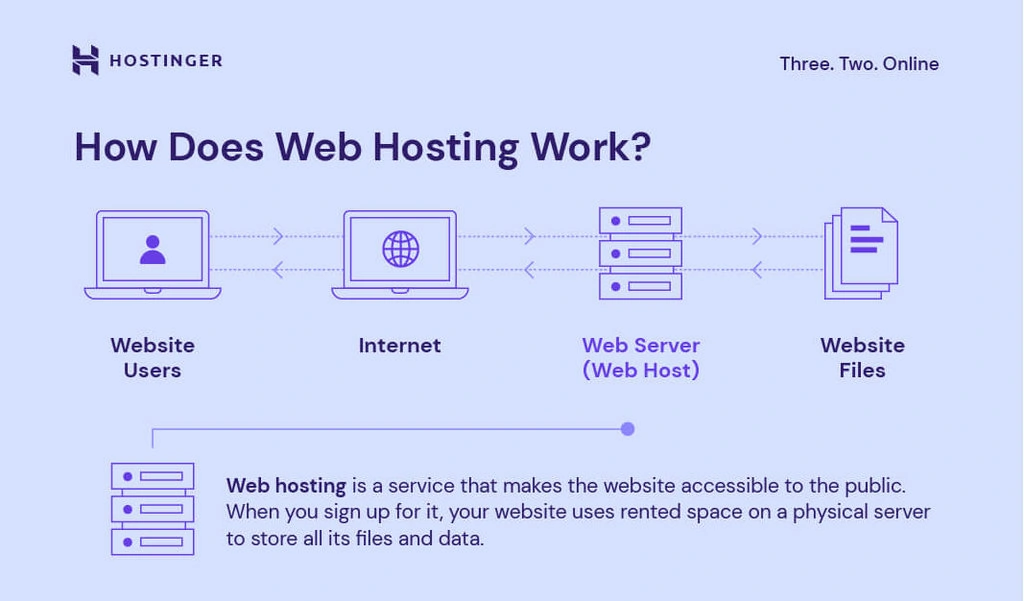
Credit: www.hostinger.com
Domain Registration
Choosing the right domain name is very important. It should be short and easy to remember. Use simple words that describe your website. Avoid using numbers or hyphens. These can confuse people. Make sure the name is unique. Check if it is available. You can do this on domain registration websites.
Once you find the perfect name, it’s time to register. Visit a trusted domain registrar site. Create an account if needed. Enter your chosen domain name. Follow the steps to register. You will need to pay a small fee. This fee is for owning the domain name. After payment, the domain is yours.
Setting Up Hosting Account
To start, visit a web hosting provider’s website. Click on the sign-up button. Fill in your personal details like name and email. Choose a password you can remember. Next, select a hosting plan that fits your needs. Plans vary in price and features. Enter your payment information to finish signing up.
Log into your new account. Find the control panel or dashboard. Look for the domain settings. Here, you can link a domain name. Adjust your website settings for security. Enable SSL certificates for safe data transfer. Check the server settings to ensure they meet your needs. Save all changes to apply them.
Installing Website Platform
Choosing a Content Management System can be fun. It helps you build your website. The most popular CMS is WordPress. It is easy to use. Many people like it. You can also try Joomla or Drupal. They are great too. Each CMS has its own features. Choose the one you like. Make sure it fits your needs.
Installing CMS on Hosting is the next step. First, log in to your hosting account. Find the control panel. Look for a tool called Softaculous or Fantastico. These tools help install the CMS. Click on your chosen CMS. Follow the instructions. It is like a step-by-step guide. Soon, your CMS will be ready to use. Now, you can start building your site.
Designing Your Website
Choose a theme that fits your style. Many themes are free. Some are paid. Themes set the look of your site. They help with colors and layouts. Templates are part of themes. They are pre-designed pages. They make designing easy. You can find themes online. Look at ratings and reviews. This helps pick good ones.
Make the design your own. Change colors and fonts. Add your logo. Use images you like. Rearrange sections. Try different styles. Test your site on phones and computers. Make sure it looks good. Check links and buttons. See if they work well. Ask friends for feedback. Fix problems they find.
Adding Content
Start by creating pages like Home, About, and Contact. These are the main sections. Use simple words for titles. Keep sentences short. For posts, choose a topic. Write a small paragraph about it. Use headings to organize your post. This helps readers find information quickly. Always add a strong opening sentence. Make it interesting. This keeps readers engaged.
Pictures and videos make your website look nice. Add a picture to each page. Make sure it matches the content. Videos can explain things better. Keep them short and clear. Use media to make the page lively. But do not add too many. It can slow the page. Always check the size of the media. Smaller sizes load faster. This helps with website speed.
Enhancing Functionality
Creating a website with web hosting enhances its functionality. Choose a reliable host. Set up and customize your website. Add features to improve user experience.
Installing Plugins
Plugins make your website better. They add new features. You can easily find plugins online. Some are free, others cost money. To install, go to your website dashboard. Click on “Plugins” and then “Add New”. Search for your desired plugin. Click “Install Now”. After installation, click “Activate”. Your plugin is now ready to use. Always check for updates. Updated plugins work better and keep your website safe.
Integrating E-commerce
E-commerce lets you sell products online. It’s easy with the right tools. Begin by choosing a reliable plugin. WooCommerce is a popular choice. Install it from your dashboard. Set up your store details. Add products you want to sell. Set prices and descriptions. Choose payment methods. PayPal and credit cards work well. Ensure your site is secure. Customers trust secure websites more. Keep your store organized. Happy customers return for more.

Credit: www.youtube.com
Seo And Optimization
Building a website starts with choosing the right web hosting service. Select a reliable provider to ensure smooth performance. Use user-friendly tools offered by hosting services to create your site easily.
Keyword Research
Finding keywords is important for your website. Use tools like Google Keyword Planner. These tools help find popular search words. Choose words related to your site. Aim for low competition keywords. These are easier to rank. Use keywords in titles and descriptions. This helps Google understand your site. Keywords should be natural in sentences. Avoid stuffing too many keywords. It can hurt your site’s ranking. Regularly update your keywords list. Trends change over time. This keeps your site fresh and relevant.
Improving Loading Speed
Fast loading sites keep visitors happy. Slow sites lose visitors quickly. Check your site’s speed often. Use tools like Google PageSpeed Insights. This tool gives tips to boost speed. Compress images to make them smaller. Smaller images load faster. Use fewer plugins on your site. Too many plugins slow down sites. Choose a good hosting provider. Some hosts are faster than others. Update software and plugins regularly. This helps improve performance. Always aim for a site that loads in under 3 seconds. Fast sites rank better on search engines.
Testing And Launching
Testing and launching your site ensures it functions well before going live. Check for broken links and test on various devices. Launch your website by updating DNS settings to point to your hosting server.
Testing Website Functionality
Check all links on your site. Make sure they work. Try every button. See if it does what it should. Look at your images. Are they clear and loading fast? Check the text. Is it easy to read? Test the site on different devices. Use a phone, a tablet, and a computer. Ensure it looks right on all. Ask a friend to look at your site. They might spot problems you missed. Fix any errors they find. Your site should be ready for everyone to use.
Launching Your Site
Your site is ready to go live. Double-check everything once more. Use your hosting control panel. Find the option to publish. Click it to launch your site. Share your site link with friends and family. They can visit and give feedback. Check visitor numbers using analytics tools. See how many people visit. Be ready to update your site regularly. Keep it fresh and exciting for visitors.
Maintenance And Updates
Websites can break sometimes. It’s smart to make regular backups. This means saving your website’s data. If something goes wrong, you can fix it. Use tools that offer automatic backups. Keep these backups in a safe place. You will feel secure knowing your data is safe.
Software needs to be current. This keeps your website safe. Old software can have problems. Update your software often. This includes plugins and themes. These updates fix bugs. They also add new features. Follow guides to update software easily. Your website will run better and faster.

Credit: www.facebook.com
Frequently Asked Questions
How To Set Up A Website Web Hosting?
Choose a reliable hosting provider and register your domain. Select a hosting plan that suits your needs. Use cPanel or another control panel to set up. Install WordPress or another CMS for easy management. Configure settings and upload your website files.
Test your website to ensure everything works perfectly.
Is Google Web Hosting Free?
Google does not offer free web hosting services. Google Cloud provides hosting solutions with various pricing plans. Users can access free tier options for limited usage, but exceeding limits incurs charges. Always check Google Cloud’s official site for updated pricing details and free tier conditions.
Is It A Good Idea To Host Your Own Website?
Hosting your own website offers control and customization. It can be cost-effective long-term but requires technical skills and maintenance. Consider your expertise and resources before deciding. Reliable hosting providers offer security and support, making them a preferred choice for many.
Evaluate your needs and abilities to make the best decision.
Can I Host My Website By Myself?
Yes, you can host your website by yourself. You need a server, internet connection, and technical skills. Hosting involves setting up hardware, software, and security measures. Consider costs and time involved. Using professional hosting services might be simpler and more reliable for most users.
Conclusion
Building a website with web hosting is straightforward. Start by choosing the right host. This sets the foundation for your site. Then, select a domain name that reflects your brand. Install a content management system for easy updates. Customize your design to make it unique.
Secure your site to protect data. Regularly update content to keep visitors engaged. Test your site to ensure it works well. Finally, promote your site to reach a wider audience. With these steps, creating a website becomes manageable and rewarding.
Dive in and start your journey today!


