
Have you ever wondered who’s behind the curtain of your website, keeping it live and accessible to the world? Knowing your web host is crucial, whether you’re troubleshooting issues, looking to switch providers, or just curious about who’s supporting your online presence.
You might have chosen a hosting service years ago and forgotten, or perhaps someone else set it up for you. No matter the reason, identifying your web host is simpler than you think, and can empower you to make informed decisions about your website’s future.
Discover how to easily find out who your web host is, and unlock valuable insights that could enhance your digital strategy. Dive into this guide to uncover the mystery of your web hosting provider and take control of your website with confidence.
Credit: whitepeak.io
Identify Your Domain Registrar
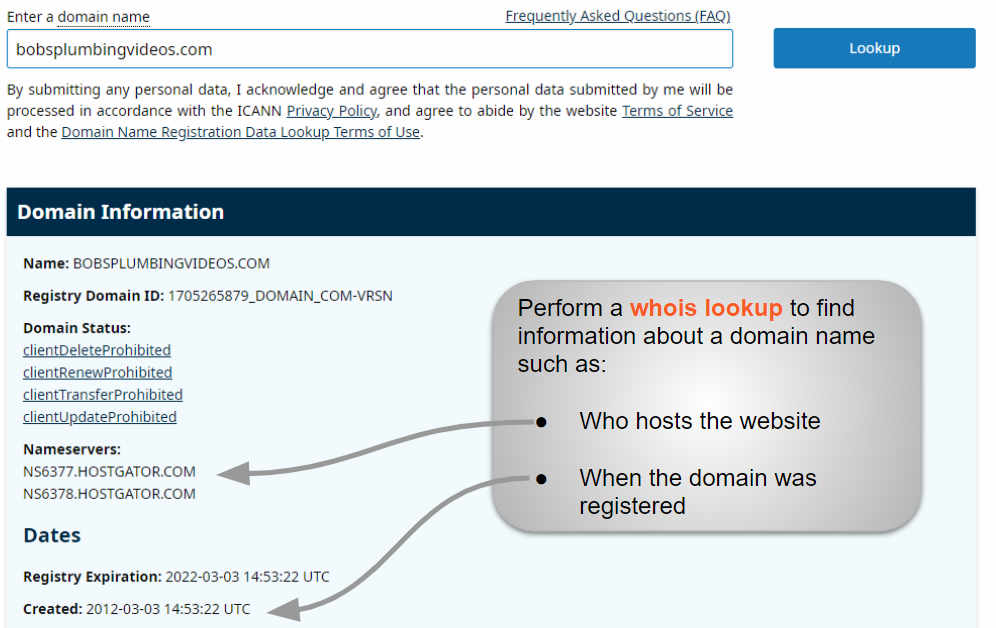
Your domain registrar is the company where you registered your domain name. To find out who your registrar is, visit WHOIS websites. These websites give detailed domain information. Type your domain name in the search bar. Click on the search button. Now, you will see details about your domain. Look for the section that says “Registrar”. The name next to it is your registrar. Remember, the registrar is not always your web host. They just help with domain names.
Credit: www.boldgrid.com
Check Whois Information
WHOIS lookup tools help find web host info. They are easy to use. Enter your website’s domain name. Press the search button. It will show details about the domain. You can see the host’s name and other info. These tools are free to use. You don’t need to sign up. Many websites offer WHOIS lookup services. Choose a reliable one for accurate info.
WHOIS results may show many details. Focus on registrar and host info. The registrar is where the domain is registered. The host is where the website files are stored. Look for words like “Hosting Provider” or “Name Servers”. These show hosting details. Sometimes, info is private. In such cases, it may not show the host name. Use other tools or contact the registrar for help.
Inspect Domain And Hosting Records
Go to your domain registrar’s website. Log into your account. Find the section for domain settings. Look for information about your DNS servers. This can give clues about the host. Sometimes, it shows the name of the web host directly. Keep an eye out for names or codes.
Use a tool like Whois Lookup. It can help find host details. Enter your domain name in the tool. Look for the “Hosting Provider” section. This will often tell you the host’s name. If not, check the nameservers listed. They can hint at the hosting company. Some websites have a “Find Host” feature. This feature can make it easier.
Explore Website Backend
First, open your web browser. Then type your website’s URL. Add “/cpanel” after the URL. Now, press enter. You should see a login page. Enter your username and password. These are from your host. Click “Login” after filling in details. Now, you are in the control panel. You can see many options here. Look for hosting info.
Find the section labeled “Account Information”. Here, you will see your host’s name. It might say something like “Hosted by XYZ”. Look for contact details. This can help if you need support. Check for the host’s logo. Sometimes, it’s on the page.
Consult With Your Web Developer
Struggling to identify your web host? Your web developer can help. They have the tools to find this information quickly. Understanding your web hosting details is essential for managing your website effectively.
Gathering Hosting Details
Your web developer can help find your host. They know your site’s details. Developers often keep hosting records. Ask them for this information. They might also have login details. This can help you access the hosting account. Sometimes, developers manage hosting directly. This means they know everything. Trust your developer for accurate info.
Understanding Developer’s Role
Developers build and maintain websites. They set up hosting too. Hosting is where your site lives online. Developers choose hosts based on site needs. They ensure the site runs smoothly. A good host keeps your site fast and safe. Developers can guide you about hosts. They know which host suits your site best. Ask them for advice if unsure.
Contact Customer Support
Find your web host by checking your billing history or email records for hosting details. Use online tools to search domain information and uncover hosting provider. Contact customer support if these methods don’t work.
Reaching Out To Registrar
First, find your domain registrar. This is where you bought your domain. Visit their website. Look for a contact number or email. Ask them for your hosting details. They can help you. Always have your account information ready. This will make things easier.
Requesting Hosting Information
Support teams can be very helpful. Tell them you need hosting info. Be clear and polite. They might ask some questions. Answer them honestly. This helps them find your data. Most registrars respond fast. Sometimes in a day. If it takes longer, send a reminder. Keep notes of any information they give. This will be useful later.
Utilize Hosting Checker Tools
Several tools can help identify your web host. These include WhoIsHostingThis and Site24x7. Both are easy to use and offer quick results. They show hosting details clearly. HostAdvice is another reliable option. It provides hosting analysis and company details. These tools are free and straightforward. You just need your website URL.
- Open a hosting checker tool.
- Enter your website URL.
- Click on the search button.
- Wait for the results to appear.
- Check the hosting provider details.

Credit: thesavvydreamer.com
Review Billing Statements
Finding Hosting Charges can be easy. Check your email for bills. These emails often show hosting costs. Look for names like GoDaddy or Bluehost. They are popular web hosts. Find monthly or yearly charges. This helps you know who hosts your site.
Identifying Hosting Provider starts with your website name. Search for the name on billing statements. Providers use their name in bills. This shows who manages your site. Many websites use this method. It is simple and effective.
Frequently Asked Questions
How Do I Know Whois Hosting My Website?
Use WHOIS lookup tools like WHOIS. net to find your website’s hosting provider. Enter your domain name to check. These tools reveal registration details, including hosting information, helping you identify who hosts your website. Ensure your domain privacy settings allow WHOIS data visibility for accurate results.
How Do I Find Out What My Host Is?
Check your website’s domain registrar details for hosting information. Use tools like WhoIs or contact your website admin. Access your website’s control panel to find host details. Hosting provider details might be in emails from your hosting service. Ensure you have login credentials to view your hosting information directly.
What Is Your Website Host?
We use [Your Web Host Name] to host our website. They provide reliable service, fast loading times, and excellent support. Our hosting choice ensures optimal performance for our visitors. Feel free to reach out if you have any questions about our hosting provider.
How Do I Find Out Who Owns My Website Domain?
Use WHOIS lookup services to find domain ownership details. Access websites like ICANN WHOIS or DomainTools. Enter your domain name to retrieve information about the registrant, including name, email, and contact details. Ensure your domain privacy settings allow public access to this information.
Conclusion
Finding your web host is simpler than you think. Use online tools for quick checks. Check billing records or emails for hosting details. Contact your domain provider for assistance. Try accessing WHOIS databases for more information. Understand your hosting setup for better control.
These methods can help you find what you need. Hosting knowledge empowers better website management. Stay informed and ensure smooth site operations. Explore these options today. You’ll gain confidence in managing your website’s backend. Keep this guide handy for future reference.
Happy hosting!


