
Are you ready to elevate your machine learning projects by hosting a Python Web API in Azure? Imagine transforming your complex algorithms into accessible services that can be deployed and scaled seamlessly.
Azure offers a robust platform with tools designed to simplify the deployment process, ensuring your Python Web API runs efficiently and securely. You will discover how to leverage Azure’s infrastructure to give your machine learning model the audience it deserves.
Get ready to unlock the potential of your Python Web API with step-by-step guidance, practical tips, and expert insights that make hosting in Azure not only possible but also straightforward. Dive in to learn how you can make your ML projects accessible to the world!
Credit: python.plainenglish.io
Setting Up Azure Account
Start by visiting the Azure website. Look for the “Start free” button. Click it to begin. Fill in your personal details. You will need an email and a phone number. Also, provide your credit card information. Don’t worry, it’s for verification. You won’t be charged. After that, complete the verification process. Follow the steps Azure provides. Now you have a free Azure account. You can use many services. Each month, you get credits to spend.
Log in to your Azure account. Look for the Azure Portal link. Click it to enter. The portal has many options. Use the search bar to find services. Explore the dashboard. It shows your resources. You can customize it. Add shortcuts to your favorite services. Get familiar with the navigation menu. It helps to quickly access different sections. Practice using it to save time.
Credit: 3cloudsolutions.com
Preparing Python Web Api
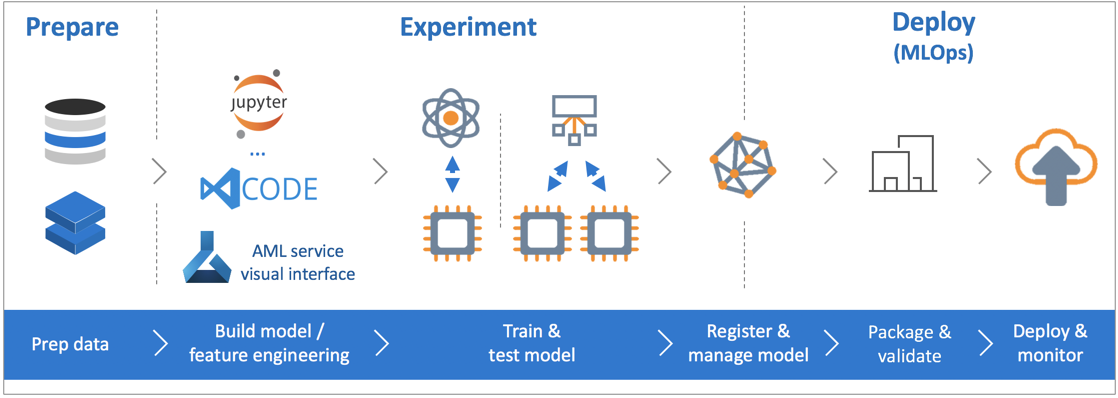
Creating an ML model starts with data collection. Data must be clean and organized. Use libraries like Pandas and NumPy for this. The next step is model training. Libraries such as Scikit-learn help with this. Train the model with your data. Test it to ensure accuracy. If the model performs well, save it. Use the joblib library for saving models. This makes loading the model easy later.
Flask is a simple tool for building web APIs. Begin by installing Flask. Use pip to install it. Next, create a basic Flask app. Define routes for your API. Each route handles a request. The API should load the saved ML model. Use it to predict results. Return these results to users. Flask makes this process easy and fast. Remember to test your API for errors. Fix any issues before deploying.
Containerizing The Application
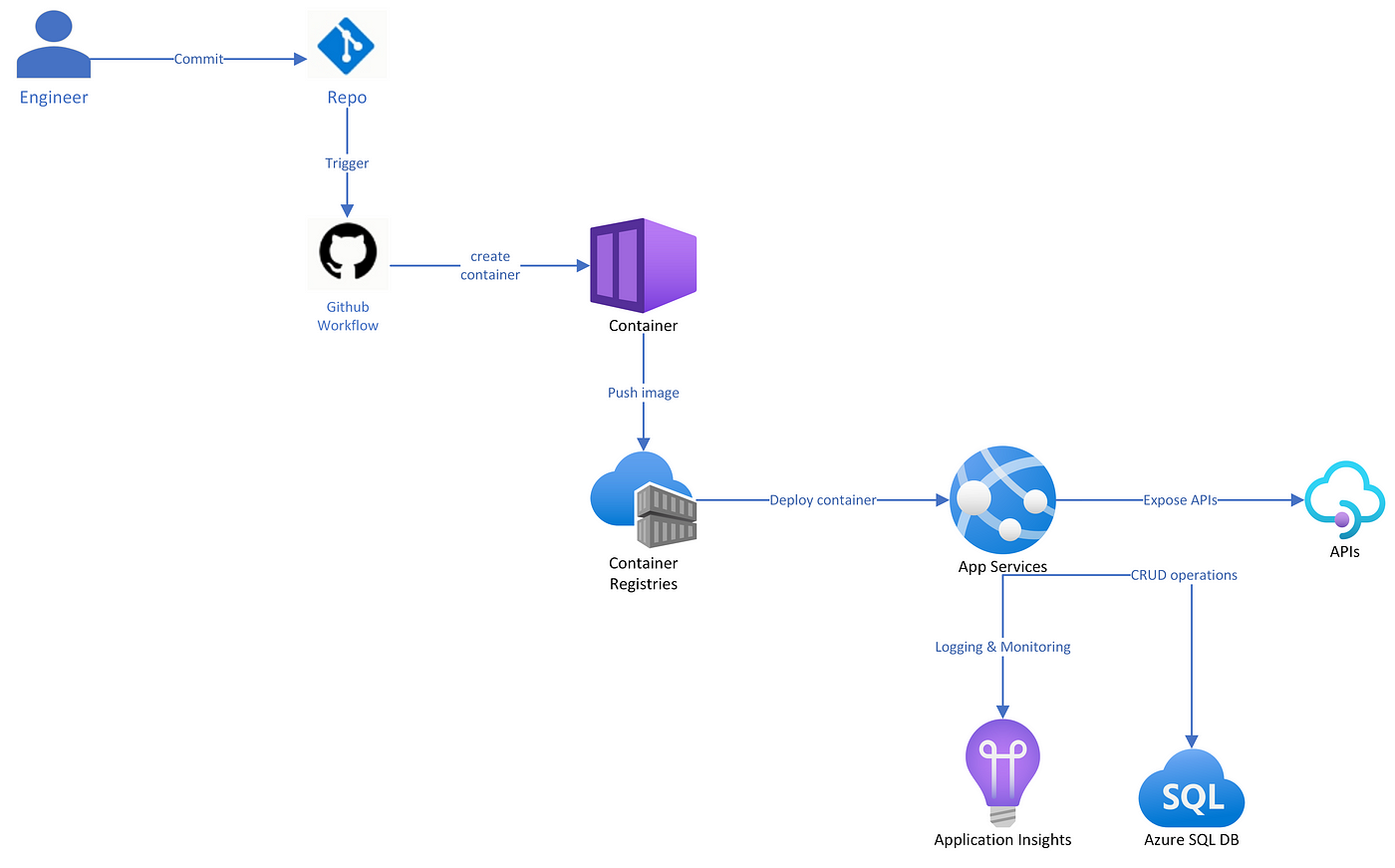
Docker is a tool that makes it easy to create containers. Containers hold everything your app needs. This includes code, system tools, and libraries. They run anywhere. This makes apps portable. You can move them from one system to another. Docker helps developers work faster. It makes sure the app runs the same every time.
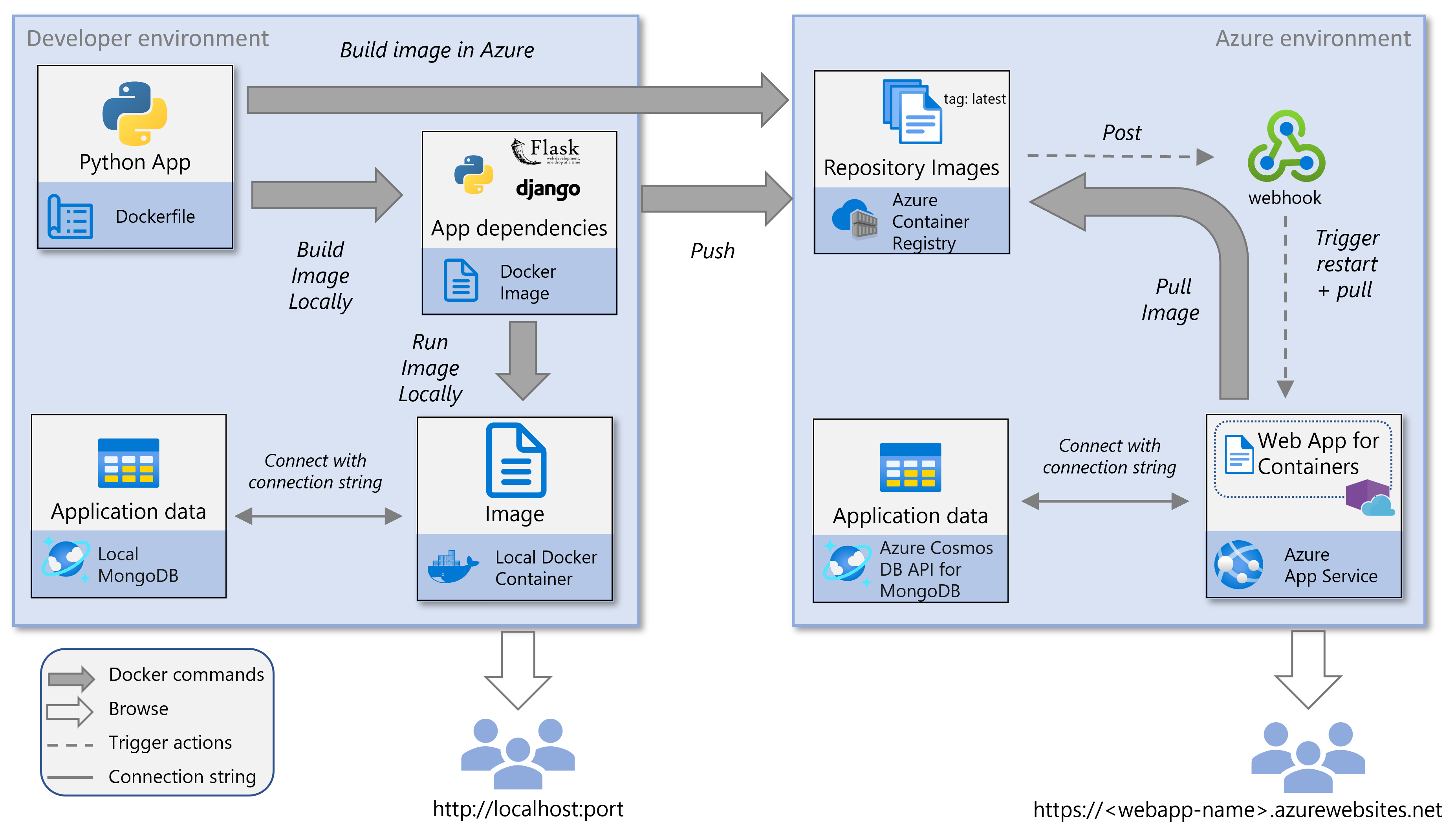
A Docker image is like a blueprint. It tells how to build a container. Start with a base image. It contains the operating system. Add your app files. Also, include dependencies. Use a Dockerfile to create the image. Write instructions in this file. Build the image using Docker commands. Once built, test the image. Make sure it works well. Store the image in a registry. You can pull it later for deployment.
Deploying To Azure App Service
First, sign up for an Azure account. Create a new App Service. Choose a resource group. Select a region close to users. Pick a plan that fits your needs.
Configure your settings. Ensure the correct runtime stack. For Python, select the latest version. Create the service. Wait for it to be ready.
Begin by building a Docker image of your app. Ensure the image works locally. Use Azure CLI to log in. Push the image to Azure Container Registry.
Link the registry to your app service. Set up deployment settings. Make sure the image path is correct. Deploy the image to Azure. Test the deployment to ensure success.
Configuring Azure Resources
Azure helps you organize your resources. Use Resource Groups to group similar items. This makes managing them easy. Start by creating a new group in the Azure portal. Name it something easy to remember. Add your resources to this group. This way, you can find them quickly. It also helps in deleting them all at once, if needed.
Environment variables store important settings. These include database names and API keys. They keep your information safe. In Azure, use the Configuration section. Here, add your variables. This makes sure your app works right. Do not hard-code sensitive data in your code. Always use environment variables.
Credit: learn.microsoft.com
Testing The Deployment
Verifying API Functionality is crucial after deployment. Start by sending a simple request. Check if the API responds correctly. Use tools like Postman or curl for testing. Ensure the API returns expected data. Look for errors in the response. Fix any issues before going live. Test different endpoints if you have more than one. This ensures all parts work well. Confirm the API handles bad requests too. This helps in making the API robust and reliable.
Monitoring Performance in Azure helps maintain API health. Use Azure Monitor to track performance. Keep an eye on response times. Slow responses need attention. Check resource usage like CPU and memory. High usage might require scaling. Set up alerts for unusual patterns. This helps in quick response to issues. Regularly review logs for errors. Identify and fix recurring problems. This ensures your API runs smoothly and efficiently.
Scaling The Application
Deploying a machine learning Python web API on Azure enables efficient scaling. Azure’s cloud services offer seamless integration and robust performance. Utilize Azure’s resources to manage traffic effectively while ensuring security.
Auto-scaling In Azure
Azure helps your app grow big and strong. Auto-scaling is a smart tool. It watches your app closely. When more people visit, it adds more power. This way, your app doesn’t slow down. You don’t have to worry about crashes. Azure handles everything. You only pay for what you use. This saves money. Your app stays fast and happy.
Optimizing Resource Usage
Using resources wisely is important. Azure helps with this. It checks how your app uses memory and power. If something is wasted, it cuts it off. This keeps the app running smoothly. It saves money too. You get the best use of every resource. Your app stays efficient and fast.
Security Best Practices
Host your machine learning Python API on Azure for enhanced security. Use Azure’s built-in features to protect data and monitor access. Implement SSL certificates and enable firewalls to ensure safe communication.
Securing Api Endpoints
APIs must be secure to protect data. Use authentication for users. Implement HTTPS for secure connections. Use tokens to verify user identity. Limit access to trusted IPs. Regularly update and patch systems. Monitor and log API requests. Look for unusual patterns. Test for vulnerabilities often. Always keep security tight.
Implementing Azure Security Features
Azure offers many security tools. Use Azure Active Directory for user management. Enable firewalls to block threats. Use Azure Security Center for monitoring. Encrypt data with Azure Key Vault. Set up alerts for suspicious activities. Ensure regular backups. Review security settings regularly. Keep Azure security features updated.
Frequently Asked Questions
How To Deploy A Web Api In Azure?
Deploy a web API in Azure by creating an Azure App Service. Use Azure Portal to configure settings. Upload your API code, then publish it using Visual Studio or Azure CLI. Monitor and scale your API through Azure’s management tools for optimal performance.
How To Deploy Ml Model To Azure?
Deploying an ML model to Azure involves creating a workspace, training the model, and registering it. Use Azure Machine Learning Studio to set up the environment. Deploy the model using Azure Kubernetes Service or Azure Container Instances. Monitor and manage the deployed model through the Azure portal.
How To Deploy Python Fastapi In Azure?
Deploy Python FastAPI on Azure by using Azure App Service. Create a virtual environment, install dependencies, and deploy using Git or Azure CLI. Ensure the app is configured properly and test the deployment to confirm functionality. Azure App Service provides seamless scaling and management for Python applications.
How To Register Web Api In Azure?
To register a web API in Azure, create an API Management instance, add an API, and configure settings. Use the Azure portal for setup. Ensure your API is secure and properly documented for easy access and management.
Conclusion
Hosting a ML Python Web API in Azure is straightforward. First, set up your Azure account. Next, choose the right Azure service. Deploy your code efficiently. Monitor its performance regularly. Azure offers tools for easy management. Keep your API secure.
Follow best practices to ensure reliability. Azure’s scalability supports growth. Understanding these steps simplifies deployment. With Azure, your API is ready for success. Enjoy seamless integration and robust support. Azure makes hosting a breeze. Take your project to the next level.
Explore Azure’s capabilities today. Let your API thrive in a cloud environment.


