
Have you ever wondered how to make your WordPress site stand out and be more user-friendly? Understanding attributes in WordPress might be your answer.
Attributes are like secret ingredients that add flavor and functionality to your website without overwhelming you. They help you organize, customize, and enhance your site’s content, making it easier for your visitors to navigate and enjoy their experience. Imagine having the power to tweak your site effortlessly, making it not just a platform but a true reflection of your vision.
Keep reading to unlock the potential of attributes and discover how they can transform your WordPress site into a compelling online presence.
Credit: www.youtube.com
Understanding Attributes
Attributes are details. They tell more about an item or object. In WordPress, attributes give extra data. They help describe pages or posts better. For example, an image can have a size or color attribute. These details help users and search engines. They make understanding the content easier.
Attributes in WordPress make content more useful. They help organize and sort information. With attributes, you can add tags or categories. This makes finding content simple. Attributes also help in customizing themes. They change how elements look. So, attributes help in making websites look unique. They are important in building a good website.
Types Of Attributes In WordPress
Product attributes help in organizing items. For example, color and size. These attributes make it easy to find products. They also help in sorting and filtering. Users can see only what they want. They improve the shopping experience. Easy to use and understand.
Custom attributes are unique. They allow users to add special details. For example, adding a custom logo or text. They give more flexibility. Users can create something special. They make websites look different. Easy for beginners to use.
Taxonomy attributes group content. For example, categories and tags. They organize posts into groups. Easy to find related posts. They make navigation simple. Users can explore similar topics. They enhance content visibility.
Setting Up Attributes
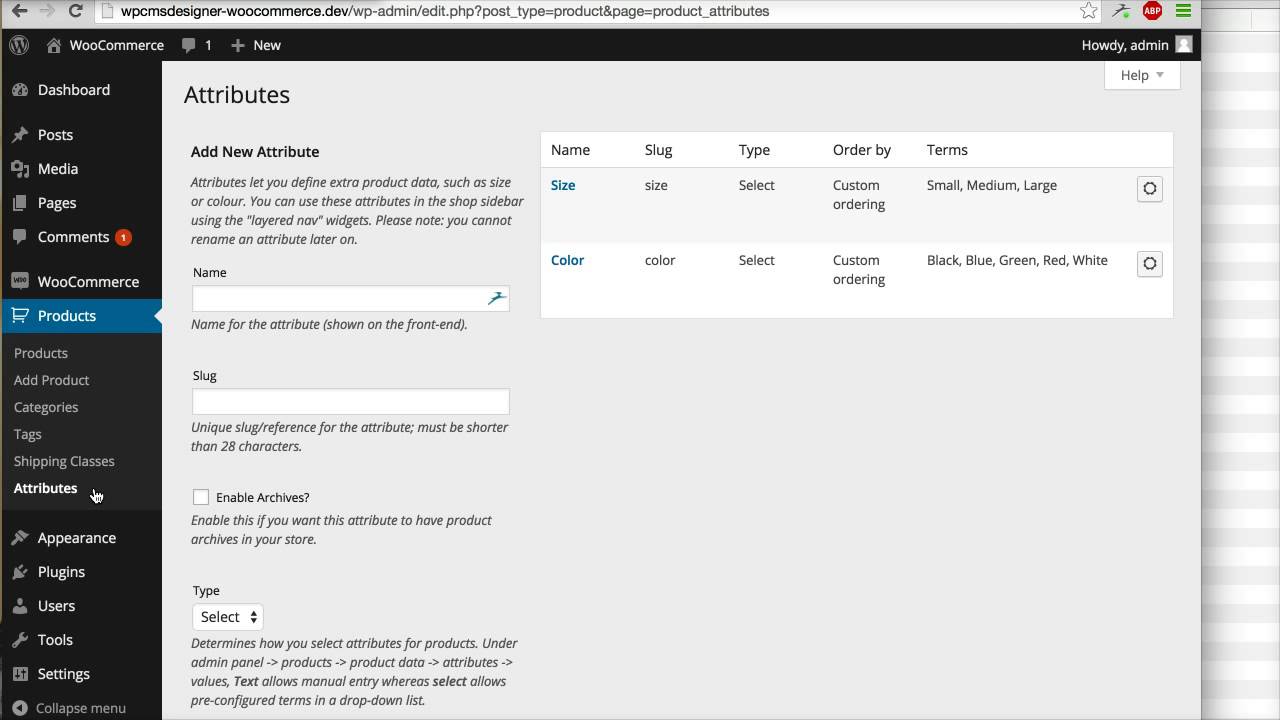
Attributes help you describe your products. You can add color, size, or other details. First, go to your WordPress dashboard. Click on “Products” and then “Attributes.” Here, you can create new attributes. Give your attribute a name. For example, “Color” or “Size.” Then, add a slug. This is a short label. It helps in URLs. Finally, click “Add Attribute.” Now, your new attribute is ready to use.
Adding attributes to products is simple. Go to “Products” in your dashboard. Click on a product to edit it. Find the “Attributes” tab. Choose the attribute you created. For example, select “Color.” Then, choose options like “Red” or “Blue.” Click “Save Attributes” to finish. Your product now shows these details. This makes shopping easier for customers. They can see all options.
Managing Attributes
Attributes in WordPress define extra details about a post or product. They enhance descriptions and improve searchability. Efficient management of these attributes can aid in organizing and presenting content clearly for users.
Editing Existing Attributes
Attributes help in customizing your WordPress site. To edit them, go to the Attributes section in your dashboard. Choose the attribute you want to change. Click the edit button beside it. You can modify its name or slug. Save changes when done. These steps ensure your site looks the way you want. Make sure to preview changes before saving.
Deleting Attributes
Deleting attributes removes them from your site. First, locate the attribute list in your dashboard. Find the attribute you want gone. Click the delete button next to it. Confirm the deletion to remove it permanently. Be careful as deleted attributes can’t be restored. Double-check before you delete. This keeps your site clean and organized.
Attributes And Seo
Attributes in WordPress play a big role in SEO. They help search engines understand your website. Tags, categories, and meta descriptions are key attributes. These elements make your site more visible. They tell search engines what your content is about. This improves your site’s ranking. Using the right attributes can boost your site’s performance.
Use clear and short tags. Use relevant categories. Write unique meta descriptions. These practices help search engines. They make your site easier to find. Avoid keyword stuffing. It can hurt your site’s ranking. Regular updates to your content are also important. Make sure your site is fast and mobile-friendly. Fast sites rank better.
Credit: imageattributespro.com
Troubleshooting Attribute Issues
Understanding attributes in WordPress is essential for customizing content. Attributes are settings or options attached to posts or pages, influencing their appearance and functionality. Troubleshooting these involves identifying incorrect configurations and adjusting them to ensure the desired result.
Common Problems
WordPress attributes can sometimes act up. One common problem is attributes not saving properly. This can happen due to plugin conflicts. Another issue is attributes not displaying on the site. It may occur if the theme does not support them.
Solutions And Fixes
For saving issues, try disabling plugins one by one. This will help find the conflicting plugin. If attributes do not show, check the theme settings. Ensure the theme supports the needed attributes. You can also update WordPress to the latest version. This might fix bugs and improve compatibility.
Advanced Attribute Usage
An attribute in WordPress defines specific properties of elements like images, text, or links. It enhances functionality by assigning characteristics that dictate appearance, behavior, or metadata. Efficiently using attributes improves site management and user experience.
Using Attributes With Plugins
Plugins can enhance your WordPress site. They allow you to add new features. Attributes in plugins let you control these features. You can change colors, sizes, and more. This makes your site unique. Most plugins offer easy settings. You just need to choose what you like. Some plugins have special attributes. They make your site look cool. Always check plugin settings for these options. You might find something useful.
Customizing Attributes
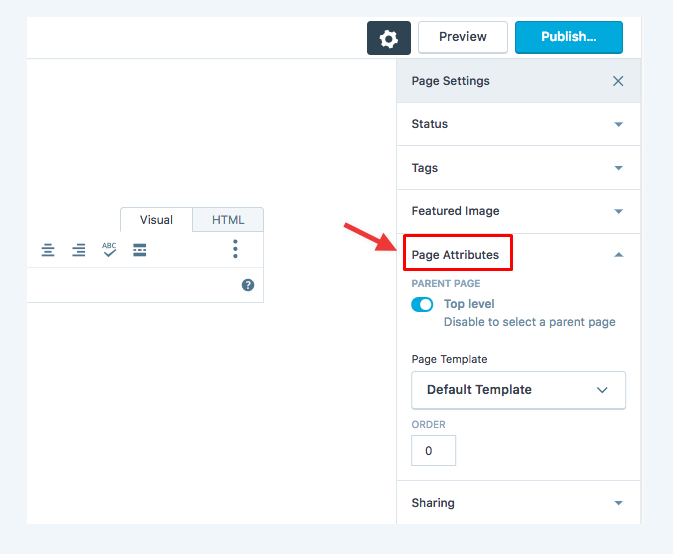
Customizing attributes is fun. It helps make your site look great. You can change the layout, fonts, and colors. This makes your site match your style. Easy settings are in the WordPress dashboard. You can try different looks. See what works best. Test different attributes. Find the one that fits your site. Always save your changes. This keeps your site looking fresh.
Credit: avada.io
Frequently Asked Questions
What Is An Attribute In WordPress?
An attribute in WordPress is a property or setting that helps define characteristics of an element. It can be associated with posts, pages, or products to control their appearance and functionality. Attributes help organize and customize content, making them crucial for a well-structured website.
How Do Attributes Affect WordPress Seo?
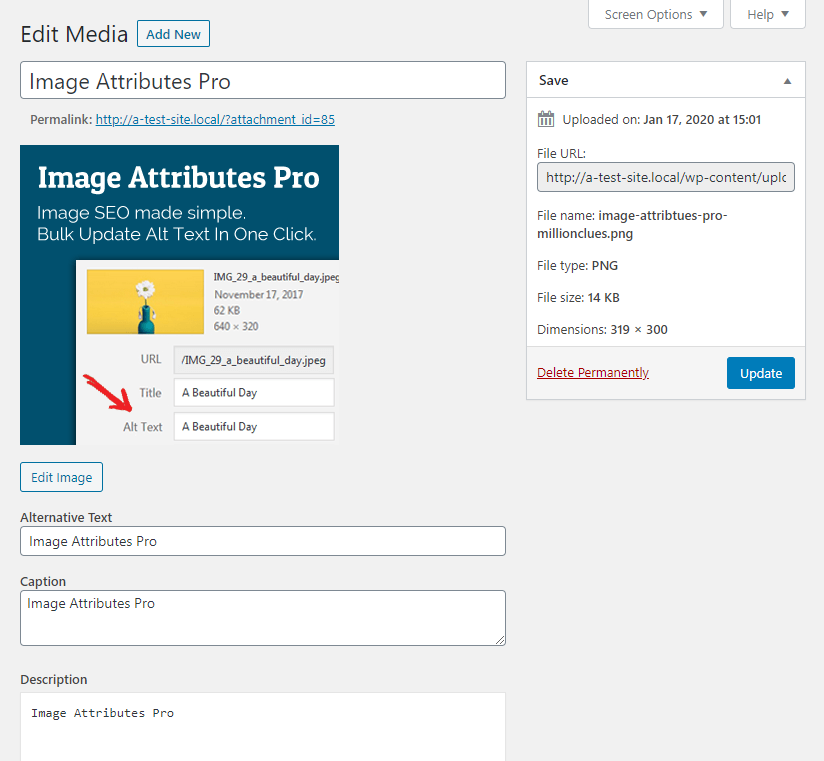
Attributes influence WordPress SEO by structuring content, enhancing navigation, and improving user experience. Properly optimized attributes, like alt text for images, help search engines understand your content better. This can lead to higher rankings and increased visibility in search results.
Can Attributes Be Customized In WordPress?
Yes, attributes can be customized in WordPress to suit specific needs. Users can modify attributes for posts, pages, or products using the built-in WordPress editor or plugins. Customizing attributes allows for better content organization, improved SEO, and a tailored user experience.
Are Attributes Important For Woocommerce Products?
Attributes are crucial for WooCommerce products as they help define product variations and options. They allow customers to filter and compare products based on different characteristics, such as size, color, or material. This enhances the shopping experience and can lead to higher conversion rates.
Conclusion
Exploring attributes in WordPress enhances your site management skills. They help customize pages, posts, and products effectively. Using attributes, you create a more organized website. They streamline content management and improve user experience. Easy to grasp, attributes simplify your WordPress journey.
Understanding them can empower you to build better sites. Attributes are fundamental for any WordPress user. They offer flexibility and control over website elements. These tools can make a significant difference in your site’s functionality. Mastering WordPress attributes is a valuable skill for any beginner.
Dive into WordPress attributes today. Your site deserves it.


