
Are you looking to manage your Economy Web Hosting Linux with ease? Accessing cPanel could be your gateway to a smoother web hosting experience.
Imagine having the power to control your website’s backend with just a few clicks, without needing to be a tech guru. Whether you’re setting up email accounts, managing files, or installing applications, cPanel simplifies these tasks, putting you in control.
You’ll discover step-by-step instructions to access cPanel effortlessly, ensuring you maximize the potential of your Economy Web Hosting Linux. Dive in to unlock the secrets that can transform your website management into a stress-free experience.

Credit: bdwebit.com
Accessing Your Hosting Account
Find your username and password from the welcome email. These details are crucial for logging in. Make sure to store them safely. If you forget them, use the password reset option. Always use strong passwords for safety.
After logging in, you reach the dashboard. It is the main control area. Here, you manage website files, email accounts, and more. The dashboard has icons and menus. They help you navigate easily. Explore different options to get familiar.
Finding Cpanel In Economy Web Hosting
Cpanel is a tool for managing your website. To find the Cpanel icon, first log into your hosting account. Once logged in, look for the dashboard. The dashboard has many icons. The Cpanel icon looks like a control panel. It may be under a section named “Hosting” or “Website.” Click the icon to open Cpanel.
You can also access Cpanel by using a direct URL. Open your web browser and type in your domain name. Add “/cpanel” at the end of the domain name. For example: yourdomain.com/cpanel. Press enter and a login page will appear. Enter your username and password to enter Cpanel.
Logging Into Cpanel
Enter your username and password to access Cpanel. Make sure the details are correct. Sometimes, people make mistakes when typing. Be careful with capital letters. Passwords are case sensitive. If you forget your password, use the reset option.
Two-factor authentication adds more security. You need to verify with your phone. First, enter your details. Then, a code will be sent to your phone. Enter this code to complete the login. This keeps your account safe.
Exploring Cpanel Features
Cpanel helps you manage files easily. Use File Manager to see all your files. You can upload, download, or edit files. Always keep your files organized. Use folders to sort them. Back up your files often. It’s very important.
Databases store important data. Use MySQL Databases in Cpanel. Create, edit, or delete databases here. phpMyAdmin is another tool. It helps you manage your database easily. Always keep a backup of your database. It protects your data.
Create and manage emails with Cpanel. Go to Email Accounts to set up new addresses. Check your emails using Webmail. Use Email Forwarders to send emails to another address. Keep your inbox clean and organized.
Security is very important. Use SSL/TLS to keep data safe. IP Blocker stops bad users from accessing your site. Always keep your passwords strong. Change them often. Use Leech Protection to protect your files.
Troubleshooting Access Issues
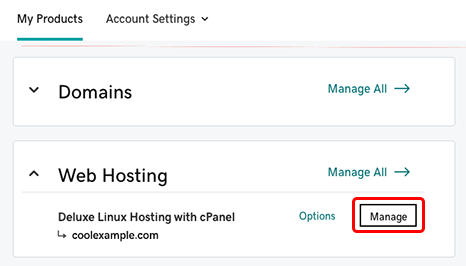
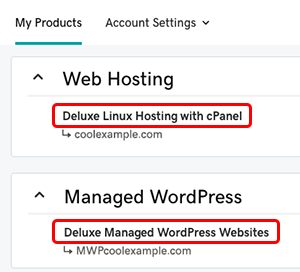
Accessing cPanel on Economy Web Hosting Linux can be tricky for beginners. Start by logging into your hosting account. Find the cPanel link, usually in the hosting dashboard. Follow the link, and you’ll reach the cPanel login page. Enter your credentials to access the cPanel interface.
Common Login Problems
Many users face login problems with Cpanel. Incorrect username is a common issue. Users often mistype their username. Wrong password causes frustration too. Passwords are case-sensitive. Ensure caps lock is off. Check for extra spaces in the password. Browser compatibility can also be a problem. Older browsers might not work well. Clear your browser cache regularly. This helps solve many login issues. Network issues can block access. Check your internet connection first. Use a stable network for best results.
Resetting Credentials
Resetting credentials is simple. Visit the hosting provider’s website. Find the login section. Click on “Forgot Password.” Follow the instructions. You’ll get a reset link in your email. Click the link to create a new password. Choose a strong password. Combine letters, numbers, and symbols. Keep your account details safe. Write them down somewhere secure. Don’t share your login information with others. Regularly update your credentials. This keeps your account safe.
Credit: www.godaddy.com
Credit: www.godaddy.com
Frequently Asked Questions
How Do I Access Cpanel From Hosting?
Log in to your hosting account. Locate the cPanel section in the dashboard. Click to access cPanel. Alternatively, use yourdomain. com/cpanel and enter your cPanel credentials. Ensure you have the correct login details from your hosting provider.
How To Access Cpanel Via Namecheap?
Log in to your Namecheap account. Go to the “Dashboard. ” Click “Hosting List,” then “cPanel” under the “Product” section. You can now access cPanel.
How To Access Cpanel Through Crazy Domains?
Log into Crazy Domains account. Navigate to “Web Hosting. ” Click “Manage” next to your domain. Select “cPanel Login” to access.
How Do I Navigate To Cpanel?
Log into your web hosting account. Locate the cPanel section on the dashboard. Click on the cPanel link. You will be directed to the cPanel interface. Access various tools and settings from there. Ensure you have your login credentials ready for authentication.
Conclusion
Accessing Cpanel on Economy Web Hosting Linux is simple. Start by logging into your hosting account. Navigate to the control panel section. Click on the Cpanel icon. You’ll find tools to manage your website. Explore features like email setup and file management.
Adjust settings as needed. If confused, refer to online guides or seek help. Cpanel offers a user-friendly interface. It makes web management easier. Take advantage of its features. Enhance your website’s performance effortlessly. Enjoy smooth hosting experience with Cpanel. Keep learning and improving your skills.


