
Are you ready to launch your website but find yourself stuck on how to connect your web hosting to your domain name? You’re not alone.
This seemingly technical step can be intimidating, but it’s simpler than you might think. Imagine having your website accessible to anyone, anywhere, at any time—sounds exciting, right? By learning how to properly link your web hosting to your domain name, you can make this dream a reality.
This guide will walk you through each step, ensuring you feel confident and empowered to move forward. Dive in and discover how easy it is to bridge the gap between your domain and hosting provider. Your online presence is just a few clicks away!

Credit: www.instagram.com
Choosing A Web Hosting Provider
Price is important. Everyone wants a good deal. But don’t choose the cheapest one. A reliable service is worth more. Look for a provider with good customer support. You might need help someday. Read reviews to know what others think. A provider with a good uptime record is best. You want your site online always. Consider the features you need. Do you need email accounts? Or a website builder? Check if they offer these.
| Provider | Strengths |
|---|---|
| Bluehost | Good for beginners, 24/7 support |
| HostGator | Affordable plans, user-friendly |
| SiteGround | Excellent uptime, good security |
Registering A Domain Name
Choose a short and simple domain name. It helps people remember it. Use words that are easy to spell. Avoid numbers and hyphens. They can confuse users. Try to use keywords related to your topic. This can help with search engines. Check if the name is available. Use a domain checker tool. Make sure it is not taken by someone else. Think about future growth. Will the name fit if you expand? Pick a domain that you can stick with for years.
Find a trusted registrar. This is a company that sells domain names. Popular ones are GoDaddy and Namecheap. Create an account on their website. Search for your domain name. If it is available, add it to your cart. Fill out your details like name, address, and email. Choose how many years you want to register. Pay with your credit card or PayPal. After payment, you own the domain. Check your email for confirmation. Keep the details safe.
Accessing Dns Settings
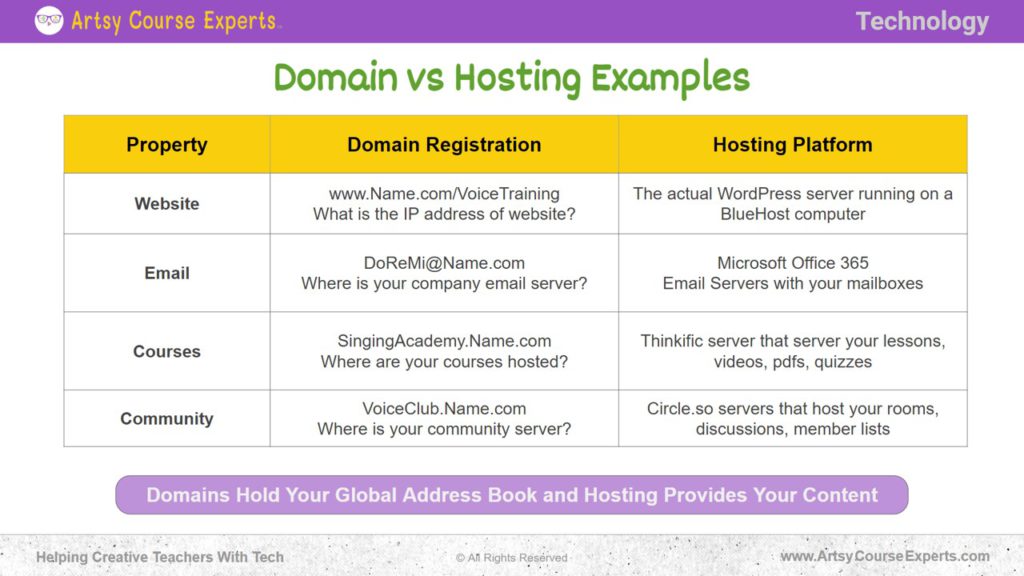
DNS stands for Domain Name System. It helps match your domain name to the correct IP address. This allows browsers to find your website. Imagine DNS like a phone book for the internet. It tells computers where to go.
Every website has a unique IP address. DNS translates domain names into these numbers. Without DNS, browsing the web would be hard. You would need to remember long number strings.
DNS settings are found in your domain registrar account. This is where you bought your domain name. Log into your account to see DNS options. Look for sections labeled “DNS” or “Name Servers”.
Another option is your web hosting control panel. Sometimes, DNS settings are here too. Check both places to be sure. Changing DNS settings helps link your domain to your hosting. It’s like updating a map for your website.
Credit: www.artsycourseexperts.com
Updating Nameservers
Nameservers connect your domain to hosting. They act like traffic signs. They guide visitors to your website. Without them, your site stays hidden. They ensure your website is found. Reliable nameservers mean faster loading times. They protect against attacks. They make sure your site remains online. They are crucial for your site’s performance. Always ensure they are set correctly. This avoids downtime.
Begin by logging into your domain registrar. Find the nameserver settings section. Enter your hosting provider’s nameservers. Save changes. It might take a few hours. Your site will be visible online soon. Check if the nameservers are updated. Use online tools for verification. Ensure no errors are present. Always double-check your entries. Mistakes can cause issues.
Configuring Domain Forwarding
Domain forwarding helps in directing visitors to a new site. This can be useful when changing your website address. It prevents losing traffic. Increased accessibility is another benefit. Users can reach your site even if they type the old URL. Brand consistency is maintained by forwarding multiple domains to one main site. This makes it easier for users to remember your brand. Forwarding also helps in SEO by directing all traffic to one domain. This boosts search ranking. It saves time and effort. No need to update links everywhere.
Log in to your domain registrar’s account. Find the domain settings page. Look for the forwarding section. Enter the new website URL. Save the changes. It may take some time for changes to update. Check if your domain forwards correctly. Ensure accuracy when entering the new URL. Mistakes can lead to broken links. Some registrars offer advanced settings. You can choose between permanent and temporary forwarding. Permanent forwarding is better for SEO. Temporary forwarding is for short-term changes. Always test after setting up forwarding.
Verifying Domain Connection
Tools for Verification can help check if your domain links to hosting. Popular tools include WHOIS and DNS Checkers. WHOIS shows domain details. DNS Checkers show DNS records. Both are easy to use. Just enter your domain name. Results show if the domain is connected. These tools are free and simple.
Troubleshooting Common Issues is important if the domain is not linked. First, check the DNS settings. Sometimes, they need updates. Second, ensure the nameservers are correct. Wrong nameservers cause problems. Lastly, wait for DNS changes. They can take up to 48 hours. Patience is key.
Managing Dns Records
DNS records help connect your domain to a web host. They are like a map for your website. There are different types of DNS records. Each has a job. A Records point to IP addresses. They show where your site lives on the web. MX Records help emails find the right server. CNAME Records are like nicknames. They point to other domain names. TXT Records store text notes. They often hold verification details. Knowing these helps you manage your website better.
Editing Dns Records
Editing DNS records is important. It lets you update your website’s details. Start by logging into your domain account. Find the DNS settings. Choose the record you need to change. Type the new details in the box. Save your changes. It takes some time to update. Be patient. Always check your changes. Make sure they work. This keeps your website online and safe.
Credit: www.canva.com
Security Considerations
Safeguarding your website starts with secure domain linking. Ensure SSL certificates are installed to encrypt data. Regularly update passwords and monitor access logs to prevent unauthorized activity.
Protecting Your Domain
Domains need strong protection. Keep your domain safe by using unique passwords. Change passwords often. Enable two-factor authentication. It adds an extra layer of security. Always monitor domain activities. Report suspicious actions immediately.
Ssl Certificates
SSL certificates secure data transfer. They encrypt information between your website and users. Protect user data with SSL. It stops data theft. Browsers show a padlock icon for SSL sites. This builds trust. Install SSL certificates easily. Many hosting services offer them. Check if your host provides SSL.
Monitoring Domain Performance
Check your website with analytics tools like Google Analytics. These tools help you see how your site is doing. You can find out how many people visit your site. You can see which pages are popular. It’s important to know where visitors come from. This helps you improve your site. Keep an eye on your site’s bounce rate. A high bounce rate means people leave quickly. You want visitors to stay longer.
Website speed is very important. People like fast websites. Slow websites can lose visitors. Use tools like Google PageSpeed Insights. This tool tells you how to make your site faster. You can reduce image sizes. This makes your site load faster. Use simple code. Too much code can slow down your site. Check your site often. Make sure it stays fast.
Frequently Asked Questions
How To Connect Web Hosting To Domain Name?
To connect web hosting to a domain, update the domain’s DNS settings. Input your hosting provider’s nameservers. This links the domain to your web server. Consult your hosting provider for specific nameserver details. Allow up to 48 hours for DNS propagation.
Your website should then be accessible online.
How Do I Link My Domain To Another Website?
Access your domain registrar’s control panel. Update DNS settings to point to the new website’s IP address. Save changes to connect your domain. Ensure DNS propagation for proper linking.
How Do I Point My Domain To Another Hosting Provider?
To point your domain to another hosting provider, update your domain’s DNS settings. Access your domain registrar’s dashboard, find DNS settings, and enter the new hosting provider’s nameservers. Save changes and allow 24-48 hours for propagation. Contact your hosting provider for specific DNS details.
How Are Domain Names And Web Hosting Related?
Domain names are website addresses, while web hosting stores website files. Both are essential for a website to be accessible online. Domain names connect users to your site, and web hosting provides the server space to display your site’s content.
Together, they make your website accessible on the internet.
Conclusion
Linking your web hosting to a domain name is essential. It connects your website to the world. Following the steps is simple. Start by accessing your hosting account. Then, update your domain’s DNS settings. Ensure they point to your hosting provider.
Double-check the details. This ensures a seamless connection. Once done, your site goes live. Visitors can now access it easily. Remember, patience is key. It may take some time to update. With practice, this process becomes easier. Your website is now ready to shine online.
Enjoy the journey of building your online presence!


