
Imagine landing on a website and instantly feeling captivated by its design and layout. This is the magic of a well-crafted front page in WordPress.
When you’re setting up your WordPress site, the front page is essentially your digital handshake, your chance to make a memorable first impression. It’s not just about aesthetics; it’s about conveying your brand’s message in a way that resonates with your audience.
But what exactly is a front page, and why does it matter for your site? If you’re eager to understand how to make your website’s front page not only visually appealing but also effective in engaging visitors, you’re in the right place. Dive in to uncover the secrets of optimizing your WordPress front page to boost your site’s performance and captivate your audience from the get-go.
Front Page Basics
The front page is the first page of a website. It is what visitors see first. It is like the cover of a book. You can design it with themes and widgets. This page shows important content. It grabs attention.
In WordPress, the front page is very important. It tells users about your site. It can be a static page. Or it can show latest posts. This page helps with SEO. Search engines find your site easily. It makes your website look professional. A good front page invites users to explore.
Setting Up The Front Page
The front page in WordPress is the main page visitors see first. It displays your latest posts or a static page. Setting it up helps control your site’s first impression and content layout.
Choosing A Static Front Page
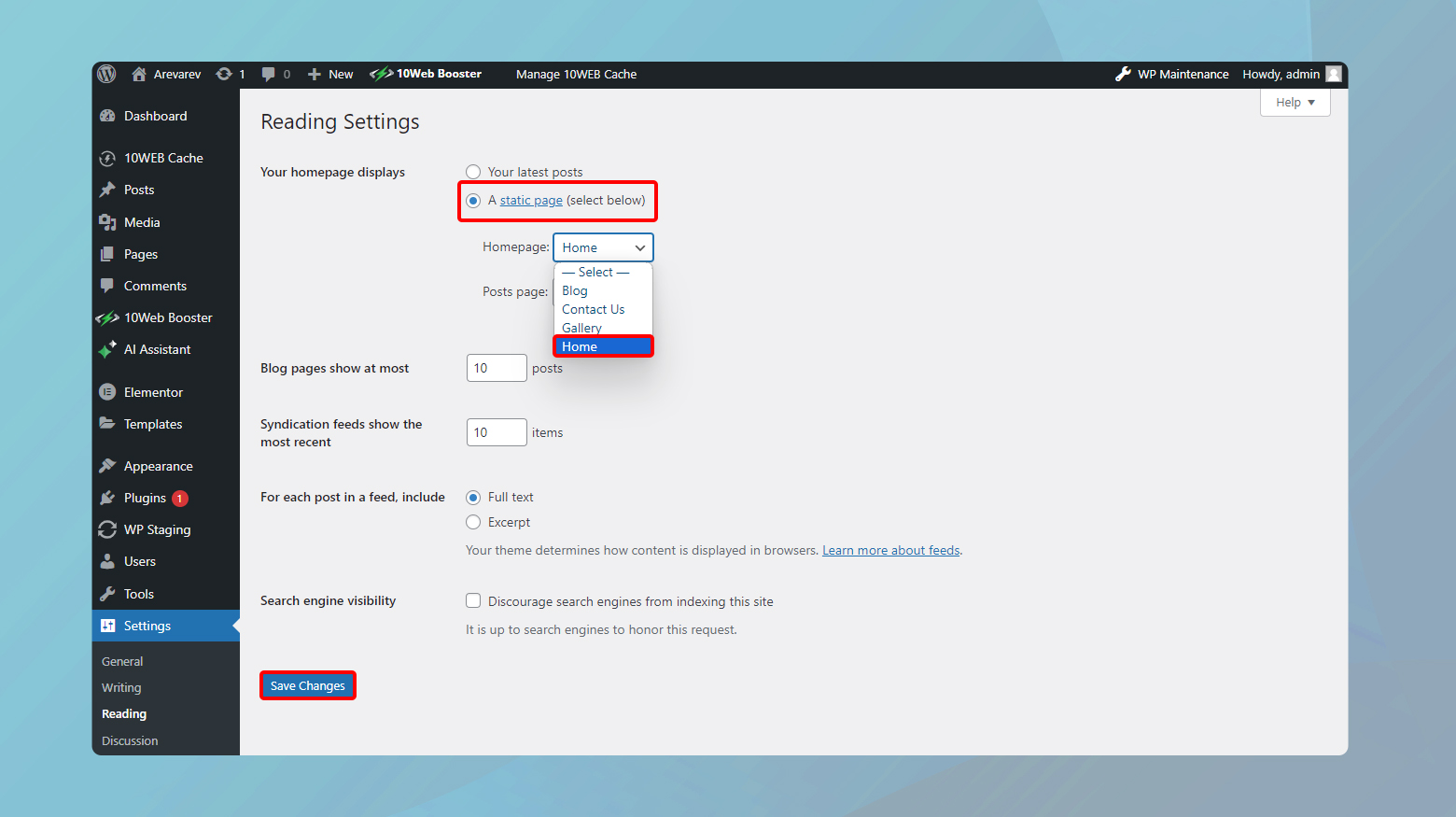
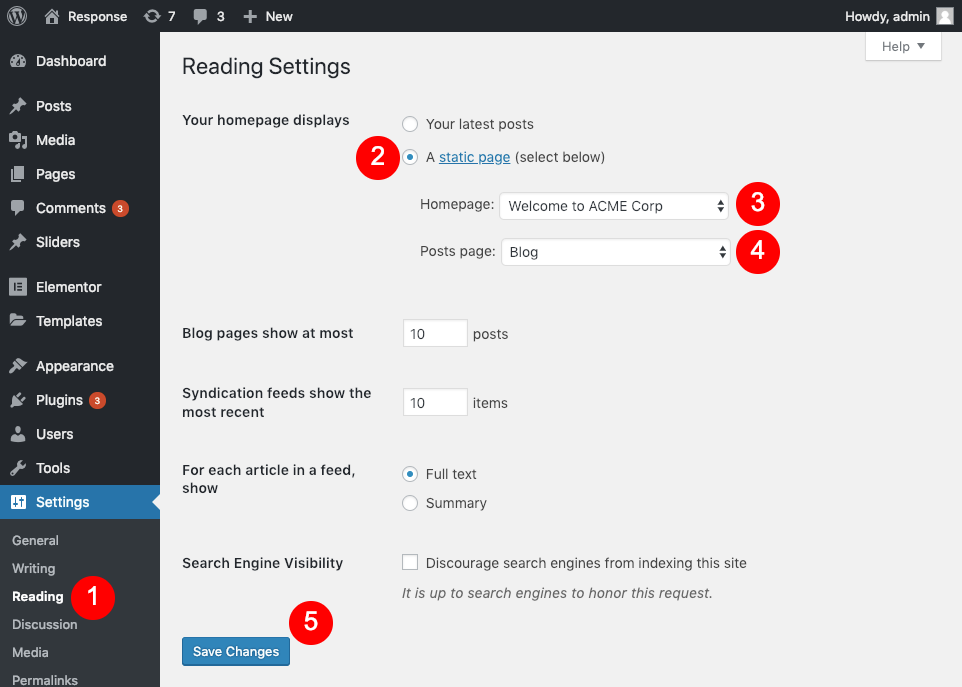
Setting up a static front page in WordPress is easy. First, go to your dashboard. Look for Settings and click on it. Next, find Reading. You will see options for Your homepage displays. Choose A static page. Select a page from the dropdown. This becomes your front page. It’s different from your posts page. It stays fixed. You can update the content anytime. This makes your site look more like a website.
Configuring Reading Settings
Reading settings are important for your site. Go to the Settings section. Click on Reading. Here, you choose how many posts show on one page. You decide whether to show full text or a summary. Choose what fits your site best. These settings help users read your site easily. You can also set the number of posts for RSS feeds. This helps with sharing your content. These settings are simple but effective. They make your site user-friendly.
Customization Options
Front Page in WordPress offers various customization options. Users can modify layout, colors, and content to match their style. These options make it easy to create a unique and appealing homepage.
Using Page Builders
Page builders help create a front page easily. They offer drag-and-drop features. These tools allow custom layouts. No coding is needed. Simply choose a layout you like. Then, add your content. You can include images, text, and buttons. Everything is customizable. Change colors and fonts too. This way, your page looks unique. Many plugins are available. Some popular ones are Elementor and Beaver Builder. They have free and paid versions. Page builders make design simple. They save time and effort.
Custom Templates
Custom templates allow more control over the front page. Themes often include templates. Choose one that fits your style. Or, you can create your own. This requires some coding knowledge. Templates define the structure. They can include headers, footers, and sidebars. Custom templates make your site stand out. They offer a personalized feel. If unsure, hire a developer. This ensures a professional look. Templates can be reused. They save time on future projects.
Credit: 10web.io
Front Page Design Tips
A well-organized front page grabs attention. Use big and bold headings. They guide the reader’s eyes. Important information should stand out. Place it at the top. Use contrasting colors for key sections. This makes them pop.
Images play a big role. They can tell a story quickly. Keep them clear and relevant. Use white space wisely. It gives the page a clean look. This helps the reader focus on the main content.
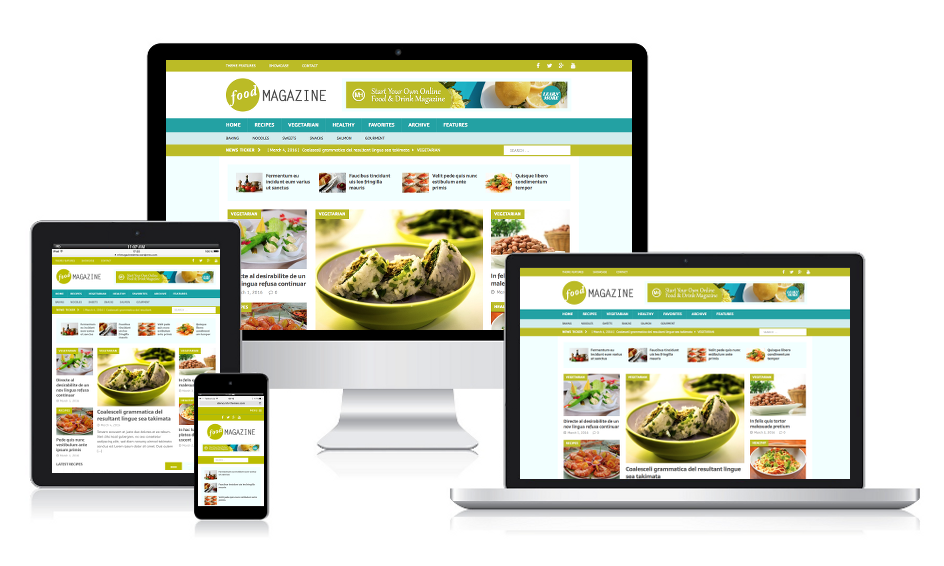
Many people use phones to surf the web. Your front page should look good on all devices. Make sure text is easy to read on small screens. Buttons should be easy to tap. They should be big enough.
Images should load fast on mobile. This keeps users happy. Check your site’s mobile view often. Ensure everything works smoothly. This keeps visitors coming back.
Seo Considerations
A front page in WordPress acts as the main entry for visitors. It displays your latest posts or a static page. Choosing between these options affects user experience and SEO. Make sure to optimize it with keywords and clear navigation to enhance visibility and engagement.
Optimizing Content
Content is key for good SEO. Use simple and clear words. This helps people understand better. Include keywords naturally. They should fit in the text. Avoid stuffing too many keywords. This can hurt SEO. Use headings and subheadings. They help organize the content. Readers find what they want faster. Alt text for images is also important. It tells what the image is about. Helps search engines understand your content better.
Improving Load Speed
Fast load speed is important. It keeps visitors happy. Slow pages make people leave. Use smaller image files. They load faster. Minimize code and use less plugins. They can slow down the site. Regularly check your site speed. Many tools can help with this. A quick site boosts SEO. Search engines like fast websites.
Credit: cyberchimps.com
Common Challenges
Understanding the front page in WordPress can be tricky. Many struggle with setting it correctly for their site. Choosing between a static page or latest posts often confuses beginners.
Troubleshooting Display Issues
Display problems often confuse users. The front page might not show correctly. This can happen due to theme issues. Sometimes, changes don’t update. Clearing the cache might help. Also, check for incorrect settings. Maybe the wrong page was set as front page. Examine if widgets are misplaced. Another reason could be bad coding. Ensure all plugins are updated. If errors persist, switch to a default theme. This can fix display errors quickly.
Dealing With Plugin Conflicts
Plugins enhance WordPress functionality. But they can conflict sometimes. Conflicts cause the front page to break. Disable all plugins to find the issue. Reactivate them one by one. This identifies the problematic plugin. Plugin updates solve many issues. Ensure all plugins are compatible with the theme. Incompatibility leads to errors. Consult plugin support if issues remain. Sometimes, a simple plugin update fixes it. Keep plugins minimal to avoid conflicts.
Tools And Resources
Discover the essence of a front page in WordPress, serving as the homepage of a website. This page typically showcases featured content, welcoming visitors with a curated selection of posts or static information. Customize it to reflect your site’s purpose and personality, offering a tailored user experience.
Recommended Plugins
Choosing the right plugins is important. Some plugins help design the front page. Elementor is popular for creating custom layouts. It offers drag-and-drop features. WPBakery is another choice. It lets users build pages quickly. Beaver Builder is also useful. It is beginner-friendly and easy to use. All these plugins offer customization options. They help users create unique designs. Installing too many plugins can slow a site. Choose wisely and keep your site fast.
Helpful Tutorials
Many tutorials teach how to use WordPress. WordPress.org has guides for beginners. YouTube is a great resource too. Many creators share step-by-step videos. They show how to set up a front page. Some blogs offer written guides. These guides explain plugins and themes. Users can learn at their own pace. Explore forums for more tips. People share their experiences there. Tutorials make learning easy and fun.
Credit: mhthemes.com
Frequently Asked Questions
How Do I Set The Front Page In WordPress?
To set the front page in WordPress, go to “Settings” in the admin panel. Click “Reading” and choose “A static page” under “Your homepage displays. ” Select the page you want as your front page and save changes. This will make your chosen page the homepage of your site.
Can I Use A Blog As My Front Page?
Yes, you can use a blog as your front page in WordPress. Go to “Settings” and then “Reading. ” Choose “Your latest posts” to display your blog posts on the homepage. This setup is ideal for websites focused on regular content updates or news.
Why Is The Front Page Important In WordPress?
The front page is crucial because it’s the first thing visitors see. It sets the tone for your site and affects user engagement. A well-designed front page can improve SEO, increase visitor retention, and enhance the overall user experience.
How To Customize The Front Page Layout?
To customize the front page layout, use WordPress themes and page builders. Many themes offer customization options in the “Appearance” section. Page builders like Elementor or Gutenberg allow you to create unique layouts with drag-and-drop features, enhancing your site’s look and functionality.
Conclusion
Understanding the front page in WordPress is essential. It shapes your website’s first impression. You can customize it to fit your needs. Whether static or dynamic, it impacts user experience. A well-designed front page attracts visitors. It boosts engagement and helps communicate your message clearly.
Make sure to use the right settings. This ensures your content stands out. With practice, you can create an effective front page. Your website will look professional and inviting. Remember, a good front page is key to success online. Keep experimenting and learning to improve your site.


