
Are you looking to harness the power of cloud computing to host your Web API efficiently? You’re in the right place.
Hosting a Web API in the cloud can transform how your applications interact, scale, and perform. Imagine having the flexibility to expand your services without the headache of managing physical servers. Picture the seamless integration and automatic updates that save you time and resources.
You’ll discover straightforward steps to successfully host your Web API in the cloud. We’ll guide you through choosing the right cloud provider, setting up your environment, and deploying your API securely. Whether you’re a seasoned developer or a curious beginner, this guide is tailored to help you make informed decisions and avoid common pitfalls. Ready to unlock the full potential of your Web API? Let’s dive in and explore how cloud hosting can elevate your projects to new heights.
Choosing The Right Cloud Provider
Finding the best cloud provider is important. Amazon Web Services offers many features. Microsoft Azure is known for its user-friendly interface. Google Cloud Platform offers great data analysis tools. Each provider has strengths. Understand your needs first. Compare the features carefully.
Cost is a big factor in cloud hosting. Amazon Web Services has a pay-as-you-go model. Microsoft Azure offers many pricing tiers. Google Cloud Platform has discounts for committed use. Check for hidden costs. Look at pricing calculators on websites. Choose a provider that fits your budget.
Reliability means your service stays online. Amazon Web Services provides uptime guarantees. Microsoft Azure has global data centers. Google Cloud Platform offers strong backup systems. Read user reviews for real experiences. Ensure your cloud choice is dependable.
Setting Up Cloud Infrastructure
Choose a cloud provider like AWS, Azure, or Google Cloud. Create a virtual machine with the right specs. Select the right operating system for your needs. Ensure your machine has enough CPU and memory. This helps run your web API smoothly.
Set up the network so your API can be accessed. Assign a public IP address to your virtual machine. Ensure you can connect from the internet. Use a firewall to control traffic. This keeps your API safe and reachable.
Protect your web API by using security groups. These limit who can access your API. Use SSL certificates to encrypt data. This keeps data safe during transfers. Regularly update your software to fix security holes. Security keeps your API and data safe from harm.
Deploying Your Web Api
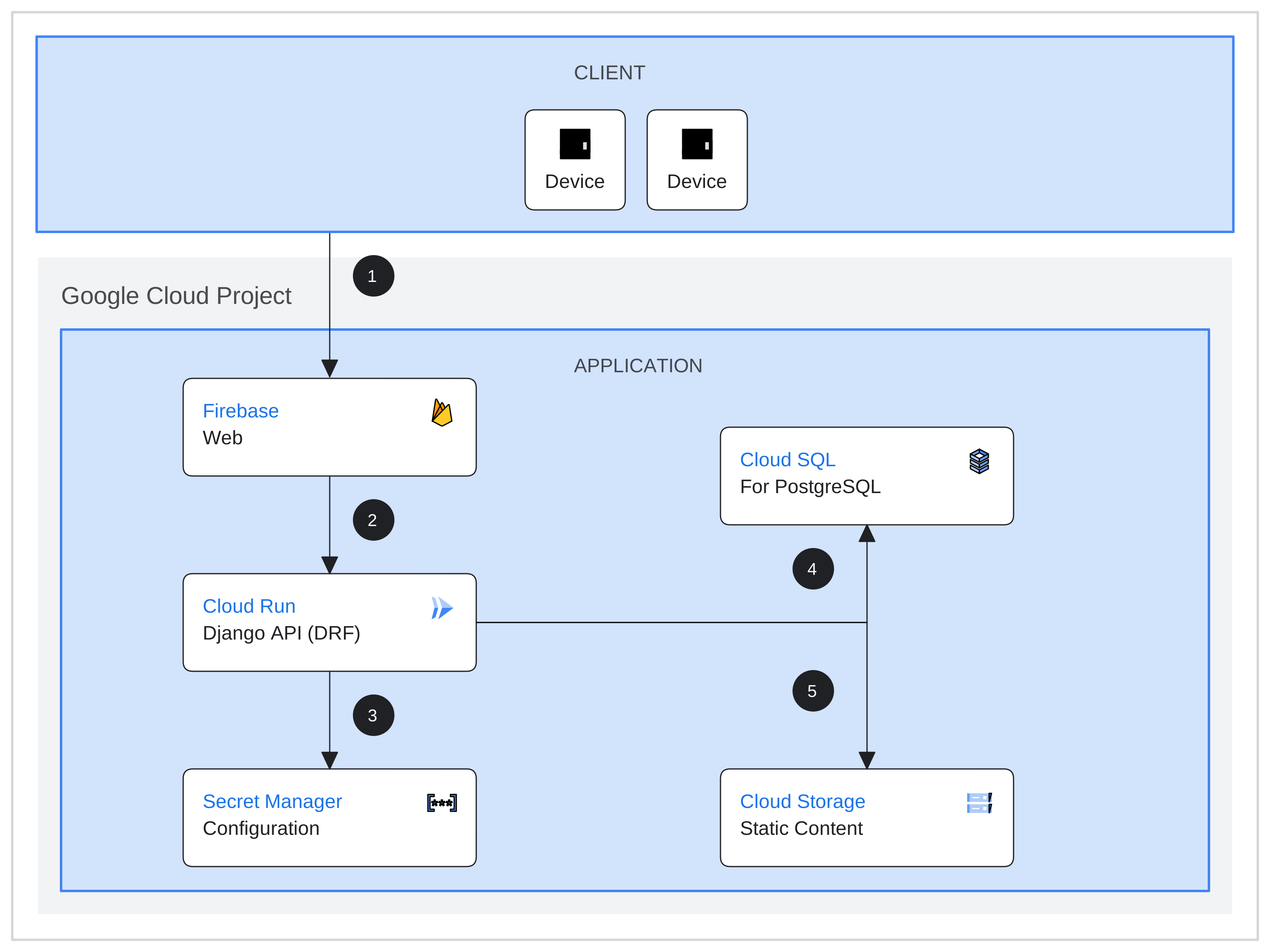
Containers help in packaging your application. They make sure the app runs smoothly on any cloud. Docker is a popular tool for this task. It creates a container with all your app’s dependencies. Kubernetes helps manage these containers. It makes sure the app is scalable. With containers, moving apps to the cloud is easy. Updates become faster and more reliable.
Serverless means you don’t manage servers. The cloud provider handles all that. You just upload your code. AWS Lambda is an example. This way, you pay only for the compute time. It helps save money. Serverless is great for apps with unpredictable traffic. The service scales automatically. This means your app is always ready for users.
Continuous Integration (CI) helps in frequent code updates. Tools like Jenkins and Travis CI are popular. They test code automatically. This finds bugs early. Continuous Delivery (CD) takes it further. It deploys tested code to production. This makes new features reach users faster. CI/CD makes the development process smooth. It ensures high quality software.
Credit: cloud.google.com
Scaling Your Web Api
Horizontal scaling means adding more servers. Each server handles part of the load. Vertical scaling means upgrading a server’s power. This can be more RAM or CPU. Horizontal scaling is better for large loads. It is also more flexible. Vertical scaling is simpler but has limits. Choose based on your API needs.
Load balancing spreads traffic across servers. This helps avoid overloads. Round-robin is a simple method. Each server gets a turn. Least connections send traffic to the least busy server. IP hash uses a client’s IP to decide. Load balancing keeps APIs running smoothly.
Monitoring checks your API’s performance. Use tools to track response times. Watch for slowdowns. Optimize by fixing these issues. Update your code regularly. Regular monitoring helps keep performance high. Good optimization improves user experience.
Ensuring Security
Data encryption is vital. It keeps information safe. Hackers cannot read encrypted data. Use strong encryption methods. Choose methods like AES or RSA. These are trusted worldwide. Protect user data. Protect your business data. Encrypted data is hard to break.
Authentication confirms user identity. Make sure only real users access the system. Use passwords and two-factor authentication. Authorization gives permissions. It decides what users can do. Set user roles carefully. Limit access to sensitive data. Keep your system secure.
Conduct regular security audits. Check for weaknesses. Fix issues quickly. Updates are crucial. Install patches regularly. Audit logs help track activities. They reveal suspicious actions. Audits keep systems safe. Protect your cloud and users.
Credit: learn.microsoft.com
Managing Costs
Cloud services can be costly. Saving money is important. Use cost-effective practices. Choose efficient tools. Choose simple solutions. Reduce unnecessary expenses. Limit resource use. Save cash for other needs.
Track your usage. Monitor data closely. Analyze usage patterns. Use alerts for limits. Avoid overuse costs. Check usage daily. Adjust based on needs. Stay informed. Save money wisely.
Choose the right pricing plan. Compare different options. Understand each plan. Pick the best fit. Match with your needs. Review features. Consider long-term benefits. Choose wisely. Optimize costs.
Troubleshooting Common Issues
Slow servers can make apps lag. Check server loads often. Monitor memory and CPU usage. Always keep software updated. Use caching to speed up responses. Spread requests over different servers. This helps balance the load. Use a Content Delivery Network (CDN) for faster access. This helps users get data quickly.
Errors can confuse users. Always show simple error messages. Log errors to find and fix them quickly. Use alerts to notify you when errors happen. Set up automatic checks to spot problems early. Keep your code clean and simple. This reduces mistakes. Test your app often to find hidden bugs.
Data loss is bad. Always have a backup plan. Schedule regular backups of your data. Store backups safely in the cloud. Test your recovery plan often. Make sure it works well. Keep copies of important files. This helps if something goes wrong. Always know how to restore data quickly.
Credit: www.aculab.com
Future-proofing Your Api
Adapting to Technological Changes is crucial for APIs. Technology changes fast. APIs must evolve too. Stay updated with new trends. This helps keep APIs relevant. Integration with Other Services is important. APIs should work well with other tools. This boosts their usefulness. Connect APIs with popular services. This attracts more users. Regular Updates and Maintenance are essential. APIs need constant care. Fix bugs quickly. Add new features often. This keeps APIs in top shape. Users appreciate a well-maintained API. Proper care prevents big problems. Regular updates help adapt to changes.
Frequently Asked Questions
How Do I Host An Api On The Cloud?
To host an API on the cloud, choose a cloud provider like AWS, Azure, or Google Cloud. Set up a virtual server or use serverless services. Deploy your API code and configure security settings. Monitor performance and scale resources as needed.
How Do I Host My Web Api?
Host your Web API on platforms like AWS, Azure, or Google Cloud. Deploy using Docker or Kubernetes for scalability. Use a web server like Nginx or Apache to manage traffic efficiently. Ensure security with SSL certificates and regular updates. Optimize for performance and monitor with analytics tools.
How Do I Deploy An Api In Cloud Run?
Deploy an API in Cloud Run by packaging it into a Docker container. Push the container to Google Container Registry. Use Google Cloud Console to create a new Cloud Run service and select your container. Set environment variables and authentication methods.
Finally, deploy the service for public access.
Can Web Api Be Self Hosted?
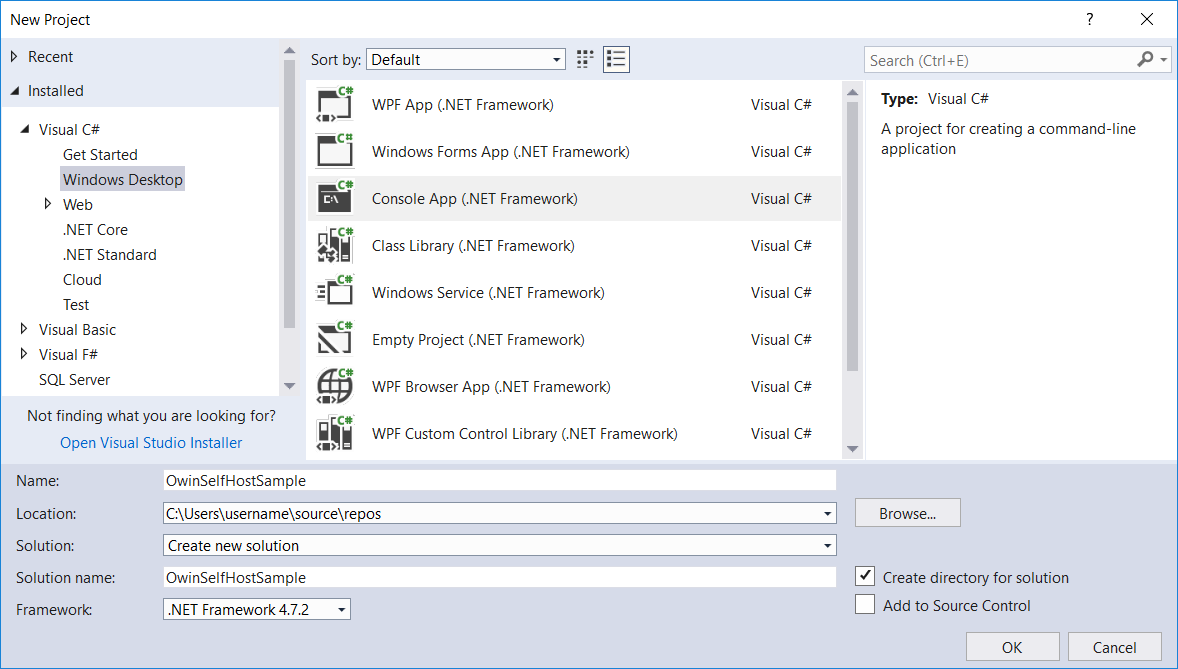
Yes, Web API can be self-hosted. Use ASP. NET Core or similar frameworks to host it on your server. Ensure proper configuration and security measures for optimal performance. Self-hosting provides flexibility and control over your API infrastructure, making it a viable option for many developers.
Conclusion
Hosting your Web API in the cloud simplifies the process. It enhances scalability and reliability. Users can access the API from anywhere, anytime. Cloud platforms offer various tools for management. Security features keep your data safe. Cost-effective options suit different budgets.
Start small, then scale as needed. Experiment with different configurations. Monitor performance and adjust settings. Cloud hosting offers flexibility and convenience. It’s a practical choice for modern applications. Embrace the cloud and make your API accessible to all.


