
Are you diving into the world of WordPress and wondering what a “Single Post Page” is all about? You’re in the right place!
Imagine having a platform where you can showcase each of your blog posts in its own unique space, allowing readers to focus solely on your content without distractions. This is exactly what a Single Post Page does in WordPress. It’s the heart of your blog, the dedicated stage for each post you publish.
Understanding its role can significantly enhance your blog’s user experience and SEO performance. Stick with us, and we’ll uncover how this simple yet powerful feature can transform your blogging journey and captivate your audience. Ready to explore the hidden potential of your WordPress site? Let’s dive in!
Single Post Page Basics
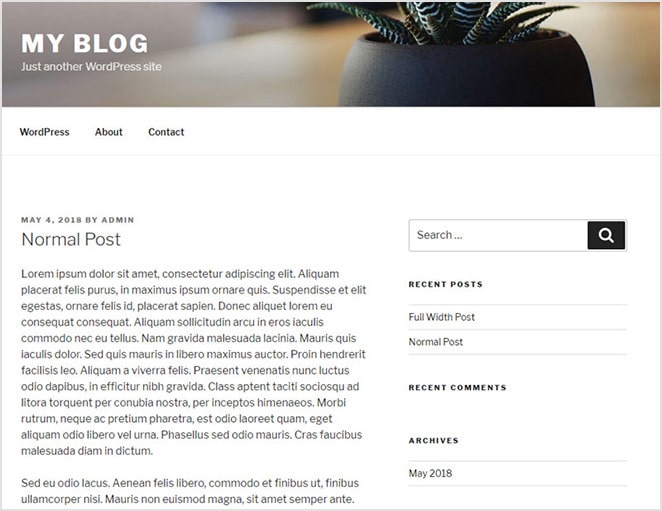
A Single Post Page shows one blog post. It focuses on a single topic. Readers can see all post details here. This includes text, images, and comments. Every blog post has its own single post page. It helps readers focus on one post at a time.
Single Post Pages are very important for bloggers. They help with user engagement. Readers spend more time on these pages. This improves their reading experience. Also, they are great for SEO. Search engines like these pages. They index them well. This means more people find your blog. It helps in growing your blog’s audience.
Credit: wpengine.com
Components Of A Single Post Page
Each post has a title. The title tells what the post is about. Under the title, the main content appears. This is the heart of the post. It can be text, images, or videos. This is where readers get information. Keep it clear and simple.
A featured image is like a cover photo. It shows at the top of the post. This image catches the eye. It helps tell the story. A good image can draw readers in. Choose one that matches the post well.
Metadata gives more details about the post. It includes the author’s name. You also see the date it was published. Sometimes, the category or tags are shown. This helps readers find related posts. Metadata is important for organizing content.
The comments section is where readers can talk. They share thoughts about the post. This part is interactive. It lets readers engage with the content. Authors can reply to comments. This makes the post more engaging. It’s a place for discussion.
Customization Options
Discover the flexibility of a Single Post Page in WordPress, where customization options abound. Tailor the look and feel to match your website’s unique style and needs effortlessly.
Theme Settings
WordPress themes allow changes to single post pages. You can adjust the font size, colors, and layout. Some themes provide built-in customization tools. These tools make it easy to change styles. Always choose a theme that fits your needs. Some themes offer more options than others. Explore various themes for the best results.
Plugins For Enhancement
Plugins add extra features to single post pages. They can improve design and functionality. Popular plugins offer SEO tools, social sharing buttons, and more. Always check plugin ratings before installing. Some plugins may slow your site. Choose plugins that are lightweight and efficient.
Custom Css And Layouts
Custom CSS lets you style single post pages your way. You can change margins, padding, and borders. This allows for unique designs. Many themes support custom CSS. Always test changes on different devices. Make sure your layout looks good everywhere.
Seo Considerations
Good metadata helps search engines. Write a short and clear title. Add a description with key words. This helps people find your page. Use keywords that fit your post.
Fast pages keep visitors happy. Use small images to make pages load quick. Limit plugins on your site. They slow down the page. A fast page ranks better in search results.
Easy words are best. Use short sentences and simple words. Break text into small paragraphs. This helps people read easily. Use headings to guide them through your post.
Common Challenges
Creating a single post page in WordPress poses challenges. Customizing layouts can be tricky for beginners. Ensuring consistent design and functionality across devices requires attention to detail.
Design Consistency
Single post pages often struggle with keeping design consistent. Each post might look different. This can confuse visitors. They like familiar and easy designs. It is crucial to use the same fonts, colors, and layout. This helps in maintaining a cohesive look.
Content Duplication Issues
Content duplication can occur easily. Sometimes posts have similar content. This can hurt your site’s ranking. Search engines dislike duplicate content. Use tools to check for duplicated text. Ensure each post is unique. This boosts your site’s reputation.
Managing Comments And Spam
Handling comments can be tough. Some comments are spam. They can clutter the site. Use plugins to filter these. This helps keep conversations clean. Only allow genuine comments. This keeps the discussion relevant and engaging.

Credit: crocoblock.com
Best Practices
Keep readers interested with clear and simple words. Use short sentences. Tell a story or share a fun fact. Add images to make the page more lively. Use headings to guide readers. Make sure each section is easy to understand. Ask questions to make readers think.
A single post page must work on all devices. Phones, tablets, and computers. Use flexible layouts. Images should fit any screen size. Text should be readable without zooming. Buttons should be easy to tap. Check the page on different devices. Make sure it looks good everywhere.
Everyone should use your page easily. Add alt text to images. Use high contrast colors. Ensure the text is big enough. Make sure links are clear. Add subtitles to videos. Use headings in the right order. Screen readers should understand your page well.
Future Trends
Gutenberg is the new way to edit posts in WordPress. It uses blocks to make writing easy. Each block is like a puzzle piece. You can move, add, or delete them. This makes editing fun. Kids can do it too. It is simple and neat.
WordPress works well with other platforms. Like Facebook and Twitter. You can share your post easily. It only takes a few clicks. This helps you reach more people. It is like magic. Everyone can see your post.
AI makes your page smart. It helps show the right post to each reader. This is called personalization. It is like a special gift. The page knows what you like. It shows you more of that. Reading becomes fun and special.

Credit: www.youtube.com
Frequently Asked Questions
What Is A Single Post Page?
A single post page in WordPress displays individual blog posts. It includes the post content, author details, and comments section. This page is crucial for SEO as it allows for detailed optimization. Customizing this page enhances user engagement and improves the overall user experience on your website.
How Do You Customize A Single Post Page?
To customize a single post page, use WordPress themes and plugins. Themes offer layout options, while plugins add functionality. Modify the template files to change the appearance. Use CSS for styling adjustments. Always preview changes to ensure they enhance user experience and maintain SEO standards.
Why Is A Single Post Page Important?
A single post page is vital for engaging readers with in-depth content. It allows for targeted SEO optimization, improving search engine rankings. By providing detailed information and user interaction options, it enhances user experience, encouraging longer site visits and increased content sharing on social media platforms.
Can You Optimize A Single Post Page For Seo?
Yes, you can optimize a single post page for SEO. Use relevant keywords in titles and content. Optimize images with alt text and compress for faster loading. Ensure the page is mobile-friendly and has a user-friendly URL. Internal linking further boosts SEO by enhancing navigation and site structure.
Conclusion
A single post page in WordPress is crucial. It displays individual posts. This enhances user experience by focusing on one article. Readers can engage more deeply with your content. It also supports SEO by targeting specific keywords. Customizing single post pages boosts your site’s appeal.
This customization can increase reader engagement and retention. Understanding its importance aids in better site design. Your WordPress site becomes more effective. This leads to improved user satisfaction and search ranking. Embrace the single post page to enhance your WordPress journey.
It’s a small change with big benefits.


