
Have you ever wondered how to host your web application successfully? You’re not alone.
Many developers and entrepreneurs face this challenge, eager to get their projects online but unsure where to start. Hosting your web application isn’t just about choosing a server; it’s about ensuring security, reliability, and performance. Imagine the satisfaction of seeing your application run smoothly, reaching users worldwide without a hitch.
You’ll discover the essential steps to host your web application effectively, so you can focus on what you do best—creating and innovating. Get ready to unlock the secrets to seamless web hosting and watch your application thrive.
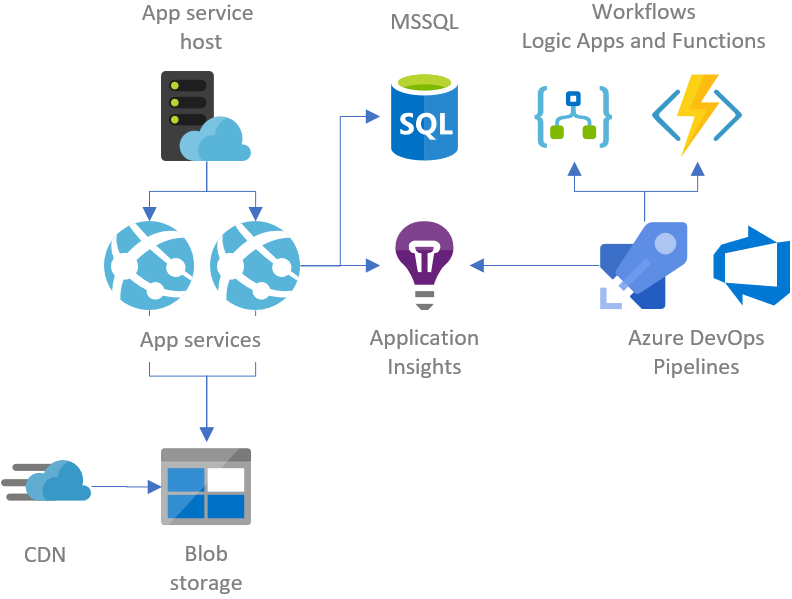
Credit: gunnarpeipman.com
Choosing A Hosting Platform
Shared hosting is cheap and easy. Many sites share one server. It’s good for small websites. You don’t need much space. You get basic features. But, if one site gets busy, it affects others. It’s not good for big sites.
VPS hosting gives you more control. It’s faster and more stable than shared hosting. You get a part of a server. You can install software. You can customize settings. It’s good for medium-sized websites. It costs more than shared hosting.
A dedicated server is all yours. No sharing with others. You get full control. You can handle more traffic. Great for large sites. It is more expensive. You need technical knowledge. You manage everything yourself.
Cloud hosting is flexible. You use many servers in the cloud. If one fails, others keep your site running. It’s good for sites with changing traffic. You pay for what you use. It can be costly. But you get reliability and scalability.
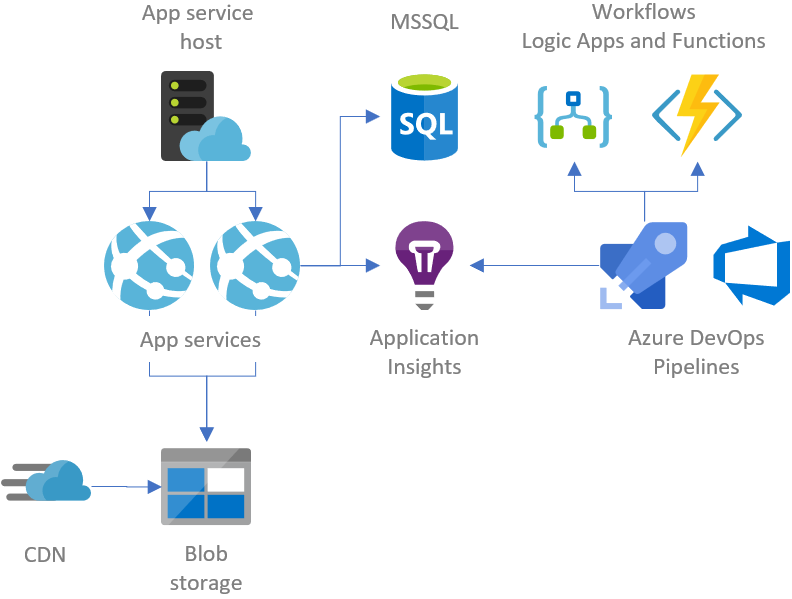
Credit: gunnarpeipman.com
Domain Name Registration
A good domain name is short and easy to remember. It helps people find your website. Choose a name that tells what your site is about. Try to make it unique. Avoid numbers and hyphens. They can make it hard to remember. Check if your name is available. Many names are already taken.
A domain registrar is a company where you buy your domain name. Some popular registrars are GoDaddy, Namecheap, and Google Domains. They help you register your domain. Prices can vary, so compare before buying. Make sure the registrar is trustworthy. Read reviews to know their reputation.
After buying a domain, you need to connect it to your hosting. Your hosting provider will give you two nameservers. Go to your domain registrar’s site. Enter the nameservers there. This links your domain to your hosting. It may take a few hours to update. Once done, your website will be live.
Setting Up The Server
Choosing the right server configuration is key. Your server must handle many users. It should also run smoothly. Start with a basic setup. Upgrade as your needs grow. Keep your software updated. This keeps your server fast and secure.
There are many operating systems to choose from. Linux is popular for servers. It’s reliable and free. Windows is another option. It’s easier for some people to use. Choose the one that fits your needs. Both can host web applications well.
Security is very important. Always use strong passwords. Update your server regularly. Install a firewall to block threats. Use SSL certificates for data safety. They keep user data safe. Back up your data often. This helps in case of problems.
Deploying The Web Application
Uploading files is a key step in deployment. Use a reliable FTP client like FileZilla. It helps move files to the server. Connect to the server using your credentials. Drag and drop files to the server folder. Ensure all files are uploaded completely.
Set up the database for your app. Access the database management tool like phpMyAdmin. Create a new database and user. Assign permissions to the user. Import the database schema using SQL files. Check the connection settings in the app.
Environment variables hold important settings. These include API keys and database passwords. Create a .env file in the app folder. Store all sensitive information here. Ensure the .env file is not publicly accessible. This keeps your app secure.
Ssl Certificate Installation
SSL makes web connections secure. It protects sensitive data like credit card info. Google prefers sites with SSL. They rank higher in search results. Users trust websites more with SSL. It keeps information private and safe.
SSL certificates can be purchased online. Many providers offer them. Some are free; others cost money. Choose the right type for your site. Domain-validated is easiest. Extended-validation gives more security. You need to verify your ownership.
After getting an SSL, it’s time to set it up. First, install the certificate on your server. Most hosting providers have guides. Follow their steps closely. Check settings for errors. Ensure the certificate is active and working.
Testing The Deployment
Check if all features are working. Click on buttons. Fill out forms. Make sure everything responds correctly. Look for errors. They should not appear. Use different devices. Test on phones and tablets. Ensure the app looks good on all screens.
Measure how fast the app loads. Use tools to check speed. Apps should load in a few seconds. Try opening many pages quickly. The app should not slow down. Test with many users at once. It must handle the load without issues.
Protect the app from hackers. Use strong passwords. Check for vulnerabilities. Test login and logout functions. Ensure data is safe. Encrypt sensitive information. Keep user data private. Always update security measures.
Monitoring And Maintenance
Web application hosting requires consistent monitoring and maintenance to ensure smooth performance. Regular updates and security checks prevent disruptions.
Regular Updates
Keeping your web application updated is key. Updates can fix bugs and enhance security. Always check for new software versions. Apply updates as soon as possible. This helps in protecting your data from hackers. Regular updates also improve performance. They make your app run smoothly. Consistent updates ensure a great user experience.
Performance Monitoring Tools
Monitoring tools help track the app’s health. These tools show how your app is performing. They alert you if something goes wrong. Popular tools include New Relic and Datadog. They help find and fix issues quickly. Monitoring ensures your app is always fast. This keeps users happy and engaged.
Backup Strategies
Backups protect your data. Always keep a copy of important files. Use cloud storage for extra safety. Schedule backups regularly. Daily or weekly backups work best. Test your backups often. This ensures they work when needed. Backups prevent data loss and downtime. They are a safety net for your app.

Credit: www.programonaut.com
Troubleshooting Common Issues
Servers can stop working. This is called downtime. Downtime affects web apps. Check the server status. Use monitoring tools. Restart the server if needed. Review server logs. Look for error messages. Contact support if problems continue.
Sometimes databases don’t connect. This can cause issues. Verify database credentials. Check username and password. Ensure the database is running. Review firewall settings. Firewalls may block connections. Use ping tools. Check if the database is reachable.
Security breaches can be serious. Update software regularly. This helps protect against threats. Use strong passwords. Change them often. Monitor network activity. Look for suspicious behavior. Enable firewalls. Protect your system from attacks.
Frequently Asked Questions
How To Host Your Own Web Application?
Choose a reliable hosting provider, register a domain, and select a suitable hosting plan. Upload your web application files using FTP or a control panel. Configure the necessary settings, such as databases and security. Test your application to ensure it runs smoothly and make it live for users.
How Is A Web Application Hosted?
Host web applications on servers using platforms like AWS, Google Cloud, or Heroku. Select the right hosting service, configure server settings, and deploy your application files. Ensure your server supports the application’s tech stack for seamless integration and functionality. Optimize settings for performance and security.
Where Can I Host My Web Application?
You can host your web application on platforms like AWS, Google Cloud, Azure, or Heroku. These services offer scalable solutions, reliable uptime, and easy integration. Choose based on your app’s specific needs, budget, and technical requirements. Always ensure the platform supports your preferred programming language and frameworks.
How To Host The Application?
To host an application, select a reliable hosting provider. Choose a hosting plan that suits your needs. Upload your application files via FTP or a control panel. Configure DNS settings if necessary, and ensure your application is secure and optimized for performance.
Regularly update and maintain your hosting environment.
Conclusion
Hosting a web application can seem challenging. But it’s manageable with the right steps. Start by choosing a reliable hosting provider. Then, set up your server environment carefully. Ensure security measures are in place to protect your data. Regularly update your application to keep it running smoothly.
Don’t forget to back up your data often. Monitoring performance helps avoid issues. Follow these simple guidelines, and your web application will thrive. Enjoy sharing your creation with the world!


