
Imagine having the power to transform your WordPress site into a visually stunning experience that captivates every visitor. That’s exactly what Maxslider WordPress can do for you.
If you’ve been searching for a tool that combines beauty and functionality, you’ve just hit the jackpot. Maxslider is not just any slider plugin; it’s your ticket to creating mesmerizing image galleries, engaging presentations, and dynamic sliders with ease. But what exactly is Maxslider WordPress, and why should it be your go-to choice for enhancing your site’s appeal?
Dive into this article to discover how Maxslider can revolutionize your website and elevate your online presence. Your site deserves to shine, and you’re about to find out how to make that happen.
Maxslider WordPress Plugin
The Maxslider plugin helps to make beautiful slideshows. It is easy to use and has many templates. Users can add text, images, and videos. The plugin is responsive, so slides look good on all devices. You can also add cool effects and transitions. It supports touch and swipe, too.
Maxslider offers many benefits for WordPress users. It makes websites look more professional. It is simple to install and set up. You do not need to know coding. The plugin is also SEO-friendly. It helps improve search rankings. Users can also customize slides to fit their brand.
Maxslider works well with most WordPress themes. It fits nicely into existing designs. There is no need for extra changes. It is also compatible with popular page builders. This makes it flexible for different needs. Users can integrate it easily with other plugins.
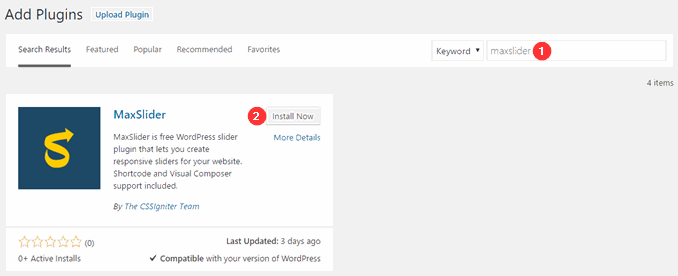
Credit: www.cssigniter.com
Installation Process
Visit the official WordPress plugin page. Search for Maxslider. Click on the download button. The file will save to your computer. You need this file for installation.
Open your WordPress dashboard. Look for the Plugins section. Click on ‘Add New’. Upload the downloaded Maxslider file. Click on ‘Install Now’. After installation, activate the plugin.
Extract the downloaded file. Use an FTP client to access your server. Upload the Maxslider folder to wp-content/plugins directory. Go to your WordPress dashboard. Find the Plugins section. Locate Maxslider. Click ‘Activate’ to finish.
Setting Up Maxslider
First, open the Maxslider plugin. Click on “Add New Slider”. Name your slider. Choose the slider type you like. Press “Create” to make it. The slider is ready for changes.
Find the “Settings” tab in your slider. Here, adjust the width and height. Set the transition effects. Pick the autoplay option if you want. Save your settings. This makes your slider unique.
Go to the “Slides” section. Click on “Add Slide”. Choose an image or video. Add text to explain the slide. Arrange slides in the order you like. Once done, save your work. Your slider is now ready to use.
Design And Customization
Choosing Slider Templates is fun and easy. Maxslider offers many options. Each template is unique and colorful. Pick one that fits your style. Change colors and fonts to match your site. This makes your website look special.
Utilizing Custom CSS lets you add personal touches. CSS changes how your slider appears. You can make it bigger or smaller. Add borders or shadows. The slider can even change colors when you hover. These tweaks make your site stand out.
Responsive Design Options ensure your slider works on all devices. It looks great on phones, tablets, and computers. The slider adjusts to the screen size. This keeps images clear and text readable. Everyone can enjoy your site. It’s a smooth experience for visitors.
Integrating Maxslider
Maxslider helps you add beautiful sliders to your site. These sliders make your pages look nice. First, create a slider in Maxslider. Next, go to your post or page. You will see an option to insert a slider. Choose your slider from the list. Now, your page has a slider. It shows your best images. This makes your site more engaging.
Shortcodes are small bits of text. They help you add sliders easily. Copy the shortcode from Maxslider. Then, paste it in your post or page. Your slider will appear there. This saves time. No need to edit code. Shortcodes are easy to use.
Many websites use page builders. Maxslider works with them too. Builders like Elementor and Beaver Builder support Maxslider. Add a slider block in your builder. Choose your slider. Drag and drop it into place. It looks great on any page. This makes creating pages fun and easy.
Performance Optimization
Maxslider makes websites fast. It uses smart ways to load. This helps pages appear quickly. Users do not wait long. Fast load times make visitors happy. They stay longer on the site.
Lazy loading is a clever tool. Images load only when needed. This saves time and data. It improves user experience. Pages feel light and fast. Visitors enjoy a smooth browsing time.
Images can be big and slow. Maxslider optimizes these images. It makes them smaller but keeps quality. Sliders then load faster. This helps the whole site be quick. A fast site is a happy site.
Troubleshooting Common Issues
Sometimes, the slider does not show on the page. This can be frustrating. First, check if the slider is activated. Make sure you added it to the right page. Also, ensure the images are uploaded and not missing. These steps can help fix the issue.
Some themes or plugins might cause problems. This means the slider won’t work. Try disabling other plugins one by one. Check if the slider works after each step. This can help find the cause. Always use updated versions of plugins and themes.
Error messages can be confusing. Read the message carefully. It can give clues to fix it. Google the error if unsure. Many people have faced similar problems. Their solutions can help you too. Follow steps carefully to fix the error.
Credit: www.cssigniter.com
Advanced Features
Maxslider lets you add fun animations to your slides. Make each slide come alive. It’s easy to do. Pick from many styles. Try fades or slides. Each animation catches the eye. Your website looks cool and modern. Visitors will enjoy it more. Keep them engaged longer.
You can use custom JavaScript with Maxslider. Add special features to your slides. This tool makes it simple. You don’t need to be an expert. Just a few lines of code can do wonders. Make your site unique and fun. Impress your visitors with creative effects.
Maxslider helps boost user interaction. Users can click and explore. Adding buttons or links is easy. Guide them through your content. Make it more engaging and interactive. This keeps them on your site longer. A happy visitor is more likely to return.
Maxslider Alternatives
Maxslider is a WordPress plugin that helps users create attractive image sliders for websites. Some alternatives include Smart Slider 3 and MetaSlider, offering similar features with various templates and customization options. These alternatives provide user-friendly interfaces for seamless slider creation.
Comparing Other Slider Plugins
Many slider plugins are available for WordPress. Some are easy to use. Others might need more skills. Smart Slider 3 is a popular choice. It offers many features. It’s user-friendly and flexible. Revolution Slider provides high customization. It can create stunning visual effects. But it may seem complicated for beginners. MetaSlider is simple and efficient. It might lack advanced features. Each plugin has unique strengths. Choosing the right one depends on your needs.
Pros And Cons Of Alternatives
| Plugin | Pros | Cons |
|---|---|---|
| Smart Slider 3 | Easy to use, flexible | Limited advanced effects |
| Revolution Slider | Highly customizable | Complex for beginners |
| MetaSlider | Simple and efficient | Fewer advanced features |
Best Practices
Regular updates keep the plugin working well. Check for updates often. Updating helps fix bugs and improves performance. Make sure to backup your site before updating. This keeps your data safe.
Security is important for your sliders. Use strong passwords to protect them. Limit access to only trusted users. Always keep your WordPress and plugins updated. This reduces security risks.
Accessibility helps everyone use your sliders. Use clear labels for buttons. Make sure images have alt text. This helps people with disabilities. Test your sliders on different devices. Ensure they work well everywhere.

Credit: www.youtube.com
Frequently Asked Questions
What Is Maxslider WordPress Used For?
Maxslider WordPress is a plugin designed to create responsive sliders. It helps enhance website visuals and improve user engagement. You can easily customize sliders, add images, text, and links to fit your site’s theme. It’s perfect for showcasing products, testimonials, or featured content.
How Do I Install Maxslider On WordPress?
To install Maxslider, go to your WordPress dashboard. Click on “Plugins” then “Add New. ” Search for “Maxslider” and click “Install Now. ” After installation, activate the plugin. You can access it via the “Maxslider” menu to start creating sliders.
Can Maxslider Improve Website Load Speed?
Maxslider is optimized for performance, ensuring minimal impact on website speed. It uses efficient coding to deliver fast-loading sliders. You can further optimize images before uploading. Proper slider settings can enhance user experience without compromising on speed.
Is Maxslider Compatible With All WordPress Themes?
Maxslider is designed to be compatible with most WordPress themes. It integrates seamlessly and adapts to different layouts. However, some themes may require minor adjustments. Always check theme documentation and plugin support for guidance on compatibility issues.
Conclusion
Maxslider WordPress simplifies creating sliders for your website. Easy and efficient. It enhances your site’s visual appeal without complex coding. Users find its interface friendly and straightforward. A valuable tool for bloggers and businesses alike. Customization options make it versatile for different needs.
It supports responsive designs, ensuring mobile-friendliness. Maxslider helps engage your audience with dynamic content. Regular updates keep it fresh and reliable. A practical choice for anyone looking to boost website visuals. Great for those seeking to enhance their site’s user experience.
Maxslider WordPress is a solid addition to your web toolkit.


