
Have you ever wondered what the table prefix in WordPress is all about? You’re not alone.
Many WordPress users come across this term while setting up their websites but aren’t quite sure what it does or why it’s important. Understanding the table prefix can be a game-changer for your website’s security and performance. Imagine if a simple tweak could significantly enhance your site’s defenses against hackers.
Intrigued? That’s exactly what a well-chosen table prefix can do for you. Dive into this article to uncover how this tiny detail plays a pivotal role in safeguarding your website and streamlining its database operations. Let’s simplify the complexity and show you how a small change can yield big results. Read on to discover the secrets behind WordPress table prefixes and why they matter to your online presence.
Table Prefix Basics
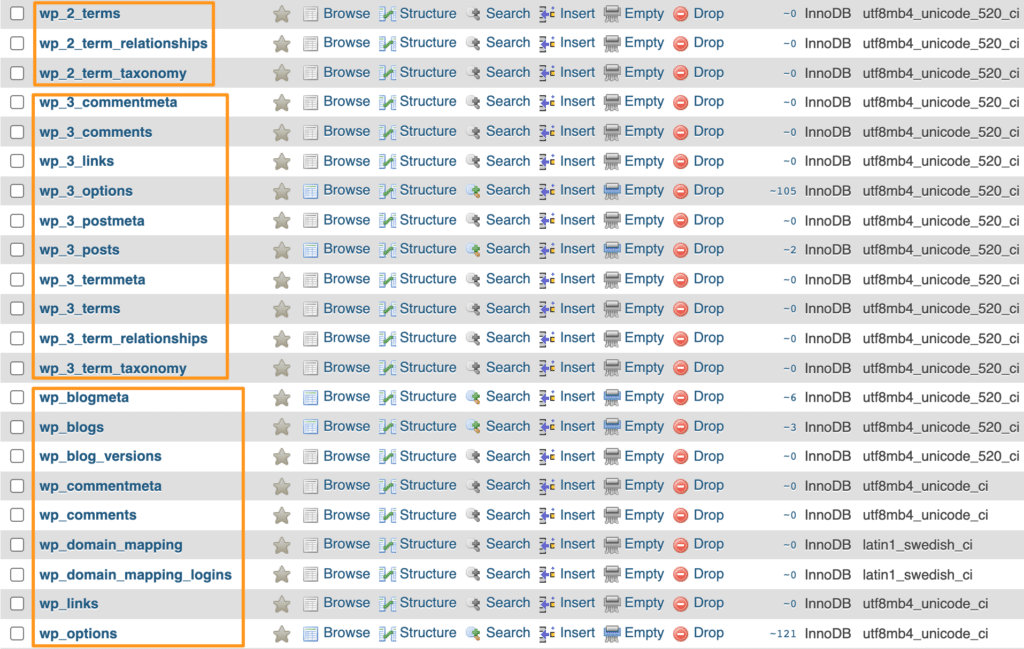
WordPress saves data in a database. Every part of the site has data. Each part has its own table. These tables have names. The table prefix is part of these names. This prefix helps keep tables unique. It helps avoid conflicts with other tables.
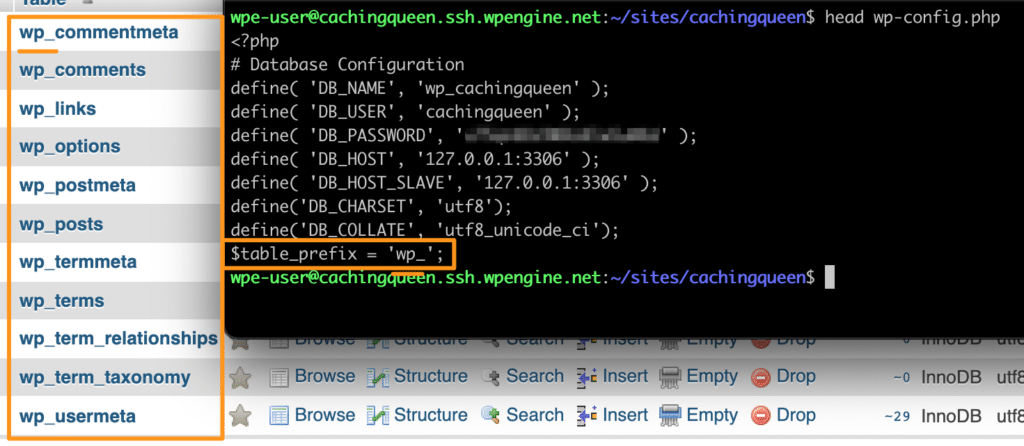
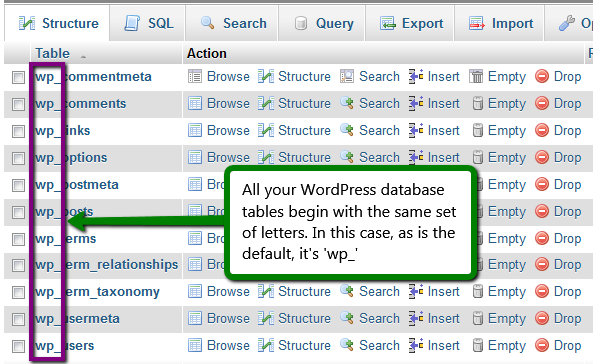
The default prefix is “wp_”. You can change this prefix. Changing it can make your site more secure. It stops bad people from guessing table names. So, changing the prefix is a good idea. It helps keep your site safe.
Credit: wpengine.com
Purpose Of Table Prefix
The table prefix in WordPress is like a label. It helps identify tables in the database. By default, the prefix is “wp_”, but you can change it. Changing it can boost security. Hackers often target tables with the default prefix. A different prefix makes it harder for them.
Another purpose of the prefix is to allow multiple installations. You can have several WordPress sites on one database. Each site will have its own unique prefix. This keeps their data separate. It helps in organizing and managing the database easily.
Default Prefix In WordPress
WordPress uses a default prefix for its database tables. This prefix is often “wp_”. It helps organize and identify tables. It also enhances security. Why? Because hackers target common prefixes. Changing the prefix makes it harder for them. But, it is important to change it carefully. A wrong change can break the site. Many plugins can help with changing the prefix. They make the process safer and easier. Always back up your database first. Then you can change the prefix safely. This keeps your site running smoothly.
Credit: wpengine.com
Security Benefits
Table prefixes can help keep your website safe. They add an extra layer of protection. Hackers often guess default table names. Changing the prefix makes it harder for them. SQL injections are less likely to happen. This keeps your data safe and sound.
Many websites use the same table prefix. This makes them easy targets. A unique prefix makes it hard for hackers. They can’t easily find your tables. This reduces the risk of attacks. Your site stays more secure. Always choose a prefix that is not common.
Customization Of Table Prefix
In WordPress, the table prefix helps organize your database by identifying each table uniquely. This customization enhances security and prevents conflicts by keeping each site’s data separate. Adjusting the prefix can deter SQL injection attacks, making your site safer and more efficient.
Changing During Installation
WordPress lets you change the table prefix during setup. This prefix is important for security. It helps protect your site from hackers. During installation, look for the field labeled Table Prefix. Change the default prefix to something unique. This makes it harder for bad people to guess your database name. Always write down your new prefix. You might need it later. It should be simple yet unique. This step is easy and boosts your site’s safety. Remember, a strong prefix helps keep your site safe.
Modifying An Existing Installation
Already installed WordPress? You can still change the table prefix. First, open the wp-config.php file. Look for $table_prefix and change it. Next, change the prefix in your database using a tool like phpMyAdmin. It’s important to back up your database. This prevents data loss. Rename all table names to match your new prefix. Be careful, as errors can break your site. With some steps, your site can be more secure. Changing prefixes is not hard. It just takes time and care.
Performance Implications
The table prefix in WordPress plays a key role. It affects how the database works. A unique prefix for each site ensures better security. It also helps in organizing the database tables. This can improve performance. But, a long or complex prefix might slow things down. It takes more time to search through the database. This might affect the site’s speed. A simple prefix is a good choice. It keeps things smooth and efficient. Always remember, a balanced approach works best. A good prefix helps your site run better. It keeps things organized and fast.
Impact On Plugins And Themes
The table prefix in WordPress affects plugins and themes. It helps in identifying and organizing database tables. Plugins rely on these tables for storing data. A unique table prefix can prevent conflicts. Themes also interact with these tables. They access content like posts and comments. A custom prefix offers security benefits. Hackers find it harder to access the database. Changing the prefix can be tricky. Some plugins may not work well with custom prefixes. Backup your database before making changes. Always check plugin compatibility. A wrong prefix can break your site. Regular updates help maintain functionality. Developers use prefixes for better code management.
Credit: www.icontrolwp.com
Troubleshooting Common Issues
Table prefixes in WordPress help organize and distinguish database tables. They enhance security by making it harder for hackers to guess table names. Customizing prefixes can prevent SQL injection attacks, offering an added layer of protection.
Database Connection Errors
Database errors can be confusing. They often happen due to incorrect table prefix settings. Check your wp-config.php file. Ensure the table prefix matches your database. Small errors in prefix can cause big problems. Double-check the spelling and punctuation. A missing underscore or typo can lead to errors.
Plugin Compatibility Problems
Table prefix changes may affect plugins. Some plugins rely on specific prefixes. They might not work if prefixes change. Always check plugin documentation. Ensure compatibility with your current prefix. Update plugins regularly to avoid issues. Conflicts can arise if plugins use hardcoded prefixes. Test your site after installing new plugins. Look for any errors or warnings. Fix them quickly to maintain site health.
Best Practices For Table Prefix
Always choose a unique prefix for your WordPress tables. This makes it harder for hackers to guess table names. A unique prefix improves your site’s security. Never use the default “wp_” prefix. Create something specific to your site. For example, use “blog123_”. This adds an extra layer of security.
Use a prefix that’s easy to remember. It should be simple and not too long. You might use a combination of letters and numbers. Avoid using special characters. This keeps your database clean and organized. A simple prefix also helps when you need to troubleshoot.
Always back up your database before changing prefixes. A backup prevents data loss. Use a plugin to help with the change. This ensures a smooth update. Double-check everything after the change. Make sure your site runs well. A mistake can break your site.
Frequently Asked Questions
What Is A Table Prefix In WordPress?
A table prefix is a unique identifier added to database table names in WordPress. It helps differentiate tables within a single database, providing security against SQL injection attacks. By customizing the prefix, you enhance your site’s security and prevent hackers from easily accessing your database structure.
Why Should I Change The Table Prefix?
Changing the table prefix improves security by making it harder for hackers to guess table names. The default prefix “wp_” is widely known, making sites more vulnerable. Customizing the prefix adds an extra layer of protection, reducing the risk of SQL injection attacks and unauthorized data access.
How Do I Change The Table Prefix In WordPress?
To change the table prefix, edit the wp-config. php file in your WordPress root directory. Locate the line containing “$table_prefix” and modify the prefix value. Ensure all existing database tables are updated with the new prefix to avoid errors. Always back up your database before making changes.
Can A Table Prefix Affect Site Performance?
A table prefix does not directly affect site performance. It primarily serves as a security measure. However, incorrect implementation during prefix changes can cause database errors. Properly configuring the prefix ensures database integrity and prevents issues, thus maintaining optimal site performance.
Conclusion
Understanding table prefixes in WordPress boosts your site’s security. They help prevent SQL injection attacks. Changing the default prefix makes your database safer. It’s a simple task with big benefits. Always backup before making changes. Choose a unique prefix for better protection.
This small change adds a layer of defense. Your site stays secure and runs smoothly. Regularly update WordPress for enhanced security. Keep learning and exploring WordPress features. The more you know, the safer your site becomes. Remember, small steps make a big difference in site management.


