
Have you ever stumbled upon a snippet of WordPress code and wondered what it all means? Maybe you’re tweaking your website, trying to add a new feature, or simply curious about how things work behind the scenes.
You’re not alone. Deciphering code can feel like unraveling a mystery. It’s a challenge that sparks curiosity and promises the thrill of discovery. But don’t worry, you don’t need to be a tech wizard to understand it. This guide is here to help you unlock the secrets hidden in your WordPress code.
By the end, you’ll not only know what that code means but also how it can empower you to customize your site like a pro. Are you ready to dive in and demystify WordPress code? Let’s get started!

Credit: www.namehero.com
Basics Of WordPress Code
WordPress code helps make websites. PHP is the main language. It works with HTML to show pages. CSS styles the pages. JavaScript adds action. Each part of code has a role. Themes change how sites look. Plugins add features like contact forms. Code can be simple or complex. Understanding code helps fix errors.
WordPress uses templates. Templates help display content. Functions are bits of code that do tasks. Functions can be reused. They make coding easy. Loops show posts on a page. Loops are important. Hooks let code add extra features. There are action hooks and filter hooks. They change how WordPress works.
Common Code Snippets
WordPress uses functions to make things work. A common one is the_title(). It shows the post title on your site. Another is the_content(). This shows the main post content. Both are used often.
Hooks are powerful in WordPress. They let you add or change things. add_action() is a popular hook. It lets you add code at a specific time. add_filter() changes data before it is shown. Hooks make your site more flexible.
Template tags display dynamic content. The tag get_header() loads the header. The tag get_footer() loads the footer. These tags help build your site’s layout.
Php In WordPress
PHP is the engine behind WordPress. It helps create dynamic web pages. This means the page changes based on user input. Without PHP, WordPress would be static and boring. It lets WordPress connect to the database. This is where all your data is stored. Data like posts, comments, and user info.
PHP makes WordPress interactive. It allows you to add features. Features like forms, login systems, and more. PHP is a server-side language. This means it runs on the server, not your computer. So, it’s secure and fast.
WordPress uses many PHP functions. These functions make tasks easier. Here are some common ones:
- get_header(): Displays the header of a page.
- the_content(): Shows the main content of a post.
- get_footer(): Adds the footer to the page.
- wp_enqueue_script(): Loads JavaScript files.
- add_action(): Connects functions to WordPress events.
These functions help in building themes and plugins. They are easy to use and understand. Developers use them to make WordPress powerful and flexible.
Html And Css In WordPress
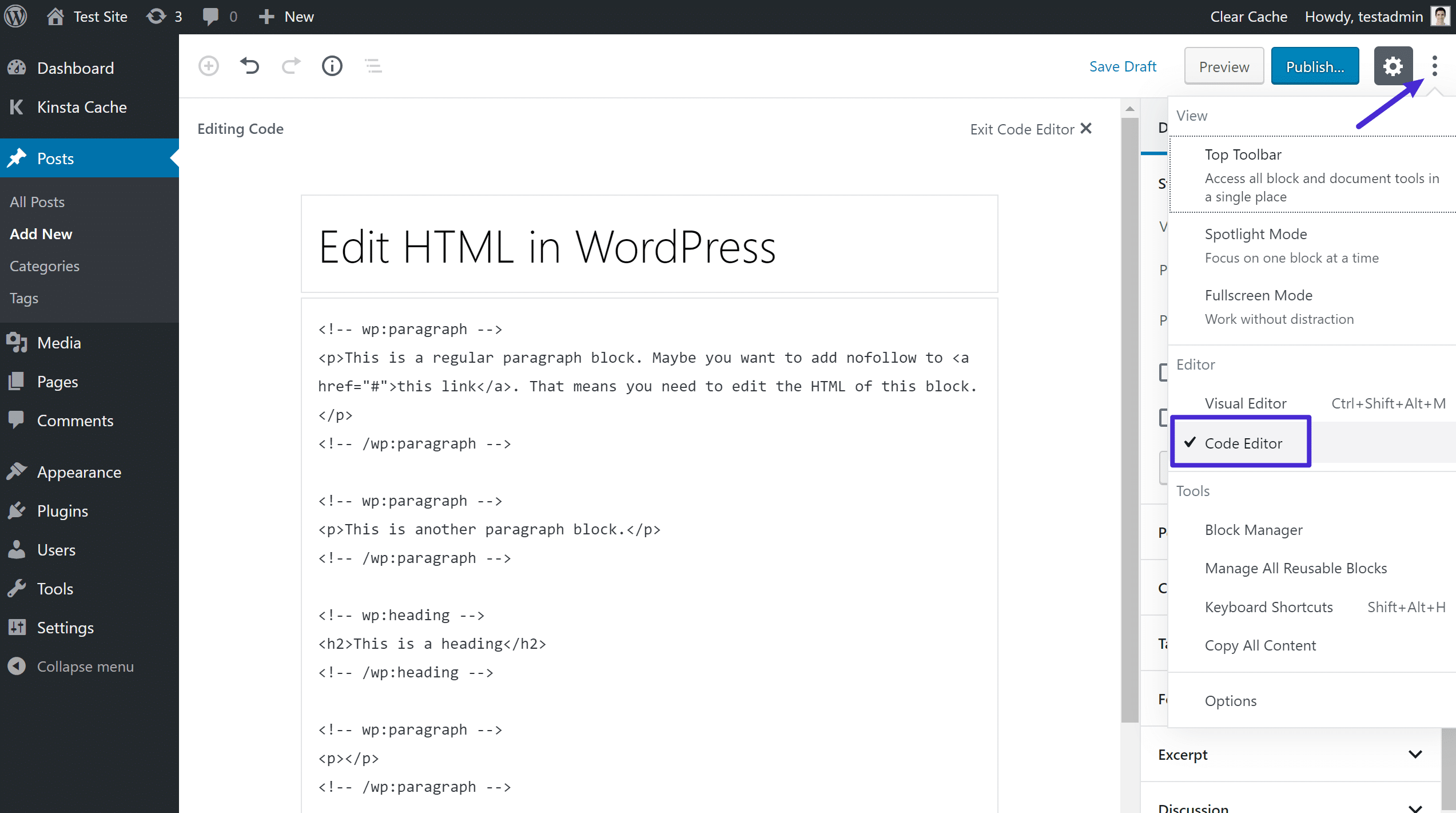
HTML is the structure of your page. It tells the browser what to show. CSS changes how it looks. It adds colors, fonts, and spacing. In WordPress, you can add custom styles. Use the theme’s style sheet or a plugin. Make sure to test your changes. Sometimes, small errors can break your site.
Use simple CSS rules. For example, use color: red; to make text red. Or font-size: 20px; for bigger text. Keep your code clean. It helps others read it easily. WordPress themes often come with built-in styles. They save time but may limit custom changes. Always check theme documentation for details.
Understanding HTML and CSS is important. It helps you control your site’s look. Practice often to get better. Experiment with different styles. Over time, you will learn what works best.
Javascript Usage
JavaScript makes websites fun and interactive. It helps create dynamic buttons and menus. Users can click and see changes. This makes the site feel alive. Animations and effects grab attention. They keep users engaged and interested. JavaScript improves the user experience. Websites become more friendly and useful.
Libraries are like toolboxes for developers. They save time and effort. jQuery is a well-known library. It simplifies many tasks. React is another popular choice. It helps build user interfaces. Angular is great for creating web apps. These libraries offer ready-made solutions. They help developers work faster and better. Using them can enhance a website’s functionality.
Credit: kinsta.com
Understanding WordPress Hooks
Action hooks let you add custom code. They help you change how WordPress works. Use them to add new features. You can make your site unique. Actions do not return a value. They run at specific times. For example, when a post is saved. Place your code inside the hook. It will run when WordPress hits that hook. Action hooks are very useful. They give you more control over your site.
Filter hooks let you change data. They are very handy. Use them to modify text. Or alter numbers. Filters return a value. They pass data through your custom code. They are like a sieve. Change what you need. Leave what you don’t. Filters allow you to refine your content. They help in making changes easy. With filter hooks, you can tweak your site to look better.
Template Tags Explained
Template tags are like shortcuts in WordPress. They help you show dynamic content in your theme. For example, php the_title(); ? displays the post title. Another tag, php the_content(); ?, shows the post content. These tags make your theme flexible and easy to use. You can place them in different parts of your theme files. This way, they display the right content on your site.
Many template tags are commonly used. php the_author(); ? shows the author name. php the_date(); ? displays the publish date. Another useful tag is php the_category(); ?. It shows the post categories. These tags help you add important details to your posts. They make your website look informative and professional.
Credit: www.namecheap.com
Shortcodes Functionality
Shortcodes let you add features quickly. They are like small magic spells. You can make a button, gallery, or form. Simply by using a shortcode. You need to know a bit of PHP. But it’s not hard. To create a shortcode, use the add_shortcode function. This connects your code to the shortcode. Then, place the shortcode in your post. It will show the feature you made.
Embedding content is easy with shortcodes. You can embed videos or maps. All with a simple code. No need to write long scripts. Just use the right shortcode. Like for a YouTube video, use the YouTube shortcode. It will show the video on your page. Shortcodes save time and keep code clean. They are very helpful for beginners.
Debugging WordPress Code
Understanding WordPress code can seem tricky. Each line serves a purpose, like defining functions or styling. Debugging involves finding errors that disrupt your site. Recognizing what each code snippet means helps in maintaining a smooth, functional WordPress experience.
Error Logs
Error logs help find problems in WordPress. They show where the problem is. Check the logs when something breaks. They give clues. Enable them in the wp-config.php file. Set WP_DEBUG to true. This will show errors on your site. Errors can be warnings or notices. Fix them to make your site better. Logs are like a diary for your site. They tell you what went wrong.
Common Debugging Tools
Many tools help debug WordPress. One useful tool is Debug Bar. It adds a menu to your admin bar. This menu shows you queries and errors. Another tool is Query Monitor. It shows database queries and hooks. Both tools are free to use. They help you find problems fast. You can also use PHPStorm for debugging. It works with WordPress well. These tools make fixing code easier.
Frequently Asked Questions
What Does Php Code In WordPress Do?
PHP code in WordPress powers the website’s functionality. It processes data, handles requests, and communicates with databases. PHP scripts are essential for running themes, plugins, and custom features. Understanding PHP helps in customizing and optimizing WordPress sites, enhancing user experience and performance.
How Do I Identify WordPress Code Snippets?
WordPress code snippets are small blocks of PHP, HTML, or CSS. They’re often used to modify themes or plugins. Look for lines starting with `<?php` for PHP or styles within “ tags for CSS. Identifying snippets helps in understanding and customizing WordPress functionality effectively.
Why Is My WordPress Code Not Working?
Your WordPress code may not work due to syntax errors, compatibility issues, or missing dependencies. Double-check for typos, ensure plugins and themes are up-to-date, and verify server requirements. Debugging tools and error logs can help identify specific problems for resolution.
How Can I Safely Edit WordPress Code?
To safely edit WordPress code, use a child theme and backup your site. Utilize a staging environment to test changes before going live. Always document modifications and use a reliable code editor to minimize errors. This approach ensures your site remains stable and functional.
Conclusion
Understanding WordPress code can be challenging. It’s vital for managing your site. Each line of code holds specific instructions. These instructions keep your website functional and secure. Learning the basics helps you troubleshoot issues. It also aids in customizing your site effectively.
Practice and patience are key to mastering these skills. Always backup your site before making changes. This prevents data loss and ensures smooth operations. Remember, coding is a valuable skill. It empowers you to improve and personalize your website. Keep exploring, keep learning.
Your WordPress journey is just beginning.


