
Imagine having the power to host websites, control the flow of information, and even build your own digital empire. Sounds intriguing, right?
Becoming a web host server isn’t just for tech gurus or large corporations anymore. It’s an exciting opportunity that you can grasp, too. If you’ve ever wondered how the internet ticks and want to be a part of that magic, you’re in the right place.
In this guide, you’ll discover exactly how you can step into the role of a web host server. Whether you’re looking to host a personal blog, support a friend’s business site, or start a hosting service of your own, the steps are simpler than you might think. Ready to unlock the potential of the internet? Let’s dive in and explore how you can become a web host server master.
Choosing The Right Server
Dedicated hosting gives you your own server. You get more control. It’s safer and faster. Shared hosting means you share with others. It’s cheaper but slower. Choose based on your needs. Think about security and speed.
Good hardware is important. You need a fast processor. Plenty of RAM helps too. Check the storage space. More space is better. Reliable hardware keeps your site running. Choose wisely.
Linux is popular for servers. It’s free and safe. Many web hosts use Linux. Windows can also be used. It’s easy to manage. Pick the one you know best. Think about your software needs.
Setting Up The Server
Choose the right software for your server. Options include Apache or Nginx. These help your server work properly. Follow the steps to install the software. Read instructions carefully. Ensure all parts are in the right place. This helps avoid problems later. Restart the server after installation. This makes sure everything is working.
Security is important for a server. Set up firewalls to block bad traffic. Use strong passwords for all accounts. Keep your software up-to-date. This helps protect against new threats. Enable SSL/TLS protocols for secure connections. Check settings regularly. Security protocols keep data safe.
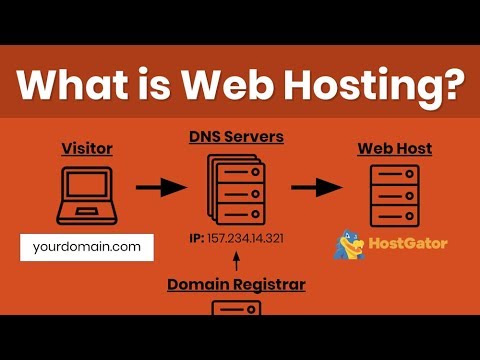
Connect your server to the internet. Use a stable connection. Set up IP addresses correctly. This makes sure others can find your server. Use DNS settings to link domain names. Test the connection. Ensure everything works smoothly. Network connections help people access your site.
Managing Server Resources
Keep a close eye on your server’s performance. Use tools to check speed and uptime. If the server is slow, users may leave. Regular checks help find problems early. Fixing them quickly keeps your site running well.
Make sure your server’s storage is well-managed. Delete files you don’t need. Compress images to save space. Organize your data into folders. This helps in finding files faster. Less clutter means better efficiency.
Prepare for high traffic times. Use load balancing to share the work. More traffic can slow things down. Have a plan to handle sudden spikes. Keep your site fast and reliable for everyone.
Credit: www.youtube.com
Implementing Security Measures
A firewall is like a shield. It protects your server from bad traffic. Setting up a firewall is easy. First, choose a good firewall software. Next, install it on your server. Make sure it is always active. It should block all unwanted access. Check it regularly to ensure it works well.
Software updates are important for security. They fix bugs and improve performance. Always check for new updates. Install them right away. This keeps your server safe. It also helps it run smoothly. Don’t ignore update alerts. They protect your data.
Backups are like a safety net. They save copies of your data. You need to back up data often. Choose a reliable backup method. Use cloud storage or external drives. Set a regular schedule for backups. This way, you won’t lose data if something goes wrong. Always test your backups. Make sure they work correctly.
Providing Customer Support
Helpdesk tools help customers get answers fast. They can ask questions anytime. Live chat is a good tool for quick help. Email support is useful for detailed answers. Ticket systems keep track of customer issues. Make sure to set them up right. This helps you solve problems fast.
Knowledge base is like a library. It has answers to common questions. FAQs help customers find solutions quickly. Guides show how to do things step by step. Articles explain topics in detail. Keep it updated. This helps customers learn on their own.
Technical issues can be tricky. Troubleshooting helps find the cause of problems. Logs show what happened before the issue. Remote support lets you fix things from far away. Regular updates keep the server running well. Be ready to solve issues quickly.
Scaling And Upgrading
Scaling and upgrading are crucial for becoming a web host server. Start by analyzing current server capacity and identifying growth areas. Implementing advanced technologies ensures your server remains efficient and reliable.
Identifying Growth Indicators
Watch for signs of growth on your server. More visitors often mean more server load. Check if your website is slow. Slow speeds can upset users. An increase in traffic is another sign. Monitor your server logs for unusual activity. This tells you when to act.
Upgrading Hardware
Adding more RAM can boost performance. A faster CPU helps with more tasks. Consider upgrading your storage. Switch to SSD for quicker access. Cooling systems are important too. Keep your server from overheating. Regular upgrades maintain efficiency.
Expanding Server Capacity
You can add more servers to handle the load. Use load balancers to share the work. This prevents one server from doing everything. Cloud services are helpful too. They offer more space easily. Adjust server settings for better results.
Legal And Compliance Considerations
Web hosts must know data privacy laws. These laws protect user information. It’s important to know rules for different countries. Laws can vary widely. Hosts should follow rules to avoid penalties. Learning about GDPR and CCPA is essential. These are key regulations. Keeping user data safe is crucial.
Compliance means following rules. Web hosts need to stay updated. Rules change often. Use compliance tools to help. These tools check if rules are met. Regular audits are important. They find any problems. Fix issues quickly to stay compliant. A dedicated team can manage compliance. This team should know the laws well.
Protecting user data is vital. Data should be stored securely. Use strong encryption methods. Limit access to sensitive data. Only authorized personnel can see it. Inform users about data usage. They should know how their data is used. Get consent before using personal data. Regularly update security measures. This keeps data safe from threats.

Credit: www.hostinger.com

Credit: www.hostinger.com
Frequently Asked Questions
How To Make A Web Hosting Server?
To make a web hosting server, first select reliable hardware and install a Linux-based OS. Configure server settings, install necessary software like Apache or Nginx, and set up DNS. Secure the server with firewalls and regular updates. Monitor performance and provide support for users.
Can I Host My Own Web Server?
Yes, you can host your own web server. Ensure you have a reliable internet connection, hardware, and software. Configure your router for port forwarding and maintain security measures. Hosting can be done using Windows, Linux, or macOS. Remember, self-hosting requires technical knowledge and regular maintenance.
Can I Host A Web Server For Free?
Yes, you can host a web server for free using platforms like GitHub Pages, Netlify, or Vercel. These services offer free hosting for static websites. For dynamic websites, free tiers are available on platforms like Heroku or Glitch, but may have limitations on resources and features.
Can I Turn My Pc Into A Web Server?
Yes, you can turn your PC into a web server. Install server software like Apache or Nginx. Configure your network settings to allow external access. Ensure your firewall permits server traffic. Regularly update software for security. This setup is suitable for testing and small-scale hosting.
Conclusion
Becoming a web host server requires patience and dedication. Start with the basics. Understand server types and choose what suits you. Focus on security and backups. They are crucial. Regular updates help keep your server running smoothly. Learn to troubleshoot common server issues.
This skill saves time and stress. Stay informed about the latest hosting trends. Your knowledge will grow over time. Practice makes perfect. Don’t rush the process. With effort, you’ll manage a successful web hosting server. Enjoy your journey into the hosting world.


