
Are you ready to bring your ideas to life and share them with the world? Hosting a web page on WordPress is the perfect way to do it.
Whether you’re starting a blog, showcasing your portfolio, or launching a small business, WordPress offers a user-friendly platform that caters to everyone—from beginners to seasoned developers. By the end of this guide, you’ll have the tools and confidence needed to get your web page up and running smoothly.
Imagine the thrill of seeing your creative vision come to life on the internet, where it can reach millions. Curious about how easy it is? Stick with us, and you’ll discover that hosting a web page on WordPress is not just simple but also incredibly rewarding. Let’s dive in and unlock the potential of your digital presence!
Getting Started With WordPress
First, visit the WordPress website. Click on the “Get Started” button. Fill in your email address. Choose a username and password. Remember these details. You will need them later. After that, click on “Create your account.” You now have a WordPress account. It is easy, right?
Think about your website’s name. It should be simple and clear. Try to make it short. A short name is easy to remember. Use words that tell what your site is about. Check if the name is available. You can use the WordPress domain checker. If it is free, then you can select it. Finally, make sure you like it. You cannot change it later.

Credit: www.crazyegg.com
Selecting The Right Hosting Plan
Choosing the right hosting plan is crucial for hosting a web page on WordPress. Consider your website’s needs, like storage and speed, to ensure optimal performance. Research reliable providers to support your site’s growth and security.
Understanding Hosting Options
Hosting plans come in many types. Shared hosting is often the cheapest. VPS hosting offers more power. Dedicated hosting is the most expensive. Each type has its own features. Choose based on your needs.
Evaluating Costs And Features
Compare prices before you decide. Some hosts offer free domain names. Others provide SSL certificates. Consider the storage space you need. Look at the customer support options. Reliable support can be helpful. Make sure the plan fits your budget. Choose wisely for your needs.
Installing WordPress
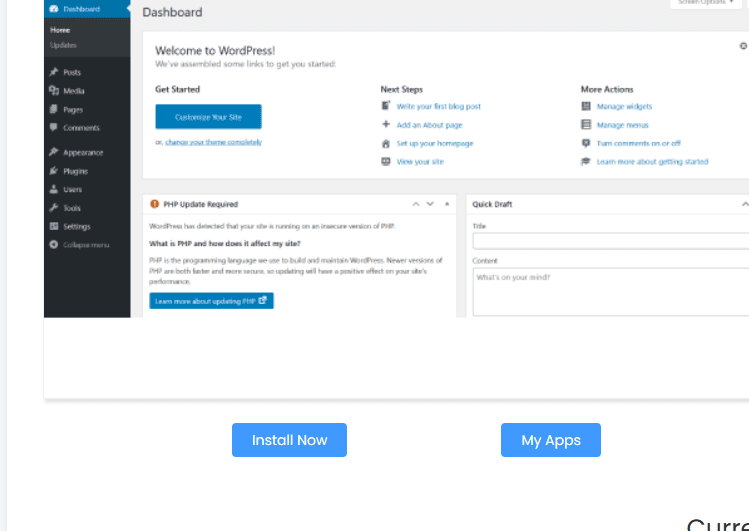
Many hosting services offer one-click installers for WordPress. These tools make installation quick and easy. First, log into your hosting account. Then, find the control panel. Look for the WordPress icon. Click on it. Follow the simple steps. Fill in your site details. Choose a username and password. Click install. Your WordPress site is ready.
Download the WordPress package from wordpress.org. Unzip the file. Open your hosting control panel. Go to the File Manager. Upload the WordPress files to the public_html folder. Create a new database. Use the database setup tool. Enter your database name, username, and password. Open your website in a browser. Follow the on-screen instructions. Enter your site details. Complete the setup. Your site is now live.
Credit: www.hostafrica.com
Customizing Your Web Page
WordPress allows easy web page hosting. Start by signing up and choosing a hosting plan. Customize your page using themes and plugins. Add content and adjust settings for optimal performance.
Choosing A Theme
A theme changes how your web page looks. You can pick from many themes. Some are free. Others cost money. Choose one that fits your style. Make sure it is easy to use. Check if it looks good on phones too. This is important. A nice theme makes your page look better. It can help people enjoy your site more.
Using Plugins For Extended Functionality
Plugins add special features to your web page. They can make your site do more things. Want to add a contact form? Use a plugin. Need a photo gallery? There’s a plugin for that too. Be careful not to add too many. They can slow down your site. Pick plugins that are popular. They should have good reviews. This way, your site will work well for visitors.
Managing Content
Pages and posts are different. Pages are static. Posts are dynamic. Pages are great for about us. Posts are great for news updates. Use the WordPress dashboard to create them. Click on ‘Add New’. Write your content. Add images if needed. Use the editor for text formatting. Save or publish your work. Look at the preview. Edit if needed.
Categories help group posts. Tags give extra details. Use categories for big topics. Tags are for small details. Choose a category when you write a post. Add tags to describe the post. Keep categories simple. Use few tags. Too many tags confuse readers. Categories help readers find posts. Tags help with search inside the site.
Optimizing For Performance
Hosting a web page on WordPress enhances site performance. Choose a reliable hosting provider for speed and security. Optimize images and plugins to keep the site fast and efficient.
Enhancing Page Load Speed
Fast pages make users happy. Use a lightweight theme. Avoid heavy images. Compress them before uploading. Use a plugin for this. Plugins can also help with caching. This makes pages load faster. Another trick is to use a Content Delivery Network (CDN). It spreads your content across the globe. Users get data from nearby servers. This reduces load time.
Implementing Security Measures
Keep your site safe. Use a strong password. Change it often. Update your plugins and themes. Old versions can have holes. Hackers can use them. Install a security plugin. It scans for problems. Back up your site regularly. If something goes wrong, you can restore it. Always use SSL certificates. They protect data. Users trust sites with SSL more.
Launching Your Web Page
After designing your web page, it is important to test it. Testing helps find errors or problems. Use different browsers like Chrome and Firefox. Check if everything looks good. Debugging fixes these problems. If a button does not work, debug it. Make sure images load quickly. Slow loading can annoy visitors. Fix any broken links. Links should take users to the right page. Check for spelling mistakes. Mistakes can confuse readers. Testing and debugging make your site ready for visitors. These steps are very important.
Publishing Your Site
Once your site is ready, it is time to publish. Publishing makes your site live for everyone. First, choose a good domain name. This is your web address. Next, select a hosting plan. Hosting keeps your site online. Follow WordPress steps to publish. It is easy to do. Check your site again after publishing. Make sure everything works well. Tell your friends about your new site. Share it on social media. Keep your site updated with fresh content. This keeps visitors coming back.
Maintaining Your WordPress Site
Keep your WordPress site safe and efficient. Update plugins and themes often. Updates fix bugs and improve security. Check for updates weekly. Some updates happen automatically. Others need your action. Always check before updating. Sometimes updates can break features.
Backing up is very important. It keeps your information safe. Use plugins for backups. Some plugins are free. Others need payment. Save backups on cloud or hard drives. Do it regularly. Daily backups are best. This helps if your site crashes. You can restore it quickly. Losing data is bad. Always have a backup plan.
Credit: 10web.io
Frequently Asked Questions
How Do I Host My Website On WordPress?
To host your website on WordPress, choose a reliable hosting provider. Install WordPress through your hosting dashboard. Customize your site using themes and plugins. Add content by creating pages and posts. Regularly update your site for security and performance. Ensure backups and SEO optimization for better visibility.
Can I Host A Website On WordPress For Free?
Yes, you can host a website for free on WordPress. com. It offers basic features and a subdomain. For more advanced features, consider upgrading to a paid plan.
How Much Does It Cost To Host A Website On WordPress?
Hosting a WordPress website typically costs between $3 to $30 per month. Prices vary based on hosting providers and features. Basic plans are cheaper, while advanced options with more resources cost more. Always compare different hosting services to find the best fit for your needs and budget.
Does A WordPress Website Need Hosting?
Yes, a WordPress website needs hosting. Hosting provides the server space to store your website’s files. Without hosting, your site won’t be accessible online. Choose reliable hosting for better performance and security.
Conclusion
Hosting a web page on WordPress is simple and efficient. With a few steps, your site goes live. Choose a reliable hosting provider. Install WordPress with ease. Customize your site design using themes. Add essential plugins for functionality. Regular updates keep your site secure.
Monitor site performance regularly. Engage visitors with quality content. Respond to feedback promptly. Enjoy sharing your ideas online. Remember, practice makes perfect. The more you explore, the better you get. Ready to start? Take the plunge and begin your WordPress journey today.
Your website awaits.


