
Have you ever stumbled upon a website and wondered who’s behind it? Maybe you’re curious about a competitor’s site or you just want to know who manages your favorite blog.
Discovering the host of a web domain can seem like a digital mystery. But don’t worry, cracking this code is easier than you think. With just a few steps, you can unveil the host and gain valuable insights. Imagine the power of knowing exactly where a domain is anchored and leveraging that information to your advantage.
Ready to transform your curiosity into knowledge? Let’s dive in and uncover the secrets hidden behind that web domain.
Understanding Domain Hosting
Finding the host of a web domain is easy. Use online tools to help. These tools show the host name quickly. Some tools are free and simple to use. Enter the domain name. Then, the tool shows the host. Kids can use these tools too. It’s safe and fun.
Every domain needs a host. Hosts keep websites online. They store website files. Check the domain’s WHOIS information. WHOIS shows details about the domain. It includes host info. Use WHOIS websites for this task. They are helpful and user-friendly.
Some domains hide their host. This is for privacy reasons. Sometimes, you can’t see the host’s name. Privacy settings can block this info. Contact the domain owner if needed. They might share the host name with you.

Credit: www.nameboy.com
Tools For Identifying Domain Hosts
WHOIS Lookup is a simple tool. It tells you who owns a domain. You can find the domain’s host with it. Just type the domain name. The tool will show you the owner and host. It is a quick way to get this info. Many websites offer WHOIS Lookup services. They are easy to use and free.
Online Hosting Checkers are available on many websites. They help find domain hosts. These tools are user-friendly. Enter the domain name. The tool will show the host’s name. Many checkers are free. They provide fast results. You don’t need any special skills to use them.
Command Line Tools help tech-savvy users. Use commands like “nslookup” or “dig”. They show the domain’s host details. These tools are built into most computers. You need to type commands correctly. They provide accurate results. It is a fast way to find domain hosts.
Steps To Use Whois Lookup
Start by visiting a WHOIS website. These websites help find domain information. Enter the domain name you want to check. Click the search button. Wait a few seconds. The site will gather data. It’s easy to use and free.
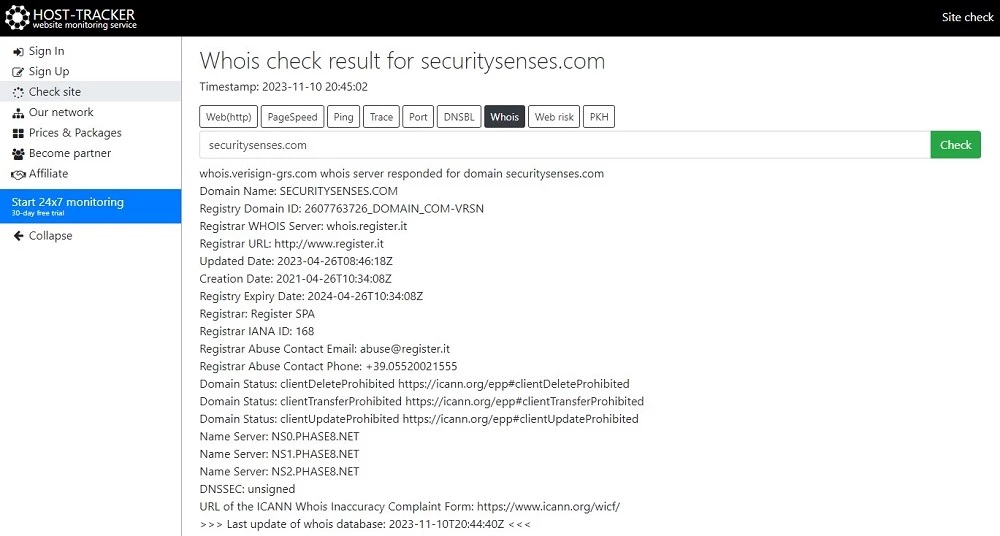
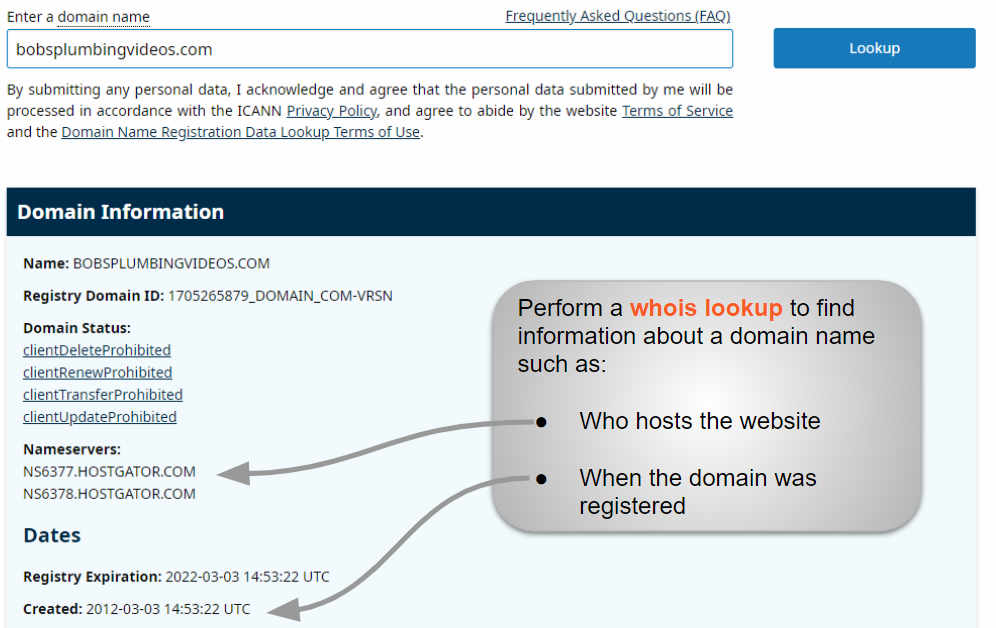
WHOIS data shows many details. Look for the registrant’s contact info. This includes the owner’s name and email. Other info includes the domain’s creation date. Check the expiration date too. These details help understand domain history.
Check the section with name servers. These are usually listed as NS records. They often reveal the hosting company. Search the names online. This helps confirm the host. Write down the name servers if needed.
Using Online Hosting Checkers
Many tools help find domain hosts. Choose a trusted tool online. Read reviews and ratings first. Popular tools often work best. Make sure the tool is free and easy to use.
Enter the domain name into the tool. Click the search button. Wait a few seconds for results. Ensure the domain name is correct. Double-check for any typing errors.
The tool shows the hosting details. Look for the host’s name. It also shows other info. Such as server location. Save the results for future use. You can write them down or take a screenshot.
Command Line Techniques
Open the Terminal on a Mac or Linux. Use Command Prompt on Windows. Type commands to find domain info. It’s simple and quick. You just need the right commands.
The whois command helps. It gives details about the domain owner. Another useful command is nslookup. It shows IP addresses linked to the domain. Both commands are powerful. They reveal hidden details.
Outputs can be long. Look for key parts like registrar and contact email. These parts tell who owns the domain. Ignore extra details. Focus on what’s important. This makes reading easy.
Credit: securitysenses.com
Addressing Privacy Protection
Domain Privacy Services help keep your information safe. When you register a domain, your details are added to a public list. This list is called WHOIS. People can see your name, address, and phone number. Privacy services hide this data. They show only the company’s info. This keeps your details private.
Limitations of WHOIS Data are important to know. WHOIS data can be outdated. Sometimes, it shows wrong information. People use it to find domain owners. But privacy services make this hard. They hide the real owner’s details. This is good for privacy but bad for finding owners.
Choosing The Right Method
Finding a domain’s host can be tricky. Accuracy matters most when choosing a method. Some methods offer more precise results. Tools like WHOIS can help. They show host details fast. DNS records give information too. Each method works differently. Some methods are easier to use. Check tools carefully before you choose. Some tools might be outdated. Others might give wrong info. Always verify your findings.
Think about the tool’s reliability. Ease of use is vital too. Some tools are free, others are paid. Consider your budget. Free tools might have limits. Paid tools might offer more features. Look at user reviews for insights. Reviews help understand tool effectiveness. Choose a tool that suits your needs best.
Troubleshooting Common Issues
Discovering the host of a web domain can solve many website issues. Use online tools like WHOIS lookup to find details. These tools provide host information quickly, aiding troubleshooting efforts.
Dealing With Incomplete Information
Sometimes, finding a domain host is hard. Information can be missing or unclear. Websites like Whois may not show full details. Some data might be hidden or incomplete. Incomplete records make it tough to identify the host. It’s smart to check multiple sources for better results. Use online tools to gather additional info. These tools help fill in the gaps.
Handling Domain Privacy Blocks
Privacy blocks protect domain owner details. They hide important contact information. This makes it tricky to find the host. Privacy services keep owner details private from public view. To bypass these blocks, you need other methods. Consider contacting domain registrars directly. Ask for help or more information. Using registrar support can reveal hidden details. It’s a useful way to find the host when privacy blocks exist.
Credit: www.boldgrid.com
Frequently Asked Questions
How To Find The Host In A Url?
The host in a URL follows “http://” or “https://”. It’s the domain name between “//” and the next “/”. For example, in “https://example. com/page”, “example. com” is the host. It identifies the server where the website is stored, crucial for accessing the site.
How Do I Find Out Whois Behind A Domain Name?
Use WHOIS lookup tools like ICANN or Whois. net to find domain owner details. Enter the domain name and get contact information. Some domains have privacy protection, hiding owner details.
How To Find Dns Provider Hostname?
Use the command `nslookup yourdomain. com` in the terminal to find the DNS provider’s hostname. Alternatively, check your domain’s WHOIS information for DNS details.
What Is Your Website Host?
Our website host is Bluehost. It offers reliable hosting services with 24/7 customer support. Bluehost provides various hosting plans suitable for different needs, including shared, VPS, and dedicated hosting. The platform ensures fast loading times, enhanced security features, and easy WordPress integration, making it ideal for bloggers and businesses alike.
Conclusion
Finding a web domain’s host is simpler than it seems. Use online tools. They help reveal the hosting provider quickly. Just enter the domain name. You’ll get results in seconds. Understanding this process saves time. It also aids in managing your web presence.
Remember, knowing your host is crucial. It ensures better control over your website. With these simple steps, anyone can find a domain’s host. Keep your website’s information handy. It helps in troubleshooting issues. Stay informed and in control. Happy hosting!


