
Do you want to host your website on a reliable and powerful platform? Look no further than Microsoft Azure.
It’s a top choice for many businesses and developers seeking flexibility, security, and scalability. But, how do you get started? The process might seem complex at first, but it’s easier than you think. In this guide, you’ll discover step-by-step instructions to host your website on Azure.
Imagine your site running smoothly, backed by the robust infrastructure of a tech giant. By the end of this article, you’ll have the knowledge and confidence to make it happen. Ready to unlock the potential of Azure for your website? Let’s dive in!

Credit: www.linkedin.com
Azure Web Hosting Basics
Azure is a cloud platform by Microsoft. It helps host websites. Websites can run on its secure servers. Azure offers scalable services. This means you can grow your site over time. Costs are based on your usage. This can save money.
To start, create an Azure account. This gives access to its services. Choose the right hosting plan. Azure has many plans. Some are basic, others advanced. Pick a plan that fits your needs.
Next, set up your site. Use Azure’s user-friendly tools. These tools help manage your site. They also keep it secure. Finally, test your site. Make sure everything works well. Azure provides support if you need help.
Setting Up An Azure Account
Azure is a cloud service by Microsoft. It helps host websites easily. First, visit the Azure website. Click on the “Start free” button. You need a Microsoft account. Don’t have one? Create it quickly. After logging in, fill in the required information. Ensure all details are correct. This step is important for setup.
Next, choose your plan. Azure offers various options. For beginners, the free plan is great. It provides enough resources to start. Billing information is necessary. Enter your payment details. But don’t worry, the free plan won’t charge you. Once done, you will have an Azure account. Now, you’re ready to host your website.
Choosing The Right Azure Plan
Azure offers different plans for hosting websites. Choosing the right plan is very important. Some plans are for small sites. Others are for big sites. Basic plans are good for simple websites. They cost less money. Standard plans offer more features. They are for medium websites. Premium plans are the best. They have the most features. Large websites need premium plans. Think about your website’s size. Think about your budget too. Compare all plans before deciding. This helps save money. Pick the plan that fits your needs. This ensures your site works well.
Creating A Web App Service
First, open the Azure Portal in your web browser. Sign in with your account. Look for the “Create a resource” button on the dashboard. This button helps you create new services. Click it to start. Next, find the “Web App” option. This is what you need to create a web app service. Click on it to proceed. A form will appear. Fill out the required fields carefully.
Once the web app is created, configure its settings. Choose the runtime stack for your app. Select the right operating system like Windows or Linux. Decide on the pricing tier based on your needs. Set up the region where your app will be hosted. This affects the speed and performance. Review your choices before saving them. Save the settings when ready. Now your web app is configured.
Deploying Your Website
Azure CLI is a tool. It helps manage Azure resources. First, install the Azure CLI on your computer. It’s simple and quick. Open your terminal or command prompt. Log in using the az login command. Follow the instructions. Now, create a resource group. Use the command: az group create. Next, deploy your website with az webapp up. This command uploads your site to Azure. It’s fast and easy. Now, your website is live.
Visual Studio is a popular tool. It helps build and deploy websites. First, open your project in Visual Studio. Then, click on Build. Choose Publish. Select Azure as your target. Sign in with your Azure account. Choose the subscription. Next, create a new web app or use an existing one. Click Publish. Visual Studio will upload your site. Now, your website is online.
GitHub can connect to Azure easily. First, create a GitHub repository. Add your website files there. Next, go to the Azure portal. Create a new web app. In the deployment section, choose GitHub. Sign in to your GitHub account. Select your repository. Azure will automatically deploy your site. Any changes on GitHub will update your site. This makes managing your site easier.
Managing And Monitoring
Ensure smooth operation by effectively managing and monitoring your website hosted on Azure. Use Azure’s tools to track performance, detect issues, and maintain uptime. Keep your website running efficiently with regular checks and updates.
Tracking Performance Metrics
Azure helps you watch your website’s performance. Use tools to track important metrics. Keep an eye on response time and traffic load. Monitor error rates and server uptime. These numbers show how well your site runs. If numbers are low, fix them quickly. This keeps users happy and your site fast.
Scaling Resources
Sometimes your website gets more visitors. You need more resources then. Azure makes it easy to add more. You can increase server power or add storage. This helps your site handle more people. Scale up or down based on need. It’s flexible and smart. This way, your site stays strong and reliable.
Securing Your Web Site
Azure offers a reliable way to host your website securely. It provides tools to protect your data and ensure uptime. Easy setup and management make Azure a practical choice for hosting needs.
Implementing Ssl Certificates
SSL certificates keep your data safe. They make sure no one steals it. Install SSL to protect your website. It helps users trust your site. A padlock symbol shows your site is secure. This builds confidence. Users feel safe visiting your site.
Setting Up Firewall Rules
Firewalls stop bad traffic from entering. Set up rules to block threats. Allow only trusted sources. This keeps your data safe. Hackers can’t harm your site. Good firewall rules protect your website from attacks. Make sure to update rules often. This keeps your site safe all the time.
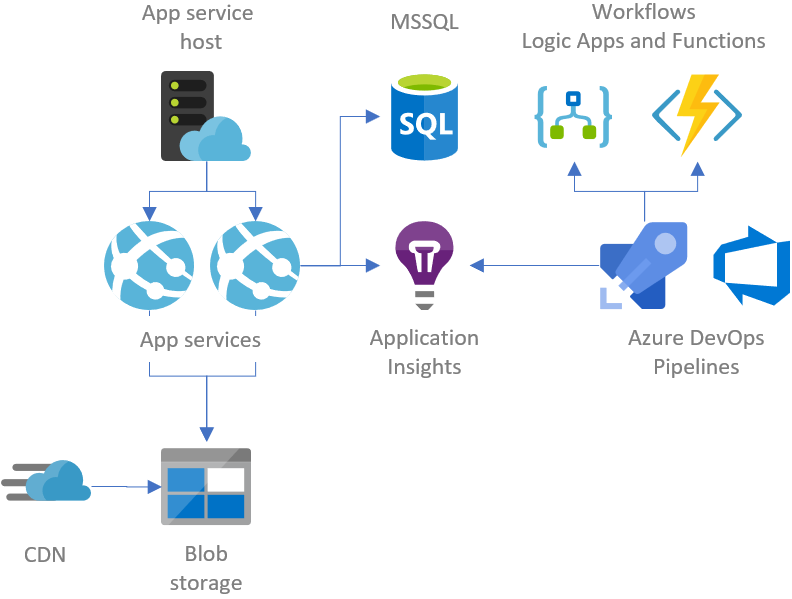
Credit: gunnarpeipman.com
Troubleshooting Common Issues
Deployment errors can be tricky. Check the error messages first. They give clues about what went wrong. Ensure your code is compatible with Azure. Verify all dependencies are installed. Sometimes missing files cause issues. Review your configuration settings. Incorrect settings lead to errors. Use Azure’s diagnostic tools. They help find problems quickly. Always keep backups of your code. They save time during fixes.
Performance bottlenecks slow down websites. Monitor your site’s speed regularly. Check server resources like CPU and memory. They affect performance. Optimize your database queries. Complex queries delay responses. Reduce image sizes to improve load times. Use caching for frequently accessed data. It speeds up retrieval. Test your site under different loads. This helps identify bottlenecks early. Remember, small changes can make a big difference.
Optimizing For Cost Efficiency
Using Azure Cost Management tools helps save money. These tools track and analyze your spending. You can set budgets and alerts for spending limits. This helps avoid surprises. Cost analysis shows where money is spent. You can find unnecessary expenses. By using these tools, you manage costs better.
Picking the right storage option matters. Azure offers different storage types. Blob storage is good for large files. File storage is for shared files. Each has its own price. Selecting the right type saves money. Always check your needs first. Then choose the best option for your budget.

Credit: www.youtube.com
Frequently Asked Questions
Can You Host A Website On Azure?
Yes, you can host a website on Azure. Azure offers various hosting options like App Service and Virtual Machines. These options provide scalability, security, and high availability for your website. Azure’s integrated tools make deployment and management easy, ensuring a seamless hosting experience.
How To Host An Html Website In Azure?
To host an HTML website on Azure, create a storage account, upload your website files to a blob, and enable static website hosting. Access the website through the provided URL. Azure offers scalable hosting and global reach for your HTML site.
How To Setup A Web Server In Azure?
Create an Azure account and sign in to the Azure portal. Select “Create a resource” and choose “Windows Server” or “Linux Server”. Configure your server settings, including size, region, and network. Review and create the server. Access the server using Remote Desktop or SSH.
How To Host A Domain In Azure?
Host a domain in Azure by purchasing a domain via Azure portal. Configure DNS settings with Azure DNS. Link the domain to Azure services using custom domain settings. Verify domain setup through Azure portal. Ensure DNS propagation for full functionality.
Conclusion
Hosting a website on Azure is straightforward and efficient. Azure offers reliable tools that simplify the process. Begin by setting up an account. Choose the right service plan. Deploy your website using the Azure portal. Monitor performance using Azure’s insights.
This platform provides robust security features. Ensure regular updates for smooth operation. Azure’s scalability caters to growing needs. Optimize resources to reduce costs. Support is available for troubleshooting. Hosting on Azure brings flexibility and control. Your website will benefit from Azure’s global reach.
Explore Azure’s features to enhance your online presence today.


