
Have you ever stumbled upon a website and wondered who’s behind the curtain? Knowing which company hosts a website can unlock a treasure trove of insights, whether you’re curious about a competitor’s online strategy or need to resolve a technical issue.
Imagine gaining the ability to peek behind the digital veil, empowering you to make informed decisions or simply satisfy your curiosity. In this guide, you’ll discover simple and effective methods to uncover the hosting company of any website. By the end, you’ll not only have the knowledge but also the confidence to navigate the digital landscape like a pro.
Ready to dive into the world of web hosting secrets? Let’s get started!
Identifying Website Hosting Providers
Finding out who hosts a website is important. It helps in solving problems. If a site is down, you know who to contact. It also helps in comparing prices. You can check other hosts for better deals. Knowing the host gives you peace of mind. You know your website is in safe hands.
There are many hosting providers. Some are more popular than others. Below is a list of some common ones:
- GoDaddy – Known for domain services.
- Bluehost – Recommended by WordPress.
- HostGator – Offers affordable plans.
- SiteGround – Known for good support.
- InMotion – Offers fast hosting.

Credit: www.hosted.com
Using Online Tools For Host Discovery
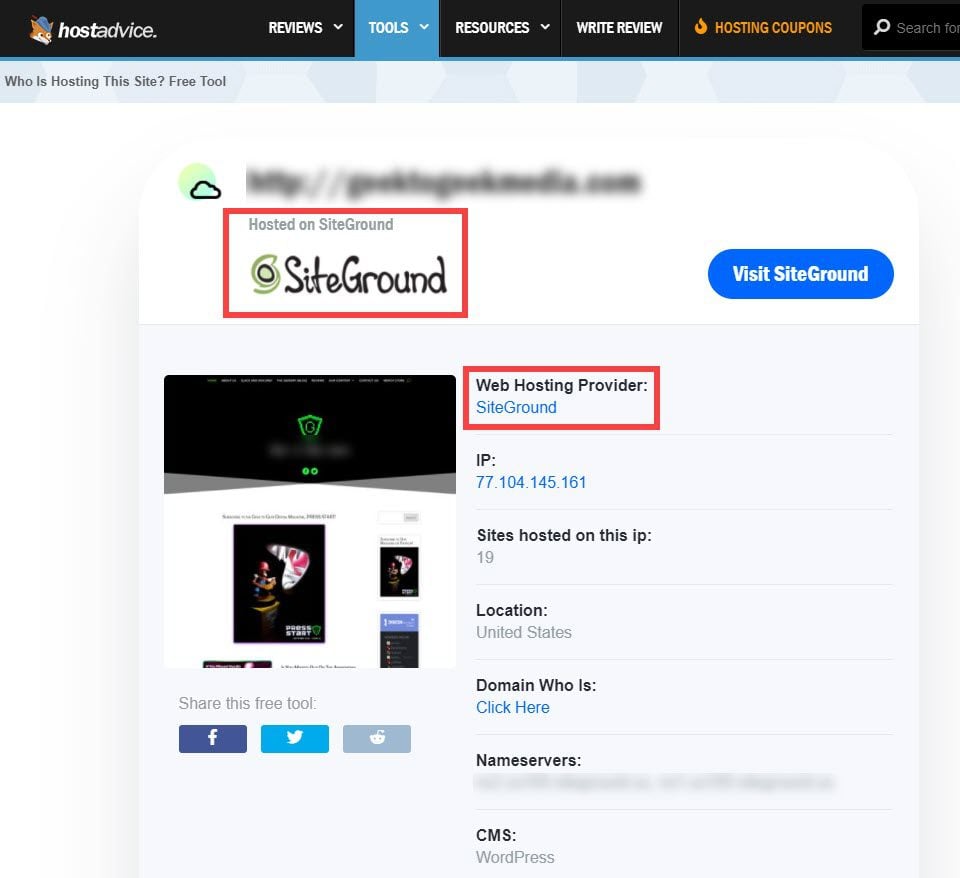
There are many tools to find out a website’s host. Some of the most popular host lookup tools include WhoIsHostingThis, HostAdvice, and Site24x7. These tools are easy to use. Enter the website URL, and they show the host details. Each tool may show different information. So, try more than one for better results.
First, open the host checker website. Next, find the search box on the page. Then, type the website URL in the box. After that, click the search button. The tool will show the hosting company name. Some tools may also show server location and IP address. Always double-check the information for accuracy.
Investigating Domain Information
WHOIS is a tool to find domain info. It tells who owns the domain. It shows details like name, address, and email. These details belong to the domain owner. WHOIS also shows when the domain was created. It tells when the domain will expire. This tool helps find the hosting company. Accessing WHOIS is easy. Many websites offer this service. Just type the domain name. Get details in seconds. Simple and quick.
A domain registrar is where you buy domain names. They manage domain registrations. Registrars keep track of domain ownership. They update domain info in WHOIS. Famous registrars include GoDaddy, Namecheap, and Google Domains. Each registrar offers different prices. They also provide other services. Services like web hosting and email. Choosing the right registrar is important. It affects how you manage your domain. Pick one that suits your needs.
Credit: www.elegantthemes.com
Analyzing Website Ip Address
Discovering which company hosts a website involves examining its IP address. Tools like WHOIS can reveal hosting details. By checking the IP, you can identify the hosting provider responsible for the site’s server management.
Finding The Ip Address
Finding a website’s IP address is simple. Use online tools like Whois and Ping. Type the website name. Then, hit search. The tool shows the IP address. Note it down. It is a series of numbers. This number is unique for each site.
Tracing Ip To Hosting Provider
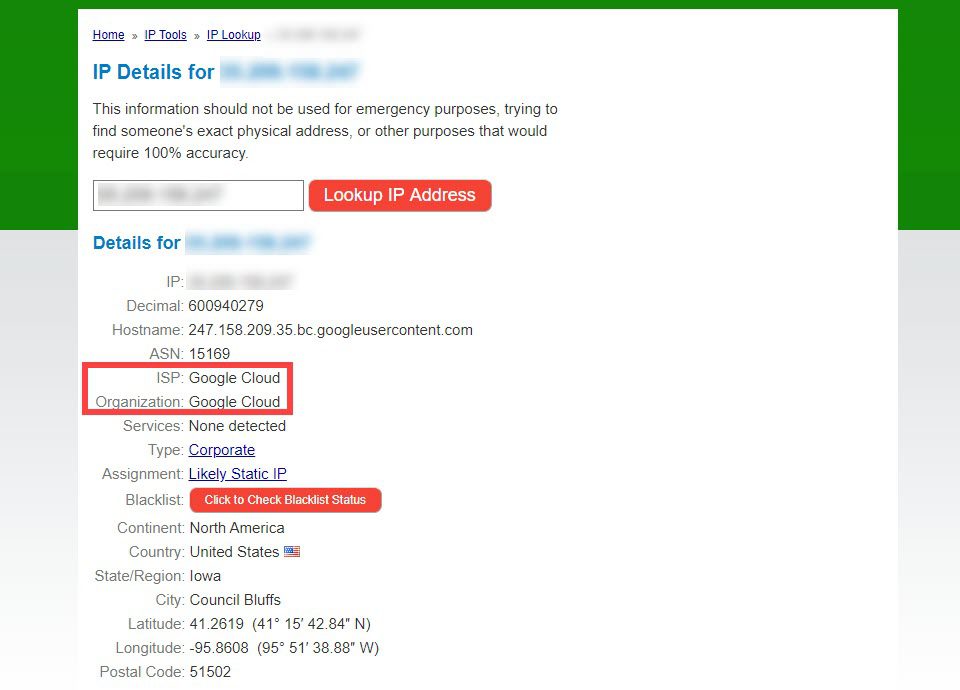
With the IP address, find the host. Use tools like IP Lookup. Enter the IP address. The tool searches for the host. It shows the hosting company name. Now, you know who hosts the website. This helps in checking website details.
Consulting Website Metadata
The HTML code of a website holds many secrets. Viewing this code can show who hosts the site. Right-click on the webpage and choose “View Page Source.” This opens up a world of information. Look for links in the code. Hosting providers often leave their mark here. Names like “Amazon” or “Google” might appear. Sometimes you find “Hosting” in comments. Finding a hosting name can be tricky. Patience helps.
Headers tell stories. They may reveal hosting secrets. Check the “Response Headers” of a site. Tools like “Inspect Element” can help. These headers show technical details. Often, there is a clue about the hosting company. Look for words like “Server” or “X-Powered-By.” These might indicate the hosting service. Headers are not always clear. But they often give helpful hints. Exploring them is worth it.
Contacting Website Administrators
Discover which company hosts a website by using online tools like WHOIS or web hosting checker websites. These tools reveal domain registration details, including hosting provider information. Understanding hosting details helps in reaching out to website administrators effectively.
Reaching Out For Hosting Information
Finding out who hosts a website can be tricky. But, contacting the website administrators can help. Start by visiting the website and looking for a Contact Us page. There, you might find an email address or a contact form. This is your first stop.
Write a short and polite message. Ask them directly about their hosting provider. Use simple words and be clear. Always include your name and reason for asking. This shows you are serious.
Sometimes, the website might not reply fast. Be patient and give them time. If they don’t answer, try again after a week. Being polite and patient can often lead to success.
Exploring Hosting Forums And Communities
Engage with hosting forums to find out more about web hosts. These platforms have helpful discussions about hosting services. Users often share their experiences and knowledge. This can help you identify hosting companies. Reading threads might reveal the hosting provider of a site. It’s a great way to learn from others.
Leverage collective knowledge from these communities. Ask questions and get responses from experienced users. Many enthusiasts love to help and share tips. Some might even know specific hosting details. Join, participate, and explore. This method is often quick and effective.
Credit: www.elegantthemes.com
Frequently Asked Questions
How To Find Out What Company Is Hosting A Website?
Use online tools like WhoIs or Hosting Checker to identify a website’s hosting company. Enter the website URL, and these tools will provide hosting details. Alternatively, check the website’s source code for clues, or contact the domain registrar for information.
How To Find Out Who Manages A Website?
Use a WHOIS lookup tool to find website ownership details. Check the website’s contact or “About Us” page. Search for the site’s domain registration information. Look for privacy policy or terms of service pages for management details. Contact the hosting provider for assistance if necessary.
How To Trace Where A Website Is Hosted?
Use online tools like Whois or hosting checker. Enter the website URL to find hosting details. These tools provide server location, IP address, and hosting provider information. Ensure the website isn’t using CDN services, as this may affect accuracy.
How To Find Out What Platform A Website Is Hosted On?
Use online tools like BuiltWith or WhoIsHostingThis to identify a website’s hosting platform. Check the site’s source code for hosting clues. Look for hosting provider badges or footer links on the website. Contact the website owner for hosting details if necessary.
Conclusion
Finding a website’s hosting company doesn’t have to be complex. Start with online tools designed for this task. They provide quick and accurate results. Check the domain registry as well. It often reveals hosting details. A WHOIS search is another useful option.
It offers information about domain ownership and hosting. Remember to explore multiple methods for thorough results. Each approach has unique benefits. Knowing the hosting company helps with website management. It also aids in solving technical issues. Knowledge is power. Use it wisely and enhance your online experience.


