
Imagine having complete control over your website, from speed and security to customization and cost. That’s what using a personal server for web hosting can offer you.
Forget the limitations and high costs of traditional web hosting services. With a personal server, you hold the reins. You can tailor your hosting environment to meet your exact needs, ensuring optimal performance and security. But where do you start?
Setting up a personal server might seem like a daunting task, but it doesn’t have to be. By the end of this article, you’ll know precisely how to transform your computer into a powerful host for your website. You’ll discover the benefits of taking this route and get step-by-step guidance to make the process as smooth as possible. If you’re ready to take control of your web hosting and save money in the long run, keep reading. Your journey to mastering personal server hosting starts here.
Benefits Of Using A Personal Server
Using a personal server offers great control over your web hosting. You decide what software to install and how to configure it. This means you can tailor the server to your specific needs. Security is another advantage. You can set up strong firewalls and anti-virus programs. This keeps your data safe from hackers. Cost savings is a key benefit. Renting space on a personal server can be cheaper than paying for shared hosting. It can also help with performance. Websites hosted on personal servers often load faster. This is because there are fewer sites competing for resources. Privacy is enhanced too. You manage who accesses your server and its data. Personal servers allow for customization. You can choose the hardware and software you want. This makes your server unique and efficient.

Credit: superuser.com
Choosing The Right Hardware
A good processor is key for fast websites. Many people use quad-core processors. These are strong and work well. RAM is also very important. 8GB of RAM is a good start. More RAM means you can host more sites. It also helps your server run fast.
Websites need space for files. SSD storage is best. It is faster than HDD. Fast storage makes websites load quickly. At least 250GB of SSD is a good choice. If you host many sites, get more storage. Keep your data safe with regular backups.
A strong internet connection is a must. Your server needs a reliable connection. Many use Ethernet cables for best results. Wi-Fi can be slower and not stable. Check your internet speed. It should be fast for users to access your site easily.
Selecting The Operating System
Choosing between Linux and Windows can be tricky. Linux is free and open-source. It offers more flexibility and control. Many developers prefer it. Windows is user-friendly. It has a familiar interface. It is good for those using Windows at home.
Linux supports many languages and tools. It is great for programming. Windows is better for applications like ASP.NET. Think about your needs before choosing.
Linux has many distributions. Some popular ones are Ubuntu and CentOS. Ubuntu is easy to use. It is good for beginners. CentOS is stable and secure. It is used for business and servers.
Windows Server is another option. It is designed for business use. It has many features for networks. Choose what fits your project best.
Setting Up Your Server
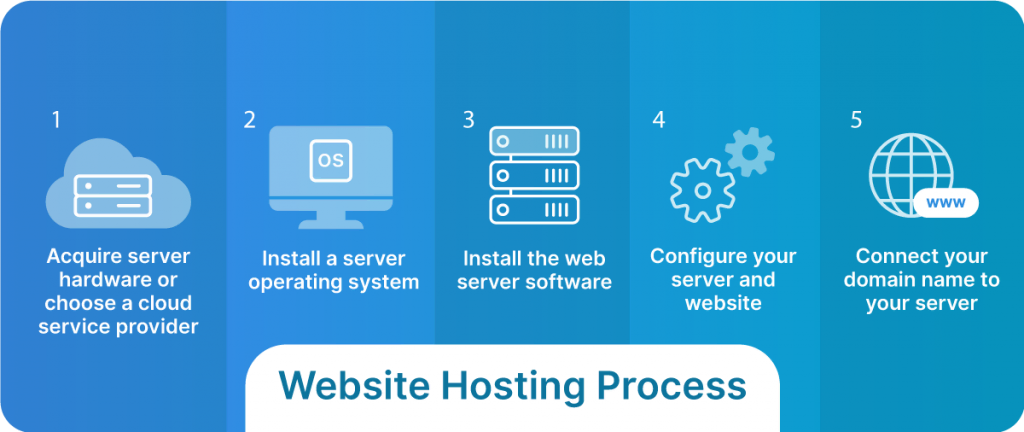
Pick an operating system for your server. Linux is common. Download the system files. Create a bootable USB drive. Use this drive to install the system. Follow the on-screen instructions. Wait for the installation to finish.
Set up the basic settings on your server. Choose a strong password. Create a user account. Set the correct time and date. Adjust the display settings. Ensure your server starts with the right settings. Save all changes before exiting.
Keep your server safe from threats. Enable a firewall to block unwanted access. Update your system regularly. Use strong passwords. Disable unused services. Monitor your network for suspicious activity. Backup important data often.
Installing Web Server Software
Choosing between Apache and Nginx can be tough. Apache is older and widely used. Many people trust it. Nginx is newer and faster. It handles more visitors at once. Apache is easy to set up. Nginx uses less memory. Both can serve your web pages. Pick one based on your needs.
Settings are important for your server. You must choose the right ones. Change the settings for speed. Adjust them for security. Make sure your website loads fast. Protect your data from bad people. Keep your visitors happy. Test your settings often. You can change them later.
Managing Domain Names
Choose a name for your website. Make it short and easy. Visit a domain registrar online. Search if your name is available. If yes, register it. Pay a small fee. Your domain is now yours.
Log into your domain account. Find the DNS settings. Add new records. Use the server’s IP address. Set up an A record. This links your domain to the server. Add more records for emails. Save changes. Your domain now points to your server.
Ensuring Security And Backup
Implementing Firewalls is vital to protect your server. A firewall blocks bad traffic. It also keeps your data safe. Choose a firewall that suits your needs. You can find many options online. Some are easy to set up. Others require more work. Make sure to update the firewall often. This helps keep it strong.
Regular Backup Strategies are important. Backups save your data. They help when things go wrong. Use a tool to automate backups. This saves time. You can schedule backups daily or weekly. Store your backups safely. Cloud storage is a good choice. Always check if backups work. This ensures you can restore data easily.

Credit: www.youtube.com
Optimizing Server Performance
Personal servers offer a reliable choice for web hosting. Efficient server performance ensures quick load times and better user experiences. Regular maintenance and updates keep your server secure and running smoothly.
Resource Monitoring Tools
Keep track of server health with resource monitoring tools. They show CPU, memory, and disk usage. These tools alert you to issues. Real-time data helps in quick decision-making. Choose tools that fit your server needs. Free and paid options are available. Some popular choices include Nagios and Zabbix. Monitor regularly to prevent downtime.
Load Balancing Techniques
Distribute traffic evenly using load balancing. This prevents server overloads. Load balancers direct traffic efficiently. They enhance user experience. Choose between hardware and software solutions. Software options are more flexible. Hardware provides high performance. Common methods include round-robin and least connection. Ensure your server setup supports load balancing.
Troubleshooting Common Issues
Error logs help find problems on your server. They store important messages about errors. Reading these logs is easy. Look for error codes and warning signs. These clues help fix issues. Always check the logs first. They give hints on what’s wrong.
Using diagnostic tools is helpful too. These tools test your server. They find problems in the system. Run diagnostics often. This keeps your server healthy.
Connectivity issues can stop your website. First, check your internet connection. Make sure it is stable. Next, see if the server is on. Restart it if needed. Ensure all cables are plugged in. Sometimes, cables come loose. Check your router settings. Make sure they allow the server to connect. Update your server software regularly. This helps fix bugs.
Credit: www.liquidweb.com
Frequently Asked Questions
Can I Host My Website On My Own Server?
Yes, you can host your website on your own server. Ensure you have the necessary hardware, software, and technical skills. Consider security and uptime. It requires ongoing maintenance and management.
How Do I Point My Domain To A Self Hosted Server?
To point your domain to a self-hosted server, update the domain’s DNS settings. Set the A record to your server’s IP address. Ensure the server is configured to accept connections from this domain. Changes may take up to 48 hours to propagate globally.
Can You Host A Website On A Local Server?
Yes, you can host a website on a local server. Use software like XAMPP, WAMP, or MAMP to set it up. Local hosting is suitable for testing and development purposes. Ensure your computer meets the necessary requirements. Your website won’t be publicly accessible without configuring port forwarding.
Can You Host A Website From Your Own Computer?
Yes, you can host a website from your computer using server software like Apache. Ensure your computer has a static IP and is always on. This setup is suitable for personal projects but may lack reliability and security for commercial sites.
Professional hosting services offer better support and performance.
Conclusion
Setting up a personal server for web hosting is rewarding. It gives control over data and resources. You can customize your server to fit your needs. Security is also in your hands. This approach reduces reliance on third-party providers. Plus, it saves costs over time.
Even with challenges, learning is part of the journey. Start small and grow your skills steadily. Many resources online can help you succeed. Enjoy the process and the benefits it brings. Your personal server could be the key to a successful online presence.


