
Imagine this: your website is running smoothly, attracting visitors, and boosting your business. But suddenly, your current web host starts causing more headaches than help.
Downtime, slow loading speeds, and inadequate support leave you frustrated. It’s time for a change, but you’re worried about potential disruptions. Switching web hosts can feel like juggling with fire. The fear of losing visitors or experiencing downtime can be overwhelming.
But what if I told you there’s a way to switch hosts without a hitch? Yes, it’s entirely possible to change web hosts seamlessly, without losing valuable traffic or compromising your website’s functionality. In this guide, you’ll discover the step-by-step process to change your web host without downtime. You’ll learn about the critical actions you must take, the common pitfalls to avoid, and the insider tips that make the transition smooth and stress-free. By the end, you’ll be equipped with all the knowledge you need to make this vital move confidently. Let’s dive in and ensure your website remains unstoppable!
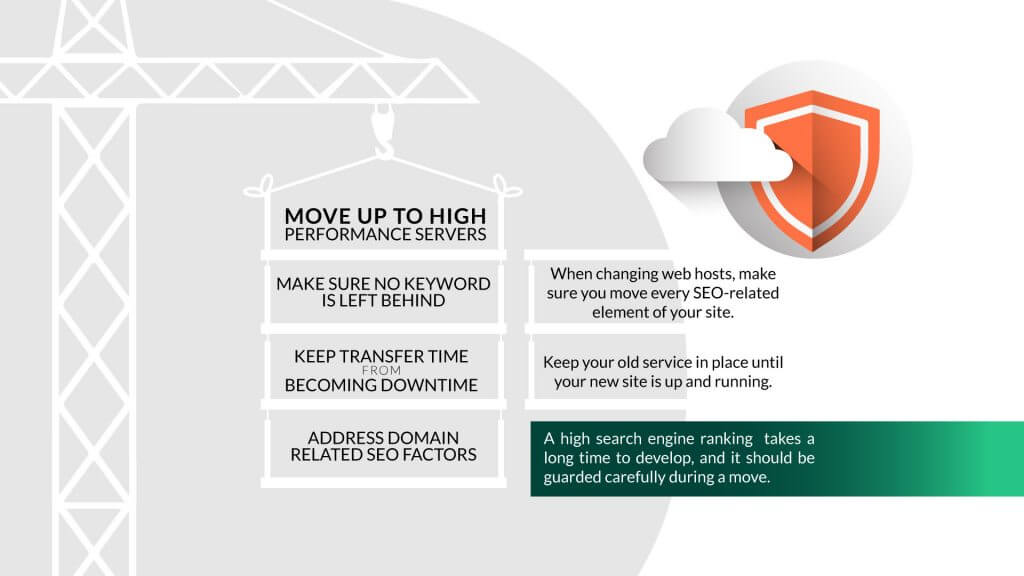
Credit: www.hostpapa.com
Choosing The Right New Host
Think about your website’s traffic and storage. Do you need a lot of space? Is your traffic heavy? Make a list of what you need. This will help you find the right host. Remember, not all hosts are the same. Some offer more features than others.
Look for providers with good reviews. Check their website for information. Make sure they offer what you need. Compare prices too. Some hosts are cheaper but lack features. Others may offer better security or faster speeds. Choose wisely.
Good customer support is very important. 24/7 support is ideal. You never know when problems will arise. Check if they have chat, phone, or email support. Quick help can save you time and stress. It’s a key factor in choosing a host.
Preparing For The Transition
Always backup your website before moving to a new host. Use tools or plugins to copy all files. Keep the backup files safe on your computer. This way, you can restore your site if needed.
Ensure your domain settings are correct. Check where your domain is registered. Verify the DNS settings. These settings help direct traffic to your site. Changes may take time to update.
Plan a transition timeline for your move. Decide on the best time to switch hosts. Consider when your site has low visitors. Make a list of tasks. Follow the plan step-by-step.
Transferring Website Files
Start by downloading your website files. Use a File Transfer Protocol (FTP) client. It’s a tool to move files. After downloading, connect to the new host. Use the same FTP client. Upload the files to the new server. Check each file. Make sure nothing is missing. This process keeps your site safe.
Export your database from the old host. Use tools like phpMyAdmin. Save it as a file on your computer. Next, import this file to the new host. Use the database tools there. Double-check the database name and user settings. Everything should match the new setup. This ensures smooth operation.
Check your website on the new host. Use a temporary URL. It’s a web address to preview your site. Look for broken links or missing images. Test all forms and features. Make sure they work well. Fix any problems you find. This ensures your site is ready for visitors.
Dns Propagation Strategy
DNS helps web browsers find your website. When you change web hosts, DNS updates are needed. These updates can take time to spread. This is called DNS propagation. It can take from a few minutes to a few days. Each internet service provider updates at different times. This is why some people see changes sooner.
You can make DNS changes faster. Set the TTL (Time to Live) to a lower number. TTL tells servers how long to keep information. A lower TTL makes updates faster. Do this before switching hosts. It helps to reduce wait time for changes.
Check your DNS changes regularly. Use online tools to see if updates have spread. Some tools show if your site is live worldwide. This helps you know when the change is complete. Always keep track of your progress. It ensures everything works smoothly.
Ensuring Website Functionality
Check your website’s speed often. Use tools like Google PageSpeed Insights. They show how fast your site loads. Fast websites make users happy. Slow ones can lose visitors. Test on different devices. Phones and tablets too. Make sure your site works well everywhere.
Security is very important. Ensure your website uses HTTPS. This keeps data safe. Check for security updates. Update plugins and themes often. A secure site protects user information. Always have a backup plan. Save copies of your site regularly.
Find and fix errors quickly. Check for broken links. They can confuse users. Use tools to find them. Fix any coding issues. Errors can make your site slow. Keep your website error-free. This makes sure everything works smoothly.
Credit: www.iplocation.net
Finalizing The Switch
Switching web hosts without downtime requires careful planning and execution. Start by backing up your website data to avoid any loss. Test the new server thoroughly before updating the DNS settings to ensure seamless migration.
Changing Nameservers
Nameservers guide the internet to your website. To change them, log into your domain registrar. Find the section for nameservers. Replace the old nameservers with the new ones. Save changes. Wait for up to 48 hours. This is called propagation. During this time, your site may be slow. But don’t worry. It will go back to normal soon.
Updating Configurations
Check your new host settings. Make sure they match your old ones. Update your database settings. Use the new host’s details. Check email settings too. Some settings might be different. Adjust them as needed. Test your website. Ensure everything works fine. Fix any errors you find.
Notifying Users Of The Change
Inform your users about the switch. Send them emails. Tell them when you expect changes. Share any planned downtime. Reassure them their data is safe. Update your social media. Keep everyone in the loop. Answer any questions they have. It’s important to communicate well.
Post-migration Checks
Switching web hosts smoothly requires careful post-migration checks. Ensure all links work and test website functions. Verify DNS settings and monitor site performance to avoid any disruptions.
Reviewing Analytics And Traffic
Check your website’s analytics for any changes. Look for drops in traffic or unusual patterns. Ensure your tracking codes are correctly placed. Verify that all pages are tracked. Compare current stats with previous ones. Any sudden decrease may indicate issues. Address these promptly to avoid further problems.
Ensuring Email Functionality
Test your email system thoroughly. Confirm emails are sent and received correctly. Verify that your email settings are accurate. Ensure no messages are lost. Check both incoming and outgoing emails. If issues arise, consult your host provider. Address any email errors immediately. A smooth email flow is crucial for communication.
Regular Maintenance And Monitoring
Keep an eye on your website regularly. Monitor performance and speed. Fix any broken links or images. Regularly update plugins and software. Check for any security vulnerabilities. Consistent monitoring ensures your site runs smoothly. Always be proactive in maintenance. This prevents future complications.

Credit: www.reviewhell.com
Frequently Asked Questions
Can You Switch Website Hosts?
Yes, you can switch website hosts easily. Choose a new host, backup your site, and migrate your files. Update DNS settings to point to the new host. Most hosting providers offer support during the transition. Ensure minimal downtime for a smooth switch, improving your site’s performance and security.
How Long Does It Take To Migrate A Website To A New Host?
Website migration to a new host usually takes 2 to 48 hours. This depends on factors like site size, DNS propagation, and hosting provider efficiency. Always plan and test thoroughly to minimize downtime and ensure a smooth transition.
How Can I Transfer My Website To Another Host?
To transfer your website, backup files and databases. Choose a new host and upload your backup. Update DNS settings to point to the new server. Test the website to ensure everything works properly.
Does Changing Website Host Affect Seo?
Changing website host can affect SEO if it leads to downtime or slow loading speeds. Ensure seamless migration to avoid issues. Choose a reliable host to maintain SEO performance and user experience. Properly redirect URLs and monitor analytics for any traffic changes after switching hosts.
Conclusion
Switching web hosts can be smooth and stress-free. Prepare carefully and follow steps. Backup your site and choose a reliable new host. Check compatibility and set up your new server. Transfer your site files accurately. Test functionality before finalizing the switch.
Communicate with your visitors about the change. Keep monitoring your website after the transfer. A seamless host switch ensures your site remains active and accessible. No downtime means no loss of traffic or users. Your website is your online presence.
Protect it with a well-planned host change strategy.


