
So, you’ve developed a web app that you’re proud of. But now comes the crucial next step: hosting it so that the world can see your creation.
This might sound daunting, but it doesn’t have to be. With the right guidance, you can have your web app live and running smoothly in no time. Imagine the satisfaction of seeing users interact with your app, the thrill of watching it grow, and the opportunity to make an impact.
This article will walk you through the hosting process in a straightforward way, breaking down complex tech jargon into simple, actionable steps. Ready to take your web app live and unlock its full potential? Let’s dive in and explore how you can do it seamlessly.

Credit: www.programonaut.com
Choosing The Right Hosting Provider
Selecting a hosting provider is crucial for web app success. Consider reliability, speed, and customer support. Compare features and pricing to make an informed decision.
Shared Hosting Vs. Dedicated Hosting
Shared hosting is like sharing a room with others. It is cheaper but slower. Your website shares a server with many sites. Dedicated hosting is like having your own room. It is faster and more secure. You get a whole server to yourself. It is more costly than shared hosting. Choose based on your needs and budget. Both have their own pros and cons.
Evaluating Uptime And Reliability
Uptime means your site is live and working. High uptime is very important. Providers promise 99% or more uptime. This means fewer downtimes. Reliable hosting keeps your site safe. Check reviews and ratings. See what other users say. Reliability builds trust with your visitors.
Pricing And Plans
Look at different pricing plans. Cheap plans may have limits. More expensive ones offer more features. Compare what each plan includes. Some plans have free trials. Others offer money-back guarantees. This helps you test before you buy. Understand what you need. Choose a plan that fits your budget.
Understanding Server Requirements
The operating system must work with your app. Some apps need Linux. Others need Windows. Check your app’s needs. Choose the right OS. It helps the app run well.
Web apps need enough bandwidth. This keeps them fast. More users need more bandwidth. Storage is also important. Big apps need more space. Plan ahead. Make sure you have enough.
Security is very important. Protect your app from hackers. Use SSL certificates. They keep data safe. Also, use firewalls. They block bad traffic. Check security often. Keep your app safe.
Domain Name Setup
A domain name is your web address. It helps people find your site. Choose a name that is easy to remember. Many sites can help you register a domain. Some popular sites are GoDaddy and Namecheap. They offer different prices and services. Keep your domain name short. It should reflect your web app’s purpose. Check if the name is available. Register it quickly before someone else does.
DNS is like a phone book for the internet. It tells browsers where to find your site. After getting your domain, you need to set up DNS. This step links your domain to your hosting server. Log into your domain registrar. Find the DNS settings page. Enter the IP address of your host server. Save changes. It might take a few hours for the changes to work.

Credit: build5nines.com
Deploying Your Web App
FTP and SSH help in uploading files to the server. FTP is easy. Just drag and drop files. SSH is more secure. It uses a command line. Choose one based on your comfort level.
Databases hold your app’s data. Connect them with your app. Use a connection string. It tells your app how to find the database. Make sure it is correct. Wrong details can cause errors. Test the connection to ensure it works.
Environment variables store important settings. They keep your app secure. Use them for secrets like passwords. Do not put secrets in your code. Change them without changing the code. This makes updates easy.
Managing Web App Performance
Traffic tells us how many users visit the web app. Load shows how much work the server does. High traffic can slow the app. Monitoring helps you know when traffic is high. Check tools like Google Analytics. See where users come from. Find peak times. Use this info to keep the app smooth. Help your app handle more users.
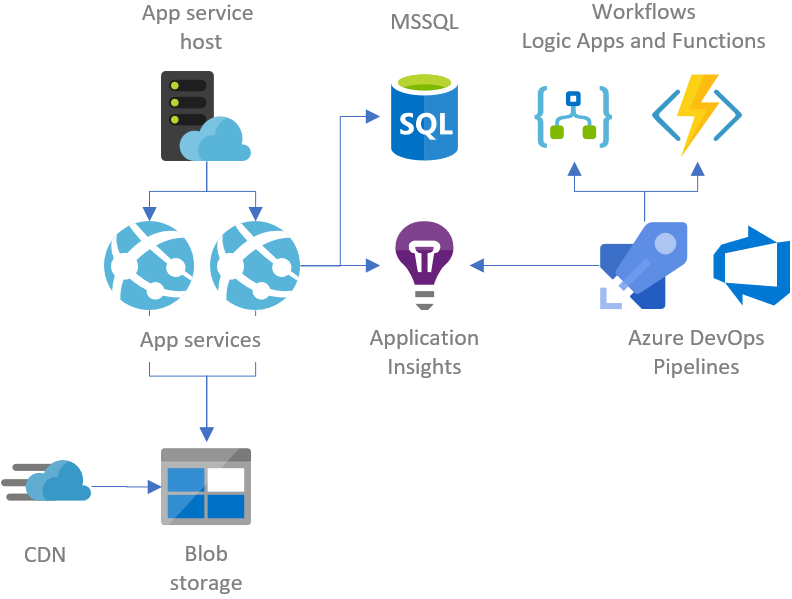
Users love fast apps. Slow apps make them leave. Use less data to load pages faster. Compress images. Minimize code. Reduce server requests. Caching stores data for quick access. Use Content Delivery Networks (CDNs) for speed. CDNs deliver content from servers close to users. Speed boosts user happiness. Keep them coming back.
More users need more resources. Scaling helps with this. Add more servers to handle extra load. Use cloud services like AWS or Azure. They offer flexible resources. Auto-scaling adjusts resources automatically. It saves time and money. Plan for growth. Ensure the app runs smoothly. Happy users mean success.
Credit: gunnarpeipman.com
Ensuring Security
SSL/TLS certificates keep data safe. They protect your app from hackers. These certificates create a secure link. Users trust sites with SSL/TLS. Browsers show a lock icon for secure sites. This icon assures users their data is safe. Always update your certificates for best security.
Security audits check for weak spots in your app. They help find problems before hackers do. Audits should be done often. Experts can help with these checks. Fix any issues found during audits. This keeps your app safe and secure. Regular checks keep users’ data protected.
Backups save copies of your important data. Make backup copies often. Store them in a safe place. If data gets lost, backups help restore it. Recovery plans are like a map. They show how to get your app running again. Practice your recovery plan to ensure it works. This keeps your app ready for any problem.
Troubleshooting Common Issues
Check the error logs for any unusual messages. These logs show what went wrong. Look for lines with the word “error”. This helps find the issue quickly. Use tools like debuggers to see the code step-by-step. Debuggers can stop the code to check what is happening. It’s like taking a picture of the problem. Fixing bugs becomes easier with these tools.
Connectivity problems can happen anytime. Check if the server is online. A simple way is to ping the server. If it responds, it’s working. Check the network cables too. Sometimes a loose cable causes issues. Ensure the firewall settings allow connections. Sometimes, firewalls block needed access. Restarting the router might help too. It refreshes the connection.
Server downtime is frustrating. First, check if the server is overloaded. Too many requests can crash it. Reduce the load if possible. Use load balancers to spread the requests. This helps servers work better. Regularly update server software. Old software can cause crashes. Have a backup plan ready. It helps restore services quickly.
Utilizing Support Resources
Finding the right support resources can simplify hosting a web app. Explore user forums and online tutorials for guidance. Leverage community knowledge to solve hosting challenges efficiently.
Accessing Customer Support
Customer support is vital for web app hosting. It helps solve problems. Most companies offer support through email, chat, or phone. Choose a host with 24/7 support. This ensures help anytime. Check the response time. Faster replies mean quicker solutions. Read reviews about support quality. Good support makes hosting easier.
Community Forums And Tutorials
Community forums are helpful. They offer advice from real users. Forums are free and open to all. Search for topics related to your issues. Many users share their experiences. Tutorials provide step-by-step guidance. They cover common problems and solutions. Free tutorials are available online. Use both forums and tutorials for better understanding. Learn from others’ experiences and improve your skills.
Frequently Asked Questions
How Do I Host A Webapp?
Select a reliable hosting provider. Choose a plan supporting your webapp’s requirements. Upload files via FTP or control panel. Configure server settings and database. Ensure your domain points to the server. Test the webapp for functionality. Optimize for performance and security.
Regularly update and maintain the webapp.
What Is The Best Hosting For A Web Application?
The best hosting for web applications includes options like AWS, Google Cloud, and Microsoft Azure. These platforms offer scalability, robust security, and excellent uptime. Choose one based on your project’s specific needs and budget. Consider factors like support, performance, and integration features to make the best decision.
How Can I Create A Web App?
Start by choosing a programming language and framework. Develop front-end and back-end components. Implement databases for data storage. Test the app for bugs and usability. Deploy the web app on a server for public access. Regularly update and maintain the app for optimal performance.
How Do I Host My Own App?
To host your own app, choose a reliable hosting provider. Set up a server and install necessary software. Deploy your app and configure domain settings. Monitor performance and security regularly for optimal operation.
Conclusion
Hosting a web app might seem challenging, but it’s manageable. Start by choosing the right hosting provider. Consider security, scalability, and support. Set up your server, ensuring proper configurations. Test your app thoroughly before launching. Regular updates keep your app efficient and secure.
Monitoring tools help track performance. Backup systems prevent data loss. Community forums offer great support. Seek advice if needed. Practice makes hosting easier. Enjoy the process of learning and growing. Hosting web apps can be rewarding. With patience and practice, you’ll become proficient.


