
Have you ever stumbled upon the term “shortcode” while working on your WordPress site and wondered what it actually means? You’re not alone.
Many users find themselves puzzled by this mysterious yet powerful feature. Shortcodes might just be the secret tool you’ve been missing to transform your website effortlessly. Imagine having the ability to add complex features with just a few simple words in brackets.
Sounds intriguing, right? This article will unravel the mystery behind shortcodes, empowering you to enhance your WordPress site with ease. Ready to discover how this small piece of code can make a big difference? Let’s dive in and explore the world of WordPress shortcodes together.
Credit: cyberpanel.net
Shortcode Basics
Shortcodes are tiny bits of code. They help users add features easily. WordPress uses them for many things. Like adding galleries or videos. You place them inside posts or pages. They make tasks simple and fast. No need to write long code. Just add a few words inside brackets. It’s that easy!
Shortcodes started with WordPress version 2.5. They were born in 2008. Their goal was to simplify coding. Developers wanted easy-to-use tools. They grew popular quickly. Over time, they evolved. Now, they support more features. They are a key part of WordPress today. They help users with limited coding skills. They make website building accessible.
How Shortcodes Work
Shortcodes are small bits of code. They help add functions to WordPress pages. Each shortcode starts with a bracket. Inside, you find a keyword. Sometimes shortcodes have extra parameters. These change what the shortcode does. For example, `` shows pictures. The numbers point to picture IDs.
Shortcodes are easy to use. Just type them where needed. They turn into special features. This makes pages more interesting. No coding skills are necessary. Everyone can use them.
Shortcodes can be used anywhere. Put them in posts or pages. They even work in widgets. Place them in the editor. Shortcodes do their magic once published. They make tasks simple and fun.
Using shortcodes saves time. No need for long code. Shortcodes are quick and easy. They make WordPress flexible. Try different shortcodes. Find the ones that fit your needs.
Common Uses
Shortcodes in WordPress simplify complex tasks. Easily embed galleries, videos, or forms without coding. Users enhance functionality with minimal effort, streamlining content creation.
Galleries And Media
Shortcodes in WordPress help create photo galleries easily. They allow users to add images without coding skills. This feature saves time for beginners. Just insert the shortcode in a post. Your gallery appears instantly. You can also add videos using shortcodes. It makes media management simple and quick.
Forms And Widgets
Adding contact forms is easy with shortcodes. Users can place forms anywhere on their site. This helps visitors reach you fast. Widgets like calendars or maps use shortcodes too. They enhance a website’s features. Shortcodes make websites interactive. Users enjoy a seamless experience without complex coding.
Content Layout
Shortcodes help organize content neatly. They can divide text into columns. This improves readability. You can highlight important points with buttons or boxes. Shortcodes add variety to your layout. They make the content attractive and engaging. A well-structured page keeps readers interested longer.
Credit: www.smashingmagazine.com
Creating Custom Shortcodes
Shortcodes make WordPress easy. They are small pieces of code. They do big tasks. For a basic shortcode, start with simple steps. Use the add_shortcode() function. This function creates your shortcode. Choose a unique name for it. Write a function for what it will do. Return a message or HTML. Add the shortcode to your page. It will do magic.
Advanced shortcodes can do more. They can take parameters. Parameters add flexibility. Use them to change outputs. Your shortcode can have loops. Or even condition checks. This makes them powerful. They can interact with your site’s content. Like showing posts or pages. You can also use them to call APIs. This makes your site interactive. Experiment with these options. They will help you learn.
Shortcode Best Practices
Shortcodes should be simple. Avoid complex code. Efficiency is key. Each shortcode should do one task. Make sure the code runs fast. Speed matters for websites. Use less memory. This helps the site stay quick. Test your code often. Find slow parts. Fix them quickly.
Regular updates keep shortcodes safe. Check for bugs. Fix them fast. Shortcodes must work with new WordPress versions. Keep them up-to-date. Backup code before changes. This saves work if things go wrong. Review code often. Make sure it stays clean. Avoid messy code. This makes updates easier.
Troubleshooting Shortcodes
Shortcodes in WordPress are tiny code snippets that simplify content creation. They help embed complex elements like forms or galleries with ease. Understanding shortcodes can streamline your website’s functionality and improve user experience.
Common Errors
Shortcodes sometimes show errors. One common error is a missing bracket. Always check for opening and closing brackets. Another error happens when you use the wrong shortcode name. Check the spelling of the shortcode name carefully. Sometimes, shortcodes do not work because of plugin conflicts. Ensure all plugins are updated. Outdated plugins might cause issues.
Debugging Tips
Debugging is like solving puzzles. First, check the code for typos. Typos can break shortcodes easily. Next, use the WordPress debug mode. It shows detailed error messages. These messages help find problems quickly. Another tip is to deactivate plugins one by one. This helps find which plugin causes the error. Finally, check the theme. Sometimes, themes have coding issues. Ensure the theme is updated and compatible.
Shortcodes And WordPress Plugins
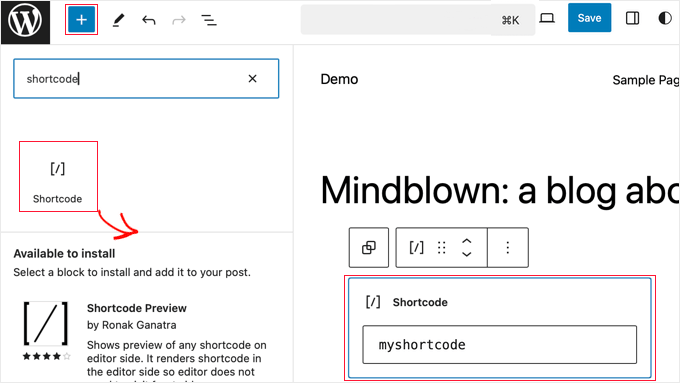
Shortcodes help you add special features to your site. They work well with many WordPress plugins. Popular plugins use shortcodes to make tasks simple. You don’t need to know coding. Just paste a shortcode in your page.
Many plugins offer extra features. Shortcodes make these features easy to use. They can add forms, galleries, or videos. This saves time and effort. You get more power with less work.
Shortcodes expand what your site can do. They add new functions without plugins. You can show maps or social media feeds. Your site becomes more interesting. Users like more options and fun tools.
Shortcodes make WordPress flexible. Your site can grow and change. You can try different shortcodes. Find what works best for your needs.
Credit: www.wpbeginner.com
Future Of Shortcodes
Shortcodes in WordPress are small code snippets that make adding custom features easy. They simplify complex coding tasks. The future of shortcodes may see more intuitive and user-friendly designs, making website customization even more accessible.
Gutenberg And Beyond: Emerging Trends
Shortcodes have been a crucial part of WordPress. They help users add special features easily. With the rise of the Gutenberg editor, things are changing. Gutenberg uses blocks instead of shortcodes. Blocks are visual and user-friendly. They make content creation simpler for beginners.
Yet, shortcodes are still useful. Many plugins rely on them. Developers are working to integrate shortcodes with Gutenberg. This makes both systems work together. In the future, we may see more advanced blocks. These blocks might replace many shortcodes.
Some users prefer shortcodes for their flexibility. Blocks may not replace them all. The WordPress community is exploring new ideas. They want to make content creation easy for everyone. The future of shortcodes looks promising. Both shortcodes and blocks can coexist. This offers users more choices.
Frequently Asked Questions
What Is A Shortcode In WordPress?
A shortcode is a small code snippet that enables users to perform complex actions easily. WordPress shortcodes simplify embedding content like galleries, videos, or forms without needing extensive HTML or PHP knowledge. They are enclosed in square brackets and can be added directly into posts, pages, or widgets.
How Do Shortcodes Benefit WordPress Users?
Shortcodes empower users to enhance website functionality without coding expertise. They save time by simplifying content embedding and layout customization. Users can effortlessly integrate dynamic features, such as contact forms or sliders, improving user experience. This boosts efficiency and helps maintain clean, organized code within WordPress sites.
Can Shortcodes Be Customized?
Yes, shortcodes can be customized to suit specific needs. Users can create custom shortcodes using PHP functions. This flexibility allows integration of unique features and styles. Many plugins offer shortcode customization options, enabling users to modify parameters. This enhances website functionality and design, catering to diverse requirements.
Are There Plugins For WordPress Shortcodes?
Yes, numerous plugins enhance WordPress shortcode capabilities. These plugins offer pre-built shortcodes for varied functionalities, like sliders, forms, and galleries. They simplify shortcode implementation, allowing users to add complex features quickly. Popular plugins include Shortcodes Ultimate and WP Shortcode. They help enhance website design and user interaction.
Conclusion
Shortcodes simplify WordPress, making tasks easier for everyone. They save time, reducing effort needed for complex functions. Even beginners can use them confidently. With shortcodes, creating content becomes more flexible and dynamic. They help in adding features without coding. This boosts creativity, allowing users to enhance their sites.
Remember, shortcodes are powerful tools. They transform the way you build and manage your WordPress site. Try experimenting with them today. Discover how they can improve your blogging experience. Keep learning and exploring new possibilities in WordPress. Your website can truly shine with the right shortcodes.


