
Imagine having a powerful tool right on your website that allows your users to write and test C code instantly. Sounds intriguing, right?
Hosting a C sandbox on your site can transform it into an interactive platform, sparking engagement and boosting your site’s value. But how do you actually get started? You might think it’s complicated, but with the right guidance, it’s simpler than you imagine.
In this guide, you’ll discover the step-by-step process to seamlessly integrate a C sandbox into your website. Whether you’re looking to enhance educational content or provide a coding playground for developers, this article will walk you through everything you need to know, ensuring your website stands out from the crowd. So, are you ready to add a dynamic feature to your web space? Let’s dive in and explore how you can make it happen effortlessly.
Choosing The Right Tools
Select tools that support easy integration of a C sandbox on a website. Ensure compatibility with existing frameworks. Prioritize user-friendly interfaces for both developers and visitors.
Selecting A Compiler
Choosing a good compiler is important. A C compiler converts code to machine language. GCC is a popular choice. It is open-source and free. It works on many systems. Another option is Clang. It is fast and supports modern features. Both GCC and Clang are reliable. They help find errors in your code. Select a compiler that suits your needs.
Integrating Code Editor
Using a code editor makes coding easier. A code editor helps write and edit code. Popular editors include Visual Studio Code and Sublime Text. They have features like syntax highlighting. Syntax highlighting helps read code better. These editors support extensions. Extensions add extra features to the editor. Choose an editor that feels comfortable. Make sure it works well with your compiler.
Setting Up The Server
Choose a server with a Linux operating system. Ensure it has at least 2 GB RAM. A dual-core CPU works well. Disk space should be 10 GB minimum. Install Apache or Nginx for hosting. Ensure the server has a stable internet connection. Verify that the server supports C language compilers. Regular updates are necessary for security.
Begin with updating the server software. Use apt-get or yum for updates. Install a C compiler using package managers. Configure web server settings to allow C scripts. Set up sandbox directories for security. Apply necessary permissions to these directories. Use firewall settings to protect the server. Ensure SSL certificates for secure connections. Test the setup by running a simple C program. Make adjustments as needed for performance.
Implementing Security Measures
Safeguard your website by hosting a C sandbox with strong security measures. Isolate user code to prevent access to sensitive data. Regularly update software and monitor for vulnerabilities to ensure a safe coding environment.
Sandboxing Techniques
Sandboxing is a key tool for security. It keeps your code safe. A sandbox is like a safe box. It runs code in a protected area. This keeps your main system untouched. Isolating the code prevents harm. It stops bad code from spreading. Sandboxing can stop unwanted access. It acts as a barrier between threats and your site.
User Authentication
User authentication checks who is using your site. It is like a security guard. Users must prove who they are. This keeps bad people out. Strong passwords are a must. Use numbers and symbols. Two-step checks add extra safety. They send a code to your phone. This code helps prove your identity.

Credit: www.youtube.com
Creating User Interface
Start by making a simple design. The layout should be clean. Use boxes to separate different sections. Keep the colors soft and gentle. This helps the users focus on the code area. Make sure the buttons are easy to see. Add labels to guide the users.
Keep the text large enough to read. Arrange the elements in a straight line. This makes navigation easy. Keep the layout simple and tidy. Users like easy-to-use interfaces.
Add clickable buttons for compiling the code. Include a text box for entering code. Provide a clear area for output. Users like to see results fast. Add a reset button to clear the screen. This saves time.
Ensure all buttons work well. Test them often. Users need a smooth experience. Interactive features make the interface fun. They keep users engaged.
Handling Code Execution
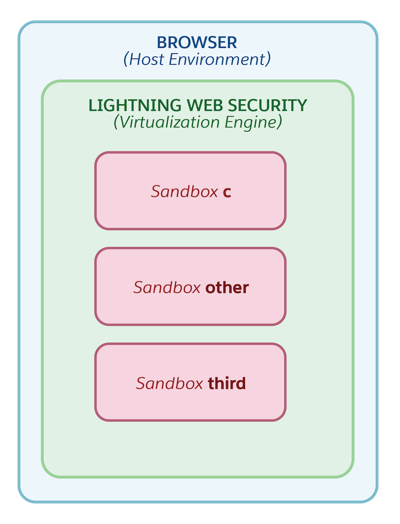
To run C code safely, setting up a controlled environment is key. Use a virtual machine or a container. This keeps your main server safe. Choose a lightweight solution for faster response. Ensure security measures are in place. This prevents unwanted access or code misuse.
Errors happen in code. Detecting errors quickly is important. Use logs to track error messages. They help find the problem. Custom error messages assist users. Simple messages guide them. Ensure the system can recover from errors. It keeps the sandbox running smoothly. Testing the error handling system is vital. It ensures reliability and user satisfaction.
Credit: developer.salesforce.com
Testing And Debugging
Hosting a C sandbox on a website enhances testing and debugging capabilities. This setup allows developers to experiment with code directly online, streamlining problem-solving and improving efficiency. Users benefit from interactive debugging, making it easier to identify and fix errors swiftly.
Test Scenarios
Create different test cases to check your C sandbox. Make sure each function works well. Use simple inputs first. Then try complex inputs. Check the sandbox’s response time. Look for any errors or crashes. Keep a record of all results. It helps in finding issues.
Troubleshooting Tips
If errors appear, check your code first. Ensure all libraries are up-to-date. Use an online debugger to spot problems. Verify the server settings. Sometimes, restarting the server helps. If issues persist, search for common error fixes online. Always keep a backup of your code.
Deploying The Sandbox
Choose a simple way to deploy your C sandbox. Containers like Docker make deployment easy. They pack the app and its needs together. Virtual machines offer more control. They provide a full environment for your sandbox. Cloud platforms are helpful. They give resources on demand. Consider using CDNs for fast access. They distribute content quickly. Load balancing keeps the server steady. It handles many users at once. Use automated scripts to ease deployment. Scripts help set up everything fast.
Monitoring keeps the sandbox safe. Use tools to check its performance. Watch for errors and bugs. Logging records all activities. It helps find problems quickly. Alerts warn you of issues right away. They keep the sandbox running well. Regular updates are crucial. They protect against new threats. Backups save important data. They help recover in case of failure. User feedback guides improvement. Listen and make changes.

Credit: gunnarpeipman.com
Frequently Asked Questions
How To Create A Sandbox Environment?
Set up a virtual machine or use cloud services. Install necessary software and configure settings. Duplicate the production environment. Test with sample data. Ensure isolation from live systems for safety.
How To Run A Sandbox Code?
Install sandbox software or use a browser-based tool. Upload your code into the sandbox environment. Execute it safely without affecting your system. Ensure the sandbox is properly configured to prevent security risks. Debug and test your code within this isolated setup.
What Is The Sandbox Environment For A Website?
A sandbox environment is a testing platform for websites. It allows developers to experiment without affecting the live site. This safe space ensures that updates, features, or changes work properly before going live. Developers can identify and fix bugs efficiently here.
What Is A Sandbox Mode Website?
A sandbox mode website is a testing environment for developers. It allows experimentation without affecting the live site. This setup helps test changes, new features, or updates safely. Developers can identify issues before deploying them to the public site, ensuring a smoother user experience.
Conclusion
Creating a C sandbox on your website helps learning and testing. It offers interactive coding practice for users. This enhances engagement and keeps visitors returning. Setting up is straightforward with the right tools. Follow the steps for a smooth experience.
Ensure security measures are in place to protect user data. Regular updates keep the sandbox reliable and functional. Encourage feedback to improve the user experience. Hosting a C sandbox can enrich your site and support your community. Build an environment that fosters growth and learning.
Your audience will appreciate the effort.


