
Imagine you’re building a house. You wouldn’t just stack bricks randomly; you’d carefully plan where each one goes.
The same goes for your WordPress site. One of the most overlooked yet critical components of your website’s architecture is the “slug. ” But what does “slug” mean on WordPress, and why should you care? Well, if you want your website to stand out, attract more visitors, and rank higher on search engines, understanding slugs is essential.
Think of slugs as the guiding signposts on your website. They play a significant role in how search engines and users perceive your content. They’re not just random strings of text; they’re purposeful, strategic, and can make or break your site’s visibility. Curious about how these tiny elements can have such a big impact? Stick around, and you’ll discover how mastering slugs can transform your WordPress site into a traffic magnet, making it irresistible to both search engines and potential visitors. Let’s dive in and unlock the secrets of slugs together!
Definition Of A Slug
A slug is part of a web address. It helps identify a post or page. The slug comes after the domain name. It often matches the title of the post. This makes it easy to find and understand. A slug is important for SEO. It tells search engines what your content is about.
Slugs must be simple and clear. Use words related to your content. Avoid using numbers or special symbols. Keep it short and easy to read. This helps users and search engines.
Credit: www.wpbeginner.com
Purpose Of Slugs In WordPress
Slugs are important in WordPress. They help identify pages. A slug is the part of the URL after the domain name. It describes the page or post. For example, if the URL is www.example.com/about, “about” is the slug.
Slugs make URLs easy to read. Users can understand the page content from the slug. Search engines also use slugs. They help rank the page better. Good slugs improve SEO. They should be short and clear. Use keywords in slugs. Avoid unnecessary words.
Slugs also help in organizing your site. They link topics and posts. Always check your slugs. Make sure they are relevant and concise. Use simple language. This helps both users and search engines. A good slug is a good start.
Creating A Custom Slug
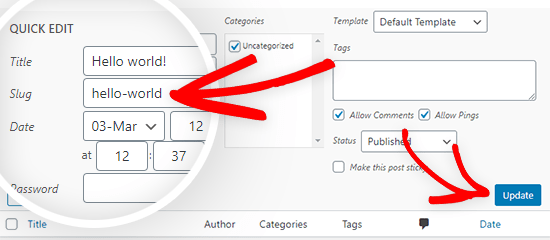
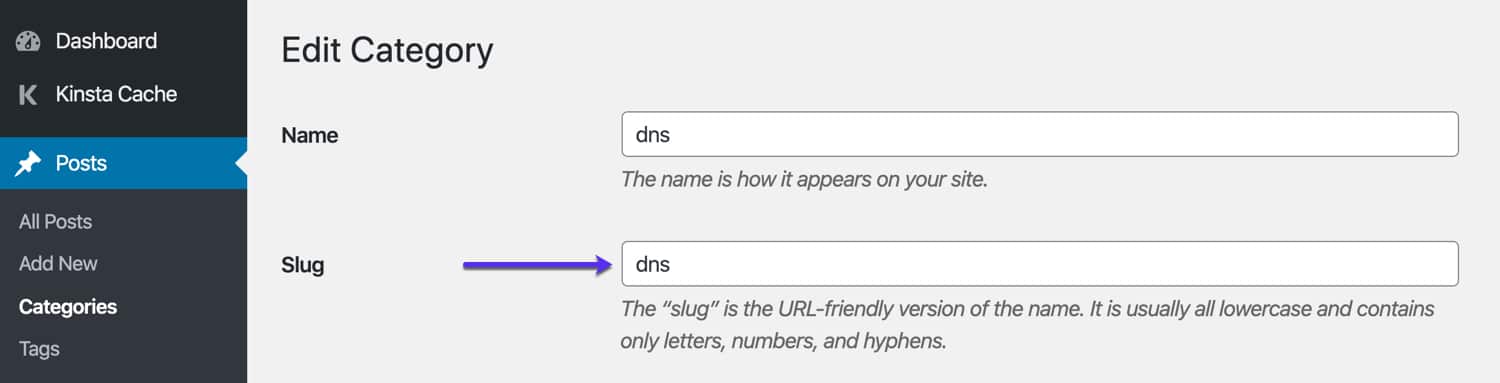
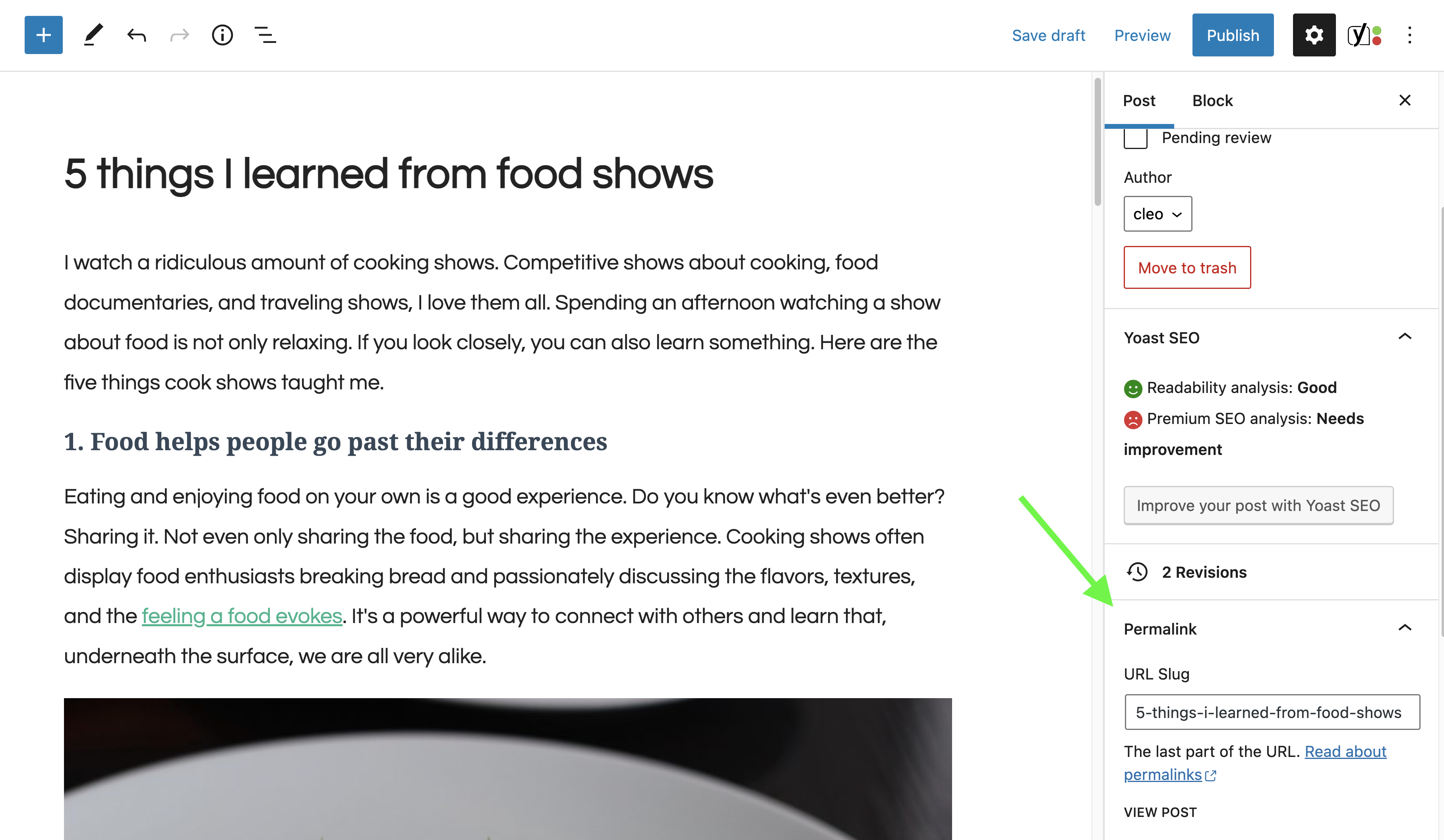
Open your WordPress dashboard. Go to the Posts section. Click on the post you want to edit. Find the Permalink section. Click Edit next to the slug. Type your new slug. Keep it short and clear. Use hyphens to separate words. Avoid using special characters.
Slugs should be descriptive and concise. Use keywords that match your post. This helps with SEO. Keep slugs easy to read. Avoid using dates or numbers. Make slugs unique for each post. Check for spelling errors.
Credit: kinsta.com
Seo Benefits Of Optimized Slugs
On WordPress, a slug is the part of a URL that identifies a page. Optimizing slugs improves search engine visibility. It makes URLs clear and easier to read. This helps search engines understand content better, enhancing SEO performance.
Keywords In Slugs
Including keywords in slugs boosts your website’s SEO. It helps search engines understand the page content. Search engines rank pages better with clear slugs. Slugs are the part of the URL after the domain name. Using relevant keywords in slugs makes your page easy to find. It improves the visibility of your site in search results. Keywords tell users what the page is about. This encourages more clicks and visits. Choose simple and clear words for your slugs. Avoid using too many words or complex terms.
Improving Readability And Searchability
Good slugs make pages easy to read and search. Short slugs are better than long ones. They are easy to remember and type. Slugs should match the page title or topic. This helps users know what to expect on the page. Search engines prefer slugs that are simple. Simple slugs are easy to index and rank. Users are more likely to click on easy-to-read URLs. This increases your site’s traffic and engagement. Always keep slugs relevant and precise.
Common Mistakes With Slugs
Many users misunderstand the meaning of slugs on WordPress, leading to common mistakes. Slugs are the URL-friendly versions of post titles, crucial for SEO. Common errors include using long, complex slugs or failing to incorporate keywords.
Avoiding Duplicate Slugs
Duplicate slugs can confuse readers. They may not know which page they are on. Unique slugs help search engines find your page. Always check your slugs are different. Use a slug that fits the page content. This makes it easy to remember. It also helps with SEO. A unique slug is best for a good user experience.
Managing Length And Complexity
Long slugs can be hard to read. Short slugs are easier for users. They keep the URL simple. Avoid complex words in slugs. Use words that everyone knows. This helps users find your page easily. Short and simple slugs improve navigation. They also help in quick page loading. Keep your slugs clear and concise.
Credit: yoast.com
Slug Management Tools
On WordPress, a slug is the URL-friendly version of a post or page title. It helps create readable links by replacing spaces with dashes and removing special characters. Effective slug management tools assist in optimizing these URLs for better search engine visibility and user experience.
Plugins For Slug Optimization
Many plugins help with slug optimization. Some popular ones are Yoast SEO and All in One SEO. These plugins offer features to make slugs better. They can suggest slug changes. They also keep slugs short and clear. Plugins can also help with automatic slug generation. This saves time for users. Using plugins makes slug management easy. Choose a plugin that fits your needs.
Built-in WordPress Features
WordPress has built-in tools for slug management. Users can change slugs directly in the editor. This is simple and quick. The editor allows for immediate changes. Users can also see how slugs appear in URLs. This helps in making slugs more effective. WordPress offers a clean interface. This makes slug editing easy for everyone. Built-in features are useful for beginners.
Case Studies Of Effective Slug Use
Understanding slugs in WordPress is crucial for SEO. They are part of a URL that explains a page’s content. Effective use of slugs can improve site visibility and user experience.
Examples From Popular Blogs
Many popular blogs use simple and clear slugs. This helps readers understand the content. For example, a blog about cooking might use “/easy-pasta-recipe” as a slug. Another blog about travel might use “/top-places-to-visit”. These slugs are short and easy to remember.
Good slugs help with SEO. They make it easier for search engines to find the blog. This means more people can read the blog. A well-chosen slug also helps with user experience. Readers can guess the content from the slug. This makes them more likely to click on the link.
Lessons Learned From Slug Optimization
Effective slugs are short. They are also descriptive. They use important keywords. This helps with both readability and search engine ranking. A good slug should be easy to type. It should also be easy to say. Avoid using numbers or special characters. This makes slugs hard to understand.
Remember to keep slugs consistent. Use the same style across all blog posts. This helps readers and search engines. It creates a clear path to the content. This results in better user engagement and higher search rankings.
Frequently Asked Questions
What Is A Slug In WordPress?
A slug in WordPress is the URL-friendly version of a post or page title. It consists of lowercase letters, numbers, and hyphens. A well-crafted slug improves SEO by making the URL clear and descriptive. It is automatically generated but can be edited for optimization.
How To Edit A WordPress Slug?
To edit a WordPress slug, go to the post or page editor. Find the permalink section under the title. Click “Edit” next to the URL, and type in your desired slug. Use lowercase letters, numbers, and hyphens for best results.
Save your changes to apply the new slug.
Why Are Slugs Important For Seo?
Slugs are crucial for SEO because they make URLs clear and descriptive. Search engines use them to understand page content. A well-optimized slug increases click-through rates by providing relevant information to users. It also helps improve the overall ranking of your website.
Can WordPress Slugs Include Special Characters?
WordPress slugs should not include special characters. They should only use lowercase letters, numbers, and hyphens. Special characters can cause issues with URLs and affect SEO performance. Avoid using spaces, punctuation, or symbols to ensure a clean and effective slug.
Conclusion
Understanding slugs on WordPress is essential for effective SEO. They help define URLs clearly, improving both search rankings and user experience. A well-crafted slug makes your content more discoverable. Keep slugs concise and relevant to the page’s content. Avoid unnecessary words or symbols.
This practice enhances navigation and search results. Remember, a good slug is simple and descriptive. It guides both search engines and visitors efficiently. By mastering slugs, you ensure your WordPress site remains optimized. This small step greatly impacts your site’s visibility.
So, focus on creating meaningful slugs for better online presence.


