
Have you ever wondered how websites manage to display different types of content so seamlessly? If you’re using WordPress, the secret often lies in something called a Custom Post Type, or CPT.
You might not realize it, but understanding CPTs can unlock a new level of customization and functionality for your website. Imagine being able to tailor your site specifically to your needs, without the usual limitations. Intrigued? You’ll discover exactly what a WordPress CPT does and how it can transform your website into a more engaging and efficient platform.
Stay with us, and by the end, you’ll see your website in a whole new light.
WordPress Cpt Basics
WordPress uses Custom Post Types (CPT) to handle different content. Posts and pages are common types. CPTs offer more options. They make WordPress flexible. CPTs help show content in various ways. Blogs, products, and portfolios use CPTs. Developers create new CPTs for unique content. Custom taxonomies work with CPTs. They organize content nicely. Users find items easily with taxonomies. Custom fields add extra details to CPTs. They store important information. CPTs can have their own templates. Templates control how content looks. Plugins support CPTs well. Many plugins add features to CPTs. Themes also work with CPTs. They style content beautifully. CPTs make WordPress sites better. They give sites special abilities.
Creating Custom Post Types
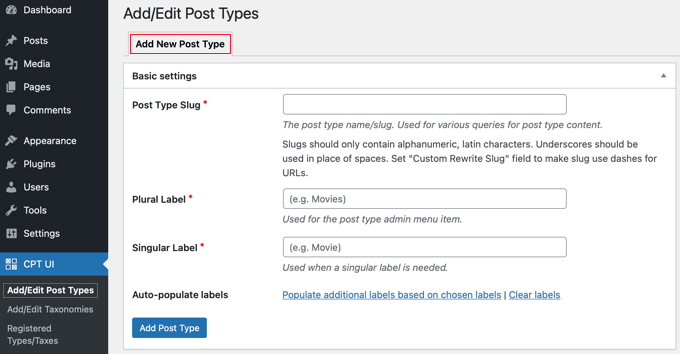
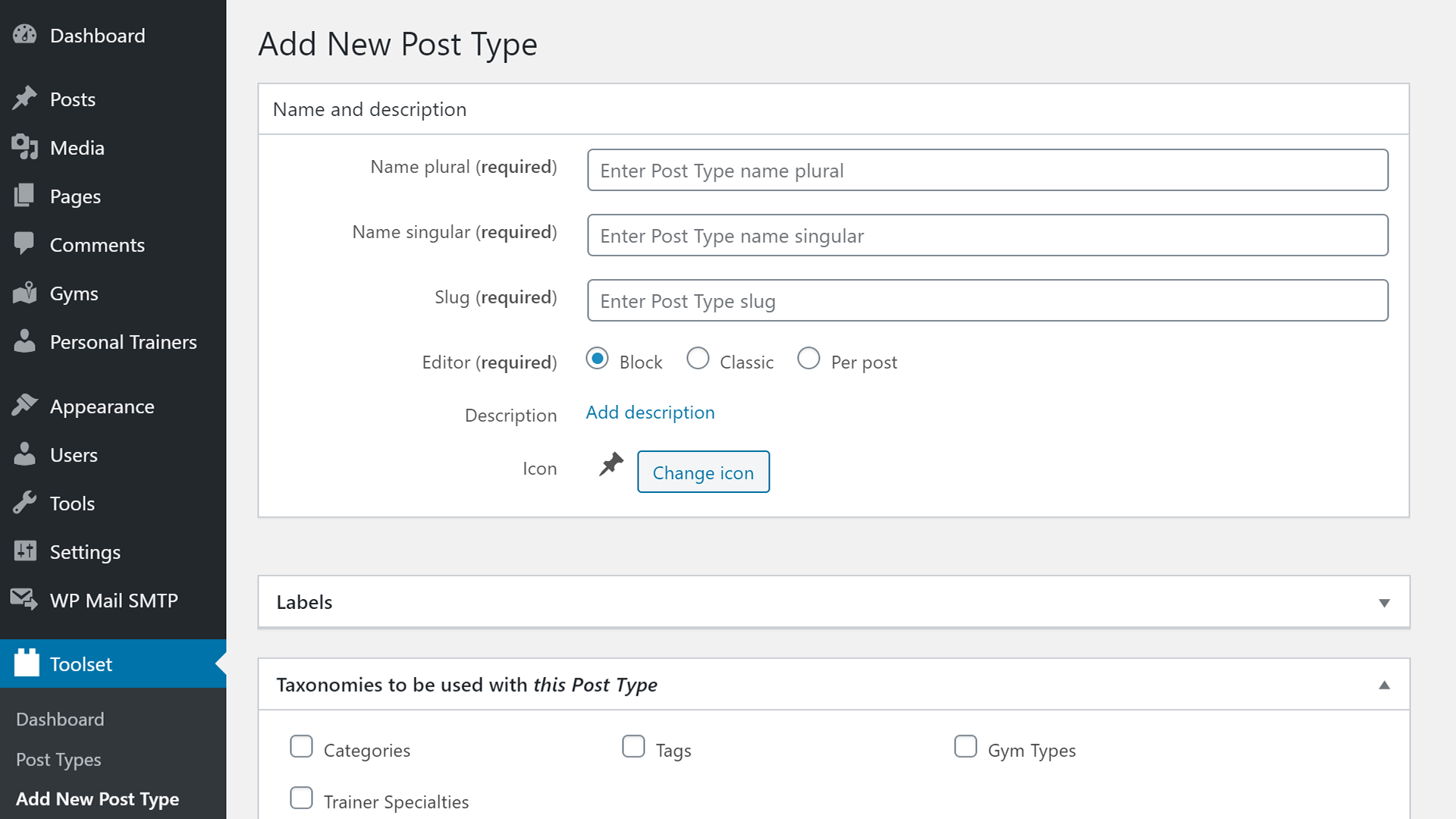
First, open your WordPress dashboard. Go to Plugins and click Add New. Search for a plugin like Custom Post Type UI. Install and activate it. Once activated, go to the CPT UI in the dashboard. Click Add New Post Type. Fill in the Name and Slug. Save changes.
For manual coding, open your theme’s functions.php file. Add code to register_post_type. Define the labels and settings. Save the file. Check the dashboard for your new post type.
Plugins are easy. No coding skills needed. Just install and set up. Good for beginners. Manual coding offers more control. Advanced users prefer it. Coding lets you customize deeply. But requires coding knowledge.
Benefits Of Using Cpt
Custom Post Types (CPT) help arrange content neatly. They allow posts to fit specific categories. This makes finding information easy and quick. Authors can create different post types like books or movies. Each type has unique features. This organization aids in better management. Efficient sorting helps in accessing related content.
Users enjoy browsing well-structured websites. CPT enhances how content appears to visitors. It allows for a tailored viewing experience. Users find relevant posts faster. It reduces confusion and saves time. Simple navigation becomes possible. User satisfaction increases with ease of access. Websites become more engaging.
Credit: www.wpbeginner.com
Cpt In Website Design
Custom Post Types (CPTs) let you add new content types. This helps make your website unique. You can create things like portfolio items or testimonials. They are not like regular posts or pages. You can make these posts fit your needs. Add different fields or features. Change the way they look. It is like having your own special box for content.
With CPTs, you have more design choices. Your website can look different and interesting. You can use different templates. This means each content type can have its own style. Imagine your blog looking one way and your gallery another. CPTs give you the power to change designs easily. Make your site truly yours.
Examples Of Effective Cpt Use
WordPress Custom Post Types (CPT) allow for unique content creation tailored to specific needs. Examples include portfolios showcasing creative work or testimonials highlighting customer experiences. These tailored posts enhance website organization and user engagement, offering a personalized browsing experience.
Portfolios
Custom Post Types (CPTs) create unique portfolios for artists. Each project gets its own post type. This keeps everything organized and clear. Artists showcase their work neatly. Visitors find and view projects easily. Portfolio CPTs display images, descriptions, and categories. They make browsing simple. Artists can add new projects anytime.
E-commerce Products
CPTs help in managing e-commerce products. Each product becomes a separate post type. It helps keep details like price and description organized. Shoppers find products quickly. It enhances the online shopping experience. Store owners update products easily. CPTs provide structure for product categories and tags. This organization boosts sales.
Events And Calendars
CPTs are useful for events and calendars. Each event has its own post type. It includes date, time, and location. Visitors view upcoming events without confusion. Organizers update event info effortlessly. CPTs help list events by categories. This setup improves event management. Users find events that interest them.
Credit: www.liquidweb.com
Common Challenges
Creating and managing Custom Post Types (CPT) in WordPress can be challenging. Users often face difficulties with compatibility issues and design limitations. Understanding plugins and settings is crucial for smooth implementation.
Compatibility Issues
Custom Post Types (CPTs) in WordPress can cause compatibility issues. Some themes or plugins might not work well with CPTs. This can break your site. Testing is important before using CPTs. Always check if your theme supports them. Some plugins help fix these issues. Backup your site regularly. This way, you can restore it if something goes wrong.
Maintenance And Updates
Custom Post Types need regular maintenance and updates. WordPress updates can affect CPTs. Some updates might break your CPTs. Always update plugins and themes too. Keeping everything updated is important. This helps prevent bugs and errors. Regular checks ensure your CPTs work smoothly. Always test updates on a staging site first. This helps avoid big problems on your live site.
Best Practices For Cpt
WordPress Custom Post Types (CPT) create unique content beyond standard posts and pages. They help organize specific content like portfolios, testimonials, or products. This improves site structure and user experience.
Naming Conventions
Choosing the right name for your CPT is important. Keep it simple and clear. Use lowercase letters and separate words with underscores. This helps with readability. For example, use “movie_review” instead of “Movie Review”. A good name makes it easy to find and use. It also helps others understand your CPT’s purpose.
Organizing Hierarchies
Organizing CPT hierarchies is crucial. Use categories and tags to group related items. This makes content easy to find. It also improves navigation. Consider the user’s experience and how they will search. Keep the structure simple and logical. Think about the main topics and subtopics. This helps in creating a clear path for users to follow.
Future Of WordPress Cpt
Custom Post Types (CPTs) are becoming more popular. People use them for unique website needs. Blogs, portfolios, and shops can all use CPTs. They help make sites special and fun. The trend is growing fast. More users are learning about CPTs every day. They find them easy and helpful. Soon, even more sites will use CPTs. They will be a part of many projects.
Technology is always changing. This change helps WordPress CPTs. New tools are making CPTs better. They are easier to use now. Developers can add more features. These features help websites work well. Users see improvements too. Websites load faster. They look nicer and work smoother. CPTs are a big part of this change. They help keep WordPress up to date. Many people like using WordPress because of CPTs. They make websites exciting and new.
Credit: toolset.com
Frequently Asked Questions
What Is A WordPress Cpt?
A WordPress CPT, or Custom Post Type, allows you to create and manage unique content types. Unlike regular posts and pages, CPTs offer flexibility in categorizing and displaying content. They help tailor the WordPress experience to your specific needs, enhancing functionality and user engagement.
How Do Cpts Differ From Regular Posts?
CPTs differ from regular posts by offering customizable content structures. While regular posts focus on blog entries, CPTs can represent portfolios, testimonials, or products. They provide additional fields and taxonomies, allowing better organization and presentation of content.
Can I Create Cpts Without Coding?
Yes, you can create CPTs without coding using plugins like Custom Post Type UI. These plugins offer user-friendly interfaces to define custom post types and taxonomies. They simplify the process, allowing WordPress users to enhance their site without technical expertise.
Are Cpts Seo-friendly?
CPTs can be SEO-friendly if properly configured. By using relevant keywords, custom fields, and taxonomies, you can optimize CPTs for search engines. They allow better content organization, improving user experience and search engine visibility when combined with SEO plugins.
Conclusion
WordPress CPTs simplify website customization. They allow unique content types. You can create portfolios, testimonials, or events easily. No coding skills needed. CPTs enhance site functionality and user experience. Organize your content better. Keep your site fresh and engaging. Choose the right plugins.
Experiment with different setups. Discover what works best for your audience. With CPTs, your site stands out. Manage content effectively. Ensure visitors find what they need. Enhance your WordPress journey. Explore the possibilities. Make your site not only functional but attractive.
CPTs are vital for a dynamic and organized WordPress site.


