
Are you ready to make your WordPress site truly your own? Customizing a WordPress theme is a fantastic way to reflect your brand and style, but what’s the price tag on this creative endeavor?
Whether you’re sprucing up a personal blog or revamping a business website, understanding the costs involved can save you from unexpected expenses and ensure you get the most value for your investment. In this blog post, we’ll break down the costs of customizing a WordPress theme.
From basic tweaks to a complete overhaul, you’ll discover exactly what factors influence the price and how to make budget-friendly decisions without sacrificing quality. Stay tuned, because knowing the financial aspects is the first step to crafting a website that’s as unique as you are!

Credit: cmsminds.com
Factors Influencing Costs
The more complex the design, the higher the cost. Simple designs need less work. Intricate designs require more time. Detailed elements increase effort. More effort means higher fees. Designers charge more for complex tasks. Simple layouts are cheaper. Complexity raises prices significantly. Decide on design early to plan budget.
Full customization costs more. Small changes are less expensive. Adding features increases cost. Tailored designs need more resources. Unique designs require extra coding. Standard themes are cheaper. Custom features need skilled work. Customization affects final price. Balance needs and budget wisely.
Experienced developers charge more. They offer quality work. Novice developers cost less. Skill level affects pricing. Expertise ensures fewer errors. High skill means better output. Choose developers based on need. Quality often comes with a price. Developer choice impacts cost.
Types Of Customization
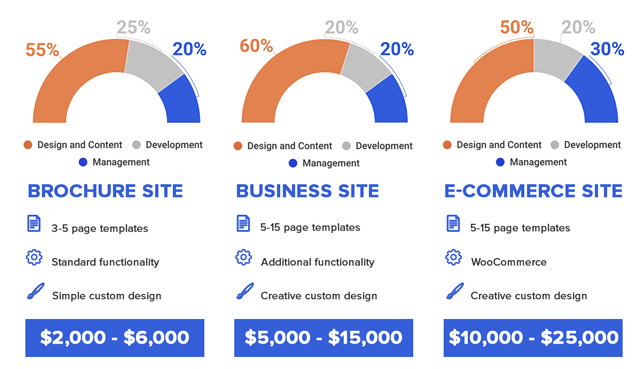
Basic adjustments usually involve simple changes. Colors, fonts, and layout are common tweaks. These changes are easy and quick to do. Costs are generally low. Hourly rate may range from $20 to $50. It depends on the developer’s skill. Small businesses often choose these adjustments. They make the website look unique without spending much. Perfect for beginners.
Adding advanced features can be complex. Sliders, galleries, or contact forms need special skills. Costs are higher for these tasks. Developers may charge between $100 to $300. It takes more time and effort. These features improve user interaction. Businesses need them for better user experience. Necessary for websites that want to stand out.
Integrating e-commerce can be costly. Online store setup requires expertise. Payment gateways, product listings, and security are involved. Costs can start from $500 and go higher. Requires skilled developers. Essential for selling products online. Many businesses invest in this. Makes buying and selling easy and safe.
Cost Breakdown
Hourly rates can be tricky. They change with the developer’s skill. A beginner may charge less. Experts ask for more money. Usually, rates range from $20 to $150 per hour. It’s like a pizza, prices vary based on toppings. A simple tweak might be cheap. A big change costs more.
Some developers prefer fixed pricing. They set one price for the whole job. This way, you know the cost upfront. No surprises later. It’s like buying a toy with a price tag. You know what you’re paying.
For those with tight wallets, there are budget-friendly options. Some developers offer basic packages. These packages cost less. They cover simple changes. Perfect for small needs.
For big dreams, choose premium customization packages. These include many features. They are costly but worth it. You get exactly what you want. Like a custom-made car. Special and unique.
Hiring The Right Developer
Choosing between a freelancer and an agency is important. Freelancers often charge less. They work alone. Agencies have a team. They might charge more. Agencies can offer more resources. Freelancers are good for small projects. Agencies handle big tasks well. Think about your budget. Decide what you need.
A portfolio shows a developer’s work. Check their style and quality. Does it match your needs? Look for unique designs. See if they have done similar work. A good portfolio speaks a lot. It tells you about their skills. You can see their creativity. Make sure their past work is good.
Read reviews from other clients. Reviews tell you about their experience. A good developer has positive feedback. Look for honest opinions. Check how they handle problems. Testimonials show trust. Many good reviews mean happy clients. Bad reviews might be a warning. Choose someone with good reviews.
Hidden Expenses
Customizing a WordPress theme often involves hidden costs. Expenses can include premium plugins, developer fees, and additional design tools. These costs add up quickly, impacting your budget.
Licensing Fees
Buying a WordPress theme often includes a licensing fee. This fee lets you use the theme legally. Some themes need yearly payments. Others have a one-time fee. Always check what’s included. Updates and support might cost extra. These fees add to your budget.
Ongoing Maintenance
Websites need regular care. Themes need updates to stay secure. Updates can fix bugs too. Some hire experts for this. Experts charge for their time. Costs can add up over time. Regular checks keep your site healthy.
Additional Plugin Costs
Plugins add features to your site. Some plugins are free. Others need payment. Paid plugins often have better support. They might also offer more features. Costs vary based on what you need. Choose plugins that fit your budget.
Diy Customization
Page builders make customizing a WordPress theme easy. They offer drag-and-drop features. No coding needed. Popular builders include Elementor and Beaver Builder. These tools help design pages quickly. Many offer free versions. Premium versions provide more features. Costs can start from $40 per year. Page builders save time and effort. They suit beginners very well.
Many online courses teach WordPress customization. Websites like Udemy and Coursera have classes. They range from free to $50. YouTube is another great resource. Many tutorials are available for free. Books can also be helpful. They provide detailed guides. Libraries often have relevant books. Investing time in learning can save money. Self-learning builds confidence too.
- Pros: Cost-effective and flexible. Customize at your own pace. Learn valuable skills.
- Cons: Time-consuming. Results may vary. Requires patience and practice.
Tips To Save Money
List the most important features you need first. Focus on what makes your website unique. Extra features can cost more. Decide which ones are essential and which are not. This helps in keeping costs low.
Talk to developers about your budget. Be clear on what you can pay. Ask for a discount or a package deal. Sometimes developers offer deals for long-term work. This can save money.
Many pre-made solutions are available. They are often cheaper than custom work. Look for themes that match your needs. Change small things yourself. It costs less than starting from scratch.
Credit: www.wpbeginner.com
Credit: thewhitelabelagency.com
Frequently Asked Questions
How Much Does WordPress Theme Customization Cost?
WordPress theme customization costs vary depending on complexity and requirements. Basic changes might cost $200-$500, while advanced customizations could exceed $1000. Hiring experienced developers may increase costs. It’s essential to clarify your needs and budget before starting. Comparing quotes from different developers can help find the best deal.
Is WordPress Theme Customization Worth It?
Customizing a WordPress theme enhances your site’s appearance and functionality. It offers a unique design tailored to your brand. While it incurs additional costs, the improved user experience can lead to increased engagement and conversions. Assessing your site’s goals will help determine if customization is worthwhile.
Can I Customize A WordPress Theme Myself?
Yes, you can customize a WordPress theme yourself using built-in tools and plugins. Basic changes like color and font adjustments are easy. However, complex modifications might require coding skills. For extensive customization, hiring a professional ensures quality and saves time.
Consider your expertise level before proceeding.
How Long Does Theme Customization Take?
The duration for theme customization varies based on complexity and developer expertise. Simple adjustments might take a few hours, while extensive modifications could take weeks. Clear communication with your developer ensures efficient progress. Setting realistic timelines helps in managing expectations and achieving desired outcomes.
Conclusion
Customizing a WordPress theme involves various costs. These depend on your needs. Basic changes are often cheaper. Complex customizations require more investment. Hiring a skilled developer ensures quality work. This may increase costs but saves time. Tools and plugins can add to expenses.
Budgeting is crucial to avoid overspending. Always compare prices and services. Research helps you find good deals. Plan your project carefully. This ensures you achieve your desired outcome. Customization enhances user experience. It makes your website unique. Remember, investing in customization can offer great returns.
So, weigh your options wisely.


