
Are you ready to revolutionize the way you connect with your team, clients, or friends? Hosting a web meeting can open up a world of possibilities, allowing you to collaborate seamlessly, no matter where you are.
But let’s face it, the idea of setting up a virtual meeting might seem daunting. You might worry about technology glitches, awkward silences, or losing your audience’s attention. Don’t fret! This guide on “How to Host a Web Meeting” is here to transform your virtual meetings from nerve-wracking to effortless.
Imagine feeling confident as you navigate the digital realm, knowing that your meeting will be smooth, engaging, and productive. By the end of this article, you’ll have the tools and tips to make your web meetings not only effective but also enjoyable for everyone involved. So, are you ready to discover how to become a web meeting maestro? Let’s dive in and make your next virtual gathering a success.
Credit: oit.colorado.edu
Choosing The Right Platform
Different platforms offer different features. Zoom is popular for its ease of use. Skype is known for its long-standing reputation. Google Meet integrates well with other Google services. Each platform has unique strengths. Users should consider what suits their needs.
Features vary greatly between platforms. Some offer screen sharing and recording. Others focus on simple calling. Costs also differ. Free options exist but have limits. Paid versions offer more benefits. Users should weigh costs against features. Budget matters, but so do needs.

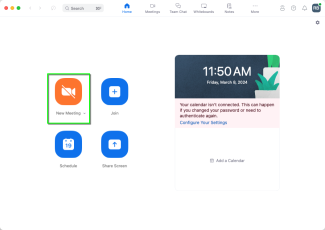
Credit: devforum.zoom.us
Preparing For The Meeting
A clear agenda is very important. Write down the main points. Share them with everyone. This helps everyone stay on track. Time management becomes easier. Everyone knows what to expect. This makes the meeting smooth.
Invite the right people. Use email or calendar invites. Ensure all have time to join. Remind them a day before. This helps them remember. Everyone must feel welcome.
Check all equipment before starting. This includes your camera and microphone. Test the software too. Make sure it works well. Ask someone to help you test. This avoids problems later.
Setting Up The Meeting Environment
A strong internet connection is vital for web meetings. Ensure your device is connected to a reliable network. Using a wired connection is often better than Wi-Fi. This prevents signal drops. Test your internet speed before the meeting starts. Close apps that use the internet. This helps in freeing up bandwidth.
Choose a quiet place for your meeting. Avoid rooms with lots of noise. Inform others in your home or office about your meeting. This reduces interruptions. Consider using headphones. This helps in blocking out background noise. A quiet space ensures clear communication.
Good lighting makes a big difference. Sit facing a natural light source like a window. Avoid having bright lights behind you. This prevents shadows on your face. Keep your background tidy and simple. This helps others focus on you. A clean background looks professional.
Conducting The Meeting
Begin the meeting by introducing everyone. Each participant should say their name and role. This helps everyone feel included. Also, it sets a friendly tone for the meeting. You can also ask a fun question. This makes it more engaging. Keep it short and simple. This way, you save time and keep interest high.
Use a clear and calm voice when speaking. Encourage others to do the same. Ask questions to make sure everyone understands. Use simple words and short sentences. This helps everyone follow the conversation. Listen carefully to what others say. Show that you value their input.
Stick to the agenda and keep track of time. Start and end the meeting on time. This shows respect for everyone’s schedule. If a topic takes too long, move it to the end. This way, you can cover more important points first. Keep discussions focused to avoid wasting time.
Engaging Participants
Start with a warm welcome to everyone. Ask simple questions to get them talking. Use names to make it personal. Invite them to share thoughts or experiences. Create a safe space to speak up. Keep the mood friendly and open. This boosts their confidence to join in.
Visual aids can make a meeting lively. Use slides to show key points. Include images or short videos. Keep slides simple with few words. Bright colors and large fonts help everyone see clearly. These tools keep eyes on the screen and minds engaged.
Questions show people are listening. Pause often to ask for questions. Encourage them to type in chat or speak up. Answer clearly and simply. Feedback helps improve the meeting. Ask what worked well or needs change. Thank them for sharing their thoughts.
Troubleshooting Common Issues
Web meetings can have technical glitches. Check your internet connection first. Slow connections cause many problems. Ensure your device is up-to-date. Updates fix many issues. Restarting your device can help too. Audio problems are common. Adjust your microphone and speakers settings. Make sure they are not muted. Use headphones for better sound. If video is blurry, check your camera. Clean the lens and adjust lighting. Update your video software regularly.
Disruptions happen in web meetings. Keep your background quiet. Mute your microphone when not speaking. This helps reduce noise. Keep your phone off or on silent. Ask participants to do the same. If someone is noisy, politely remind them to mute. Always have a backup plan. Be ready to reschedule if needed. Share a meeting agenda before the meeting. This keeps everyone on track.
Following Up After The Meeting
Send a recap of the web meeting. Include all important points discussed. List the key decisions made. Make sure to attach any relevant documents. This helps everyone stay informed. It also clears up any confusions.
Ask for feedback from participants. You can use a simple survey. This helps you understand what went well. It also shows what can be improved. This step is important for future meetings.
Create a clear plan for future actions. Assign tasks to team members. Set deadlines for each task. This keeps the team focused. It also ensures everyone knows their responsibilities. Make sure the plan is easy to follow.

Credit: money.howstuffworks.com
Frequently Asked Questions
How To Host An Online Meeting?
Choose a reliable platform like Zoom or Microsoft Teams. Schedule the meeting time and invite participants. Set up necessary equipment like a webcam and microphone. Share the meeting link and agenda with attendees. Start the meeting, manage participants, and ensure a smooth flow.
Conclude with a summary and next steps.
What Is The 40 20 40 Rule For Meetings?
The 40 20 40 rule allocates meeting time as follows: 40% preparation, 20% meeting, and 40% follow-up. This strategy enhances productivity, ensuring effective planning, efficient execution, and thorough post-meeting evaluation. Adopting this approach leads to more focused and successful meetings.
Is A Virtual Meeting The Same As Zoom?
A virtual meeting refers to any online gathering using digital tools. Zoom is a popular platform for hosting virtual meetings. While Zoom is widely used, virtual meetings can also occur on other platforms like Google Meet, Microsoft Teams, and Skype.
Zoom is just one option for conducting virtual meetings.
How Do I Host A Zoom Meeting On The Web?
Log in to your Zoom account on the web. Click “Schedule a Meeting” or “Host a Meeting. ” Choose your meeting settings and save. Share the meeting link with participants. Start the meeting by clicking “Start. ” Ensure your internet connection is stable for a seamless experience.
Conclusion
Hosting a web meeting can be simple. Start with clear goals. Use reliable technology. Invite the right people. Prepare your materials. Test your setup in advance. Keep the meeting focused. Encourage participation. Address technical issues quickly. Follow up with notes or actions.
Practice makes perfect. Each meeting helps you improve. Stay patient and adaptable. Remember to listen and engage. Your efforts will pay off. Web meetings can connect people anywhere. They save time and resources. With these tips, you can host successful meetings.
Keep learning and improving. Every meeting is an opportunity.


