
Have you ever wondered how WordPress brings your website to life with vibrant designs and layouts? One crucial piece of this puzzle is CSS classes.
Understanding CSS classes in WordPress can transform the way you design and customize your site. Imagine having the power to change colors, fonts, or even the layout of your pages with just a few clicks. That’s the magic of CSS classes.
Whether you’re a beginner or a seasoned developer, mastering CSS classes in WordPress can enhance your site’s aesthetics and functionality. By the end of this article, you’ll not only know what CSS classes mean but also how to leverage them to make your website stand out. Dive in to discover how you can take control of your site’s design like never before!
Css Classes Basics
CSS classes are like labels for HTML elements. They help in adding styles to those elements. You can use the same class for different elements. This keeps your design consistent. Think of it as a way to organize your web page’s appearance. It makes the design process easier and faster.
In web design, CSS classes play a key role. They allow designers to change the look of web pages. With classes, you can make text bold, change colors, or adjust layout. They help in making websites attractive and functional. Designers use them to ensure a good user experience.
Css Classes In WordPress
CSS classes help you change the look of your site. They work with themes to make your site special. You can add or change classes to match your style. Themes often come with default CSS classes. These classes make the design look nice and neat. Adding your own classes can give a unique touch.
You can use CSS classes to change colors and fonts. They also adjust the layout of your site. This makes your site look just how you like it. Using CSS is like painting. You choose the colors and shapes. Classes help you do this easily. They are the tools to create a perfect design.
Identifying Css Classes
Browser developer tools help find CSS classes. Right-click on a webpage and choose “Inspect”. A panel will open showing the webpage’s code. Look for the HTML elements. These elements often have class attributes. The words after “class” are the CSS classes.
CSS classes style the webpage. They make things look pretty. You can see how many classes an element has. This helps when you want to change a website’s look. Try finding the classes on different parts of the page. It helps learn how WordPress sites are built.
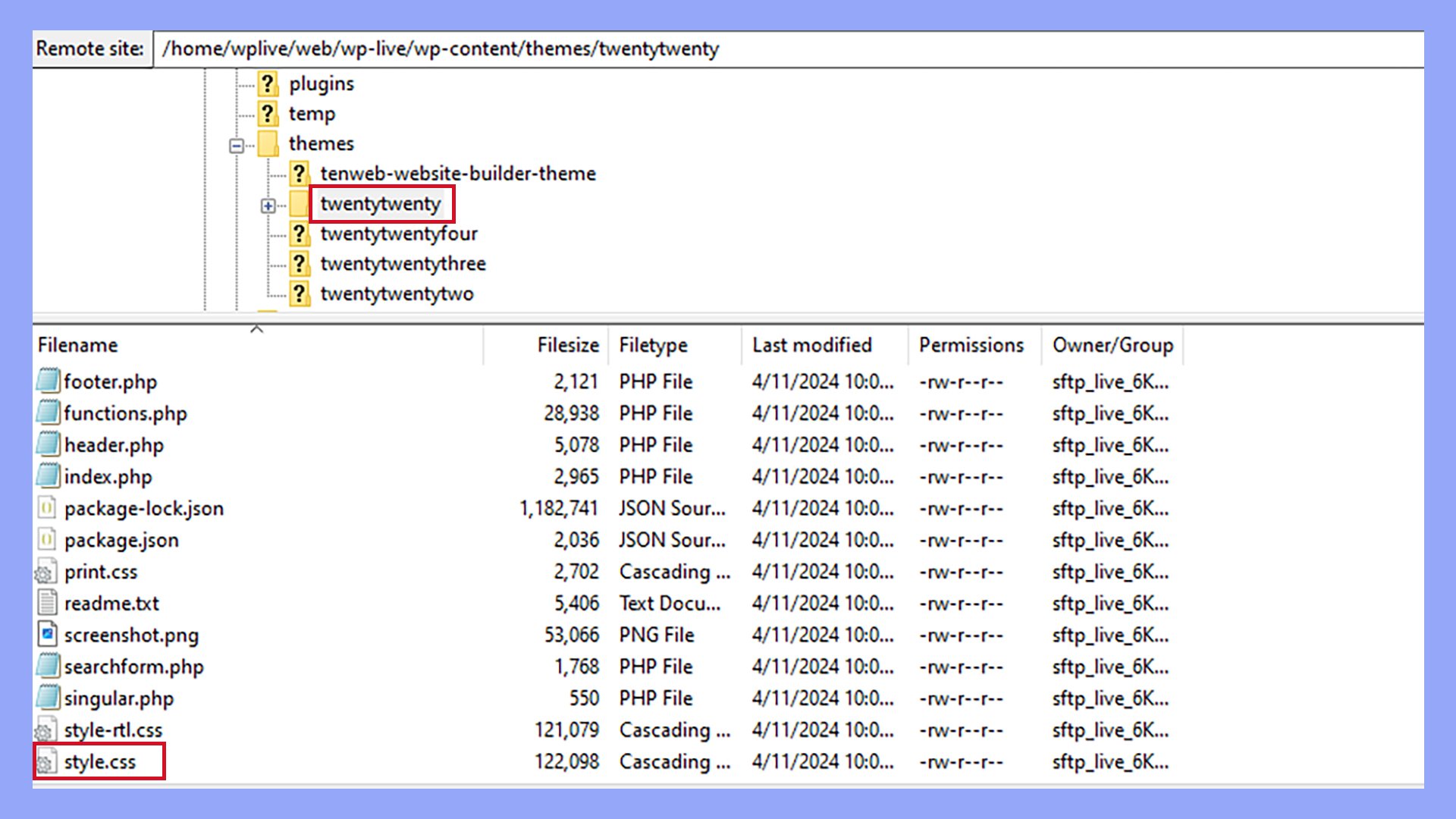
WordPress themes use many CSS classes. They make each theme unique. By inspecting themes, you see how styles are applied. Open the theme files in the editor. Look for the CSS stylesheets. These files have many class definitions. Each class has specific styles.
Experiment with changing classes. See how it changes the look. This is a fun way to learn. WordPress themes have a lot to explore. Keep inspecting and learning. CSS classes are a big part of web design.
Custom Css Classes
CSS classes help change the look of a website. They make parts look different. You can make your own CSS classes. First, write a CSS rule in the style sheet. Then, give it a name. After that, add this name to your WordPress elements. This step is called applying a class.
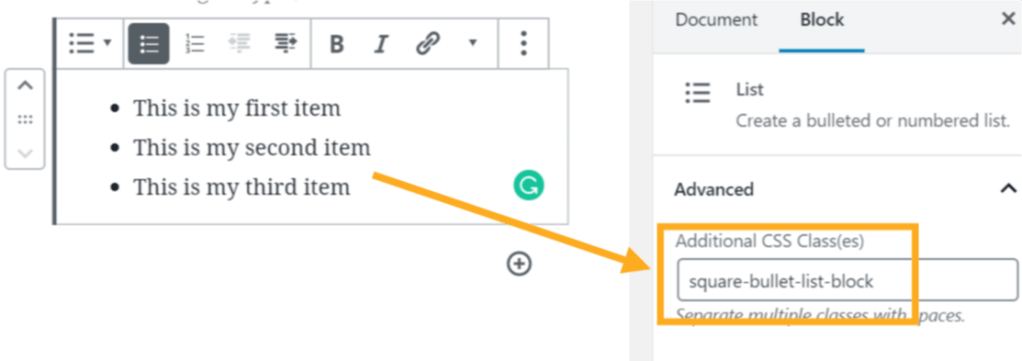
Use the WordPress editor to do this. Select the element you want to change. Next, find the block settings. Here, you will see a field for additional CSS classes. Type your class name in this box. Your changes will show on the page.
Keep CSS class names short and clear. This helps you remember them. Use names that tell what the class does. For example, use “big-text” for large text. Always test changes to see if they work. This way, your site looks good and works well.
Common Issues And Solutions
Understanding CSS classes in WordPress helps customize site appearance. They define styling for elements like headings and buttons. Adjusting CSS classes resolves common design issues, enhancing user experience.
Conflicting Styles
CSS classes can sometimes clash with each other. This happens when two classes have similar names. It makes your website look strange. The styling may not work as expected. Always check your class names. Use unique names. This helps avoid conflicts.
Troubleshooting Tips
First, identify the problem. Check the CSS code in your theme. Look for classes with the same name. Change one of the names. This will fix the conflict. Use tools like browser developer tools. They help find where the problem is. Test the site after changes. Ensure everything looks good.
Credit: wordpress.com
Advanced Css Techniques
Understanding CSS classes in WordPress enhances your site’s design flexibility. These classes assign styles to specific elements, making customization easier. They help maintain a consistent look throughout your website.
Responsive Design
Responsive design makes websites look good on all devices. CSS helps adjust layout based on screen size. Media queries are important here. They check the device type and width. Then, apply specific styles. Use percentages instead of fixed units. This ensures elements resize well. Flexbox and Grid are powerful tools. They help create flexible layouts easily. Always test your design on different devices. This guarantees good user experience everywhere.
Animations And Transitions
Animations and transitions add life to web pages. CSS allows smooth changes between styles. Transitions are simple to use. They make elements change smoothly. For example, hover over a button. It changes color slowly. Animations are more complex. They let elements move and change over time. Keyframes define how animations play. CSS animations can loop or play once. They make websites engaging and fun. Use them wisely to enhance user experience.
Leveraging Plugins
CSS plugins help make websites look nice. They add colors and styles. These plugins are easy to use. Even beginners can try them. They let users change how the site looks. You can find many plugins online. Some are free, while others cost money.
Plugins do more than add style. They make websites work better. CSS plugins can help make pages load faster. Users can change fonts and layouts. This makes each site unique. Good plugins come with help and updates. This keeps the site safe and fresh.
Credit: 10web.io
Future Trends
New CSS features are coming soon. These features will change design. CSS Grid is one such feature. It helps in creating complex layouts. Another feature is CSS Variables. They make changing styles easy. Just update one place and see the magic.
WordPress themes use CSS a lot. With new CSS, themes will be better. Users can expect more custom designs. Editing themes will be easier too. Developers can build faster. They will spend less time fixing styles. This is good for everyone.
Credit: 10web.io
Frequently Asked Questions
What Is A Css Class In WordPress?
A CSS class in WordPress is a selector that allows you to apply specific styles to HTML elements. By assigning a CSS class to an element, you can customize its appearance without altering the HTML structure. This helps in maintaining consistency and making design changes easily across your WordPress site.
How Do I Add Css Classes In WordPress?
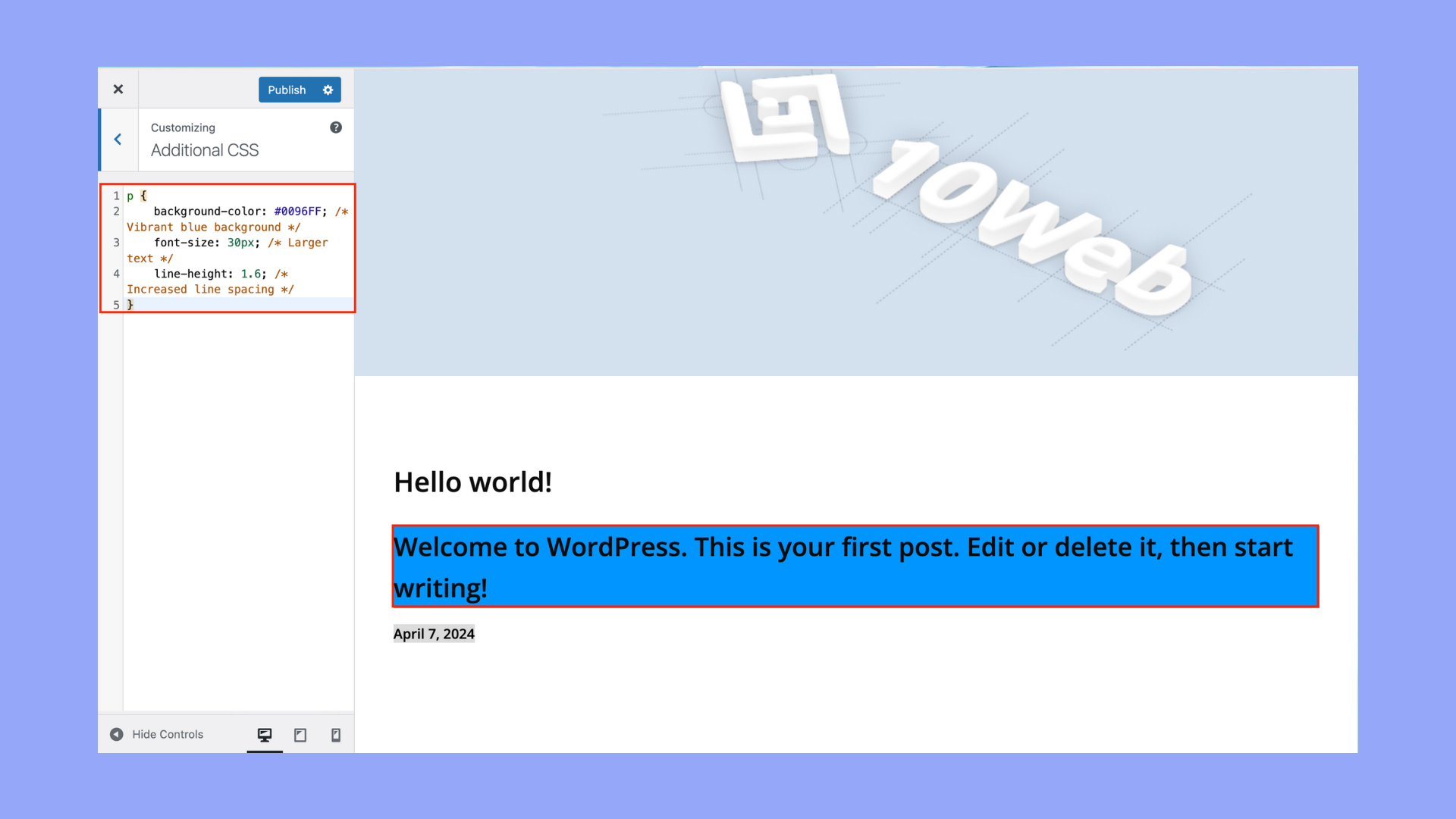
To add CSS classes in WordPress, use the Additional CSS feature in the Customizer. Navigate to Appearance > Customize > Additional CSS, then enter your CSS code. You can also add classes directly to HTML elements in your theme files or through page builders and plugins that support custom CSS.
Why Are Css Classes Important In WordPress?
CSS classes are important in WordPress because they enable precise styling of elements. They help to maintain consistent design across your site and make updates easier. By using classes, you can target specific elements for styling, enhancing both the visual appeal and user experience of your site.
Can I Use Multiple Css Classes On An Element?
Yes, you can use multiple CSS classes on a single HTML element in WordPress. Simply separate each class name with a space in the element’s class attribute. This allows you to apply multiple styles and achieve more complex designs, giving you greater control over the appearance of your site.
Conclusion
Understanding CSS classes in WordPress boosts your site’s design flexibility. They help customize appearance without complex code. CSS classes make styling efficient and organized. This knowledge empowers better website management. You can easily change layouts, colors, and fonts. Even small tweaks can improve user experience.
Start exploring CSS classes today. Enhance your WordPress site with simple styling techniques. With practice, you’ll see results in your website’s look and feel. Remember, mastering CSS classes is a gradual process. Keep learning and experimenting for better outcomes. Happy styling!


