
Are you looking for a way to supercharge your WordPress site without getting tangled in technical jargon? Imagine having a tool that not only boosts your site’s performance but also gives you peace of mind.
Flywheel might be the secret weapon you’ve been searching for. With its user-friendly features, Flywheel simplifies managing your WordPress site, making it an ideal choice for both beginners and seasoned professionals. But what exactly does Flywheel do for WordPress, and why should you care?
Let’s dive into the world of Flywheel and explore how it can transform your WordPress experience, ensuring your site runs smoothly and efficiently. Keep reading to discover how Flywheel can become your ultimate WordPress ally.

Credit: www.bluehost.com
Flywheel Hosting Features
Flywheel makes WordPress easy. It handles updates for you. No need to worry about technical stuff. You focus on your content. They handle the rest.
Your site loads fast. Flywheel uses caching to speed up pages. Visitors don’t wait long. Happy visitors stay longer. A fast site is important.
Keeping your site safe is vital. Flywheel offers firewalls and malware scanning. They protect your site all the time. No hackers allowed. Your data stays safe.
User-friendly Dashboard
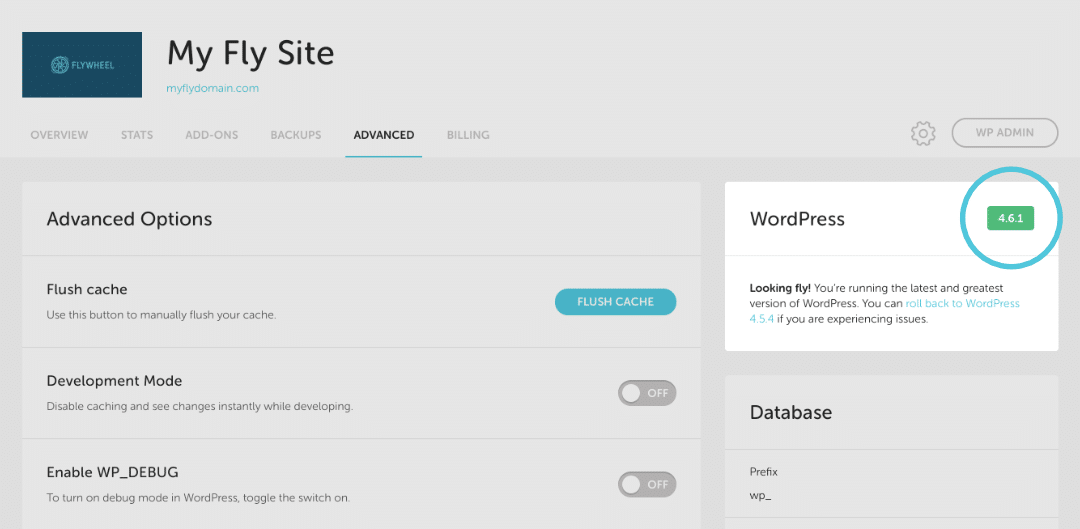
Flywheel’s dashboard is very easy to use. It is designed for everyone. Even beginners can navigate it. The interface is clean and simple. Buttons and options are clearly labeled. This helps users find what they need quickly. No confusion or complex steps. Just straightforward actions.
Flywheel offers handy tools for site management. Users can manage multiple sites easily. Backup options are available with one click. Users can also access staging environments. This helps in testing changes safely. Collaborative tools let teams work together. Sharing access is easy and secure.
Collaboration Tools
Flywheel offers great tools for managing teams. Each team member gets a role. This helps in organizing tasks easily. You can see who is doing what. Changes are tracked. This way, nothing is missed.
Flywheel makes it easy for clients and teams to work together. Clients can view projects anytime. They can leave comments or feedback. This helps in making quick changes. Everyone stays on the same page. Projects move faster and smoother.
Credit: getflywheel.com
Backup And Restore Options
Flywheel makes sure your site is always safe. It does this by creating automated backups every night. This means your site’s data is saved daily. You don’t have to worry about losing important information. These backups are done without you lifting a finger. It’s like having a safety net for your website. You can relax and focus on other tasks. Your site is safe with Flywheel’s smart system.
Sometimes things go wrong. But Flywheel has you covered. It offers a one-click restore feature. This means you can bring back your site easily. Just one click, and everything is back to normal. No complicated steps needed. It’s fast and simple. This feature saves time and stress. You can trust Flywheel to keep your site running smoothly.
Scalability And Flexibility
Customizable Plans are ideal for growing needs. Flywheel offers plans for everyone. Small websites, big websites. There is something for each. Users can pick what they need. No more, no less. This keeps costs low and control high. Plans can change as needs change.
Resource Allocation is like a puzzle. Flywheel helps piece it together. Websites need different things. Some need more memory. Others need more space. Flywheel makes sure each gets what it needs. This keeps websites running smooth. No waste, just smart use of resources.

Credit: duplicator.com
Developer-friendly Environment
Staging sites are crucial for testing changes. Flywheel offers easy-to-use staging sites. Developers can try updates without affecting live sites. This helps keep sites running smoothly. Flywheel’s staging sites are quick to set up. They give developers peace of mind. Changes can be tested safely. Mistakes can be fixed before going live. This protects user experience and site performance.
Flywheel offers local development tools for WordPress. These tools help developers work offline. Developers can build sites on their computers. No internet needed. Flywheel’s tools are simple to use. They save time and improve workflow. Developers can easily share projects with teams. Flywheel’s tools are built for WordPress. They make development faster and easier. Developers can focus on creating great sites.
Customer Support
Flywheel offers help all day, every day. Users can ask for help any time. This is great for those with urgent issues. Waiting for the next day is not needed. The team is friendly and eager to assist. They solve problems quickly. They make sure sites run smoothly. Users feel safe knowing support is always available.
24/7 Support
Support is available 24/7. This means help is always there. No matter the time, Flywheel is ready to assist. Problems can arise any time. Users need quick answers. Flywheel understands this need. They ensure help is just a click away. This service brings peace of mind. Users know their site is cared for.
Knowledge Base Resources
Flywheel has a wealth of resources. These are easy to find and use. Users can learn from guides and articles. These cover many topics. They answer common questions. Users can find solutions on their own. This saves time. Knowledge base helps users grow their skills. It empowers them to manage their sites better.
Frequently Asked Questions
What Is Flywheel In WordPress?
Flywheel is a managed WordPress hosting provider. It offers features like daily backups, free SSL, and staging sites. Flywheel aims to simplify the hosting process for designers and agencies. It provides tools for collaboration and performance optimization. The platform is known for its user-friendly interface and reliable customer support.
How Does Flywheel Improve WordPress Speed?
Flywheel enhances WordPress speed through caching and CDN integration. Their infrastructure is optimized for fast load times. Flywheel also offers image optimization and performance monitoring tools. These features collectively ensure a faster and smoother user experience. The platform’s robust technology stack is designed to handle high traffic efficiently.
Is Flywheel Good For Beginners?
Yes, Flywheel is user-friendly and ideal for beginners. Its intuitive dashboard simplifies managing WordPress sites. Flywheel provides excellent support and resources for new users. The platform’s automated features reduce technical complexities. Beginners can focus more on content and design rather than hosting issues.
Does Flywheel Offer Site Backups?
Flywheel provides automatic daily backups for all sites. Backups are stored securely and can be restored easily. This feature ensures your data is safe and recoverable. Users can manually create backups whenever needed. Flywheel’s backup system offers peace of mind for website owners.
Conclusion
Flywheel makes WordPress hosting simple and efficient. It offers reliable support and easy site management. Users enjoy fast loading times and secure environments. The platform caters to designers and developers. With Flywheel, creating and managing sites becomes less stressful. It provides tools that streamline processes, saving time and effort.
Flywheel suits those seeking hassle-free hosting solutions. Its user-friendly interface attracts beginners and experts alike. Experience the convenience Flywheel brings to WordPress. Start enhancing your website today. Flywheel simplifies hosting for everyone. Enjoy smoother site operations with Flywheel’s excellent features.
Give your WordPress site the care it deserves.


