
Are you wondering what you should use your home page for in WordPress? You’re not alone.
Your home page is the first impression visitors have of your site, and it plays a crucial role in how they perceive your brand. It’s your digital storefront, and getting it right can make all the difference. Imagine your visitors landing on your site and immediately finding everything they need without having to dig.
That seamless experience can turn casual browsers into loyal followers. Your home page isn’t just about aesthetics; it’s a strategic tool that can boost engagement, drive conversions, and enhance your site’s SEO. By understanding what your home page can do for you, you’re setting the stage for success. Dive into this article to discover actionable tips that will transform your WordPress home page into a powerful asset for your online presence. Don’t miss out on learning how to captivate your audience and keep them coming back for more.
Setting The Purpose
The home page is the first thing visitors see. It should be clear and welcoming. Introduce your site and its main idea. Make it simple and easy to navigate. Include a brief description of what your site offers. Use images to make it attractive. The goal is to capture attention quickly.
Think about what you want visitors to do. Should they explore other pages? Or contact you? Maybe subscribe to a newsletter. Place call-to-action buttons where they are easy to find. This helps guide visitors. Keep the design clean and organized. Avoid too much text. It should be easy to read.
Showcasing Content
Your home page is like a store window. It should show the best pieces. Choose articles that are popular or new. These articles grab attention. It makes people want to read more. Use clear images and catchy titles. They should make sense at a glance. Let your content shine here.
Keep your page fresh with recent posts. Visitors like to see what’s new. List the latest articles with short descriptions. This helps users pick what they want to read. A simple list can work wonders. Make sure the titles are clear. It should be easy for everyone to understand.
Enhancing User Experience
Easy Navigation helps users find what they need fast. A clear menu is key. It guides visitors to different pages. Keep it simple. Use easy words. Make sure the links work. A visitor should not feel lost. They should know where to click. This makes them happy. And they stay longer on your site.
Search Functionality is important too. It lets users find things quickly. A search bar should be easy to spot. It should be at the top of the page. Users type in what they need. Results should show quickly. This saves time. People like sites where they find answers fast. It makes the site user-friendly.
Branding And Identity
Logo and design play a big part in your website. They show who you are. Your logo should be easy to remember. Use colors that match your brand. Choose fonts that are clear and simple. This helps people know you better.
Your home page should have a strong tagline. It tells your story in few words. This helps visitors understand your site quickly. Use short, catchy sentences. Your message should be clear and warm. It’s like a friendly hello to everyone.
Engaging Visuals
Hero images grab attention fast. They are big and bold. These images set the tone for your website. They show what your site is about. A clear hero image can tell a story. It should be eye-catching and simple. Use high-quality images for best results. Make sure they load quickly too.
Videos can make your site lively. They engage visitors more than text. Add short clips to keep it interesting. Ensure the video is relevant to your content. Place it where it’s easy to see. Videos should have a clear purpose. They should add value to your page.
Credit: cyberchimps.com
Call To Action
Encourage visitors to subscribe to your newsletter. A simple form works best. Keep fields short. Ask for their email. Offer a small reward. Maybe a free ebook or a discount code. Make it easy to subscribe. Use a clear button. Make the button stand out with a bright color. This helps grab attention.
Provide easy ways to contact you. Add an email address. Include a phone number. A contact form is also useful. This helps visitors reach you fast. Use a simple layout. Make sure it’s easy to find on your page. Clear contact info builds trust. It shows you are available and ready to help.
Social Media Integration
Adding social sharing buttons helps visitors share your content. These buttons make it easy to post on Facebook, Twitter, and other platforms. This can bring more people to your site. Place them in a visible spot on your homepage. Usually, at the top or bottom works well. Visitors will see them right away. They are simple and effective.
A live feed display shows updates from your social media. It keeps your site fresh and lively. Visitors can see your latest posts without leaving your page. This means they stay longer on your site. You can use plugins to add this feature. Choose a plugin that works with your social accounts. Make sure it updates in real-time. This keeps everything current and engaging.
Credit: www.wpexplorer.com
Seo Optimization
Your home page can help with SEO optimization. Place keywords carefully. Keywords should be in the title, headings, and content. This helps search engines find your page. Make sure your content is clear and relevant.
Meta descriptions are important too. They tell search engines about your page. Write a short summary of your page. Use your main keyword in the meta description. Keep it under 160 characters. This helps people know what your page is about.
Analyzing Performance
Knowing how many people visit your site is key. Traffic metrics help you understand your site’s reach. You can find this data in your WordPress dashboard. Look for tools that show daily and monthly visitors. Check which pages attract more visits. It’s important to see where your visitors come from. Sources can include search engines or social media. Identifying popular sources can guide your marketing efforts. Monitor bounce rates to see if visitors leave quickly. High bounce rates mean users don’t find what they need. Adjust your content to keep them engaged.
User engagement measures how long visitors stay. It shows if they find your content interesting. Track the average time spent on pages. Longer times mean users find value in your content. Check comments and shares on your posts. They indicate active participation. You can use plugins to see engagement metrics. Encourage users to comment by asking questions. Respond to comments to create a conversation. This builds a community around your site.

Credit: learn.wordpress.org
Frequently Asked Questions
What Is The Purpose Of A Home Page In WordPress?
The home page in WordPress serves as the main entry point to your website. It showcases your brand identity, highlights key content, and guides visitors to different sections. An effective home page can improve user engagement and conversions, making it crucial for SEO and overall site performance.
How Can I Optimize My WordPress Home Page For Seo?
To optimize your WordPress home page for SEO, focus on keyword-rich content, meta tags, and alt texts for images. Ensure your page loads quickly and is mobile-friendly. Use internal links to guide visitors and improve navigation. Regularly update content to keep it fresh and relevant for search engines.
Should My WordPress Home Page Be Static Or Dynamic?
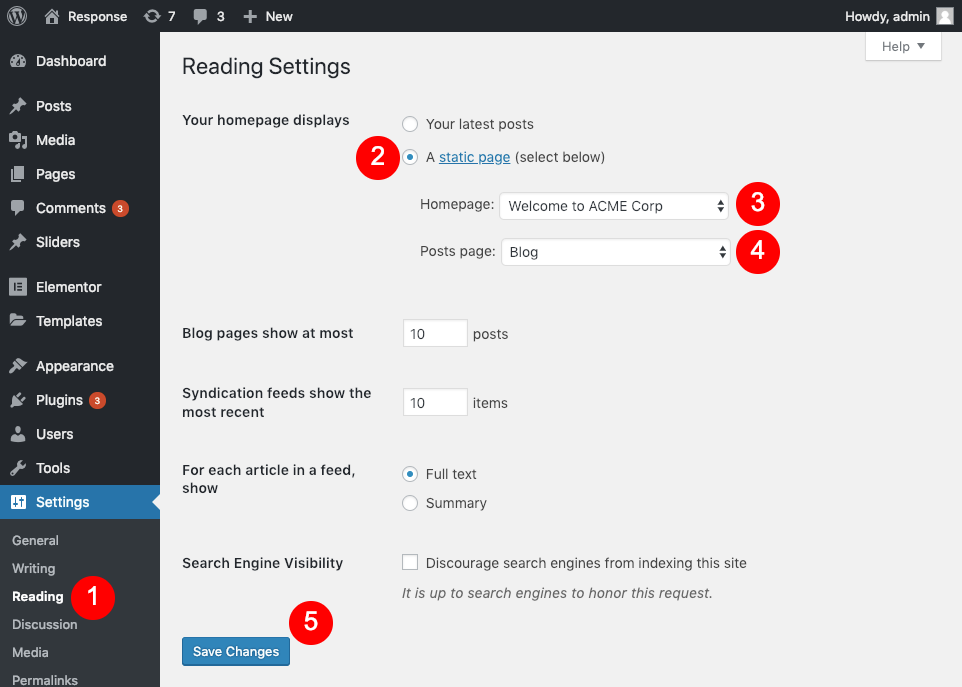
Choosing between a static or dynamic home page depends on your site’s goals. A static page suits businesses focusing on branding and key information. Dynamic pages fit blogs or news sites, showcasing recent posts and updates. Both options can be optimized for SEO with strategic content and layout.
How Do I Customize My WordPress Home Page Layout?
Customizing your WordPress home page layout involves using themes and plugins. Themes provide a variety of design options and layouts. Plugins offer additional functionalities like sliders or contact forms. Use the WordPress Customizer to adjust colors, fonts, and widgets to align with your brand identity.
Conclusion
Your home page in WordPress is a vital tool. It sets the tone for your site. Use it to engage visitors right away. Showcase your key content or services. Keep the design clean and navigation simple. Ensure the site loads quickly.
Optimize for mobile devices. Highlight your unique value. Encourage visitors to explore further. A well-crafted home page builds trust. It can turn visitors into loyal users. Remember, first impressions matter. Make yours count.


