
Ever wondered what’s behind your website’s curtain? The web hosting server is the powerhouse that keeps your site running smoothly.
Knowing which server hosts your website isn’t just for tech enthusiasts—it’s crucial for anyone who wants to optimize their online presence. You might be looking to switch providers, troubleshoot issues, or simply satisfy your curiosity. Whatever your reason, understanding your web hosting server can unlock new opportunities for growth and efficiency.
Stick around, and you’ll discover how easy it is to uncover this hidden gem, paving the way for a more informed and strategic online journey.
Identifying Server Type
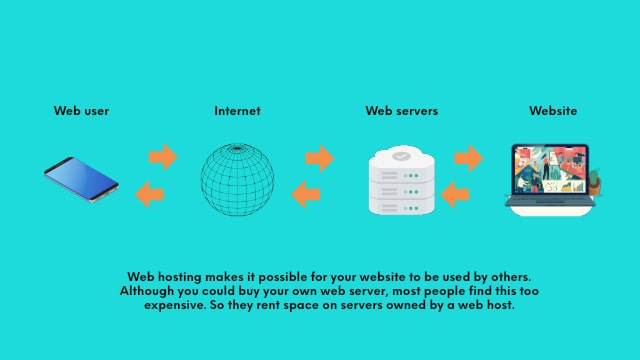
Shared hosting is a popular choice for small websites. Many sites share one server. This keeps costs low. But it may slow down if too many sites use it. Good for blogs and personal pages.
A Virtual Private Server, or VPS, provides more control. It divides one server into parts. Each part acts like its own small server. It’s more secure than shared hosting. Ideal for growing businesses.
Dedicated servers give you the whole server. You have full control over it. It’s perfect for big websites with lots of traffic. It’s more expensive but offers high performance. Best for large companies.
Cloud hosting uses many servers to keep your site up. If one server fails, another takes over. It can handle traffic spikes well. It’s flexible and scalable. Good for sites that grow fast.
Credit: www.godaddy.com
Domain Name Lookup
WHOIS lookup helps find domain details. It shows who owns a domain. You can see contact info and registration dates. WHOIS is like a phone book for domains. Use it to learn about any domain. It’s simple and fast. Enter the domain name in a WHOIS tool. The tool shows all the info you need. Great for checking domain history.
Many tools help you find domain info. DomainTools and Whois.net are popular. They offer easy ways to search domains. Just type the domain name and click search. Results show the server location and owner details. Free and paid options are available. Choose based on your needs. These tools make domain research easy. Always use trusted sites for accurate info.
Ip Address Detection
Open your Command Prompt on your computer. Type ping followed by the website name. Press Enter. You will see some numbers. Those are the IP address of the website. This method is simple and quick. It works on Windows computers.
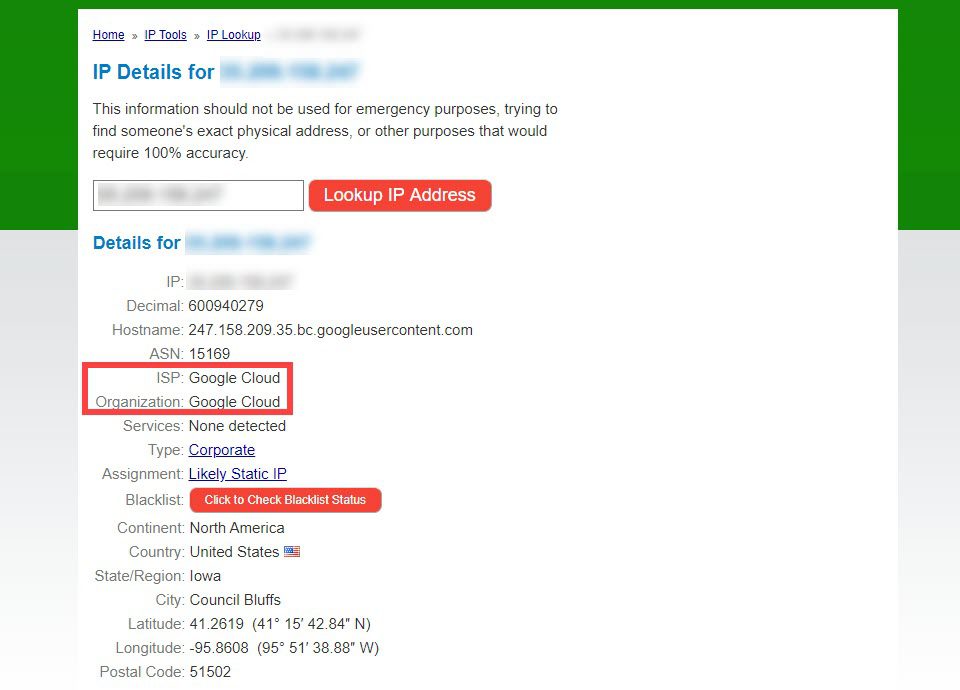
Many websites can find IP addresses. Type the website name in the search box. Click on search. The website will show the IP address. Some popular websites for this are WhatIsMyIPAddress.com and IP-Details.com. They are easy to use. No need to install anything. Just an internet connection is needed.

Credit: www.hostinger.com
Dns Records Analysis
The A Record links a domain to an IP address. It helps web browsers find your website. Each domain has an A Record. This record is crucial for your website. It tells the browser where to go. An accurate A Record ensures your site loads correctly.
CNAME Records point one domain name to another. They help in redirecting traffic. If you own multiple domains, use CNAME. It simplifies domain management. CNAME records are useful for subdomains. For example, www is often a CNAME. It points to the main domain. This makes website management easier.
Server Location Verification
Finding a server’s location is easy with Geo-Location Tools. These tools show the server’s physical place. You just type the IP address. The tools then tell you where the server is. It can show details like country and city. Some tools are free. Others might need a small fee. It’s a quick way to learn about a server’s location.
The Traceroute Method helps find the path to a server. This method shows all steps data takes to reach the server. You can see the IP address of each step. Each step shows the server’s location. It helps to check how far your data travels. This method is simple and useful for learning about server paths.
Hosting Provider Identification
Reverse IP Lookup is a simple tool. It helps find the hosting provider. Enter the website’s domain name. The tool shows other sites on the same server. This can reveal the hosting company. Some popular tools are MXToolbox and Whois. These tools are easy to use. They are also free for basic searches. Reverse IP Lookup is helpful for beginners. It gives quick results. Finding a hosting provider is no longer hard. Just a few clicks away!
Web Hosting Checker Tools are useful. They show who hosts a website. Tools like HostAdvice and HostingChecker work well. Enter the domain name to start. The tool provides details about the host. It can also show server location. These tools are free to use. They help users make informed decisions. Finding a hosting server is now simple. No need for expert knowledge. Just use these tools!
Contacting Hosting Support
Finding your web hosting server details is essential for smooth website management. Check your hosting account dashboard for server information. Contacting hosting support can provide guidance if you face difficulties accessing the server details.
Gathering Contact Information
Find the support page on your host’s website. Look for a phone number or email address. Sometimes, there’s a live chat option. These are quick ways to get help. Support pages often have all contact details. Bookmark this page for easy access next time. Write down the details to avoid losing them.
Preparing Your Query
Before contacting, jot down your questions. Be clear and specific. Avoid long sentences or complex questions. This helps support understand your issue. Include your account number if needed. It makes things faster. Have a pen and paper ready for notes. Listen carefully to their advice.
Credit: www.elegantthemes.com
Frequently Asked Questions
How To Find The Hosting Server Of A Website?
Use online tools like “Whois” to find a website’s hosting server. Enter the site’s domain name for results. Check the “Hosting Provider” section for details. Alternatively, inspect DNS records via “dig” or “nslookup” commands. These methods reveal server information quickly and efficiently.
How Do I Find My Web Server?
Access your domain registrar or hosting provider account for server details. Alternatively, use a website like “Whois” to identify your server. Check your website’s control panel or contact your hosting provider for assistance. Ensure you have your account details ready for quick identification.
How To Find Out What Web Hosting A Site Is Using?
Use online tools like Whois, BuiltWith, or Hosting Checker to identify a site’s web hosting. Check the site’s DNS records for clues about its hosting provider. Contact the website owner directly for hosting information.
How To Find Out What Platform A Website Is Hosted On?
Use online tools like BuiltWith or Wappalyzer to identify a website’s hosting platform. Check domain WHOIS data for hosting information. Inspect the website’s source code for clues about the hosting provider. Use browser extensions to analyze website technologies.
Conclusion
Finding your web hosting server is crucial. It helps manage your website. Understanding server details enhances site performance. Knowing server types aids in choosing the right one. Tools simplify the process of identifying servers. Regular checks ensure your site runs smoothly.
This boosts user experience and site reliability. Remember, a stable server supports your online presence. Take steps to learn about your server. It’s essential for website success. Use the tips shared to discover your server details. Your online journey starts with the right server choice.
Keep exploring and learning for better web management.


