
Have you ever scrolled down to the bottom of a website and noticed the links neatly arranged in the footer? Those aren’t just random links; they serve a specific purpose.
If you’re using WordPress for your website, understanding footer links can enhance your site’s functionality and user experience. But what exactly are WordPress footer links, and why should you care about them? Imagine your website as a grand building. The footer is like the foundation that holds everything together, offering visitors a reliable pathway to navigate your site.
These links can help streamline navigation, boost your site’s SEO, and even improve visitor engagement. Curious about how you can leverage these tiny but mighty links to your advantage? You’ve landed in the right place. This article will unravel the mysteries of WordPress footer links, showing you how they can transform your website into a well-oiled machine. Keep reading to discover how you can make the most out of your WordPress footer links and ensure your site stands out from the crowd.
WordPress Footer Links Basics
Footer links sit at the bottom of a website page. They are often used for navigation. These links can lead users to important pages. Privacy policy and contact pages are common examples.
Footer links help users find what they need quickly. They improve website structure. Search engines can crawl these links easily. This boosts SEO.
Setting up footer links is simple. WordPress offers tools to add links. Users can customize links based on needs. Proper setup ensures better user experience.
Keep links relevant and organized. Avoid cluttering the footer area. Group similar links together. This makes navigation easy.
Credit: mcstarters.com
Importance Of Footer Links
Footer links can boost your website’s SEO. Search engines use them to understand your site’s structure. They are also a way to pass link authority. This helps in ranking your pages better. Good footer links can improve visibility in search results.
Footer links make websites easy to use. Users find key pages without effort. This improves the overall user experience. It makes the website more user-friendly. Visitors can get the information they need quickly. This leads to happy users and more return visits.
Footer links act as a map for your site. They guide users to important sections. This helps in finding important content fast. Especially on big websites. It ensures users do not get lost. They reach their destination with ease.
Types Of Footer Links
Legal and compliance links are vital in footers. They guide users to terms and privacy policies. These links help users understand their rights. They also ensure website compliance. Most websites include these links for transparency. Users find them helpful for legal reasons. They often look for them in footer areas.
Footers often show contact and social media links. Users can reach out easily. Email and phone numbers are common. These links connect users to social media pages. They help in building community. Businesses use them for engagement. They are usually placed in footers for easy access.
Site map links organize website pages. They help users find sections quickly. Footers include these links for easy navigation. Users rely on them to explore sites. Site maps show all website parts in one place. They improve user experience. Many websites use them for better browsing.
Credit: gracethemes.com
Best Practices For Footer Links
Footer links should connect to important pages. Relevant links help users find what they need. Search engines also value these links. They boost your site’s ranking. Ensure each link serves a purpose.
Too many links can confuse visitors. Keep the footer clean and simple. Only include essential links. Each link should be clear and easy to understand. Avoid clutter for a better user experience.
Check if footer links work on mobile. Many people use phones to browse. Links must be easy to click. Make sure the design adjusts well. Good mobile design improves accessibility.
Common Mistakes With Footer Links
Too many links can confuse readers. Crowded footers look messy. This makes it hard to find important information. Visitors may leave your site fast. Keep it simple and neat. Only include necessary links in the footer.
Some links may not match your site’s content. This can confuse users and harm your site’s SEO. Make sure all footer links are related to your site. This keeps visitors interested and helps search engines understand your website better.
Outdated links can lead to error pages. This frustrates visitors. Check your footer links regularly. Update them as needed. Ensure links are active and lead to correct pages. This keeps your site looking professional and trustworthy.
Credit: diviextended.com
Customizing Footer Links In WordPress
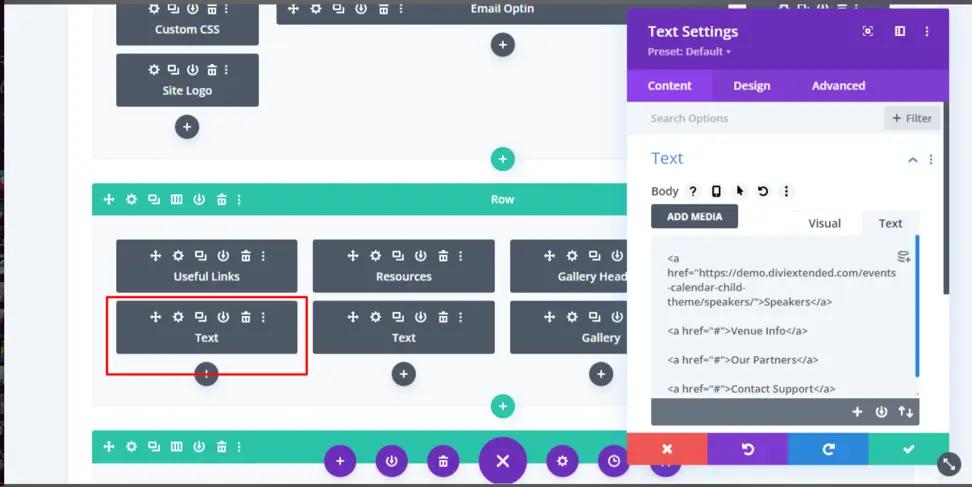
Widgets and menus are tools for adding links. Widgets can hold text, images, or links. Menus organize links neatly. Drag and drop widgets in the footer area. Make lists of links with menus. Simple and effective!
Plugins add extra features to footers. Many plugins offer custom link options. Choose a plugin that fits your needs. Follow instructions to install. Plugins make footers more functional and stylish.
CSS and HTML change the look of links. CSS styles the text. HTML adds structure. Learn basic codes for simple changes. Experiment with colors and fonts. Make footers unique and personal.
Case Studies Of Effective Footer Links
Successful websites use footer links wisely. These links guide visitors to important pages. Amazon is a great example. Their footer links include customer service and account details. This helps users find what they need quickly. BBC also uses footer links well. They link to popular news categories and contact information. This keeps users on their site longer.
Etsy, an online marketplace, uses footer links to highlight policies and seller information. This builds trust with visitors. University websites often use footer links to provide access to resources and admissions. These links make navigation easy for students. Good footer links improve user experience and website performance.
Frequently Asked Questions
What Are Footer Links In WordPress?
Footer links in WordPress are navigational links located at the bottom of a website. They often include links to important pages like the privacy policy, terms of service, and contact information. These links improve user experience and can boost SEO by providing additional pathways for search engines to crawl.
How To Add Footer Links In WordPress?
Adding footer links in WordPress is simple. You can customize them via the WordPress dashboard by navigating to Appearance > Menus. Select the footer menu, add your desired links, and save the changes. Alternatively, many themes offer widget options for footer customization.
Why Are Footer Links Important For Seo?
Footer links are crucial for SEO as they improve site navigation and user experience. They help search engines understand your site’s structure, offering additional pathways for crawling. This can enhance your site’s visibility and relevance, positively affecting your search engine rankings.
Can Footer Links Affect Website Design?
Yes, footer links can influence website design. They contribute to the overall structure and aesthetics of a site. Effective use of footer links can enhance user navigation, while overcrowding can lead to a cluttered appearance. Thoughtful design balances functionality and visual appeal.
Conclusion
WordPress footer links play a crucial role in website navigation. They help visitors find important pages quickly. Footer links enhance user experience and improve site organization. They can boost your site’s SEO by linking to relevant content. Make sure these links are clear and easy to understand.
Avoid cluttering the footer with too many links. Keep it simple and focused. Regularly update the links to ensure accuracy. With thoughtful planning, footer links can benefit both users and search engines. So, use them wisely to create a more effective website.


