
Are you struggling to manage multiple domains effectively? You’re not alone.
Many website owners find themselves overwhelmed when it comes to organizing their web host directory for various domains. But here’s the good news—structuring your web host directory doesn’t have to be a headache. Imagine a streamlined system where everything is easily accessible, saving you time and reducing stress.
You’ll discover practical steps to create a seamless structure for your web host directory. You’ll learn how to enhance your workflow, boost efficiency, and keep your domains running smoothly. By the end, you’ll feel confident and empowered to manage your web hosting like a pro. Ready to transform chaos into order? Let’s dive in!

Credit: hostscore.net
Choosing The Right Web Hosting Plan
Shared hosting is cheap. Many websites use the same server. This can make it slow. Dedicated hosting is different. You get your own server. It is faster but costs more. Shared hosting is good for small sites. Dedicated hosting is better for big sites.
Cloud hosting is flexible. It uses many servers. This makes it reliable. If one server fails, others help. Cloud hosting is scalable. You can add more space easily. It is great for growing sites. It costs more than shared hosting but less than dedicated.
Organizing Your Domain Portfolio
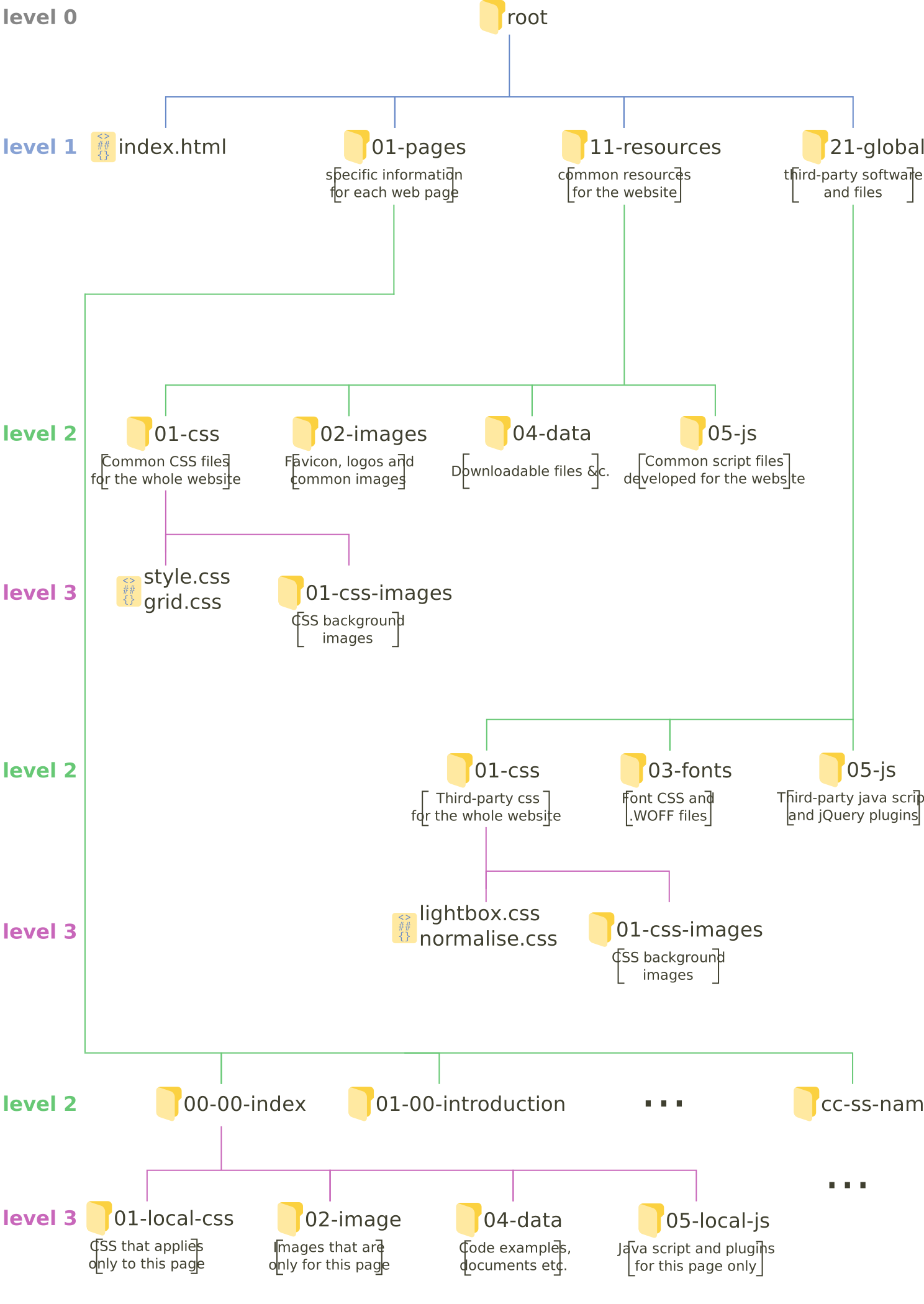
Grouping domains helps keep things tidy. You can group them by industry or purpose. For example, some domains might be for business, others for personal use. Create folders named after each category. This will make finding domains easy.
Use clear names for your domains. Short names work best. Avoid numbers and special characters. They confuse people. Choose names that tell what the website is about. This helps people remember them. Keeping names simple makes them easy to type. This is important. Everyone likes easy things.
Setting Up Your Web Host Directory
A clear and simple directory structure is key. Folders should be named well. Use short names that make sense. Each domain should have its own folder. This helps in keeping things organized. Avoid clutter by having a main parent directory. Inside, create subfolders for each domain. This makes it easy to find files.
Keep file names short and descriptive. Avoid using spaces or special characters. Use underscores or hyphens instead. Consistent naming helps in searching. Regularly clean up unused files. This saves space and reduces confusion.
Back up files often. This protects against data loss. Use automated tools for backup. They save time and effort. Monitor disk space regularly. This prevents running out of space. Keep an eye on server logs. They show errors or issues.
Permissions are important. Set them carefully for each folder. This ensures only authorized access. Regularly review and update permissions. This keeps data safe. Use version control for important files. It helps track changes and revert if needed.
Credit: practicalseries.com
Configuring Dns Settings
DNS stands for Domain Name System. It helps link domain names to IP addresses. Think of it as a phone book for the internet. Every website has a unique IP address. DNS makes it easy to find websites by their names. Without DNS, we would remember long numbers. Understanding DNS is key for managing domains.
Customizing DNS records allows control over domain settings. The A record links your domain to an IP address. The MX record helps with email delivery. CNAME records are used for aliasing domains. Each record serves a specific purpose. Setting up the right records is important. It ensures your website runs smoothly. Adjust records based on your needs.
Implementing Security Measures
Secure your site with an SSL certificate. This ensures data safety. An SSL encrypts data between users and the server. This keeps information safe from hackers. It builds trust with visitors too. They see a padlock in the address bar. They know the site is secure. Choose a certificate that fits your needs. Some certificates cover multiple domains.
A firewall blocks harmful traffic. It keeps your site safe. Install a firewall to protect against attacks. Use malware protection to scan for threats. This removes harmful software. Keep your security tools updated. Updates add new features and fixes. Regular checks keep your site secure. Always be vigilant against new threats.
Managing Website Performance
Regular checks of your server load keep websites running smoothly. High load can slow down sites or cause crashes. Use tools to track server performance. Know when to upgrade resources. This helps in maintaining a fast and reliable website experience.
Fast-loading sites make visitors happy. Compress images to reduce size. Minimize CSS and JavaScript for speedier loading. Choose a reliable hosting service. It should offer fast server speeds. This keeps your site quick and efficient.
Scaling Your Infrastructure
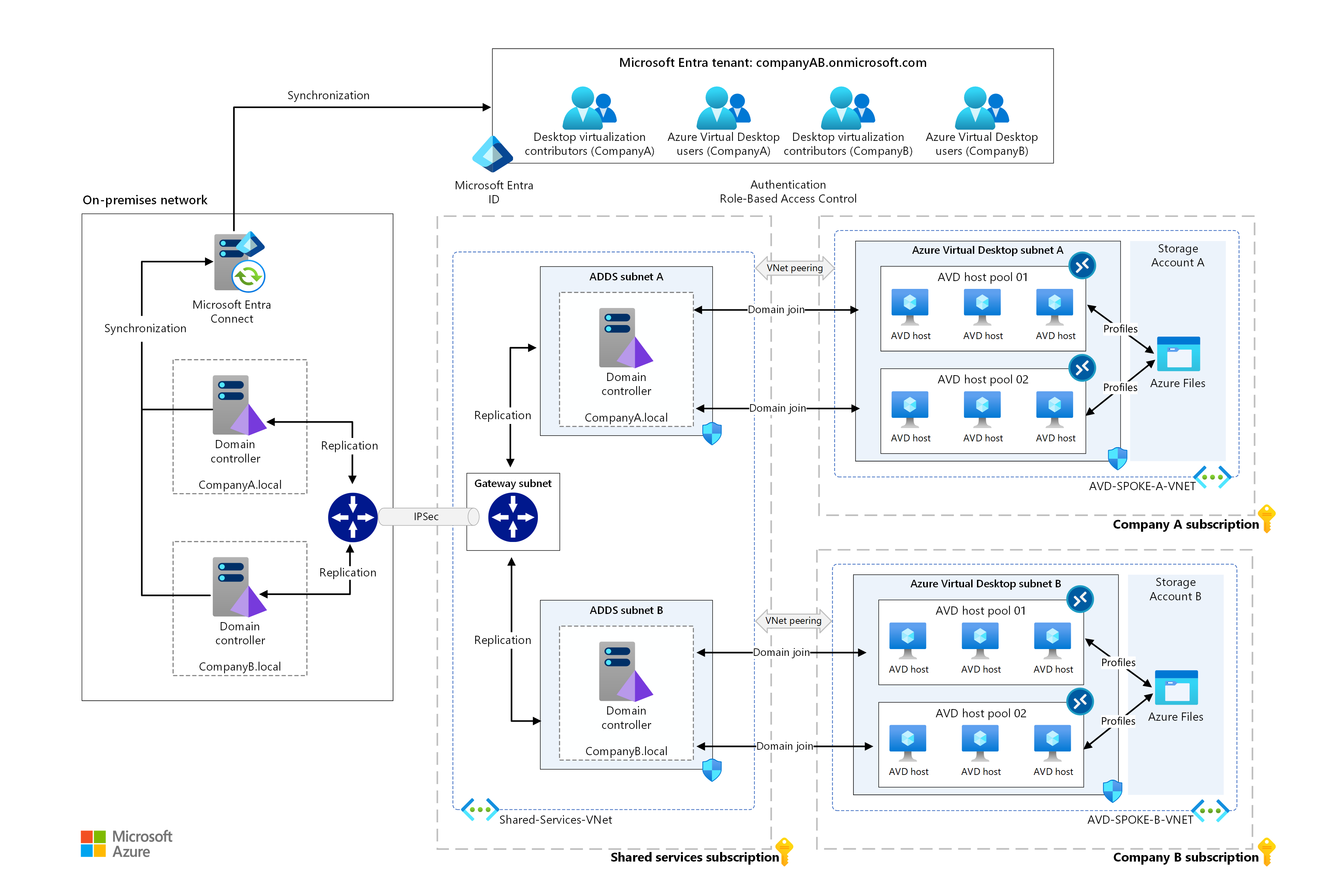
Load balancing helps to manage traffic across servers. It prevents a single server from getting overloaded. This ensures smooth performance for users. Round-robin is a common technique. It distributes requests evenly across servers. Session persistence is another method. It keeps users connected to the same server during their session. Least connection strategy is also popular. It directs traffic to the server with the fewest active connections. Balancing techniques are essential for reliable performance and user satisfaction.
Automated scaling adjusts resources based on demand. Auto-scaling is a key feature. It adds or removes servers automatically. Cloud services often provide automated scaling. They ensure your website can handle sudden traffic spikes. Load prediction tools forecast future needs. This helps in planning resources efficiently. Monitoring systems track server health. They alert you to potential issues before they become problems. Automated solutions save time and reduce manual work.
Credit: learn.microsoft.com
Regular Maintenance And Updates
Backup scheduling is very important for web directories. It protects against data loss. Always choose a backup tool that is reliable. Set a regular backup schedule. Daily or weekly is often best. Store backups in a safe place. Cloud storage or external drives work well. Check your backups regularly. Ensure they are complete and accessible.
Software updates keep your system secure. They fix bugs and improve features. Always check for updates. Do this weekly. Install updates promptly. Use an update protocol. Write down steps for each update. Make sure everyone knows these steps. Test updates before full use. This avoids problems later.
Frequently Asked Questions
Can I Have Multiple Domains On One Hosting Account?
Yes, most hosting providers allow multiple domains on one account. Check your hosting plan’s features for domain limits.
How Do You Point Multiple Domains To The Same Website?
Point multiple domains to the same website by setting up domain forwarding or DNS settings. Use 301 redirects for SEO-friendly results. Ensure hosting supports multiple domains, and configure the server correctly. Check each domain’s DNS records to direct traffic to the main domain efficiently.
Do I Need Separate Hosting For Each Domain?
You don’t need separate hosting for each domain. Many hosting plans allow multiple domains on one account. Check with your provider for specific details. This can save money and simplify management. Always review terms to ensure your hosting plan supports multiple domains effectively.
What Is A Method For Hosting Multiple Domain Names On A Single Server?
Use virtual hosting to manage multiple domains on a single server. Configure the server to differentiate requests. This approach allows each domain to have its own space and resources, optimizing server efficiency. Ensure proper DNS settings and use server software like Apache or Nginx for seamless management.
Conclusion
Structuring your web host directory benefits multiple domains effectively. It keeps things organized and easy to manage. This helps you save time and reduce errors. Use clear, simple folder names for easy navigation. Choose a hosting plan that supports your needs.
Consider future growth when planning your directory. A well-structured directory improves website performance. It also enhances user experience. Regular updates and backups are essential. They ensure your data stays safe. With the right structure, managing multiple domains becomes straightforward. Aim for simplicity and clarity in your setup.
This approach leads to success and efficiency.


