
Are you struggling with WordPress file permissions? You’re not alone.
Many website owners overlook this crucial aspect, leaving their sites vulnerable to potential security breaches and functionality issues. Imagine your site crashing or sensitive data being exposed simply because of a small oversight. It’s not just about securing your website; it’s about ensuring smooth operations and peace of mind.
In this post, you’ll discover the proper file permissions for WordPress and how they can safeguard your site. Don’t let a simple mistake compromise your hard work. Dive in and empower your WordPress site with the right protection.
Importance Of File Permissions
File permissions in WordPress are very important. They keep the site safe. Without them, hackers can easily access files. This can cause a lot of damage. Proper permissions help control who can read, write, or execute files.
Permissions are set as numbers. The most common are 644 and 755. The number 644 is for files. It allows the owner to read and write. Others can only read. The number 755 is for directories. It allows the owner to read, write, and execute. Others can only read and execute.
Setting permissions correctly is key. It prevents unauthorized access. It keeps your site secure. Always check your permissions after installing plugins or themes. This ensures your settings are correct. Be careful with permissions. They protect your website.
Basic Permissions Explained
Understanding file permissions is crucial for WordPress security. Set directories to 755 and files to 644. This configuration helps prevent unauthorized access, keeping your website safe.
Read, Write, Execute
File permissions control who can read, write, and execute files. These permissions are vital for WordPress security. Permissions are given to user, group, and others. The user is the file owner. The group is a set of users. Others are everyone else.
The read permission lets users see the file contents. The write permission allows users to change the file. The execute permission lets users run the file. For WordPress, correct permissions are crucial. They keep your site safe and secure. Incorrect permissions can lead to security holes.
Use permissions wisely. Protect your site from hackers. Make sure files have the right permissions. This keeps your WordPress site safe. Remember, security is always important.
Default WordPress Permissions
Core files need special care. These files should be set to 644 permissions. This means only the owner can change them. Others can read but not change. It keeps the site safe from harm.
The wp-content directory holds themes and plugins. Set permissions to 755. Owners can change files. Others can only read. This keeps the site running smoothly.
Files in uploads and themes are important. Set them to 644. Folders should be 755. This setup keeps everything safe. It also allows changes when needed.
Setting Secure Permissions
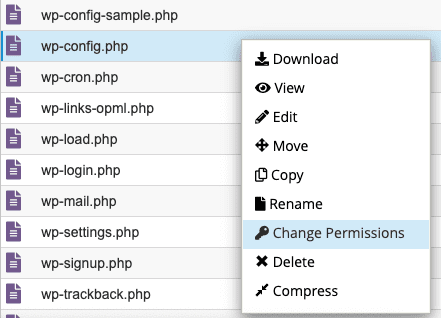
File Manager is an easy tool. It helps set file permissions for WordPress. Permissions decide who can read or write files. Setting them right keeps your site safe. For most files, use 644 permissions. This means everyone can read the file. But only the owner can write or change it. For folders, use 755 permissions. Everyone can enter the folder and read files. Only the owner can change them.
The Command Line Interface, or CLI, is for advanced users. It allows direct control over file permissions. To set permissions, type commands into the terminal. Use `chmod 644` for files and `chmod 755` for folders. This ensures security and keeps your WordPress safe. Always double-check permission settings to avoid errors.
Common Permission Issues
Proper file permissions for WordPress ensure site security and functionality. Typically, folders should have permissions set to 755. Files should have permissions set to 644. This setup protects against unauthorized access while allowing essential operations.
Permission Denied Errors
File permissions can cause big trouble. Permission denied errors are common. They happen when files or folders are not set right. You may see error messages on your screen. It means you can’t access the file. This is because of wrong permissions.
For WordPress, set permissions carefully. Most files need 644 permissions. Folders need 755 permissions. These numbers are important. They allow the right access. But not too much. Fixing permissions can stop these errors. Always check permissions if errors pop up.
Security Vulnerabilities
Wrong file permissions can lead to security vulnerabilities. They let hackers in. They can change or steal data. Keeping files safe is important. 644 and 755 are safe settings. They protect your site. Never set 777 permissions. They are too open. They invite trouble.
Check your settings often. It helps keep your site safe. A safe site is a happy site. Always remember, safety first. Protect your WordPress files. Set permissions right and avoid risks.
Credit: themeisle.com
Best Practices For Permissions
Regular audits help find problems with file permissions. They keep your website safe. Check permissions often to avoid risks. Update settings after audits. This stops unwanted access. Use tools to make audits easier. They help spot wrong permissions fast. Keep logs of audits for future checks. Logs help track changes over time.
Restrictive permissions are vital for security. Limit who can change files. Give access only to trusted users. Set files to read-only if possible. This prevents unwanted edits. Use chmod for setting permissions. It controls who can read, write, or execute files. Correct permissions protect your site. They prevent hackers from causing harm. Avoid giving full access to all users. Restriction keeps your data safe.
Tools For Managing Permissions
WordPress file permissions keep your site secure. Set folders to 755 and files to 644 for safety. Correct permissions prevent unauthorized access and keep data safe. Adjust them in your hosting control panel or using FTP.
Ftp Clients
FTP clients help manage WordPress file permissions. They connect your computer to the server. You can use them to change files. Popular ones include FileZilla and Cyberduck. These tools are easy to use. Just drag and drop files. Always ensure you set the right permissions. Wrong permissions can harm your site. Keep your site safe and secure.
WordPress Plugins
Plugins can also manage file permissions. Some plugins offer extra features. They make your site safer. A popular one is iThemes Security. It checks your file permissions. It also suggests the right settings. Plugins are often easier than FTP. They work inside WordPress. No need to leave your dashboard. Make sure to update plugins regularly. This keeps your website secure.
Credit: www.malcare.com

Credit: themeisle.com
Frequently Asked Questions
What Is The Default File Permission For WordPress?
The default file permission for WordPress files is 644. This setting allows the owner to read and write files. Other users can only read them. Directories usually have 755 permissions, enabling the owner to read, write, and execute. Others can read and execute, ensuring website functionality.
How Do I Change WordPress File Permissions?
You can change WordPress file permissions using FTP or a hosting control panel. Connect to your server, select the files, and adjust permissions. Ensure directories are 755 and files are 644. This helps maintain security and functionality without compromising access.
Why Are Correct File Permissions Important In WordPress?
Correct file permissions prevent unauthorized access and protect your WordPress site. They help maintain security by restricting who can modify files. Improper permissions can lead to vulnerabilities, allowing hackers to exploit them. Always ensure files are set to 644 and directories to 755.
Can Incorrect Permissions Break My WordPress Site?
Yes, incorrect permissions can break your WordPress site. They can restrict necessary file access, causing errors. Files need specific permissions for proper operation. Always ensure files are 644 and directories are 755. This helps maintain functionality and prevents unexpected issues.
Conclusion
Understanding file permissions in WordPress is crucial for security. Set permissions correctly to protect your site. Use 755 for directories and 644 for files. These settings keep your files safe. They also allow your site to function properly. Incorrect permissions can lead to security risks.
Regularly review your settings. This practice helps prevent unauthorized access. It also ensures a smooth user experience. A secure site builds trust with visitors. Keep your WordPress site safe. Follow these guidelines for peace of mind. Your efforts will pay off in the long run.


