
Are you ready to bring your website to life on the internet? Hosting a website on a web server might sound like a daunting task, but it’s easier than you think.
Imagine the thrill of seeing your website accessible to users worldwide, a digital space where your ideas, products, or services can shine. This guide will walk you through the process step-by-step, ensuring you feel confident at every stage. Whether you’re launching a personal blog, an online store, or a portfolio, understanding how to host your site is crucial.
Let’s dive in and transform your vision into a reality on the web. Keep reading to discover how simple it can be to host your website successfully.
Choosing The Right Web Server
Many people use Apache. It is open-source and free. It works well with many websites. Another popular choice is Nginx. It is fast and uses less memory. Microsoft IIS is also a good choice. It works well with Windows. Each server has its own strengths.
Apache is easy to use. It has many features. Nginx handles high traffic better. It is great for busy sites. IIS is perfect for Windows users. It integrates easily with Microsoft products. Choosing the right server depends on your needs. Consider cost, speed, and platform compatibility.
Before choosing, think about your website size. Large sites need fast servers. Look at the server’s speed. Faster servers make websites load quickly. Check the cost. Some servers are free. Others charge a fee. Think about the compatibility with your system. Windows users might prefer IIS. Linux users often choose Apache or Nginx.
Consider the support options available. Paid servers often have better support. Finally, check if the server can handle your website’s traffic. Busy websites need powerful servers. Choose a server that meets all your needs.
Credit: www.youtube.com
Setting Up The Server Environment
First, find a good server for your website. Choose a server that fits your needs. Then, install the necessary software. You will need a web server software. Common ones are Apache or Nginx.
These help your server talk to the internet. Next, install a database software like MySQL. This keeps your data safe. Finally, get a scripting language like PHP. This helps your website work better.
Start by setting up your server settings. Make sure your server has the right IP address. This helps people find your website. Check your server’s firewall. It keeps your server safe from bad people.
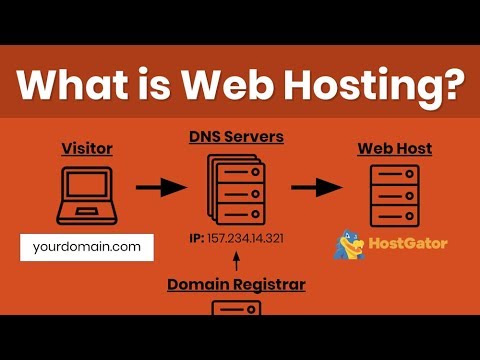
Also, set up your DNS settings. This links your domain name to your IP. Finally, ensure your server can handle the traffic. More traffic means more people can visit.
Uploading Website Files
FTP stands for File Transfer Protocol. It helps move files from your computer to the server. First, get an FTP client like FileZilla. Then, open it and enter your server’s details. This means the host name, username, and password. Click “Connect” to access your server files. Now, drag your website files into the server folder. Watch the transfer progress. Wait until all files are uploaded.
Keeping files in order is key. Create folders for different types of files. For example, images go in an “images” folder. Scripts can have their own folder too. This makes it easy to find files later. Also, ensure your main file is named “index.html” or “index.php”. This file opens first when people visit your site. Check everything is in the right place. This way, your website will run smoothly.

Credit: www.hostinger.com
Configuring Domain Name
DNS, or Domain Name System, is like a phone book. It connects your domain name to your web server. First, log into your domain registrar. Find the DNS settings option. You will see fields for nameservers. These are the addresses that tell where your domain points.
To point your domain to a server, you need the server’s IP address. Enter this IP address into the A Record field. This tells the domain where to go. Save changes after entering the IP address. It may take some time to update. Usually, it takes a few hours.
Testing Website Functionality
Checking Links and Media is important. Links should take users to the right pages. Click each link to test it. If a link is broken, fix it soon. Pictures and videos should load quickly. Check if they display properly. Ensure all media files are clear. This helps users enjoy the site.
Ensuring Responsive Design means your site works on all devices. Phones, tablets, and computers should display the site well. Use tools to test this. Adjust layouts for different screens. Text should be easy to read everywhere. Buttons should be easy to click. A good design keeps users happy.
Credit: verpex.com
Monitoring And Maintenance
Effective monitoring and maintenance ensure your website stays online smoothly. Regular checks identify issues early, preventing downtime. Keep your server updated and secure for optimal performance.
Regular Backups
Regular backups protect your data. They save your work from getting lost. Backup files once a week. Use cloud storage for safety. Automate backups if possible. This saves time and effort. Check backups to ensure they work. Keep multiple copies in different places. This helps if one fails. Regular checks help keep data safe and secure.
Performance Monitoring Tools
Monitoring tools check your website’s speed. They help find problems fast. Tools can alert you if something goes wrong. Use them to keep your site running well. Some tools are free, while others may cost money. Choose one that fits your needs. Regular checks help avoid big issues. Faster sites make visitors happy. Happy visitors come back again.
Security Measures
Ensure your website’s safety by implementing strong passwords and regular software updates. Firewalls and SSL certificates protect against threats. Regular backups safeguard your data, providing peace of mind.
Installing Ssl Certificates
SSL certificates keep your website safe. They encrypt data between the server and users. This stops hackers from stealing information. Always choose a trusted SSL provider. They ensure the certificate is strong. SSL also helps with search engine rankings. Google likes secure sites. Install SSL on your web server. Follow the steps given by your provider. Make sure the certificate is always updated.
Implementing Firewalls And Security Protocols
Firewalls protect your web server from attacks. They block unauthorized access. Set them up correctly to keep hackers out. Always use strong security protocols. These protect data and user information. Regularly update your firewall settings. Keep them active and well-configured. Monitor traffic to catch any suspicious activity. This helps keep your website safe.
Frequently Asked Questions
How Do I Host My Own Website On A Server?
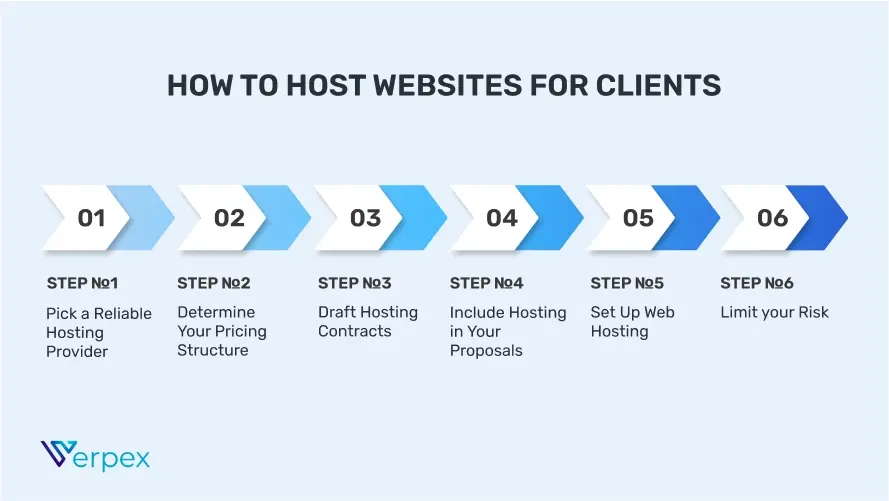
Choose a reliable hosting provider and purchase a hosting plan. Install a web server, like Apache or Nginx. Upload website files using FTP. Configure domain settings and point DNS to your server. Ensure server security with firewalls and regular updates.
Monitor performance and backups to keep your site running smoothly.
Do I Need A Server To Host A Website?
Yes, a server is essential for hosting a website. It stores your site’s files and makes them accessible online. You can use shared, VPS, or dedicated hosting services. Alternatively, consider cloud hosting for scalability and flexibility. Choose a reliable hosting provider to ensure optimal website performance and security.
How Much Does It Cost To Host A Website Server?
Website hosting costs vary from $3 to $300+ monthly, depending on server type and features. Shared hosting is cheaper, while dedicated servers are more expensive. Consider factors like storage, bandwidth, and customer support when choosing a plan. Always compare providers to find the best value for your needs.
Is Google Web Hosting Free?
Google Cloud offers free hosting under its free tier. This includes limited resources, ideal for small projects. Users can upgrade for more features, but the free tier provides basic access to Google Cloud services, making it suitable for beginners or those testing new ideas.
Conclusion
Hosting a website on a web server is straightforward. Start by choosing a suitable web server. Install it and configure the settings. Upload your website files carefully. Check everything to ensure proper functionality. Secure the server with necessary precautions. Regular updates keep your server safe and efficient.
Practice these steps to host successfully. Anyone can manage with patience and practice. Remember, consistent maintenance is key. Troubleshoot issues promptly for smooth operation. Hosting a website empowers you to share content globally. Enjoy the process and learn as you go.


