
Are you ready to take your website to the next level with Amazon Web Services (AWS) web hosting? Imagine having the power and reliability of one of the world’s leading cloud platforms at your fingertips.
You might feel overwhelmed by the technical jargon and multitude of options, but fear not. This guide will simplify the process, making it accessible even if you’re not a tech guru. We’ll walk you through the essentials of using AWS for web hosting, transforming what seems like a complex task into a straightforward, step-by-step adventure.
By the end of this article, you’ll be equipped to harness AWS’s full potential, ensuring your website runs smoothly, securely, and efficiently. Let’s dive in and unlock the secrets of AWS web hosting tailored just for you!

Credit: www.geeksforgeeks.org
Benefits Of Aws Web Hosting
AWS offers many benefits for web hosting. One big advantage is scalability. Websites can grow easily without any problems. AWS also ensures high availability. This means your site stays online most of the time. Another benefit is security. AWS protects data with strong security tools.
Costs are also low with AWS. You only pay for what you use. This makes it cheaper than other options. AWS has global reach too. Your site can be fast in many countries. It is also very reliable. Many famous websites use AWS for hosting. With AWS, you get fast support too. Their team is ready to help anytime.
Using AWS makes hosting easy and safe. Many businesses trust it. It’s a great choice for any website.
Setting Up An Aws Account
Create an AWS account by visiting the AWS website. Click the “Create an AWS Account” button. Fill in your email, password, and account name. Verify your email by checking your inbox. Follow the link in the email. Add your payment method using a credit card or bank account. AWS needs this for billing. Choose the Basic Support Plan. It’s free and good for beginners. Complete the identity verification by receiving a call or text. Enter the pin shown on the screen. Sign in to the AWS Management Console with your new account. Explore the AWS services available. AWS offers many tools for web hosting. You can start using them now.
Choosing The Right Hosting Plan
Shared hosting means you share a server with others. It’s like sharing a bus ride. You save money but have less control. Dedicated hosting gives you the whole server. It’s like having your own car. More control, but it costs more.
AWS offers plans that grow with your needs. Start small and expand as you need more power. Pay only for what you use. This saves money over time. Monthly fees can vary. Choose a plan that fits your budget and needs.
Navigating The Aws Management Console
The AWS Management Console is a web app. It helps manage Amazon services. You log in with your AWS account. The console home page shows many services. These services include EC2, S3, and RDS. Each service has a dashboard. The dashboard helps you control resources.
To find a service, use the search bar. Type the name of the service. Click on the service to open it. You can also use the menu. The menu is on the top left. It lists all available services. This makes it easy to switch between services.
The console supports different regions. Each region is a location. You choose the region for your service. This helps with data laws and speed. Always check the region before creating a resource. This ensures your service is in the right place.
Deploying Your Website
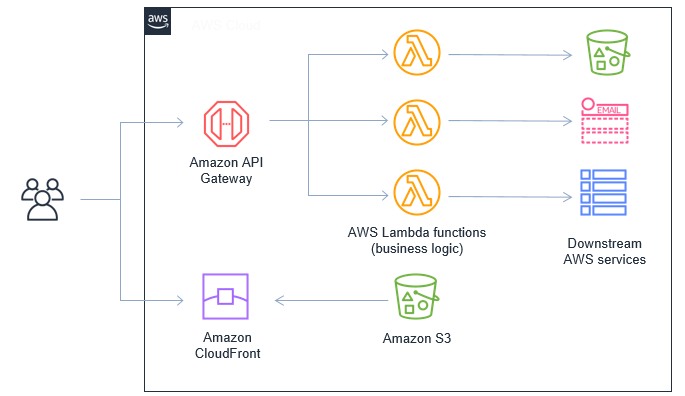
Amazon S3 is a cloud storage service. It stores files and websites. Upload your website files to S3. It is simple and fast. S3 scales automatically. You pay for what you use. You can set permissions for your files. Choose who can see or change them. S3 works well for static sites. These sites do not need databases. S3 is reliable and secure.
EC2 instances are virtual servers. They run your applications. Choose the right instance for your needs. EC2 is flexible. You can change settings easily. Install your software on EC2. Connect to your instance. Use SSH for secure connection. EC2 allows automatic scaling. It handles more traffic. You only pay for what you use. EC2 is powerful for dynamic sites. These sites have many features.
Credit: aws.amazon.com
Configuring Domain And Dns
First, choose a domain name for your website. It should be easy to remember. Go to a domain registrar to buy it. Many registrars are available online. Pick one that suits your needs. Enter your chosen domain name. Check if it is available. If it is, you can buy it. The process is simple and fast. Once purchased, you own that domain. Now, it is time to set up DNS.
Route 53 helps manage your DNS settings. It is a tool from AWS. First, sign into your AWS account. Go to the Route 53 service. Create a new hosted zone. This is for your domain. Add your domain name here. Route 53 will give you name servers. Update these in your domain registrar settings. Now, Route 53 controls your DNS. Your website can connect to the internet.
Security Best Practices
SSL certificates keep data safe. They protect user info. Encrypt data between servers and users. Make sure your site has SSL. Check your certificate regularly. Renew it on time. This helps keep your site secure. Hackers cannot steal data. SSL is a must for safety.
IAM roles manage access. Control who can use AWS services. Give specific permissions. Limit access to important data. Assign roles carefully. Only trusted users should have access. Protect your AWS account. IAM roles help keep your services safe. Use roles wisely for security.
Monitoring And Maintenance
AWS CloudWatch helps keep an eye on your website. It shows how well your site is doing. You can see charts and graphs. These show your site’s speed and usage. Alerts can be set up to warn you. They tell when something goes wrong. This way, you fix problems fast. CloudWatch is like a helpful friend. It watches your site all the time. Keep your site running smooth and safe.
Backups save copies of your data. AWS makes this easy. You can set it to do it by itself. This means your data is always safe. No more worries about losing information. Automated backups work while you sleep. They are like little helpers. Always working to keep your data protected. It’s important for peace of mind. Data loss is a big problem. Automated backups prevent it.
Cost Optimization Strategies
Reserved Instances help save money on AWS. They are great for long-term use. With them, you pay less than on-demand instances. Choose the right size for your needs. Pick a plan for one or three years. Reserved Instances work best for steady workloads. This way, you can plan your budget better. Always check for updates on prices.
Spot Instances offer big savings. They use spare AWS capacity. Prices change often. Use them for flexible tasks. They are best for batch processing and data analysis. Always have a backup plan in case they stop. Spot Instances can save up to 90% on costs. Set a price you are willing to pay. This helps control costs.
Troubleshooting Common Issues
Explore AWS Web Hosting with ease by addressing common issues. Identify problems with server configurations or domain settings. Ensure smooth operation by regularly checking security settings and updates.
Resolving Connectivity Problems
Connectivity problems can cause frustration. Check your network settings first. Ensure your firewall allows AWS connections. Look at your security groups in AWS. They might block traffic. Always verify your DNS settings. Incorrect DNS can cause issues. Update them if needed. Reset your router to fix local network problems. Simple resets help many times.
Handling Traffic Spikes
Traffic spikes can slow your website. Auto-scaling is a great tool on AWS. It adjusts resources based on traffic. Use CloudWatch to monitor traffic levels. It alerts you of high activity. Elastic Load Balancing helps manage load. It distributes traffic evenly. Consider caching for repetitive requests. This reduces load effectively. Optimize your content delivery. A faster site means happy users.

Credit: www.mgt-commerce.com
Frequently Asked Questions
Can I Host A Website On Amazon Aws?
Yes, you can host a website on Amazon AWS. AWS offers services like EC2 and S3 for hosting. These services provide scalable and reliable hosting solutions. You can choose from various configurations to fit your needs. AWS also provides security and performance monitoring tools.
Is Aws Good For Web Hosting?
AWS is excellent for web hosting. It offers scalable infrastructure, high reliability, and global data center availability. Users benefit from flexible pricing options, robust security features, and various hosting services tailored for diverse needs. AWS supports seamless integration and provides comprehensive management tools for optimal website performance.
How To Host A Website On Amazon S3?
Create an S3 bucket with your domain name. Enable static website hosting. Upload your website files. Set permissions for public access. Configure your domain’s DNS settings to point to the S3 bucket.
How To Create A Web Server On Aws?
Start by signing into AWS. Launch the EC2 service and select ‘Create Instance’. Choose an Amazon Machine Image (AMI), configure instance details, and add storage. Set security settings, review, and launch the server. Access your server using SSH and manage via the AWS console.
Conclusion
AWS web hosting offers reliable and scalable solutions for your website. Easy setup and management make it accessible for everyone. With AWS, you can trust your site is secure and fast. It adapts to your needs, whether you’re a beginner or experienced.
Explore the resources available to enhance your web presence. Remember to monitor your usage and costs. AWS provides various tools to help manage your hosting efficiently. Embrace the flexibility and power it offers. Start hosting with confidence today. Your journey to effective web hosting begins with AWS.


